MagicMirror Forum
    • Recent
    • Tags
    • Unsolved
    • Solved
    • MagicMirror² Repository
    • Documentation
    • 3rd-Party-Modules
    • Donate
    • Discord
    • Register
    • Login
    A New Chapter for MagicMirror: The Community Takes the Lead
    Read the statement by Michael Teeuw here.

    MMM-Temperature/Humidity Module (DHT11, DHT22 and AM2302 sensors.)

    Scheduled Pinned Locked Moved Utilities
    34 Posts 11 Posters 38.3k Views 10 Watching
    Loading More Posts
    • Oldest to Newest
    • Newest to Oldest
    • Most Votes
    Reply
    • Reply as topic
    Log in to reply
    This topic has been deleted. Only users with topic management privileges can see it.
    • J Offline
      jsyzthz
      last edited by jsyzthz

      @psk i’m following your steps.but got some errors
      0_1475156462089_upload-b782b89f-2067-4c7d-92ed-d69124b72d1c
      can you help me to take a look? thanks!

      pskP 1 Reply Last reply Reply Quote 0
      • pskP Offline
        psk
        last edited by paviro

        @jsyzthz I ran into the same while setting up!

        try this. Go to MMM-Temperature-Humidity,

        npm rebuild --runtime=electron --target=1.4.0 --disturl=https://atom.io/download/atom-shell --build-from-source

        My Electron version is 1.4.0. If yours is different, replace accordingly. :D

        This is a known issue which is caused by the serialport module using native code that is built for a different version of Node. You can read a bit more about addons here, if you’re interested; they’re just modules written in C/C++ that can interface with Node so the module can interface with the hardware more easily.

        Credits : stackoverflow.com


        Note from admin: Please use Markdown on code snippets for easier reading!

        P.S.K

        1 Reply Last reply Reply Quote 0
        • pskP Offline
          psk @jsyzthz
          last edited by paviro

          @jsyzthz
          I’m not sure whether to rebuild in MMM-Temperature-humidity directory or the Magic Mirror directory.
          Try executing in the MagicMirror directory first.

          npm rebuild --runtime=electron --target=1.4.0 --disturl=https://atom.io/download/atom-shell --build-from-source

          Also you can find the electron version by : npm list

          Just in case, i had this in my commands history :D
          npm rebuild --runtime=electron --target=1.3.4 --disturl=https://atom.io/download/atom-shell --abi=49 -d

          P.S.K

          J 1 Reply Last reply Reply Quote 0
          • J Offline
            jsyzthz @psk
            last edited by

            @psk i use the first command. it woks now.thx!

            pskP 1 Reply Last reply Reply Quote 1
            • pskP Offline
              psk @jsyzthz
              last edited by

              @jsyzthz Glad I could help :D :D

              P.S.K

              1 Reply Last reply Reply Quote 0
              • H3L1o150H Offline
                H3L1o150
                last edited by

                Hi, i am really new on this, someone can help me, with the code on config.js file?

                     {
                                module: 'MMM-Temperature-Humidity',
                                position: 'bottom_bar',
                                config: {
                                  var dht = new rpiDhtSensor.DHT11(21);
                	    }
                      },
                

                thanks

                yawnsY 1 Reply Last reply Reply Quote 0
                • yawnsY Offline
                  yawns Moderator @H3L1o150
                  last edited by

                  @H3L1o150
                  No, you need to edit the file node_helper.js in the modules folder
                  Currently you cannot define the pin and the sensor type in the config section. But I think this should be improved in a future release

                  1 Reply Last reply Reply Quote 1
                  • H3L1o150H Offline
                    H3L1o150
                    last edited by paviro

                    @yawns so i left the config.js file like that?

                      {
                             module: 'MMM-Temperature-Humidity',
                              position: 'top_right',
                              config: {
                                   ...
                          }
                      }
                    

                    Note from admin: Please use Markdown on code snippets for easier reading!

                    yawnsY 1 Reply Last reply Reply Quote 0
                    • yawnsY Offline
                      yawns Moderator @H3L1o150
                      last edited by yawns

                      I never played around with this module. But I would use this:

                      { module: 'MMM-Temperature-Humidity', position: 'top_right' }

                      And then you edit node_helper.js to set for DHT11 or DHT22 and the correct pin in ( )

                      1 Reply Last reply Reply Quote 1
                      • H3L1o150H Offline
                        H3L1o150
                        last edited by

                        @yawns Tanks for the help

                        maybe i’m wrong in code. with me show a white screen

                        pskP 1 Reply Last reply Reply Quote 0
                        • pskP Offline
                          psk @H3L1o150
                          last edited by paviro

                          @H3L1o150 currently, to define the pin to which sensor is connected, you need to edit the node_helper.js file ind MMM-Temperature-Humidity directory and edit line number 12.
                          var dht = new rpiDhtSensor.DHT11(2); to var dht = new rpiDhtSensor.DHT11(21);

                          you can leave the config as

                                      {
                          			module: 'MMM-Temperature-Humidity',
                          			position: 'bottom_right',
                          			config: {
                          				refreshInterval: 10000,
                          				temperaturePrefix: "Room temperature: ",
                          				temperatureSuffix: "°C",
                          				humidityPrefix: "Humidity: ",
                          				humiditySuffix: "%"
                          			}
                          		},
                          

                          guess this needs to be improved in future release… :D


                          Note from admin: Please use Markdown on code snippets for easier reading!

                          P.S.K

                          1 Reply Last reply Reply Quote 0
                          • H3L1o150H Offline
                            H3L1o150
                            last edited by

                            Tanks @psk

                            1 Reply Last reply Reply Quote 1
                            • J Offline
                              jsyzthz
                              last edited by

                              i found MMM cannot auto startup if use it. because it must be run with sudo. but i don’t know how to run sudo with ‘DISPLAY=:0’? @psk

                              pskP 1 Reply Last reply Reply Quote 0
                              • BangeeB Offline
                                Bangee Module Developer
                                last edited by

                                @jsyzthz checkt this out: https://forum.magicmirror.builders/topic/738/mmm-dht22-humidity-and-temperature-module

                                1 Reply Last reply Reply Quote 0
                                • pskP Offline
                                  psk @jsyzthz
                                  last edited by psk

                                  @jsyzthz Unfortunately neither did I have any luck executing with sudo while using ‘DISPLAY=:0’ .

                                  For auto start I used PM2.

                                  This is my mm.sh file

                                  cd ~/MagicMirror
                                  DISPLAY=:0 sudo npm start
                                  

                                  P.S : I haven’t yet tried this alternative by Bangee. But it sure looks promising in this scenario where we need the mirror to start from ssh(or Terminal) while specifying the display device.

                                  If i come across any workarounds, I’ll update.
                                  Cheers.

                                  P.S.K

                                  1 Reply Last reply Reply Quote 0
                                  • J Offline
                                    jsyzthz
                                    last edited by

                                    @psk , when i execute your command in my pi3 from putty. will get below error.
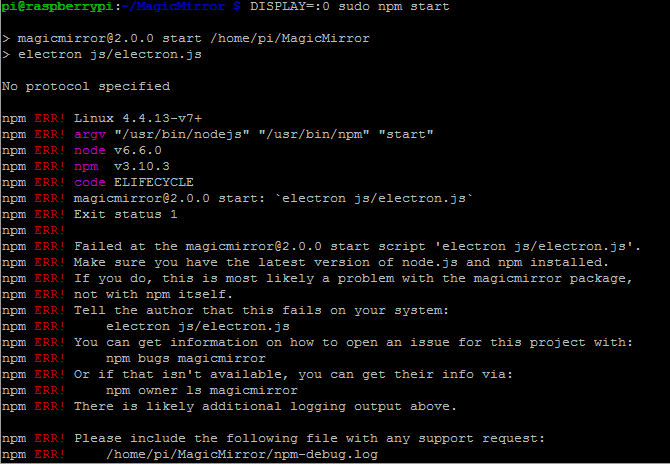
                                    0_1476980028924_upload-94e2d7d2-b3a1-493a-a093-7ac8645113c3

                                    1 Reply Last reply Reply Quote 0
                                    • D Offline
                                      d3r
                                      last edited by

                                      I’m going to order the dht-22 soon. I was reading about the sensor set up and most guides mention using a resistor. Do you guys have one in your set up?

                                      pskP 1 Reply Last reply Reply Quote 0
                                      • pskP Offline
                                        psk @d3r
                                        last edited by

                                        @d3r Dht 22 and 11 series doesnt require one :)

                                        PS: Just saw the post.Was out of town for two weeks…

                                        P.S.K

                                        yawnsY 1 Reply Last reply Reply Quote 0
                                        • yawnsY Offline
                                          yawns Moderator @psk
                                          last edited by

                                          @psk
                                          That depends on the sensor you buy. If you use a sensor with 4 pins you need the resistor. If you use the sensor with 3 pins mounted to a circuit board you don’t need the resistor.

                                          1 Reply Last reply Reply Quote 0
                                          • pskP Offline
                                            psk
                                            last edited by

                                            This was my reference. Both the models are similar, though the one without the PCB(4 pin model) might require some resistance. Not sure though…Need to dig Deeper :D
                                            Cheers :)

                                            P.S.K

                                            1 Reply Last reply Reply Quote 0

                                            Hello! It looks like you're interested in this conversation, but you don't have an account yet.

                                            Getting fed up of having to scroll through the same posts each visit? When you register for an account, you'll always come back to exactly where you were before, and choose to be notified of new replies (either via email, or push notification). You'll also be able to save bookmarks and upvote posts to show your appreciation to other community members.

                                            With your input, this post could be even better 💗

                                            Register Login

                                            • 1
                                            • 2
                                            • 2 / 2
                                            • First post
                                              Last post
                                            Enjoying MagicMirror? Please consider a donation!
                                            MagicMirror created by Michael Teeuw.
                                            Forum managed by Sam, technical setup by Karsten.
                                            This forum is using NodeBB as its core | Contributors
                                            Contact | Privacy Policy