MagicMirror Forum
    • Recent
    • Tags
    • Unsolved
    • Solved
    • MagicMirror² Repository
    • Documentation
    • 3rd-Party-Modules
    • Donate
    • Discord
    • Register
    • Login
    A New Chapter for MagicMirror: The Community Takes the Lead
    Read the statement by Michael Teeuw here.

    MMM-HTMLBox not displaying my 1 hour countdown timer html file

    Scheduled Pinned Locked Moved Unsolved Requests
    18 Posts 3 Posters 4.3k Views 3 Watching
    Loading More Posts
    • Oldest to Newest
    • Newest to Oldest
    • Most Votes
    Reply
    • Reply as topic
    Log in to reply
    This topic has been deleted. Only users with topic management privileges can see it.
    • B Offline
      btni
      last edited by

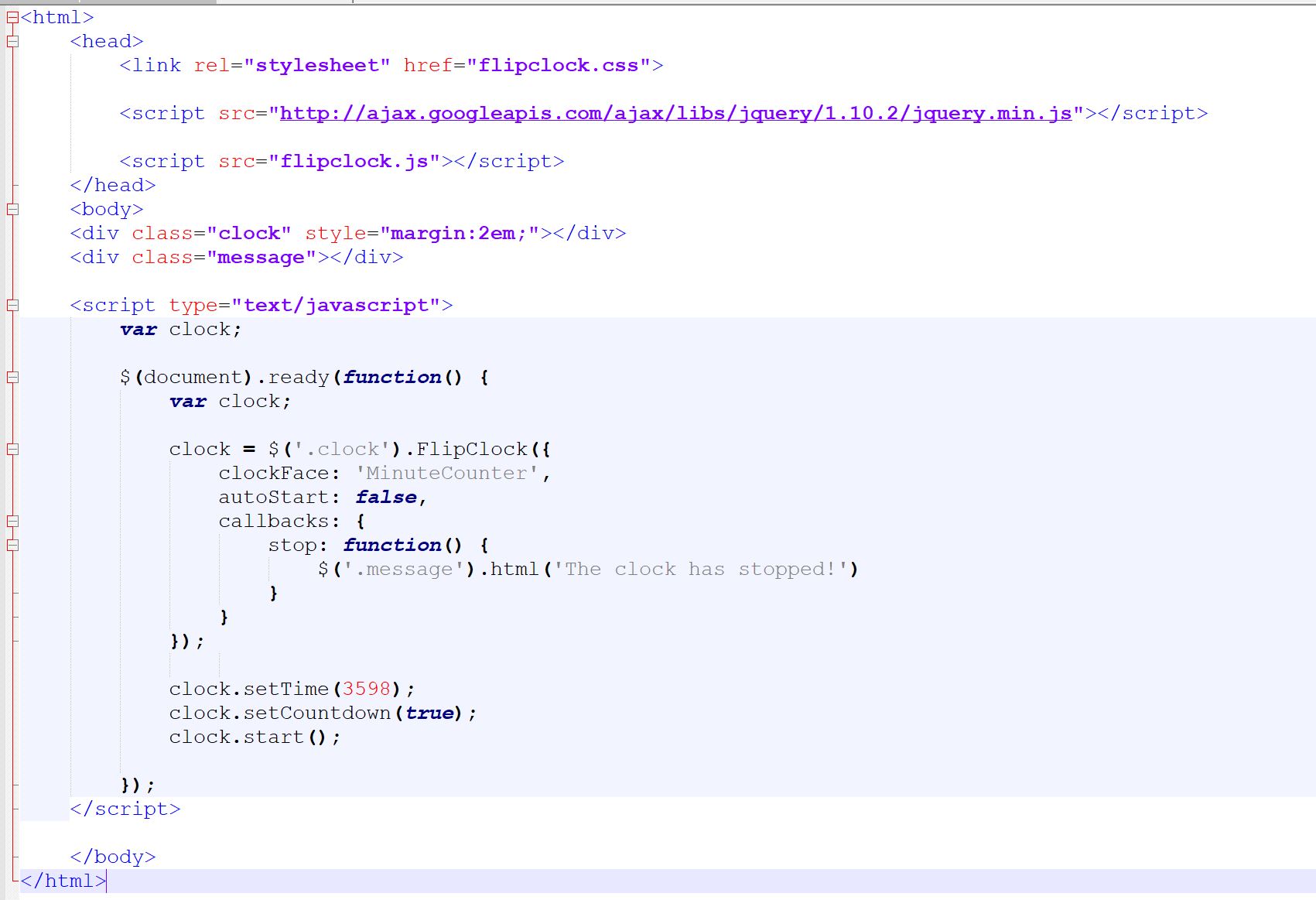
      not sure if anyone can see this code below, i shall take a screen grab next and upload it

      <html>
      	<head>
      		<link rel="stylesheet" href="flipclock.css">
      
      		<script src="http://ajax.googleapis.com/ajax/libs/jquery/1.10.2/jquery.min.js"></script>
      
      		<script src="flipclock.js"></script>
      	</head>
      	<body>
      	<div class="clock" style="margin:2em;"></div>
      	<div class="message"></div>
      
      	<script type="text/javascript">
      		var clock;
      		
      		$(document).ready(function() {
      			var clock;
      
      			clock = $('.clock').FlipClock({
      		        clockFace: 'MinuteCounter',
      		        autoStart: false,
      		        callbacks: {
      		        	stop: function() {
      		        		$('.message').html('The clock has stopped!')
      		        	}
      		        }
      		    });
      				    
      		    clock.setTime(3598);
      		    clock.setCountdown(true);
      		    clock.start();
      
      		});
      	</script>
      	
      	</body>
      </html>
      
      1 Reply Last reply Reply Quote 0
      • B Offline
        btni
        last edited by

        0_1574985054807_base.html.jpg

        1 Reply Last reply Reply Quote 0
        • B Offline
          btni
          last edited by

          the file structure looks a bit messy as i have copied the files in a number of places to try to get it working, but currently running with all necessary files in the same location, the sub folder of MMM-HTMLBox
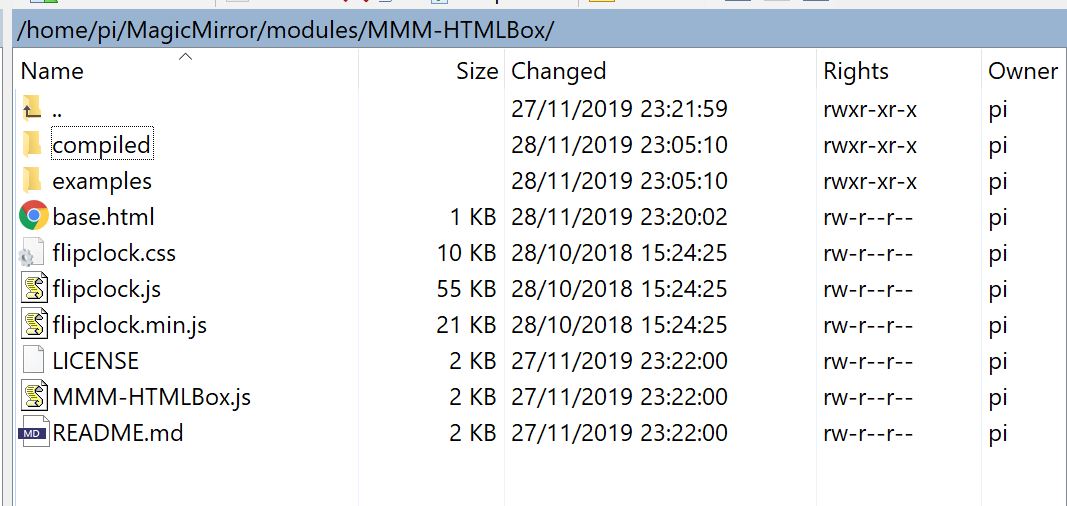
          0_1574985403249_files.JPG

          1 Reply Last reply Reply Quote 0
          • ? Offline
            A Former User
            last edited by

            MMM-HTMLBox is Just putting static HTML code into MagicMirror. as described on byline. It will not parse your JS code, that is not HTML.
            So if you need, you could make iframe wrapper to load your page.
            Or try MMM-Widgetinstead.

            B 1 Reply Last reply Reply Quote 0
            • B Offline
              btni @Guest
              last edited by

              Thanks @Sean i will try that

              1 Reply Last reply Reply Quote 0
              • B Offline
                btni
                last edited by

                ok I have been trying out different code in different modules like MMM-Widget and MMM-iFrames and still unable to get a 1hr coutdown to display.

                issue 1 - MMM-Widget - I cannot get it to display a local file. I have even tried creating a public subfolder and use url local location, but I cant seem to get any public folder to publish?

                Issue 2 - MMM-iFrame - Will display a local single test html file but if I use this code below it doesnt. Here is my code that is working in the www.w3schools.com website.

                Sorry I am a bit of a noob with html, js MM etc.

                I cant seem to add the code in here but here is a link to the w3schools site

                Your Code has Been Saved
                File has been saved to: https://www.w3schools.com/code/tryit.asp?filename=G0I4VVLAWBCN

                Thanks
                Dave

                ? 1 Reply Last reply Reply Quote 0
                • ? Offline
                  A Former User @btni
                  last edited by A Former User

                  @btni
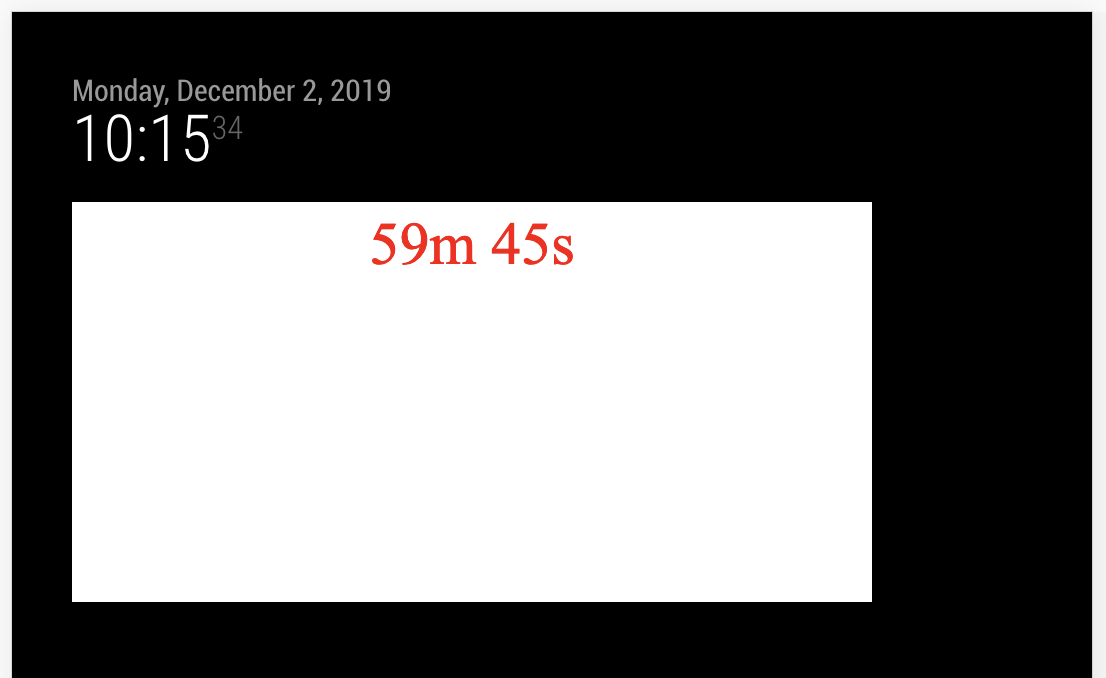
                  Is this what you want?

                  0_1575278171064_ee7c245a-574a-41f1-913a-c6d436f9ed01-image.png

                  {
                    module: "MMM-Widget",
                    config: {
                      widgets: [
                        {
                          html:`
                  // Put your HTML & JS code into here.
                          `,
                          position: "top_left",
                          width: "800px",
                          height: "400px",
                          backgroundColor: "#FFF"
                        },
                  
                      ]
                    }
                  }
                  
                  G 1 Reply Last reply Reply Quote 0
                  • B Offline
                    btni
                    last edited by

                    Thanks Sean, sorry I left my update late last night, then when driving into work this morning remembered I had moved away from testing the MMM-Widget and was going to test it first thing this morning. You beat me to it, thank you for your help, I can now tweak the background and text colour etc.

                    Thanks again
                    David

                    ? 1 Reply Last reply Reply Quote 0
                    • ? Offline
                      A Former User @btni
                      last edited by

                      @btni
                      But if you need just a countdown itself, there be plenty of countdown(and more) modules. How about using them?

                      1 Reply Last reply Reply Quote 0
                      • B Offline
                        btni
                        last edited by btni

                        Hi Sean,
                        I think with my very limited knowledge of the code, I first started looking at some of the modules like Doomsday, countdown etc but from what i could see they all counted down to a date/time, rather than now + 60 minutes.
                        I was then trying to just get html code and use the other modules, but still hitting the same wall. I still cant even get the html code working inside the MMM-Widget lol.

                        If you can help steer me to a countdown module that can reset to 60 minutes via MMM-Remote - restart MM then that would be great, or if you can see where I am going wrong below it would help. I have shorted to a sample html file.
                        At the start of the HTML code, do I need the file header items like DOCUTYPE, html and body? It makes it dissapear in the formatted code below.

                        {
                          module: "MMM-Widget",
                          config: {
                            widgets: [
                              {
                                html:`
                        <!DOCTYPE html>
                        <html>
                        <body>
                        <h1>My First Heading</h1>
                        <p>My first paragraph.</p>
                        </body>
                        </html>        `,
                                position: "top_left",
                                width: "800px",
                                height: "400px",
                                backgroundColor: "#FFF"
                              },
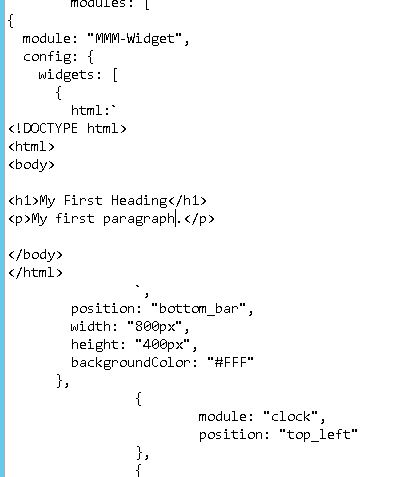
                        

                        0_1575282743647_MMMWidget.JPG

                        ? 2 Replies Last reply Reply Quote 0
                        • ? Offline
                          A Former User @btni
                          last edited by

                          @btni
                          Frankly said, Just needs inside of < html > but, putting all the things doesn’t matter. (It might cause iframe errors but it would not interfere MM’s running)

                          Anyway, You have another option. Build your custom module. Almost the same with your current JS.

                          Last question. What is the purpose of this count down? Your code will count down from every startup from MM, but I cannot understand why you need this. If I get your intention, maybe more adequate suggestions could be possible.

                          1 Reply Last reply Reply Quote 0
                          • ? Offline
                            A Former User @btni
                            last edited by A Former User

                            @btni
                            Try this;

                            modules/MMM-MyCountDown/MMM-MyCountDown.js

                            Module.register("MMM-MyCountDown", {
                              defaults: {
                                refreshInterval: 1000,
                                targettMS : 1000 * 10, // milliseconds to alarm
                              },
                            
                              /*
                              getStyles: function() {
                                // return ["MMM-MyCountDown.css"]   // If needed, you can add your css.
                              },
                              */
                            
                              getScripts: function() {
                                return ["moment.js"]
                              },
                            
                              start: function() {
                                this.endTime = null
                                this.timer = null
                              },
                            
                              getDom: function() {
                                var dom = document.createElement("div")
                                dom.className = "CountDown_Content"
                                dom.innerHTML = this.showRemain()
                                return dom
                              },
                            
                              notificationReceived: function(noti, payload, sender) {
                                switch(noti) {
                                  case "DOM_OBJECTS_CREATED":
                                    this.startCountDown()
                                    break
                                  case "RESET":
                                    this.startCountDown(payload)
                                    break
                                }
                              },
                            
                              startCountDown: function(ms = null) {
                                this.resetCountDown()
                                ms = (ms) ? ms : this.config.targetMS
                                this.endTime = moment().add(ms, "ms")
                                this.refresh()
                              },
                            
                              resetCountDown: function() {
                                this.endTime = null
                                clearTimeout(this.timer)
                                this.timer = null
                              },
                            
                              refresh: function() {
                                this.updateDom()
                                var curTime = moment()
                                if (curTime.isAfter(this.endTime)) {
                                  this.resetCountDown()
                                  this.sendNotification(
                                    "SHOW_ALERT",
                                    {
                                      title: "MyCountDown",
                                      message: "CountDown ended.",
                                      timer: 3000,
                                    }
                                  )
                                } else {
                                  this.timer = setTimeout(()=>{
                                    this.refresh()
                                  }, this.config.refreshInterval)
                                }
                              },
                            
                              showRemain: function() {
                                if (!this.endTime) {
                                  return "CountDown being not set."
                                } else {
                                  var curTime = moment()
                                  var remain = moment.duration(this.endTime.diff(curTime))
                                  var format = function (dur) {
                                    str = ""
                                    if(dur.days() > 1) str = str + Math.floor(dur.days()) + " - "
                                    if(dur.hours() > 1) str = str + Math.floor(dur.hours()) + ":"
                                    if(dur.minutes() > 1) str = str + Math.floor(dur.minutes()) + ":"
                                    if(dur.seconds() > 1) str = str + Math.floor(dur.seconds())
                                    return str
                                  }
                                  return format(remain)
                                }
                              },
                            })


                            config/config.js

                            {
                              module: "MMM-MyCountDown",
                              position: "top_left",
                              config: {
                                targetMS: 1000*60*60,
                              }
                            }
                            

                            It will display like this;

                            0_1575286266624_e27af3e9-4f93-4b28-a4cc-a7a4c8395192-image.png

                            Of course, you can look inside and modify for your purpose.

                            B 2 Replies Last reply Reply Quote 1
                            • B Offline
                              btni @Guest
                              last edited by

                              @Sean
                              Hi Sean, I have tried putting this code in but getting a black screen. As I have played with lots of different modules and code I am going to rebuild the pi this afternoon and only put this module and code in to test.
                              My idea is if my kids have built up enough brownie points to get 1hr of Tech, then I use remote.html (via MMM-Remote module) to refresh HTML or restart the MagicMirror to start a 1-hour timer on the Magic Mirror Screen above the computer desk.
                              I am sure there are loads of ways to do this, but I like the clean crispness of the MagicMirror and will be building one with stocks/calendar etc for my bedroom, and possibly one for most rooms around the house (some touchscreen).
                              I do want to get ways to put up an image and/or play a video to them which I have seen some modules to allow this, but the first basic thing I would like to get is this countdown timer working.

                              Thanks again for your patience and help, I shall rebuild this pi this afternoon and let you know how I get on,
                              Dave

                              1 Reply Last reply Reply Quote 0
                              • B Offline
                                btni @Guest
                                last edited by btni

                                @Sean
                                Hi Sean,
                                I rebuild a new Pi with MM and was able to get the countdown timer showing, thank you for your help.

                                However some 0 numbers dissappear and I am trying to increase the size of the font.
                                I have created a css file in the module subfolder as per your instructions in the cs file. Then I have copied and edited the css info from this post https://forum.magicmirror.builders/topic/4527/change-fontsize , I doubled all values to see if it makes a difference, but the text stayed the same size. Am I looking in the right area.

                                I did uncomment your line

                                    return ["MMM-MyCountDown.css"]   // If needed, you can add your css.
                                

                                Thanks
                                Dave

                                 body {
                                 	
                                .xsmall {
                                  font-size: 30px;
                                  line-height: 40px;
                                }
                                
                                .small {
                                  font-size: 40px;
                                  line-height: 50px;
                                }
                                
                                .medium {
                                  font-size: 60px;
                                  line-height: 70px;
                                }
                                
                                .large {
                                  font-size: 130px;
                                  line-height: 130px;
                                }
                                
                                .xlarge {
                                  font-size: 150px;
                                  line-height: 150px;
                                  letter-spacing: -6px;
                                }
                                
                                 }
                                
                                ? 1 Reply Last reply Reply Quote 0
                                • ? Offline
                                  A Former User @btni
                                  last edited by

                                  @btni
                                  That code was just an example. so you’d better create your own. Mine was just showing that module-building is not so difficult than people’s thought.

                                  B 1 Reply Last reply Reply Quote 0
                                  • B Offline
                                    btni @Guest
                                    last edited by

                                    @Sean
                                    No problem, thanks for the help, :)
                                    D

                                    1 Reply Last reply Reply Quote 0
                                    • G Offline
                                      guongthongminh @Guest
                                      last edited by

                                      @Sean Can you help me Website display on the mirror after voice search?
                                      It should look like this:
                                      alt text

                                      1 Reply Last reply Reply Quote 0

                                      Hello! It looks like you're interested in this conversation, but you don't have an account yet.

                                      Getting fed up of having to scroll through the same posts each visit? When you register for an account, you'll always come back to exactly where you were before, and choose to be notified of new replies (either via email, or push notification). You'll also be able to save bookmarks and upvote posts to show your appreciation to other community members.

                                      With your input, this post could be even better 💗

                                      Register Login

                                      • 1 / 1
                                      • First post
                                        Last post
                                      Enjoying MagicMirror? Please consider a donation!
                                      MagicMirror created by Michael Teeuw.
                                      Forum managed by Sam, technical setup by Karsten.
                                      This forum is using NodeBB as its core | Contributors
                                      Contact | Privacy Policy