Read the statement by Michael Teeuw here.
"Npm start" doesn't work
-
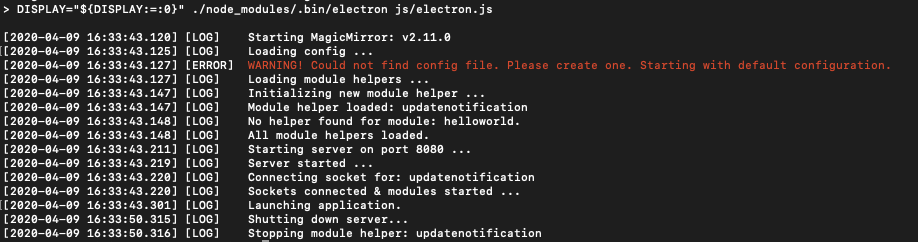
So I enter npm start and then it loads and all but then it just opens the application electron showing just a blak screen and my cursor. I check the files and saw that there was no config file so how do I get it??
-
@Mahieedaboss is this a new install? did u do manual install?? git clone, & npm install?
if so, you missed step 5 of the manual instructions
Make a copy of the config sample file: cp config/config.js.sample config/config.js
-
@sdetweil said in "Npm start" doesn't work:
cp config/config.js.sample config/config.js
how would I copy a sample file.
This is a new install so I’m pretty sure I did it manually. I did git clone and npm install myself
P.s Jeez that was a fast response
-
how would I copy a sample file.
This is a new install so I’m pretty sure I did it manually. I did git clone and npm install myself
P.s Jeez that was a fast response
-
@Mahieedabos please see the steps
https://docs.magicmirror.builders/getting-started/installation.html#manual-installation
in the future u may want to try my scripts for install and update
which were removed from version 2.11, but listed in the alternative install section
https://docs.magicmirror.builders/getting-started/installation.html#alternative-installation-methodsyou run the scripts directly from the repo , see the readme
-
hi again,
when I copy -
hi again,
when I copy
cp config/config.js.sample config/config.js
it just does nothingwhy is this
-
@Mahieedaboss u are in the MagicMirror folder, right?
see step 3
-
So I tried npm start and it appears I have the config file but now I have more problems
DISPLAY=“${DISPLAY:=:0}” ./node_modules/.bin/electron js/electron.js
[2020-04-09 17:08:55.739] [LOG] Starting MagicMirror: v2.11.0
[2020-04-09 17:08:55.742] [LOG] Loading config …
[2020-04-09 17:08:55.746] [LOG] Loading module helpers …
[2020-04-09 17:08:55.747] [LOG] No helper found for module: alert.
[2020-04-09 17:08:55.764] [LOG] Initializing new module helper …
[2020-04-09 17:08:55.765] [LOG] Module helper loaded: updatenotification
[2020-04-09 17:08:55.765] [LOG] No helper found for module: clock.
[2020-04-09 17:08:55.947] [LOG] Initializing new module helper …
[2020-04-09 17:08:55.948] [LOG] Module helper loaded: calendar
[2020-04-09 17:08:55.948] [LOG] No helper found for module: compliments.
[2020-04-09 17:08:55.948] [LOG] No helper found for module: currentweather.
[2020-04-09 17:08:55.948] [LOG] No helper found for module: weatherforecast.
[2020-04-09 17:08:55.961] [LOG] Initializing new module helper …
[2020-04-09 17:08:55.961] [LOG] Module helper loaded: newsfeed
[2020-04-09 17:08:55.961] [LOG] All module helpers loaded.
[2020-04-09 17:08:56.018] [LOG] Starting server on port 8080 …
[2020-04-09 17:08:56.028] [LOG] Server started …
[2020-04-09 17:08:56.029] [LOG] Connecting socket for: updatenotification
[2020-04-09 17:08:56.029] [LOG] Connecting socket for: calendar
[2020-04-09 17:08:56.030] [LOG] Starting node helper for: calendar
[2020-04-09 17:08:56.030] [LOG] Connecting socket for: newsfeed
[2020-04-09 17:08:56.030] [LOG] Starting module: newsfeed
[2020-04-09 17:08:56.030] [LOG] Sockets connected & modules started …
[2020-04-09 17:08:56.100] [LOG] Launching application.When it loads now, I still have the black screen with cursor
What am I not doing???
-
@Mahieedaboss don’t see any problem there…
what pi is this?
-
So I have the config files but I still only see a black screen and a cursor??
-
@Mahieedaboss i asked, what pi is this?
-
I went through all the manual steps again but the problem with the no text just courser problem is still there!!! NOte: The command starting with
cp
when copied and pasted and run did nothing
-
@Mahieedaboss need more info… what pi is this please
-
@Mahieedaboss said in "Npm start" doesn't work:
when copied and pasted and run did nothing
it does not display any output, it just copies (cp) one file to another
-
@Mahieedaboss as you don’t have much experience at the linux terminal window, I suggest you run my automated install script…
do
cd ~ rm -rf MagicMirror bash -c "$(curl -sL https://raw.githubusercontent.com/sdetweil/MagicMirror_scripts/master/raspberry.sh)" -
Mac mini…
Hello! It looks like you're interested in this conversation, but you don't have an account yet.
Getting fed up of having to scroll through the same posts each visit? When you register for an account, you'll always come back to exactly where you were before, and choose to be notified of new replies (either via email, or push notification). You'll also be able to save bookmarks and upvote posts to show your appreciation to other community members.
With your input, this post could be even better 💗
Register Login