Read the statement by Michael Teeuw here.
Hello-Lucy Module Microphone not working
-
@Linas123 yep, i do support most of the time, maintain the installer/updater scripts…
have a pi0, 3, 4, odroid, jetson nano I use the odroid in a production photoframe/info kiosk on the wall in my hall (no mirror glass or enclosure)
-
I put a lot of effort into building the Magic Mirror (even a frameless Magic Mirror). Without self-praise I have seen many other Magic Mirrors but mine is by far the most beautiful one and finally a voice control is part of it. It is also completely designed for a Raspberry Pi, so I don’t want to change anything now.
-
@Linas123 cool… glad you are happy with your project… it takes a lot of energy!..
-
@sdetweil Yes, I’am a bit proud of me. It’s very cool that in this forum are so helpful and nice guys.
-
Guys can you please help me out! @Mykle1 @Linas123 @sdetweil @TheGeekfather
My rpi model 3b+
I have installed Hello lucy correctly, executed npm install.
My mic card and device number is 1,0
My mic and speaker both are working fine, tested: arecord test.wav
Whenever I start my MM and speak hello lucy , lucy don’t detect my voice he don’t respond.
So I tried:
In asoundrc file I changed “hw:1,0” to “plughw:1,0”
But the result is same lucy is not responding. -
@varad-wattamwar said in Hello-Lucy Module Microphone not working:
executed npm install.
Uhh, that is not how the dependencies are installed, according to the readme.
Please keep your questions about this subject to 1 topic. This is the third topic your posting to for the same issue
-
Guys can you please help me out with this @Mykle1 @Linas123 @sdetweil @TheGeekfather
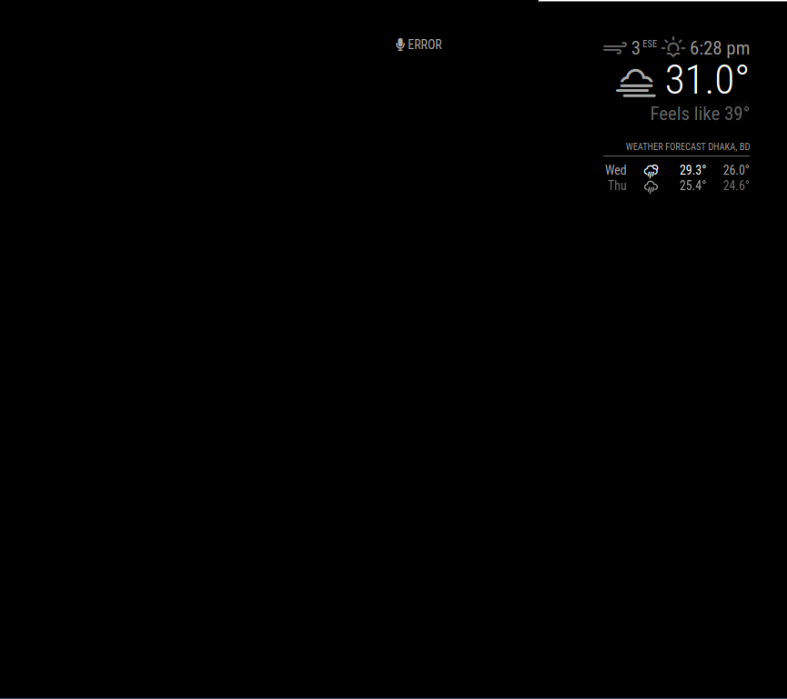
i’m new in all of this so please take it easy with me … so i installed MMM-hello lucy module but after i installed it and got the config right and i put my mic card and speaker device and all set … but after i launched magic mirror it shows up the microphone icon and says error … and it hangs like this like there is no solution … it’s like lucy is not detecting or something … and before i say anything the error just shows up …
and if i installed MMM-voice and make it like MMM-hello lucy and MMM-voice together in the magic mirror, will it work ? and how will it be if i make both of them in my magic mirror?
I’d be so glad if anyone could help me out with this … -
@cq0q Lucy is MMM-Voice plus some stuff… no, no can’t do both
u need to walk thru the steps
arecord -l (for list)
will list the input devices
aplay -l will list the output devicesso, do
arecord test.wav
say something
ctrl-x to end recordingaplay test.wav
did u hear what you said…provides the mic works…
now, what device is it (from the arecord list)
is that where Lucy is configured ?Voice/Lucy use the sphinx voice reco library, which is ok, but sensitive to the voice model.
i stopped using it , cause it was accurate maybe 50% of the time… and I had to repeat myself a lot… -
@sdetweil yes i did that and i heared myself and made the config but the error still shows …
but what is sphinx voice reco library ? and how can i use it/install it ? and is it important for the module ?
and why you had to repeat yourself alot ? is the problem from the module itself or ?- do i need sphinx to use MMM-voice module as well or it’s just for lucy module ?
-
@cq0q the library is installed and used by mmm-voice and Lucy. u don’t have to do anything. that is the voice reco library they both use.
why repeat, cause it doesn’t so very well in my opinion
-
@sdetweil so what should i do to fix that problem ?
-
@cq0q I do not know. is the mic number in arecord -l the same in config.js for Lucy?
-
@sdetweil yes it is
-
well … it just fixed by itself … but as you said… i need to repeat myself and that’s bad actually …
what do you think of MMM-voice module ? is it better than this one ? or MMM-voice commands -
@cq0q mmm-voice has the same mic/library/reco problem
-
@cq0q said in Hello-Lucy Module Microphone not working:
it just fixed by itself
Magic!
@sdetweil is correct. Hello-Lucy is a stripped down version of MMM-voice (removed most of its functionality) and added the ability to hide and show individual modules and pages of modules. Simplified the process of adding any module to this functionality. Modules can share regions. Etc,
The recognition is average at best. Lucy (and voice) have trouble with certain accents, Norwegian in particular, (My friend can attest to that). Even I had some early trouble with non-recognition and/or false positives. I’ve learned ‘how’ to speak to Lucy after quite some time using her (3 years?). She also likes a completely quiet environment. With that said, she will never be as accurate, or work as well, as an Alexa or Google device.
Lastly, I don’t use Lucy on a Pi. The pi’s inherent delay is too aggravating and frustrating. Now, using Lucy on more robust hardware is quite a different experience. Very satisfying, for me at least.

Hello! It looks like you're interested in this conversation, but you don't have an account yet.
Getting fed up of having to scroll through the same posts each visit? When you register for an account, you'll always come back to exactly where you were before, and choose to be notified of new replies (either via email, or push notification). You'll also be able to save bookmarks and upvote posts to show your appreciation to other community members.
With your input, this post could be even better 💗
Register Login