MagicMirror Forum
    • Recent
    • Tags
    • Unsolved
    • Solved
    • MagicMirror² Repository
    • Documentation
    • 3rd-Party-Modules
    • Donate
    • Discord
    • Register
    • Login
    A New Chapter for MagicMirror: The Community Takes the Lead
    Read the statement by Michael Teeuw here.

    MMM-MyCommute not showing up.

    Scheduled Pinned Locked Moved Solved Troubleshooting
    31 Posts 4 Posters 12.8k Views 4 Watching
    Loading More Posts
    • Oldest to Newest
    • Newest to Oldest
    • Most Votes
    Reply
    • Reply as topic
    Log in to reply
    This topic has been deleted. Only users with topic management privileges can see it.
    • D Offline
      Doogain @buzzkc
      last edited by Doogain

      @buzzkc said in MMM-MyCommute not showing up.:

      @Doogain Did you add the module into the MagicMirror/config/config.js?

      That might be the issue, I didnt know I had to do that. Never installed a module before.

      @sdetweil said in MMM-MyCommute not showing up.:

      @Doogain that is NOT your ‘config’… that is the module source.
      my general rule, you never edit the module source, unless u are doign something special, like extending its functionality

      to install a module you do

      cd ~/MagicMirror/modules
      git clone ??? 
      

      where ??? is the module github url

      then when that completes, you add a

          { 
                module:   ??? ,
                config: {
                }
          },
      
      to the modules array in config/config.js
      
      the required data for the config entry will be found in the README.md file in the module folder just created by the git clone operation
      

      I already did the first part, its the last part that I think I’ve screwed up on. I’ll give a go now, will post back soon.

      1 Reply Last reply Reply Quote 0
      • D Offline
        Doogain
        last edited by Doogain

        So I added this to config.js in MagicMirror/config
        {
        module: “MMM-MyCommute”,
        position: “top_left”,
        header: “Traffic”,
        classes: “default everyone”,
        },

        I recieved this error in developer console now

        alt text

        S 1 Reply Last reply Reply Quote 0
        • buzzkcB Offline
          buzzkc
          last edited by

          @Doogain
          Your config entry should look more like the one in the Readme.md page of the module (https://github.com/jclarke0000/MMM-MyCommute)

          Also, be sure you followed all of the installation notes in the readme.

          {
            module: 'MMM-MyCommute',
            position: 'top_left',
            config: {
              apikey: 'API_KEY_FROM_GOOGLE',
              origin: '65 Front St W, Toronto, ON M5J 1E6',
              startTime: '00:00',
              endTime: '23:59',
              hideDays: [0,6],
              destinations: [
                {
                  destination: '14 Duncan St Toronto, ON M5H 3G8',
                  label: 'Air Canada Centre',
                  mode: 'walking',
                  color: '#82E5AA'
                },
                {
                  destination: '317 Dundas St W, Toronto, ON M5T 1G4',
                  label: 'Art Gallery of Ontario',
                  mode: 'transit'
                },
                {
                  destination: '55 Mill St, Toronto, ON M5A 3C4',
                  label: 'Distillery District',
                  mode: 'bicycling'
                },
                {
                  destination: '6301 Silver Dart Dr, Mississauga, ON L5P 1B2',
                  label: 'Pearson Airport',
                  avoid: 'tolls'
                }
              ]
            }
          }
          

          Darren

          My Build: https://forum.magicmirror.builders/topic/11153/new-non-mirror

          1 Reply Last reply Reply Quote 0
          • S Do not disturb
            sdetweil @Doogain
            last edited by

            @Doogain u modified the module source. Please remove yours, and customize the config.js

            1 Reply Last reply Reply Quote 0
            • D Offline
              Doogain
              last edited by

              I reverted the module source, I messed up bigtime on that. The modules show up in MM now, and that is so great! Thanks a lot!

              It does give a me a error instead of commute time tho, I think thats a either a API or adress error.
              Which API do I have to select from google? It gives me several choices.

              1 Reply Last reply Reply Quote 0
              • buzzkcB Offline
                buzzkc
                last edited by

                I believe it’s the Maps Javascript API>>Directions API

                Darren

                My Build: https://forum.magicmirror.builders/topic/11153/new-non-mirror

                D 1 Reply Last reply Reply Quote 0
                • D Offline
                  Doogain @buzzkc
                  last edited by

                  @buzzkc said in MMM-MyCommute not showing up.:

                  I believe it’s the Maps Javascript API>>Directions API

                  Hmm still getting a error where it should say commute time.
                  It says:
                  MMM-MyCommute: You must enable Billing on the Google Cloud Project at https://console.cloud.google.com/project/_/billing/enable Learn more at https://developers.google.com/maps/gmp-get-started

                  I already have that enabled tho.

                  S 1 Reply Last reply Reply Quote 0
                  • D Offline
                    Doogain
                    last edited by

                    I figured it out. I had to enable all the following
                    1.) Maps Javascript API
                    2.) Directions API
                    3.) Geocoding API.

                    Marking as solved, thanks for all the help :-)

                    1 Reply Last reply Reply Quote 0
                    • S Do not disturb
                      sdetweil @Doogain
                      last edited by

                      This post is deleted!
                      1 Reply Last reply Reply Quote 0
                      • S Offline
                        spoonek
                        last edited by spoonek

                        Sorry to bump an old post, seemed like a better idea vs creating a new one…

                        I’m having the same issue. I’m using MagicMirror 2.12. The MMM-MyCommute module shows “Error” in red for my destination. I have an api key. The api key is active. I’ve added the Directions API, Geocoding API and Maps JavaScript API to my Google Cloud Platform account. I’ve tried both apikey and apiKey. I did read on the Google site that the request needs to be something like “key_api” but can’t find that verbiage again to validate. Not sure what else I can do at this point. Any tips? Many thanks!!

                        code:

                        {
                        	module: 'MMM-MyCommute',
                        	position: 'top_left',
                        	header: 'Commute Times',
                        	config: {
                        		apiKey: '**********************************',
                        		origin: '**my home address**',
                        		startTime: '00:00',
                        		endTime: '23:59',
                        		destinations: [
                        			{
                        				destination: '6000 N Terminal Pkwy, Atlanta, GA 30320',
                        				label: 'Airport'
                        			},
                        		]
                        	}
                        
                        S 1 Reply Last reply Reply Quote 0
                        • S Do not disturb
                          sdetweil @spoonek
                          last edited by sdetweil

                          @spoonek apikey, all lower case, read the module doc

                          open the developers window ctrl-shift-i, then select the console tab and scroll up see any errors. u can also filter messages by module, by placing part of the module name in the filter field ‘comm’ for example

                          S 1 Reply Last reply Reply Quote 0
                          • S Offline
                            spoonek @sdetweil
                            last edited by spoonek

                            @sdetweil said in MMM-MyCommute not showing up.:

                            @spoonek apikey, all lower case, read the doc

                            open the developers window ctrl-shift-i, then select the console tab and scroll up see any errors. u can also filter messages by module, by placing part of the module name in the filter field ‘comm’ for example

                            Thanks. There is conflicting info on github. One MyCommute says use apikey. The other fork says to now use apiKey. I tried both, same result…“Error”.

                            I’ll check out the dev window. I’m a n00b so learning as I go. Appreciate the suggestion!

                            [edit]. …aaaaaand I’m on a MAC. :man_facepalming_light_skin_tone:

                            S 2 Replies Last reply Reply Quote 0
                            • S Do not disturb
                              sdetweil @spoonek
                              last edited by

                              @spoonek the same result means the problem is probably in the key. Google requires a credit card to back their accounts, altho they give generous credits against usage for a while

                              S 1 Reply Last reply Reply Quote 0
                              • S Offline
                                spoonek @sdetweil
                                last edited by

                                @sdetweil Yep, I added a card and activated the account last night. Was hoping it would sync up overnight but same issue this morning.

                                S 1 Reply Last reply Reply Quote 0
                                • S Do not disturb
                                  sdetweil @spoonek
                                  last edited by

                                  @spoonek use the menu to get the dev window open. or start with

                                  npm start dev

                                  if u normally use pm2, do pm2 stop 0
                                  before the npm start

                                  S 1 Reply Last reply Reply Quote 0
                                  • S Do not disturb
                                    sdetweil @spoonek
                                    last edited by

                                    @spoonek no sync time. it’s immediate.

                                    1 Reply Last reply Reply Quote 0
                                    • S Offline
                                      spoonek @sdetweil
                                      last edited by spoonek

                                      @sdetweil said in MMM-MyCommute not showing up.:

                                      @spoonek use the menu to get the dev window open. or start with

                                      npm start dev

                                      if u normally use pm2, do pm2 stop 0
                                      before the npm start

                                      OK, that is awesome! Thanks for the tip! So maybe I need to generate a new api key and use that?

                                      [2020-08-20 09:07:14.680] [LOG] MMM-MyCommute: You must use an API key to authenticate each request to Google Maps Platform APIs. For additional information, please refer to http://g.co/dev/maps-no-account

                                      S 1 Reply Last reply Reply Quote 0
                                      • S Do not disturb
                                        sdetweil @spoonek
                                        last edited by sdetweil

                                        @spoonek u didn’t list the maps api I the list of services above

                                         Google Maps Platform APIs
                                        
                                        S 1 Reply Last reply Reply Quote 0
                                        • S Offline
                                          spoonek @sdetweil
                                          last edited by

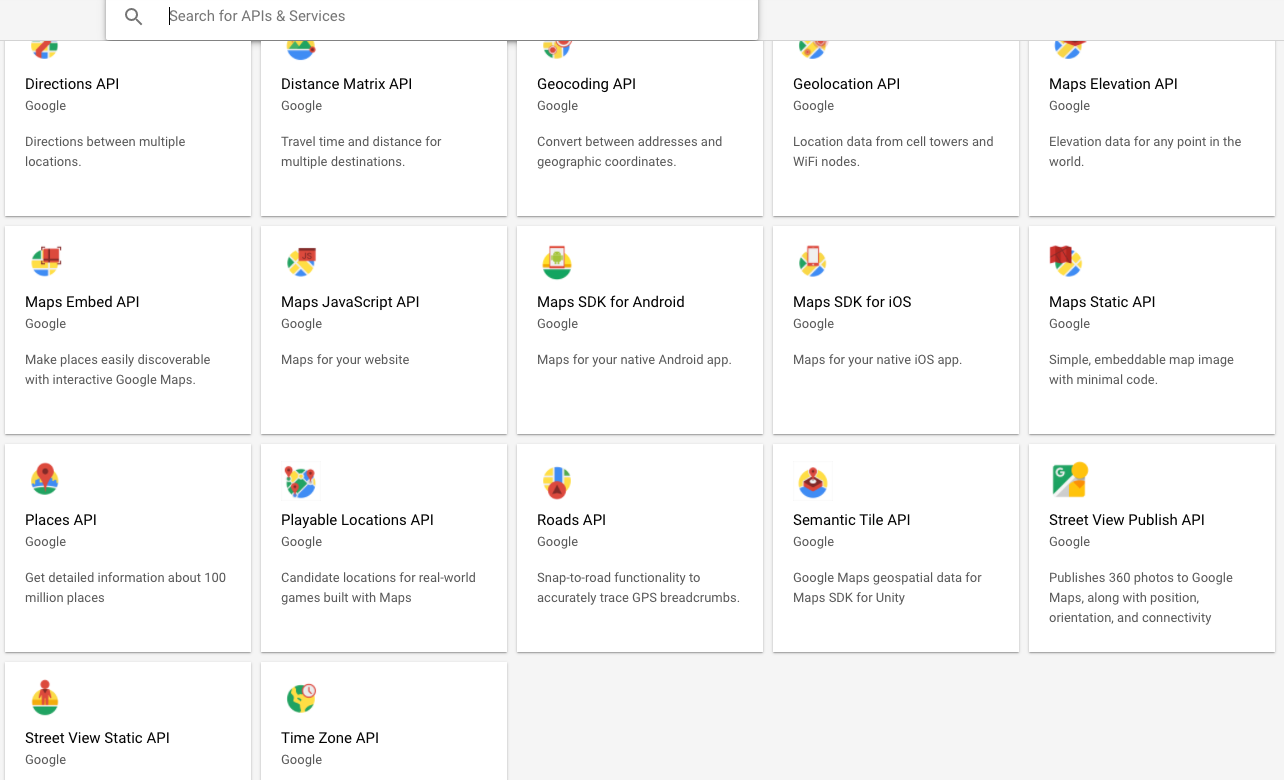
                                          @sdetweil thanks. I don’t see it…

                                          Screen Shot 2020-08-20 at 9.15.50 AM.png

                                          S 1 Reply Last reply Reply Quote 0
                                          • S Do not disturb
                                            sdetweil @spoonek
                                            last edited by sdetweil

                                            @spoonek from the link on the module doc

                                            Maps JavaScript API
                                            

                                            from the image u posted,
                                            2nd row, second box from left

                                            S 1 Reply Last reply Reply Quote 0

                                            Hello! It looks like you're interested in this conversation, but you don't have an account yet.

                                            Getting fed up of having to scroll through the same posts each visit? When you register for an account, you'll always come back to exactly where you were before, and choose to be notified of new replies (either via email, or push notification). You'll also be able to save bookmarks and upvote posts to show your appreciation to other community members.

                                            With your input, this post could be even better 💗

                                            Register Login

                                            • 1
                                            • 2
                                            • 1 / 2
                                            • First post
                                              Last post
                                            Enjoying MagicMirror? Please consider a donation!
                                            MagicMirror created by Michael Teeuw.
                                            Forum managed by Sam, technical setup by Karsten.
                                            This forum is using NodeBB as its core | Contributors
                                            Contact | Privacy Policy