Read the statement by Michael Teeuw here.
UPDATE: Replaced my PIR-Sensor with a Doppler Microwave Sensor.
-
@uros76 Great to hear that it’s working now!
-
@Fozi Hi I was following the steps and everything is working fine I’m using the same pir module as you with the same configuration. But TV when I launch the mirror the screen is blank and at first it meant that the mirror was working and started moving my hand in front of the sensor and nothing. Is it necessary to solder the pins to the sensor for it to activate? If so then that must be my problem. I haven’t seen many other sources of a microwave sensor with raspberry pi only PIR and I would be greatly appreciate for your input.
-
@Philly I gave up on PIR as it was giving me too many false-positive reads no matter which type or brand I tried. Simply too unreliable for my taste. And you need to position it in front of mirror glass which doesn’t look good on my slim smart mirror design.
The microwave sensor mentioned in this thread works perfectly for my mirror so far. I had to set the trimmer value a bit higher (close to 180ohm) to get an ideal sensing range. But as you see on the link above, my design has a sensor behind glass. -
@Philly Sorry for coming back somewhat late, was ill the last few days. Yes you need to solder the pins to the sensor, as they are then connected with Dupont cables to the GPIO on the RPi. Probably the pins are not soldered cleanly and don’t provide electrical contact.
-
This post is deleted! -
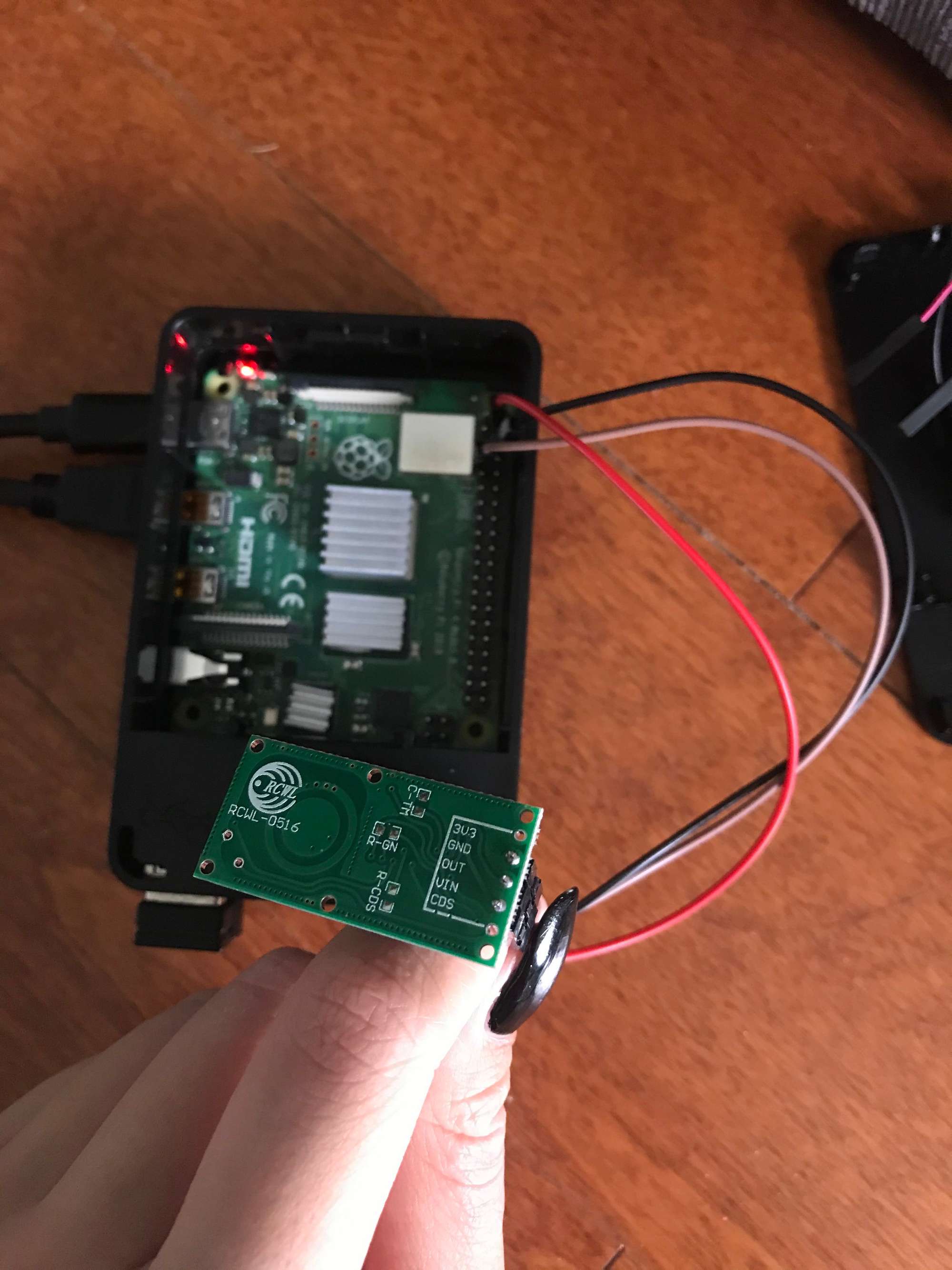
Hi thank you for responding, I recently bought a soldering iron and soldered the pins to the sensor and I’m still having trouble having it turn on the smart mirror. I’ve attached a picture, I don’t think the module is the problem and made sure the cables are attached to the right pins, could it be the soldering? Sorry to bother I’m new at this. -
@Philly From what I see in the picture the soldering seems to be OK, but I’m not sure you wired it correctly on the GPIO. The picture is somewhat blurry, so I can’t recognize it well enough.
The red wire should go to the first right pin, which provides +5V. From the picture it seems to go to the first left pin, which provides only 3.3V.
The black wire seems to go to the second right pin, which also provides +5V. It should go to the third right pin for GND.
Finally, the brown wire appears to go to the third left pin, which is provides a SCL signal (serial clock) and is reserved for I2C. Don’t use that, but the forth left pin, which is a digital I/O.
Please check the wireing again according to my description and adjust also the config.js accordingly.{ module: 'MMM-PIR-Sensor', disabled: false, config: { sensorPin: 4, powerSavingDelay: 30, // (seconds) how long the monitor will be turned on } }, -
@Fozi I rechecked my wires and confirmed they were wired on the correct pins although the picture I sent does look off, the red wire is on the 5v, black is on gnd, and the brown wire is on GPIO pin 7. The config.js is also configured accordingly but when I npm start the Magic Mirror a blank screen continues to show. So I tried using the MMM_PIR module instead and got the same results, a blank screen. Not sure why the sensor’s not working
-
@Fozi
You wrote that you are using a double sensor is that this one?zerodis-HB100-Mikrowelle-Sensor-Modul-Doppler-detecor
-
@Ghost2000 I use this one https://amzn.to/35SEYd3
-
@Fozi
then did you connect two? -
@Ghost2000 no, it is a single sensor. You probably got irritated by the noun „Doppler“. This has nothing to do with double or to similar. The sensor uses an effect which was discovered by the physicist Christian Doppler. See also https://en.m.wikipedia.org/wiki/Doppler_effect
-
eah right, now I see
-
Hi @Fozi ,
just to make sure that I am on the right way:
- Buy a RCWL-0516 module
- Wire the module to my Raspberry Pi 4
- Install @Bugsounet MMM-NewPIR on my MM
That’s it? Or did I miss something?
My MM is not a mirror, more a wall-mounted picture frame with some nice to have information on it. I would like to have the monitor turned off, if nobody is in the room.Thank you,
Christian
-
@MajorC yeah, that are the steps to go. The RCWL-0516 module is a 1:1 replacement of the common IR sensors usually used. MAke sure to follow also the instructions I wrote (see link in my signature).
-
Good morning,
I also used a PIR sensor and obviously, behind the glass it does not work (the glass is 6 mm thick and the back of wood 3 mm), also I do not want it visible as the mirror will be positioned in the bathroom and behind I the power supply, so no wires remain in sight.
At the end of the story I found this topic and I also wanted to change the presence sensor.
I made my purchases as instructed and started testing.
The first test I did without modifying anything, simply connected, installed the MMM-Pir Paviro configured and it immediately started to work.
But I noticed one thing, my sensor is not so sensitive (indeed) I think it depends on those 9 mm total between the size of the mirror and the wooden board, if I move from behind and if I leave it too attached to the tablet wood does not detect anything (it detects only on the back or by moving the mirror from the wall).
I will also try to build a box to keep the sensor a little detached from the wood and let’s see what happens.Any suggestions on this?
In the meantime, thanks to everyone for the advice and good construction with your MM.
Hello
-
@mickyvi in my case it was the opposite experience. I have 3mm thick glass and back of the glass is covered by matte black paper. The initially installed microwave sensor (behind glass and paper) was too sensitive and could pick up movement up to 4-5m distance. That was too much for me so I had to modify the sensor by adding a trimmer.
Once the trimmer was added I could dial in the sensitivity as needed.
Here is my mirror… https://forum.magicmirror.builders/topic/13430/my-first-slim-mirror-at-homeIn your design, maybe cut a hole in the wood back cover to fit the sensor in. That way the sensor will only need to go through 6mm glass. You can cover the space of the hole with black paper to eliminate any light entry there.
It’s hard to recommend anything smarter without knowing the details of your design. Do you have any picture you could share so we can see how the back of the glass enclosure looks like? -
Hi Uros,
I also thought of making a window and putting the sensor in there in order to eliminate 3 mm of thickness and in fact I think it will be the first test I will do.
Unfortunately today I am at work and I will be able to carry out studies and modifications only tomorrow when I have the day off.
I have no photos of the rear, very simple cmq, a wooden frame covered in metal 100 x 40 cm, a 6 mm Mirastar mirror, a 3 mm plywood tablet painted in black on which the various electronic devices are placed.
Tomorrow I will take some photos inside the outside as well, at the moment it is like this:https://forum.magicmirror.builders/topic/9246/which-type-of-mirror-to-use/13?page=2
Thanks bye
-
@mickyvi Ususally those sensors a quite sensitiv and detect motions even through walls. That was also my case, why I added the trimmer to reduce sensitivity. Maybe the sensor is from a bad lot. You could try anotherone if you have a spare. Those sensors are pretty cheap.
-
Goodmorning everyone,
after several attempts I have resigned myself to the fact that the doppler sensor cannot pass the 6 mm of glass.
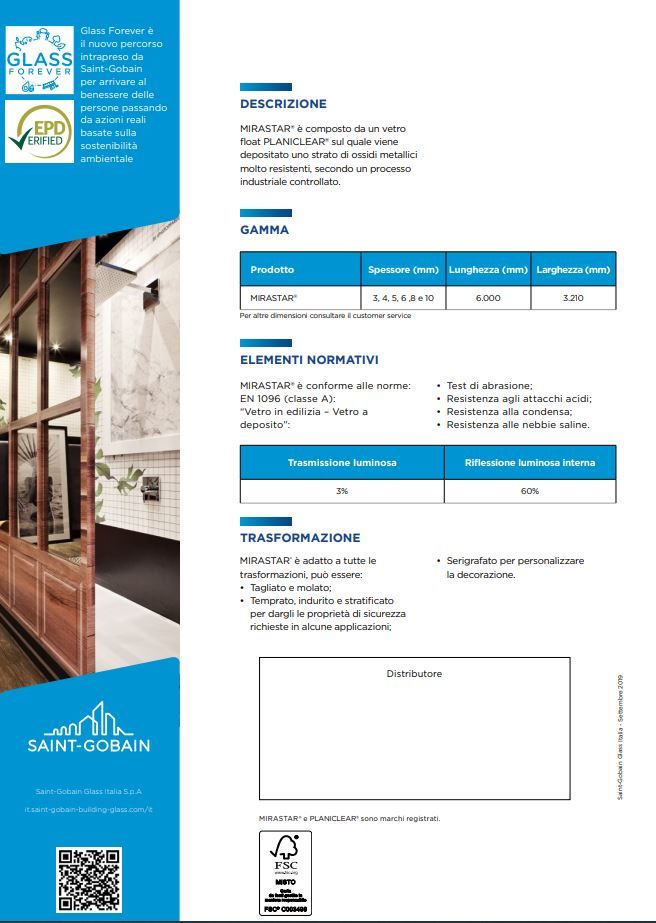
I also tried to buy a slightly more “expensive” sensor but the result is always the same.
https://www.amazon.it/gp/product/B089NKGWQQ/ref=ppx_yo_dt_b_asin_title_o00_s00?ie=UTF8&psc=1
unfortunately the result is always the same: it detects well from behind but from the front there is no way to pass the signal.
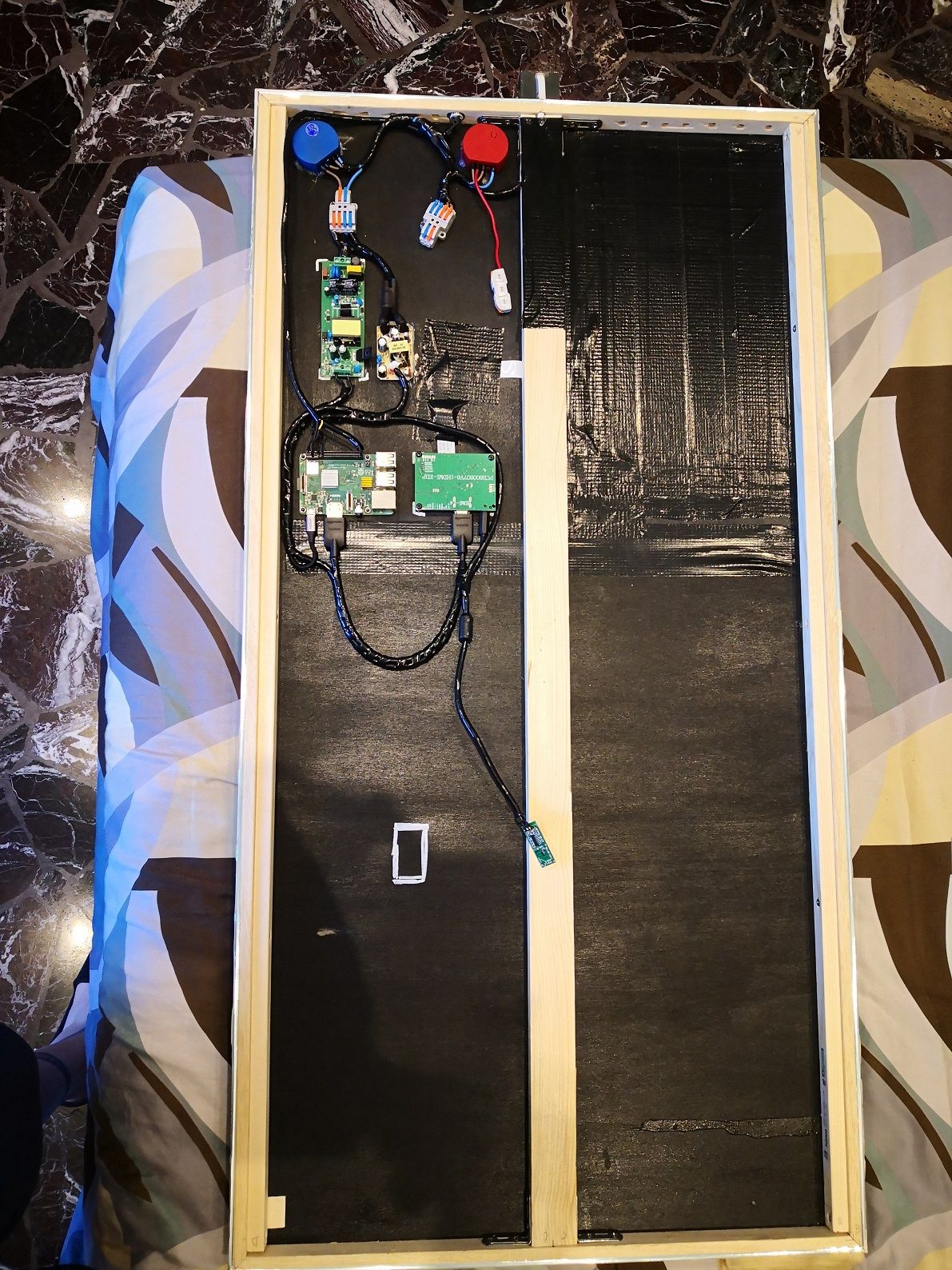
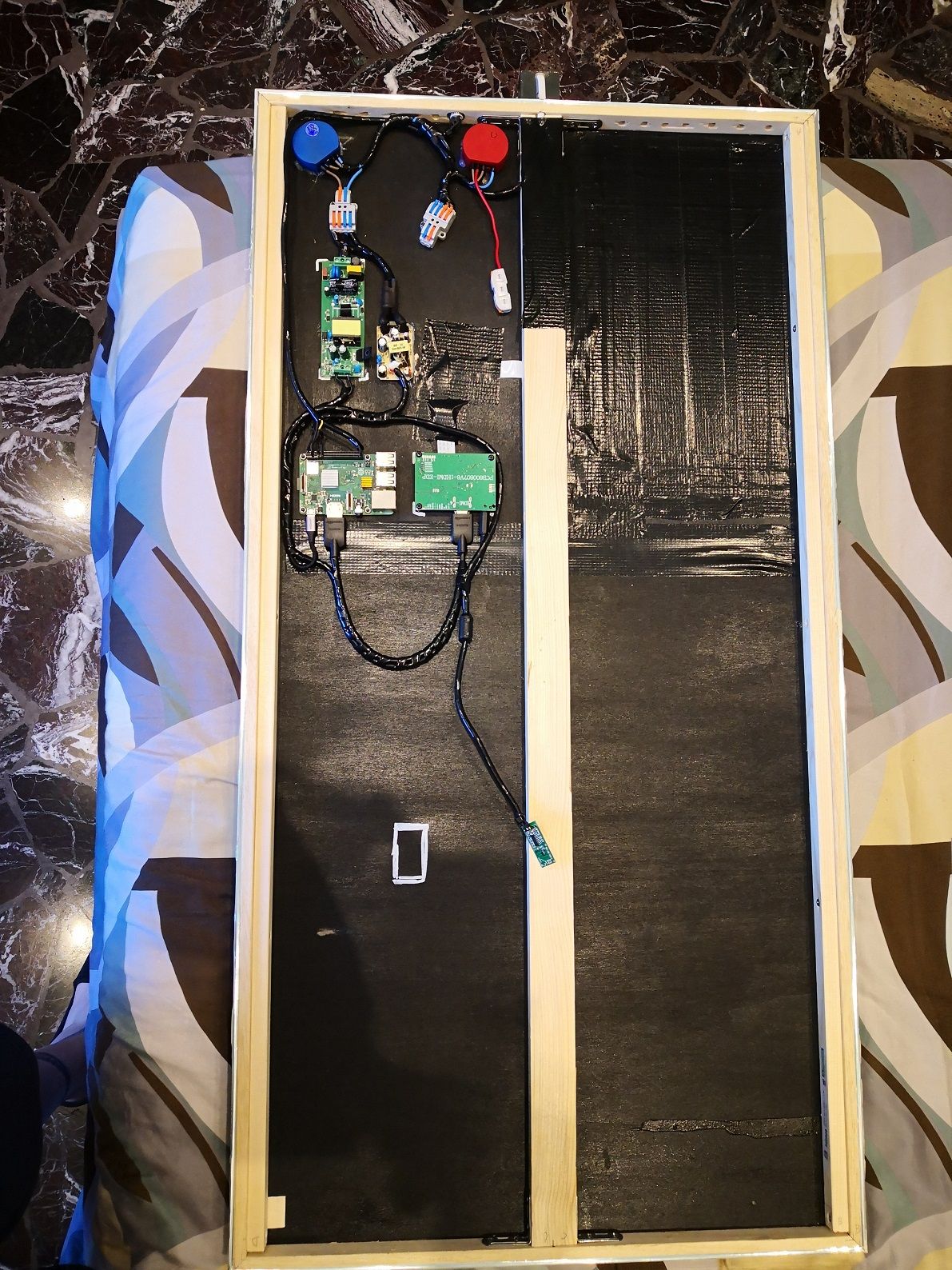
Even trying to make a window in the plywood the result does not change (same result with “inexpensive” sensor and with “very expensive” sensor.
Very disappointed and dejected about this. :-(
I think I’ll try again with simple PIRs maybe with the 2mm hole tutorial. And let’s see what happens.
Hello everybody


Hello! It looks like you're interested in this conversation, but you don't have an account yet.
Getting fed up of having to scroll through the same posts each visit? When you register for an account, you'll always come back to exactly where you were before, and choose to be notified of new replies (either via email, or push notification). You'll also be able to save bookmarks and upvote posts to show your appreciation to other community members.
With your input, this post could be even better 💗
Register Login