Read the statement by Michael Teeuw here.
Is it possible to ad an Arduino?
-
Hi, for school we need to build a project using an Arduino.
For me the Arduino itself is boring thats why i decided to build a MagicMirror using Raspberry Pi and i wanted to integrate functions from Alex, different Sensor-stats like Temperature and the PIR
But everything i tried didn’t worked and now im Wondering if it’s even possible to connect both.Sensors i have and want to use :
DHT11, for Temperature in Room,
HC-SR501, for Timeouts when not standing infont of it
ESP8266 ESP-12E, to Connect to the AlexaIm Using a Raspberry Pi3
and an Arduino Uno R3 with the ELEGOO Ultimate Starter kit and a few other modules.i would really appreciate if someone helps me and if you have good ideas to what i should add to get a good grad xD i would really appreciate it aswell.
This is my Current Config :
/* Magic Mirror Config Sample
 *
 * By Michael Teeuw https://michaelteeuw.nl
 * MIT Licensed.
 *
 * For more information on how you can configure this file
 * See https://github.com/MichMich/MagicMirror#configuration
 *
 */

var config = {
	address: "localhost", 	// Address to listen on, can be:
							// - "localhost", "127.0.0.1", "::1" to listen on loopback interface
							// - another specific IPv4/6 to listen on a specific interface
							// - "0.0.0.0", "::" to listen on any interface
							// Default, when address config is left out or empty, is "localhost"
	port: 8080,
	basePath: "/", 	// The URL path where MagicMirror is hosted. If you are using a Reverse proxy
					// you must set the sub path here. basePath must end with a /
	ipWhitelist: ["127.0.0.1", "::ffff:127.0.0.1", "::1"], 	// Set [] to allow all IP addresses
															// or add a specific IPv4 of 192.168.1.5 :
															// ["127.0.0.1", "::ffff:127.0.0.1", "::1", "::ffff:192.168.1.5"],
															// or IPv4 range of 192.168.3.0 --> 192.168.3.15 use CIDR format :
															// ["127.0.0.1", "::ffff:127.0.0.1", "::1", "::ffff:192.168.3.0/28"],

	useHttps: false, 		// Support HTTPS or not, default "false" will use HTTP
	httpsPrivateKey: "", 	// HTTPS private key path, only require when useHttps is true
	httpsCertificate: "", 	// HTTPS Certificate path, only require when useHttps is true

	language: "de",
	logLevel: ["INFO", "LOG", "WARN", "ERROR"],
	timeFormat: 24,
	units: "metric",
	// serverOnly:  true/false/"local" ,
	// local for armv6l processors, default
	//   starts serveronly and then starts chrome browser
	// false, default for all NON-armv6l devices
	// true, force serveronly mode, because you want to.. no UI on this device

	modules: [
{
		module: 'MMM-TelegramBot',
		config: {

			telegramAPIKey: 'api token changed so you can't use it xD',
			allowedUser: ['same for here'],
			adminChatId: 'xxx'

		}
	},


{
			module: "MMM-Online-State",
			position: "top_left",

		},

{
			module: "updatenotification",
			position: "bottom_bar"
		},

		{
			module: "clock",
			position: "top_right"
		},
		{
            module: 'MMM-RBB-Weather',
            position: "top_left",
            config: {
                         id: "18228265",
                         days: "0",
                         updateInterval: "600",
                         }
        },
{
			module: "calendar",
			header: "Events",
			position: "top_left",
			config: {
				calendars: [
					{
						symbol: "calendar-check-o ",
						url: "my ical adress changed it aswell",
						maximumEntries: "5",
						maximumNumberOfDays: "7"
					}
				]
			}
		},


{
  module: "MMM-NowPlayingOnSpotify",
  position: "bottom_left",

  config: {
    showCoverArt: false,
    clientID: "nothing to see here",
    clientSecret: "pls help me get a good grade",
    accessToken: "xD",
    refreshToken: "xxx"
  }
},
	]
};

/*************** DO NOT EDIT THE LINE BELOW ***************/
if (typeof module !== "undefined") {module.exports = config;}
EDIT:
And oh before i forget i would like to add some w2812b RGB Strips -
@Shinji0912 there are a bunch of arduino modules on github
google search
mmm-arduino github
some are general (arduport)
some are more specific MMM-temphumidity -
@Shinji0912 Hi, I wrote a module which converts messages received at serial interfaces to notifications (https://github.com/Tom-Hirschberger/MMM-Serial-Notifications). I have two Arduinos connected to my Pi with gesture and distance sensors.
My temperature module (https://github.com/Tom-Hirschberger/MMM-Temperature) can receive notifications to update the values.
Edit: The notification feature is only available in the development branch at the moment. I will mere it to the master the next days.
There are examples integrated which show how to connect an esp32 board with WiFi to get temperature and humidity.
Currently I am working on a module which should use MQTT to control an WS2801 LED Strip. But this one is in a very early state and will take a while to develop. -
@wishmaster270 Wow thank you very much , im completly new to this and first of all this helps me out very much and im going to try to make my own module showing an API from our school , is it okay if i ask you questions when i need help?
and btw. rrealllyy appreciate your help :) -
@sdetweil I tried the “Arduports” one but for some reason it didn’t worked for the sensors im using ^^
-
@Shinji0912 u have to have code running in the Arduino sending the data, doesn’t just happen
-
@sdetweil I know I’ve set it up but it didn’t worked.
-
@Shinji0912 seems pretty simple, connect serial port for arduino to serial port for PI…
arduino send 10
https://www.arduino.cc/reference/en/language/functions/communication/serial/write/
pi read 10
https://www.npmjs.com/package/serialportu can test that without MagicMirror
-
This post is deleted! -
@sdetweil Thats my Current Arduino code :
volatile int32_t m_counter = 0;
bool WasStarted = false;

static const char *pcDHT11Prefix = "[sensor:DHT11:";
static const char *pcPostfix = "]";

void setup() {
  Serial.begin(9600);
  while(!Serial);

  Serial.println("[status:setup:starting]");
  Serial.println("[sensor:DHT11:11]");

  int test = 1;
  m_counter = test;

  if(test > 1) {
    WasStarted = false;
    Serial.println("[status:setup:failed]");
    return;
  }

  delay(3000);
  WasStarted = true;
  Serial.println("[status:setup:started]");
  delay(100);
}

void loop() {
  Serial.print(m_counter + 11);
  Serial.println(pcPostfix);

  if(m_counter % 3 == 0) {
    delay(1000);
    Serial.print(pcDHT11Prefix);
    Serial.print(m_counter + 11);
    Serial.println(pcPostfix);
    delay(2000);
  }
  if(m_counter >= 60) m_counter = 0;
  m_counter++;

  delay(1000);

  }
and i got the ArduPorts running on the MM itself
now it is running but always searching for the module … see Picture.
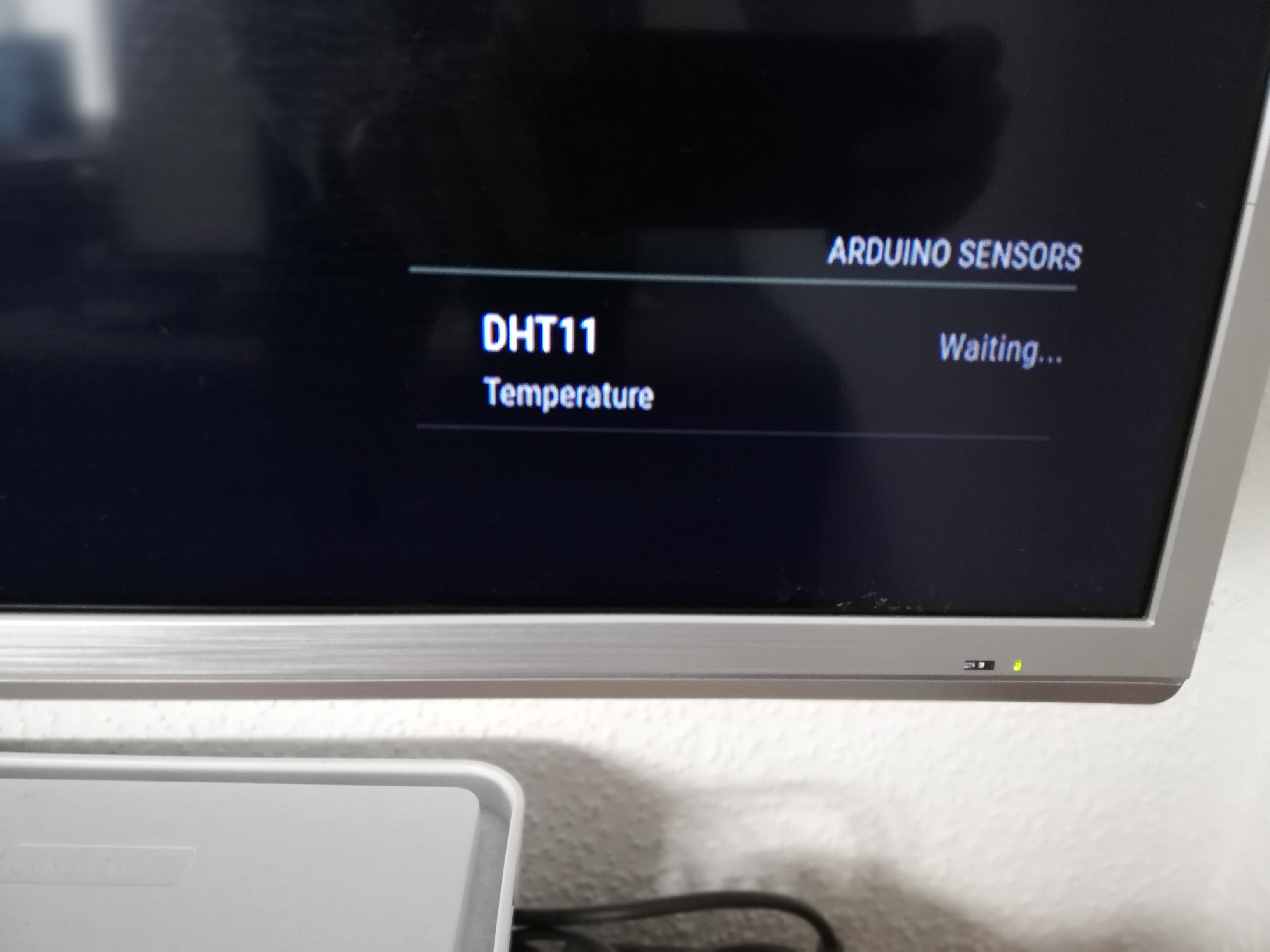
-
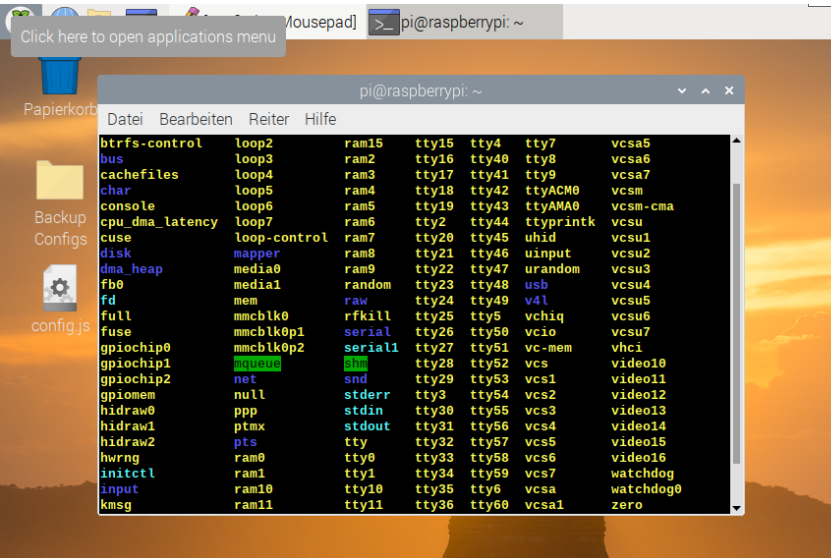
@Shinji0912 and the config for the port ??
              config: {
                portname: "/dev/ttyUSB0",
ls /dev | grep -i usb
I don’t see a ttyUSB0 on my pi4…
is that the right one on pi?i would guess that is for a USB plugin serial port, not direct serial port…
I do have a /dev/serial1 (on all 3 of my pi devices, Pi0, Pi3, and Pi4)
-
I have it plugged in on my Raspberyy Pi3 and the config on the Pi itself is
	modules: [
 {
	          module: 'MMM-ArduPort',
	          position: 'bottom_right',
              header: 'Arduino Sensors',
              config: {
                portname: "/dev/ttyUSB0",
                updateInterval: 1,
                animationSpeed: 1000,
                displayIcons: true,
                showDescription: true,
                hideLoading: false,
                hideWaiting: false,
                useColors: true,
                sensors: [
{
                        name: "DHT11",
                        description: "Temperature",
                        maxValue: 50,
                        maxFormat: "({0}°C) VERY HIGH",
                        highestValue: 30,
                        highestFormat: "({0}°C) HIGH",
                        highValue: 15,
                        highFormat: "({0}°C) NORMAL",
                        lowValue: 10,
                        lowFormat: "({0}°C) LOW",
                        lowestValue: 5,
                        lowestFormat: "({0}°C) VERY LOW",
                        minValue: 0,
                        minFormat: "({0}°C) OK"
                    },
]
            }
        },
and im not pretty sure what u want to tell me (im not an native english speaker) i come from germany
-
@Shinji0912 said in Is it possible to ad an Arduino?:
portname: "/dev/ttyUSB0",I think that is the wrong device name for the serial port on the pi. if you are using the gpio header pins
Ich denke, das ist der falsche Gerätename für die serielle Schnittstelle auf dem Pi. wenn Sie die GPIO-Header-Pins verwenden
-
@sdetweil Im not using the Gpio header pins i have the Arduino connected to the Pi using usb?
-
@Shinji0912 i have never seen arduino connected via USB… none of my arduino devices have USB plugs
did u check the available device names on your pi?
from a terminal window dols /dev | grep -i usb -
@sdetweil https://www.conrad.de/de/p/arduino-ag-usb-2-0-anschlusskabel-1x-usb-2-0-stecker-a-1x-usb-2-0-stecker-b-1-80-m-schwarz-95068.html?hk=SEM&WT.srch=1&WT.mc_id=google_pla&s_kwcid=AL!222!3!418522360024!!!g!!&ef_id=CjwKCAjwkoz7BRBPEiwAeKw3qy_SdRSLbXPZvYvpwSlJoKKFL-pjesNMeK_-wcbD8RJ4kJ7A1uo9ghoCmeUQAvD_BwE%3AG%3As&gclid=CjwKCAjwkoz7BRBPEiwAeKw3qy_SdRSLbXPZvYvpwSlJoKKFL-pjesNMeK_-wcbD8RJ4kJ7A1uo9ghoCmeUQAvD_BwE
-
@Shinji0912 this is my arduino experience
https://www.antratek.com/nodemcu-v2-lua-based-esp8266-development-kit -
@sdetweil Oh ok , the school told us to buy the Uno R3 and it’s the first one i’ve used so far ^^
-
-
@Shinji0912 don’t see ttyUSB0
are there any message on the console where u start mm? npm start? or pm2 logs --lines=?????? is a number, default is 15

Hello! It looks like you're interested in this conversation, but you don't have an account yet.
Getting fed up of having to scroll through the same posts each visit? When you register for an account, you'll always come back to exactly where you were before, and choose to be notified of new replies (either via email, or push notification). You'll also be able to save bookmarks and upvote posts to show your appreciation to other community members.
With your input, this post could be even better 💗
Register Login