MagicMirror Forum
    • Recent
    • Tags
    • Unsolved
    • Solved
    • MagicMirror² Repository
    • Documentation
    • 3rd-Party-Modules
    • Donate
    • Discord
    • Register
    • Login
    A New Chapter for MagicMirror: The Community Takes the Lead
    Read the statement by Michael Teeuw here.

    MMM-Domoticz-ext: interact with Domoticz

    Scheduled Pinned Locked Moved Utilities
    121 Posts 14 Posters 101.6k Views 16 Watching
    Loading More Posts
    • Oldest to Newest
    • Newest to Oldest
    • Most Votes
    Reply
    • Reply as topic
    Log in to reply
    This topic has been deleted. Only users with topic management privileges can see it.
    • G Offline
      goedh452 @najtram
      last edited by

      The plugin now supports basic auth for Domoticz.

      1 Reply Last reply Reply Quote 0
      • N Offline
        najtram @najtram
        last edited by

        It is still working great.

        Why is this IMHO great plugin not mentioned (yet) on:
        ⮑ https://github.com/MichMich/MagicMirror/wiki/3rd-Party-Modules

        G 1 Reply Last reply Reply Quote 0
        • G Offline
          goedh452 @najtram
          last edited by

          @najtram

          Thanks for the suggestion! I added the module to the page.

          1 Reply Last reply Reply Quote 0
          • S Offline
            Sp0nsje
            last edited by

            Hi @goedh452 ,

            Thanks for the MM Module its great!
            I’m an beginner with MM and Domoticz.
            Is it possible to display texts and distances (dummy text and Dummy Distance) i use the ‘‘both’’ function on my mirror.
            The distance is now grouped with the switches.
            I’m using it for my water softener salt level.

            Mayby its somehow possible to overrule the grouped option and show defined idx numbers at the bottom.

            Do you have a link on how u managed your luxaflex to work in domoticz ?
            (Hunter Douglas hub) i’ve got 2 top down bottom up blinds would love to read the state on my mirror.

            If its not possible let me know.

            gr,
            Martijn

            G 1 Reply Last reply Reply Quote 0
            • G Offline
              goedh452 @Sp0nsje
              last edited by

              @sp0nsje

              Would an option be that you add the module a second time in the config with option “All”? Then the devices are displayed separately.

              My luxaflex are operated with MQTT. I build in a servo myself and attached it to a NodeMCU. Domoticz sends an MQTT command when I press a dummy switch.

              S 1 Reply Last reply Reply Quote 0
              • P Offline
                peterh
                last edited by peterh

                @goedh452
                Thanks for this awesome MagicMirror Domoticz module.
                I’ve switched over to using this one and the pretty gauges make it look great.
                Electricity use/consumption works well, but I cannot seem to get other “meter” type sensor/devices to show up.
                Temperature sensors appear in the module “Weather” section, but Text, Voltage (V) or Current (I) sensor in the Domoticz Utilities tab, do not appear to display in any section.

                Feature request :-)

                Is it possible to have an arbitrary numeric device displayed as a gauge in its own section of the display?

                thanks for your time so far.

                G 1 Reply Last reply Reply Quote 0
                • G Offline
                  goedh452 @peterh
                  last edited by goedh452

                  @peterh I’ll have a look at it this weekend. Could you post the JSON output from the devices so I can have a look where de field with the data are?

                  This can be done with the following link:
                  "http://DOMOTICZ-IP:PORT/json.htm?type=devices&rid=IDX

                  1 Reply Last reply Reply Quote 0
                  • S Offline
                    Sp0nsje @goedh452
                    last edited by

                    @goedh452 thanks fixed it by using the utility for actual usage so i don’t need it in the rooms layout.
                    Is it posible to implement my distance Dummy sensor into a utility gauge?
                    the sensor is receiving data in this format “Data” : “22.1 cm”,
                    I can also make a dummy counter and it will be “Counter” : "22.035 ",
                    If i try to add a gauge in the module it wont load. i think its because of the data provided by my IDX numbers.

                    G 1 Reply Last reply Reply Quote 0
                    • G Offline
                      goedh452 @Sp0nsje
                      last edited by

                      @sp0nsje

                      I think you are right why it is not loading. I’ll have a look at the multiple requests this weekend.

                      S 1 Reply Last reply Reply Quote 0
                      • S Offline
                        Sp0nsje @goedh452
                        last edited by

                        @goedh452 thanks,
                        Is it true that the gauges switch position? added 2 of them (electr. usagage and gas usage) is see them switch position sometimes when they update apart from each other.

                        somehow my gass gauge updated and switched to the left side 10 sec later electr. gauge was updated and switched back to the left side.

                        Feature request

                        Would be nice to fix their position.

                        thanks allot for the module it looks Great!

                        G 1 Reply Last reply Reply Quote 0
                        • G Offline
                          goedh452 @Sp0nsje
                          last edited by

                          @sp0nsje

                          This sometimes seems to happen indeed. I notices it as well. The different gauges aren’t always processed in the same order and that causes the switch of position. I have a look at this as well. It should be possible to always order them according to the order in the config.

                          G 1 Reply Last reply Reply Quote 0
                          • G Offline
                            goedh452 @goedh452
                            last edited by goedh452

                            @Sp0nsje @peterh

                            I made some modifications to the code:

                            • Fixed the switching positions of gauges (I think, it doesn’t happen to me a lot, so testing is a bit difficult)

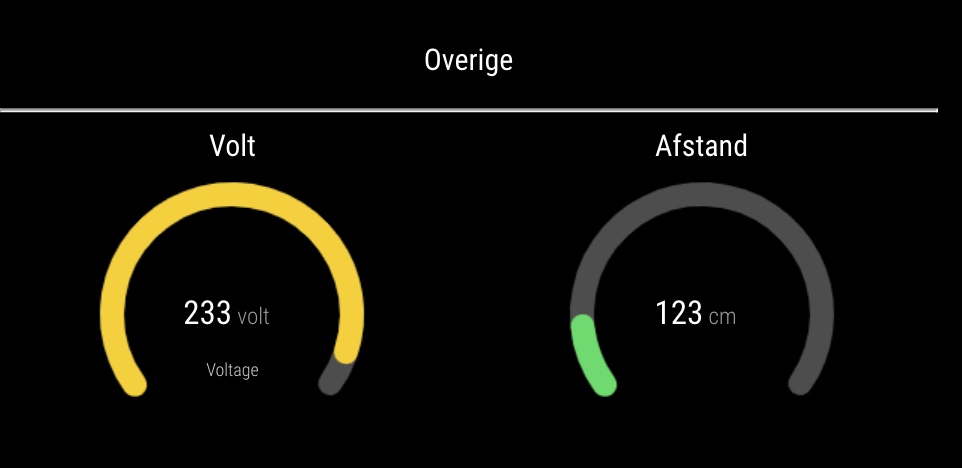
                            • Added ‘Custom gauges’. You can use every type of device to be displayed as a gauge as long as you specify the correct config settings (also see the readme).

                            My customGauge config is:

                            customGauges: {
                                        headerLabel: "Overige",
                                        showLabel: true,
                                        devices: [
                                          {
                                            idx: "1356",
                                            deviceHeader: "Volt",
                                            lowerText: "Voltage",
                                            gaugeAppendText: "volt",
                                            gaugeMaxValue: 250,
                                          },
                                          {
                                            idx: "2057",
                                            deviceHeader: "Afstand",
                                            gaugeAppendText: "cm",
                                            gaugeMaxValue: 1000,
                                            markerColor: "#70db70"
                                          }
                                        ]
                                      },
                            

                            This results in:
                            Schermafbeelding 2021-05-22 om 12.18.17.png

                            Please download the latest code from GitHub and give it a try! Let me know it you encounter any problems.

                            P 1 Reply Last reply Reply Quote 0
                            • S Offline
                              Sp0nsje
                              last edited by

                              @goedh452
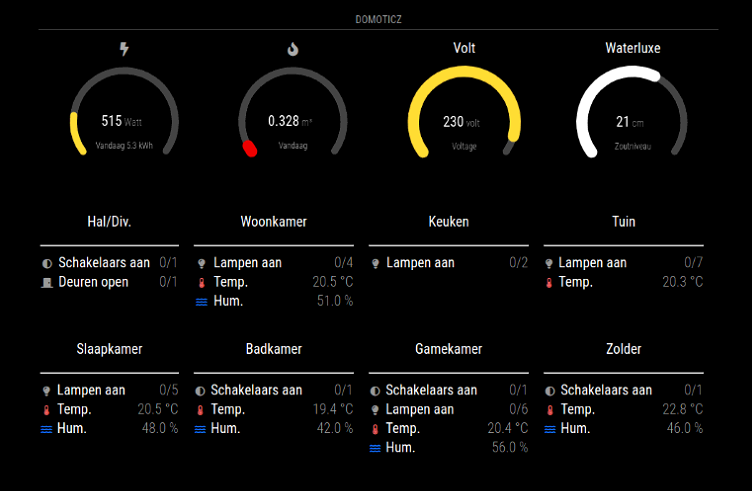
                              Thanks,
                              Works like a charm.
                              Will keep u posted if some errors show up.
                              TeamViewer_v0z7TZ2slJ.png

                              S M 2 Replies Last reply Reply Quote 0
                              • S Offline
                                Sp0nsje @Sp0nsje
                                last edited by

                                @goedh452
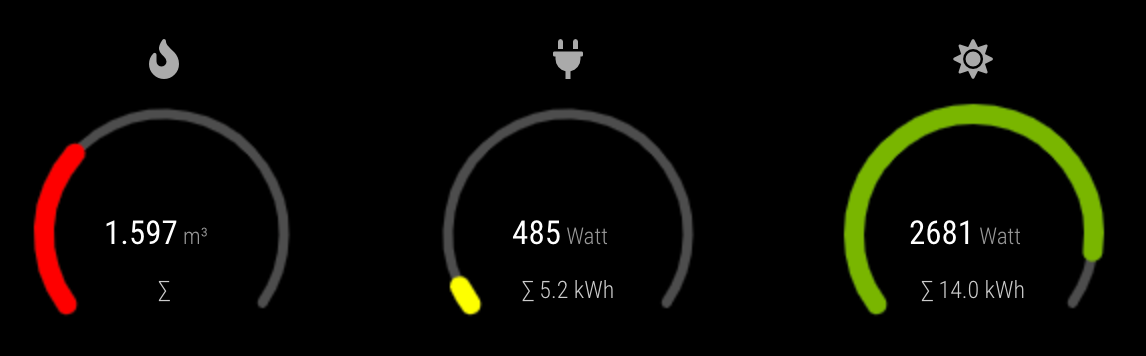
                                Looking at my post is spotted some differances in the gauges. they were my mistakes :P
                                1 Reply Last reply Reply Quote 0
                                • P Offline
                                  peterh @goedh452
                                  last edited by

                                  @goedh452

                                  Hi and thanks again for your efforts.

                                  Gauge swapping positions
                                  I can confirm that this occurs occasionally, on a manual browser refresh if seems to have a 15% chance of occurring. ( i did 30 refreshes. and got 2 swaps) i only see the last 2 gauges, out of the 5 that i have showing, do the swap.

                                  Custom Gauges
                                  These work well and as expected. - thank you!
                                  0ed953b6-b5b3-4dc9-8411-f2bfb374622a-image.png

                                  here is the config I am using:

                                              {
                                                        module: "MMM-Domoticz-ext",
                                                        //header: "Domoticz - new",
                                                        //position: "bottom_left",
                                                        position: "bottom_bar",
                                                        config: {
                                                              apiBase: "10.60.2.252",
                                                              apiPort: "8080",
                                                              //apiUser: "XXXX",              // only works with domoticz "Setup|Settngs|Website protection = "Basic auth" add the MM Ip to the "Local Networks" list to allow access with no auth, then all sensors will be listed.
                                                              //apihPW: "YYYY",
                                                              //alwaysShowDashboard: true,
                                                              horizontal: "true",
                                                              columnCount: 3,
                                                              displayType: "all",     // show all switchs/lights status
                                                              //displayType: "dashboard",     // dashboard
                                                              //dashboardColumnCount: 3,
                                                              //switchIcon: "lightbulb",
                                                              weather: {
                                                              devices: [ "199", "200" ],    //snake temps
                                                                      weatherLabel: "Temperatures",
                                                                      gaugeWidth: 200,
                                                                      gaugeWindAppendText: "km/h",
                                                                      rainSuffix: "mm",
                                                              },
                                                              utilities: {
                                                                      utilityLabel: "Gas - Water - Elec",
                                                                      showLabel: false,
                                                                      devices: [
                                                                      {
                                                                              idx: "164",
                                                                              deviceHeader: "Solar Gen",
                                                                              useHeaderSymbol: false,
                                                                              headerSymbol: "solar-panel",
                                                                              counterTodayLabel: "Today",
                                                                              gaugeMinValue: 0,
                                                                              gaugeMaxValue: 2000,
                                                                              gaugeAppendText: "Watts",
                                                                              gaugeWidth: 150,
                                                                              lineWidth: 12,
                                                                              markerWidth: 12,
                                                                              markerColor: "#F4D03F"
                                                                      },
                                                                      {
                                                                              idx: "191",
                                                                              deviceHeader: "PowGen/PowUse",
                                                                              useHeaderSymbol: false,
                                                                              headerSymbol: "solar-panel",
                                                                              counterTodayLabel: "Today",
                                                                              gaugeMinValue: -2000,
                                                                              gaugeMaxValue: 2000,
                                                                              gaugeAppendText: "Watts",
                                                                              gaugeWidth: 150,
                                                                              lineWidth: 12,
                                                                              markerWidth: 12,
                                                                              markerColor: "#F4003F"
                                                                      },
                                                                      ],
                                                              },
                                                              customGauges: {
                                                                      headerLabel: "Monitoring",
                                                                      showLabel: false,
                                                                      devices: [
                                                                        {
                                                                          idx: "209",
                                                                          deviceHeader: "Toaster",
                                                                          lowerText: "Voltage",
                                                                          gaugeAppendText: "volts",
                                                                          gaugeMaxValue: 255,
                                                                          gaugeWidth: 150,
                                                                          lineWidth: 12,
                                                                          markerWidth: 12,
                                                                          markerColor: "#70db70"
                                  
                                                                        },
                                                                        {
                                                                          idx: "208",
                                                                          deviceHeader: "Toaster",
                                                                          gaugeAppendText: "Amps",
                                                                          lowerText: "Current",
                                                                          gaugeAppendText: "volts",
                                                                          gaugeMaxValue: 16,
                                                                          gaugeWidth: 150,
                                                                          lineWidth: 12,
                                                                          markerWidth: 12,
                                                                          markerColor: "#70db70"
                                                                        },
                                                                      {
                                                                          idx: "232",
                                                                          deviceHeader: "Brightness",
                                                                          lowerText: "Manual Override",
                                                                          gaugeAppendText: "%",
                                                                          gaugeMaxValue: 100,
                                                                          gaugeWidth: 150,
                                                                          lineWidth: 12,
                                                                          markerWidth: 12,
                                                                          markerColor: "#707070",
                                                                        },
                                                                      ],
                                  
                                                              },
                                                              rooms: [
                                                                      { idx: "17", name: "Status" },  // can only show switch status,, breaks if temp. in room?
                                                                      //{ idx: "14", name: "Testing" },
                                                              ],
                                                        },
                                              },
                                  

                                  – Peter

                                  G 1 Reply Last reply Reply Quote 0
                                  • G Offline
                                    goedh452 @peterh
                                    last edited by

                                    @peterh

                                    Hi Peter,

                                    Great it is working out for you! In the config there is a question that the lower part breaks when it encounters a temperature. Is that right? It should be able to show temperatures as well.

                                    P 1 Reply Last reply Reply Quote 0
                                    • P Offline
                                      peterh @goedh452
                                      last edited by

                                      @goedh452

                                      Hi

                                      rooms: [
                                                                          { idx: "17", name: "Status" },  // can only show switch status,, breaks if temp. in room?
                                                                          //{ idx: "14", name: "Testing" },
                                                       ],
                                      

                                      I have a “room” plan set in Domoticz that contains various virtual devices, if i add a temperature device to it, the list of devices shown in MM stops at that device.

                                      8f17e183-8837-437b-b290-9f71709ca668-image.png

                                      With “mote” (temp & humidity) sensor in the room

                                      35f3ac30-1d1e-4146-b6ae-66a083656501-image.png

                                      With no mote in the room.

                                      d4e62b1b-7864-43a9-85ee-f8e9cf609196-image.png

                                      Please note: I have used custom css to shrink the members of the room to a more compact left justified list, rather than spread across the whole width of the screen.

                                      regards Peter

                                      G 2 Replies Last reply Reply Quote 0
                                      • G Offline
                                        goedh452 @peterh
                                        last edited by

                                        @peterh

                                        I can have a look at the temp/hum issue. I have several of these sensors myself and they do work in this layout. I would need the JSON-output of the specified device to figure out the problem.

                                        1 Reply Last reply Reply Quote 0
                                        • G Offline
                                          goedh452 @peterh
                                          last edited by goedh452

                                          @peterh

                                          I tried, but am unable to reproduce your problem. If you would like me to have a look, please post the JSON result for the device “mote”.

                                          P 1 Reply Last reply Reply Quote 0
                                          • P Offline
                                            peterh @goedh452
                                            last edited by

                                            @goedh452

                                            Hi
                                            Sorry for the delayed response.
                                            It appears that the issue occurs when there is no temperature or humidity data in the json output.
                                            the sensor had no data while i was initially testing. After collecting some data it works as expected.
                                            sample json data:

                                            pi@MM-lite:~$ curl "http://10.60.2.252:8080/json.htm?type=devices&rid=196"
                                            {
                                                    "ActTime" : 1623221642,
                                                    "AstrTwilightEnd" : "18:46",
                                                    "AstrTwilightStart" : "05:45",
                                                    "CivTwilightEnd" : "17:46",
                                                    "CivTwilightStart" : "06:45",
                                                    "DayLength" : "10:07",
                                                    "NautTwilightEnd" : "18:16",
                                                    "NautTwilightStart" : "06:15",
                                                    "ServerTime" : "2021-06-09 14:54:02",
                                                    "SunAtSouth" : "12:16",
                                                    "Sunrise" : "07:12",
                                                    "Sunset" : "17:19",
                                                    "app_version" : "2020.2 (build 12917)",
                                                    "result" :
                                                    [
                                                            {
                                                                    "AddjMulti" : 1.0,
                                                                    "AddjMulti2" : 1.0,
                                                                    "AddjValue" : 0.0,
                                                                    "AddjValue2" : 0.0,
                                                                    "BatteryLevel" : 255,
                                                                    "CustomImage" : 0,
                                                                    "Data" : "0, 27.0",
                                                                    "Description" : "temperature and humidity in my office. polled from mqtt",
                                                                    "Favorite" : 0,
                                                                    "HardwareDisabled" : false,
                                                                    "HardwareID" : 3,
                                                                    "HardwareName" : "virtual hardware",
                                                                    "HardwareType" : "Dummy (Does nothing, use for virtual switches only)",
                                                                    "HardwareTypeVal" : 15,
                                                                    "ID" : "14114",
                                                                    "LastUpdate" : "2021-01-04 17:58:14",
                                                                    "Name" : "mote",
                                                                    "Notifications" : "false",
                                                                    "PlanID" : "0",
                                                                    "PlanIDs" :
                                                                    [
                                                                            0
                                                                    ],
                                                                    "Protected" : false,
                                                                    "ShowNotifications" : true,
                                                                    "SignalLevel" : "-",
                                                                    "SubType" : "THGN122/123/132, THGR122/228/238/268",
                                                                    "Timers" : "false",
                                                                    "Type" : "Temp + Humidity",
                                                                    "TypeImg" : "temperature",
                                                                    "Unit" : 1,
                                                                    "Used" : 1,
                                                                    "XOffset" : "0",
                                                                    "YOffset" : "0",
                                                                    "idx" : "196"
                                                            }
                                                    ],
                                                    "status" : "OK",
                                                    "title" : "Devices"
                                            }
                                            

                                            With Temperature and humidity

                                            pi@MM-lite:~$ curl "http://10.60.2.252:8080/json.htm?type=devices&rid=196"
                                            {
                                                    "ActTime" : 1623222662,
                                                    "AstrTwilightEnd" : "18:46",
                                                    "AstrTwilightStart" : "05:45",
                                                    "CivTwilightEnd" : "17:46",
                                                    "CivTwilightStart" : "06:45",
                                                    "DayLength" : "10:07",
                                                    "NautTwilightEnd" : "18:16",
                                                    "NautTwilightStart" : "06:15",
                                                    "ServerTime" : "2021-06-09 15:11:02",
                                                    "SunAtSouth" : "12:16",
                                                    "Sunrise" : "07:12",
                                                    "Sunset" : "17:19",
                                                    "app_version" : "2020.2 (build 12917)",
                                                    "result" :
                                                    [
                                                            {
                                                                    "AddjMulti" : 1.0,
                                                                    "AddjMulti2" : 1.0,
                                                                    "AddjValue" : 0.0,
                                                                    "AddjValue2" : 0.0,
                                                                    "BatteryLevel" : 14,
                                                                    "CustomImage" : 0,
                                                                    "Data" : "32.2 C, 34 %",
                                                                    "Description" : "temperature and humidity in my office. polled from mqtt",
                                                                    "DewPoint" : "14.35",
                                                                    "Favorite" : 0,
                                                                    "HardwareDisabled" : false,
                                                                    "HardwareID" : 3,
                                                                    "HardwareName" : "virtual hardware",
                                                                    "HardwareType" : "Dummy (Does nothing, use for virtual switches only)",
                                                                    "HardwareTypeVal" : 15,
                                                                    "HaveTimeout" : false,
                                                                    "Humidity" : 34,
                                                                    "HumidityStatus" : "Comfortable",
                                                                    "ID" : "14114",
                                                                    "LastUpdate" : "2021-06-09 15:10:35",
                                                                    "Name" : "mote",
                                                                    "Notifications" : "false",
                                                                    "PlanID" : "0",
                                                                    "PlanIDs" :
                                                                    [
                                                                            0
                                                                    ],
                                                                    "Protected" : false,
                                                                    "ShowNotifications" : true,
                                                                    "SignalLevel" : "-",
                                                                    "SubType" : "THGN122/123/132, THGR122/228/238/268",
                                                                    "Temp" : 32.19,
                                                                    "Timers" : "false",
                                                                    "Type" : "Temp + Humidity",
                                                                    "TypeImg" : "temperature",
                                                                    "Unit" : 1,
                                                                    "Used" : 1,
                                                                    "XOffset" : "0",
                                                                    "YOffset" : "0",
                                                                    "idx" : "196",
                                                                    "trend" : 1
                                                            }
                                                    ],
                                                    "status" : "OK",
                                                    "title" : "Devices"
                                            }
                                            

                                            mote sensor appears now, above the snake enclosure light.

                                            19d4bb5e-56d7-4fde-9eb1-a5b883c0398b-image.png

                                            thanks again for your attention

                                            1 Reply Last reply Reply Quote 0

                                            Hello! It looks like you're interested in this conversation, but you don't have an account yet.

                                            Getting fed up of having to scroll through the same posts each visit? When you register for an account, you'll always come back to exactly where you were before, and choose to be notified of new replies (either via email, or push notification). You'll also be able to save bookmarks and upvote posts to show your appreciation to other community members.

                                            With your input, this post could be even better 💗

                                            Register Login

                                            • 1
                                            • 2
                                            • 3
                                            • 4
                                            • 5
                                            • 6
                                            • 7
                                            • 3 / 7
                                            • First post
                                              Last post
                                            Enjoying MagicMirror? Please consider a donation!
                                            MagicMirror created by Michael Teeuw.
                                            Forum managed by Sam, technical setup by Karsten.
                                            This forum is using NodeBB as its core | Contributors
                                            Contact | Privacy Policy