Read the statement by Michael Teeuw here.
Display colored emoji
-
Hi!
I’m trying to get colored emojis to work on MagicMirror v2.8.0 using Raspberry Pi.
I followed this steps:
https://www.omgubuntu.co.uk/2016/08/enable-color-emoji-linux-google-chrome-noto
And got it working with local Chromium browser:
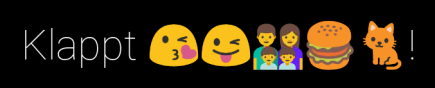
But MagicMirror is still showing this:

Maybe there’s a solution to get this work?
Thanks
-
Edit: Could make it working.
-
Hi, I have my MagicMirror installed on a Mac mini …so i can copy all emojis from my telegram messenger (desktop version) to my config.js.
That works fine for me… -
@Stoffbeuteluwe said in Display colored emoji:
Hi, I have my MagicMirror installed on a Mac mini …so i can copy all emojis from my telegram messenger (desktop version) to my config.js.
That works fine for me…Hi,
what exactly have you copied to your config.js?
-
@floschibo I have copied the emoji out off my telegram messenger (desktop version on my Mac mini)
-
@Stoffbeuteluwe Ok, now I think I get it. In my case I’m jusing the MMM-IFTTT module to send Messages to the Mirror.
So emojis are displayed by text send via IFTTT. It’s not a fixed Text I can copy to my config.js file. :thinking_face: -
Hey there - the instructions above doesn’t worked for me. But I found a solution that works perfectly:
- Open https://github.com/googlefonts/noto-emoji/tree/master/fonts
- Download most recent NotoColorEmoji.ttf
- Copy file in /home/pi/.fonts (if you cant see the .fonts folder please use CTRL+H to display it (Folders with names starting by “.” are hidden on Raspbian))
- Done!
-
Hi there,
topic is quite old but still present for me. :D As you can see on picture below, the envelop smiley is not converted into emoji. For test using, I pasted an smiley into it and it seems, that it’s not the Chrome Noto Font.
Followed the instruction provided by @floschibo > How To Enable Color Emoji on Chrome for Linux (Updated).
Also tried the latest instruction above by @MZ-BER.Should be:
✉ Envelope Emoji
Name: Envelope
Unicode number: U+2709
HTML-code: ‘✉’;
CSS-code: \2709Screenshot of the MagicMirror Page.
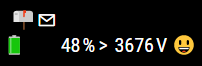
I also tried to install another font the Linux Color Emoji Font. But same here - could not make it applied. But the Chrome Noto Font would be fine for me.
Any recommendations?
Thank you.Regards.
-
Edit: Could make it working.
-
i will try to get apple style working, here is the font: https://github.com/samuelngs/apple-emoji-linux
mkdir ~/.fonts
cd ~/.fonts
wget https://github.com/samuelngs/apple-emoji-linux/releases/download/ios-15.4/AppleColorEmoji.ttf
fc-cache -f -v




Hello! It looks like you're interested in this conversation, but you don't have an account yet.
Getting fed up of having to scroll through the same posts each visit? When you register for an account, you'll always come back to exactly where you were before, and choose to be notified of new replies (either via email, or push notification). You'll also be able to save bookmarks and upvote posts to show your appreciation to other community members.
With your input, this post could be even better 💗
Register Login