Read the statement by Michael Teeuw here.
MMM-Carousel not displaying
-
@mumblebaj do you have an example of your config?
-
@pastormingle I sent my weather module to use the same as the clock position but still nothing…
-
@pastormingle I used one of the default.
            module: 'MMM-Carousel',
            config: {
                transitionInterval: 10000,
                ignoreModules: [],
                mode: 'positional',
                top_left: {enabled: true, ignoreModules: [], overrideTransitionInterval: 15000},
                top_right: {enabled: true, ignoreModules: ['currentweather']}
            }
        },
Just tested the Global option and it works fine and rotates all the modules one by one.
Here is the config for globalmodule: 'MMM-Carousel', config: { transitionInterval: 10000, ignoreModules: ['clock'], mode: 'global' } } -
@mumblebaj hum… this is my config…
/• * * By Michael Teeuw https://michaelteeuw.nl * MIT Licensed. * * For more information on how you can configure this file * see https://docs.magicmirror.builders/getting-started/configuration.html#general * and https://docs.magicmirror.builders/modules/configuration.html */ let config = { address: "localhost", // Address to listen on, can be: // - "localhost", "127.0.0.1", "::1" to listen on loopback interface // - another specific IPv4/6 to listen on a specific interface // - "0.0.0.0", "::" to listen on any interface // Default, when address config is left out or empty, is "localhost" port: 8080, basePath: "/", // The URL path where MagicMirror is hosted. If you are using a Reverse proxy // you must set the sub path here. basePath must end with a / ipWhitelist: ["127.0.0.1", "::ffff:127.0.0.1", "::1"], // Set [] to allow all IP addresses // or add a specific IPv4 of 192.168.1.5 : // ["127.0.0.1", "::ffff:127.0.0.1", "::1", "::ffff:192.168.1.5"], // or IPv4 range of 192.168.3.0 --> 192.168.3.15 use CIDR format : // ["127.0.0.1", "::ffff:127.0.0.1", "::1", "::ffff:192.168.3.0/28"], useHttps: false, // Support HTTPS or not, default "false" will use HTTP httpsPrivateKey: "", // HTTPS private key path, only require when useHttps is true httpsCertificate: "", // HTTPS Certificate path, only require when useHttps is true language: "en", locale: "en-US", logLevel: ["INFO", "LOG", "WARN", "ERROR"], // Add "DEBUG" for even more logging timeFormat: 24, units: "metric", // serverOnly: true/false/"local" , // local for armv6l processors, default // starts serveronly and then starts chrome browser // false, default for all NON-armv6l devices // true, force serveronly mode, because you want to.. no UI on this device modules: [ { module: "alert", }, { module: "updatenotification", position: "top_bar" }, { module: "clock", position: "top_left" }, { module: "calendar", header: "US Holidays", position: "top_left", config: { calendars: [ { symbol: "calendar-check", url: "webcal://www.calendarlabs.com/ical-calendar/ics/76/US_Holidays.ics" } ] } }, { module: "compliments", position: "lower_third" }, { module: "weather", position: "top_right", config: { weatherProvider: "openweathermap", type: "current", location: "New York", locationID: "5128581", //ID from http://bulk.openweathermap.org/sample/city.list.json.gz; unzip the gz file and find your city apiKey: "YOUR_OPENWEATHER_API_KEY" } }, { module: "weather", position: "top_left", header: "Weather Forecast", config: { weatherProvider: "openweathermap", type: "forecast", location: "New York", locationID: "5128581", //ID from http://bulk.openweathermap.org/sample/city.list.json.gz; unzip the gz file and find your city apiKey: "YOUR_OPENWEATHER_API_KEY" } }, { module: "newsfeed", position: "bottom_bar", config: { feeds: [ { title: "New York Times", url: "https://rss.nytimes.com/services/xml/rss/nyt/HomePage.xml" } ], showSourceTitle: true, showPublishDate: true, broadcastNewsFeeds: true, broadcastNewsUpdates: true } }, { module: 'MMM-Carousel', config: { transitionInterval: 10000, ignoreModules: [], mode: 'global' } } ] }; /*************** DO NOT EDIT THE LINE BELOW ***************/ if (typeof module !== "undefined") {module.exports = config;} -
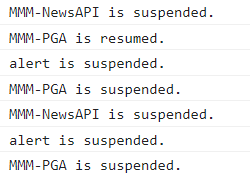
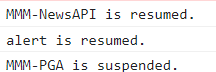
@pastormingle Are there any errors where you start the mirror? I.e. if you do npm start are there any errors in the terminal window or if you use pm2 you can check the pm2 logs. You can also check the Developer Console, do shift_ctrl + i and select the console tab. See if there are any errors there. If no errors you should see something like the below, modules suspended…module resumed
-
@pastormingle please use code block around config info
-
-
@sdetweil not sure what that means?
-
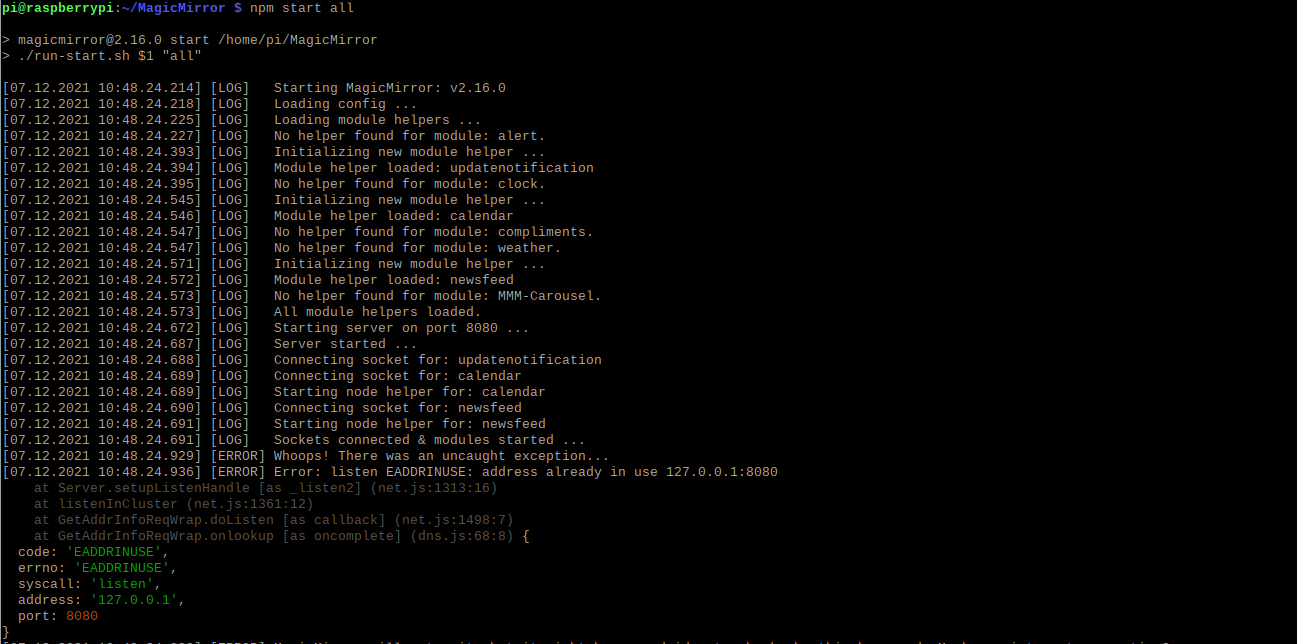
@pastormingle That means that something is already running with that IP. Do you only have 1 instance of MM running?
-
@mumblebaj The IP conflict is due to me ssh into the pi and starting magic mirror… I am referring to the commits from sdetweil that said “please use code block around config info” So still not working… But it looks like the carousel module is working…
-
@pastormingle What Sam was saying was the when posting your config, you need to set it in a code block. That is done by selecting the config you posted and then pressing the </> button at the top of the window. That would wrap the config in a code block and make it look “pretty”.
I am glad your Carousel is now working.
-
@mumblebaj sorry mumblebaj that was a typo it’s not working… Any other suggestions?
-
/* Magic Mirror Config Sample * * By Michael Teeuw https://michaelteeuw.nl * MIT Licensed. * * For more information on how you can configure this file * see https://docs.magicmirror.builders/getting-started/configuration.html#general * and https://docs.magicmirror.builders/modules/configuration.html */ let config = { address: "localhost", // Address to listen on, can be: // - "localhost", "127.0.0.1", "::1" to listen on loopback interface // - another specific IPv4/6 to listen on a specific interface // - "0.0.0.0", "::" to listen on any interface // Default, when address config is left out or empty, is "localhost" port: 8080, basePath: "/", // The URL path where MagicMirror is hosted. If you are using a Reverse proxy // you must set the sub path here. basePath must end with a / ipWhitelist: ["127.0.0.1", "::ffff:127.0.0.1", "::1"], // Set [] to allow all IP addresses // or add a specific IPv4 of 192.168.1.5 : // ["127.0.0.1", "::ffff:127.0.0.1", "::1", "::ffff:192.168.1.5"], // or IPv4 range of 192.168.3.0 --> 192.168.3.15 use CIDR format : // ["127.0.0.1", "::ffff:127.0.0.1", "::1", "::ffff:192.168.3.0/28"], useHttps: false, // Support HTTPS or not, default "false" will use HTTP httpsPrivateKey: "", // HTTPS private key path, only require when useHttps is true httpsCertificate: "", // HTTPS Certificate path, only require when useHttps is true language: "en", locale: "en-US", logLevel: ["INFO", "LOG", "WARN", "ERROR"], // Add "DEBUG" for even more logging timeFormat: 24, units: "metric", // serverOnly: true/false/"local" , // local for armv6l processors, default // starts serveronly and then starts chrome browser // false, default for all NON-armv6l devices // true, force serveronly mode, because you want to.. no UI on this device modules: [ { module: "alert", }, { module: "updatenotification", position: "top_bar" }, { module: "clock", position: "top_left" }, { module: "calendar", header: "US Holidays", position: "top_left", config: { calendars: [ { symbol: "calendar-check", url: "webcal://www.calendarlabs.com/ical-calendar/ics/76/US_Holidays.ics" } ] } }, { module: "compliments", position: "top_left" }, { module: "newsfeed", position: "bottom_bar", config: { feeds: [ { title: "New York Times", url: "https://rss.nytimes.com/services/xml/rss/nyt/HomePage.xml" } ], showSourceTitle: true, showPublishDate: true, broadcastNewsFeeds: true, broadcastNewsUpdates: true } }, { module: 'MMM-Carousel', config: { transitionInterval: 1000, ignoreModules: [], mode: 'global' } } ] }; /*************** DO NOT EDIT THE LINE BELOW ***************/ if (typeof module !== "undefined") {module.exports = config;} -
@pastormingle As mentioned previously, are the any errors in the developers window? Do you have any errors in the terminal window? I am using the exact same config as you for Carousel and it work just fine for me
-
@mumblebaj said in MMM-Carousel not displaying:
That would wrap the config in a code block and make it look “pretty”.
not pretty, just more readable
-
@mumblebaj yes, generally, w package.json you would need an npm install. but in this case, the dependencies after for testing not running
-
@sdetweil ```
Here is what is in my developer window under the console tab… I don’t see anything that stands out.loader.js:164 Translations loaded for: clock
loader.js:184 Load script: modules/default/calendar/calendar.js
module.js:501 Check MagicMirror version for module ‘calendar’ - Minimum version: 2.1.0 - Current version: 2.16.0
module.js:503 Version is ok!
module.js:509 Module registered: calendar
loader.js:155 Bootstrapping module: calendar
loader.js:244 File already loaded: moment.js
loader.js:160 Scripts loaded for: calendar
loader.js:203 Load stylesheet: modules/default/calendar/calendar.css
loader.js:244 File already loaded: font-awesome.css
loader.js:162 Styles loaded for: calendar
loader.js:164 Translations loaded for: calendar
loader.js:184 Load script: modules/default/compliments/compliments.js
module.js:509 Module registered: compliments
loader.js:155 Bootstrapping module: compliments
loader.js:244 File already loaded: moment.js
loader.js:160 Scripts loaded for: compliments
loader.js:162 Styles loaded for: compliments
loader.js:164 Translations loaded for: compliments
loader.js:184 Load script: modules/default/newsfeed/newsfeed.js
module.js:509 Module registered: newsfeed
loader.js:155 Bootstrapping module: newsfeed
loader.js:244 File already loaded: moment.js
loader.js:160 Scripts loaded for: newsfeed
loader.js:203 Load stylesheet: modules/default/newsfeed/newsfeed.css
loader.js:162 Styles loaded for: newsfeed
loader.js:164 Translations loaded for: newsfeed
loader.js:184 Load script: modules/MMM-Carousel/MMM-Carousel.js
module.js:501 Check MagicMirror version for module ‘MMM-Carousel’ - Minimum version: 2.3.0 - Current version: 2.16.0
module.js:503 Version is ok!
module.js:509 Module registered: MMM-Carousel
loader.js:155 Bootstrapping module: MMM-Carousel
loader.js:160 Scripts loaded for: MMM-Carousel
loader.js:203 Load stylesheet: modules/MMM-Carousel/MMM-Carousel.css
loader.js:162 Styles loaded for: MMM-Carousel
loader.js:164 Translations loaded for: MMM-Carousel
loader.js:203 Load stylesheet: css/custom.css
:8080/modules/default/alert/alert.js:165 Starting module: alert
:8080/modules/defaul…enotification.js:21 Starting module: updatenotification
:8080/modules/default/clock/clock.js:46 Starting module: clock
:8080/modules/defaul…ndar/calendar.js:87 Starting module: calendar
:8080/modules/defaul…s/compliments.js:38 Starting module: compliments
:8080/modules/defaul…feed/newsfeed.js:63 Starting module: newsfeed
main.js:499 All modules started!
9
XHR finished loading: GET “”.
-
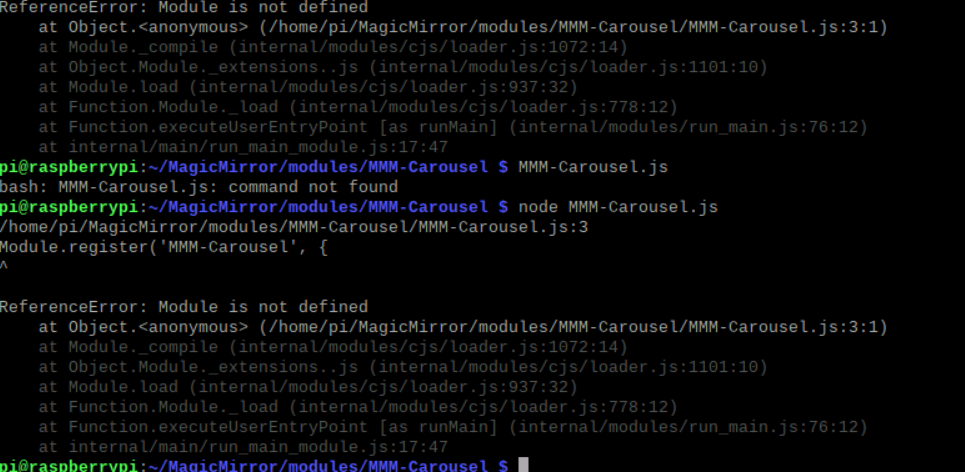
@sdetweil I tried to manual run the MMM-Carousel.js but returned the following.
 MMM-
MMM-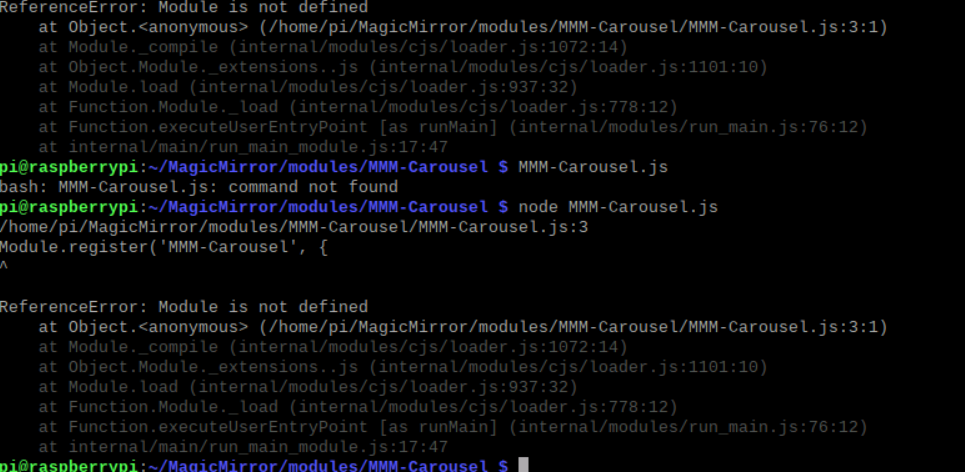
-
@pastormingle don’t know why you would do that. it has to run under MagicMirror…
-
@pastormingle Do you see any of the module suspended or module resumed stuff?

Hello! It looks like you're interested in this conversation, but you don't have an account yet.
Getting fed up of having to scroll through the same posts each visit? When you register for an account, you'll always come back to exactly where you were before, and choose to be notified of new replies (either via email, or push notification). You'll also be able to save bookmarks and upvote posts to show your appreciation to other community members.
With your input, this post could be even better 💗
Register Login