Read the statement by Michael Teeuw here.
MMM-Spotify
-
@Bugsounet Good I checked the older messages in this thread to better understand the complexity with multiple accounts. I had no idea it would impact the CPU that much. Thanks for pointing out.
Being able to change it verbally is currently not an option as I don’t plan to implement vocal for my mirror. But can’t think of an alternative as of now.BTW: Thanks a lot for your hard work on this module!
-
@Bugsounet said in MMM-Spotify:
if Soptify logo not hidden after start, it’s means :
token missing or token erroryou should have in console something like that :
[SPOTIFY:ERROR] USERNAME: [your username] [SPOTIFY:ERROR] Token Error ! ./[token name].json@Bugsounet I have this same error. I got the webpage after running node first_auth.js but it said invalid and then I had to CRTL-Z to stop it. Now when I run node first_auth.js I get errors. Do I need to uninstall MMM-Spotify and start from scratch?
Also, I already am using MMM-NowPlayingOnSpotify and that is working fine. Can I just reuse my existing Client ID and Client Secret? I’m worried that using both modules is causing the issue. I could be wrong though.
Thanks!
-
It’s means that the token is not set
maybe callback url is not set
after if you have used thesudocommand for install MM or for install this module, it will not work (not write access) -
@zauberclown said in MMM-Spotify:
Good I checked the older messages in this thread to better understand the complexity with multiple accounts. I had no idea it would impact the CPU that much. Thanks for pointing out.
Being able to change it verbally is currently not an option as I don’t plan to implement vocal for my mirror. But can’t think of an alternative as of now.
BTW: Thanks a lot for your hard work on this module!yes, I can’t display ALL account in the same time.
example 2 accounts listen at the same time -> what is the visual (complex to determinate) !?for CPU time:
Xaccount registred =X* CPU time
SoX* time DNS access,X* traffic to spotifythat’s why i use a switch for another account
-
@Bugsounet Good point. I was thinking I needed to reuse my client ID credentials I had already setup for MMM-NowPlayingOnSpotify. DOH! I just created a “New App” on the Spotify Dev page for MMM-Spotify. Should be good to go now.
-
when it want to works ;)
-
@Bugsounet said in MMM-Spotify:
when it want to works ;)
pi@raspberrypi:~/MagicMirror/modules/MMM-Spotify $ node first_auth.js
[SPOTIFY:ERROR] Token not found! /home/pi/MagicMirror/modules/MMM-Spotify/token.json
[SPOTIFY] Spotify v1.0.2 Initialized…
[SPOTIFY_AUTH] Opening the browser for authentication on Spotify…
events.js:174
throw er; // Unhandled ‘error’ event
^Error: listen EADDRINUSE: address already in use :::8888
at Server.setupListenHandle [as _listen2] (net.js:1280:14)
at listenInCluster (net.js:1328:12)
at Server.listen (net.js:1415:7)
at Function.listen (/home/pi/MagicMirror/modules/MMM-Spotify/node_modules/express/lib/application.js:618:24)
at Spotify.authFlow (/home/pi/MagicMirror/modules/MMM-Spotify/node_modules/@bugsounet/spotify/index.js:310:8)
at Promise (/home/pi/MagicMirror/modules/MMM-Spotify/first_auth.js:20:14)
at new Promise ()
at authorize (/home/pi/MagicMirror/modules/MMM-Spotify/first_auth.js:17:12)
at authorizations (/home/pi/MagicMirror/modules/MMM-Spotify/first_auth.js:33:19)
at Object. (/home/pi/MagicMirror/modules/MMM-Spotify/first_auth.js:40:1)
Emitted ‘error’ event at:
at emitErrorNT (net.js:1307:8)
at process._tickCallback (internal/process/next_tick.js:63:19)
at Function.Module.runMain (internal/modules/cjs/loader.js:834:11)
at startup (internal/bootstrap/node.js:283:19)
at bootstrapNodeJSCore (internal/bootstrap/node.js:623:3) -
@spoonek said in MMM-Spotify:
Error: listen EADDRINUSE: address already in use :::8888
it’s mean that the port 8888 il used by another app… free this port temporarily and retry
-
@Bugsounet said in MMM-Spotify:
@spoonek said in MMM-Spotify:
Error: listen EADDRINUSE: address already in use :::8888
it’s mean that the port 8888 il used by another app… free this port temporarily and retry
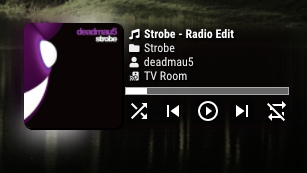
I just started over from scratch and now was able to get the authorization webpage login to work.
-
when it want to work ;)
-
I understand the CPU and traffic issue, but would there be any chance to check at least 2 accounts at the same time in a future version?
-
@Bugsounet said in MMM-Spotify:
yes, I can’t display ALL account in the same time.
example 2 accounts listen at the same time -> what is the visual (complex to determinate) !? -
@Sean said in MMM-Spotify:
MMM-Spotify
Spotify controller for MagicMirror
Screenshot
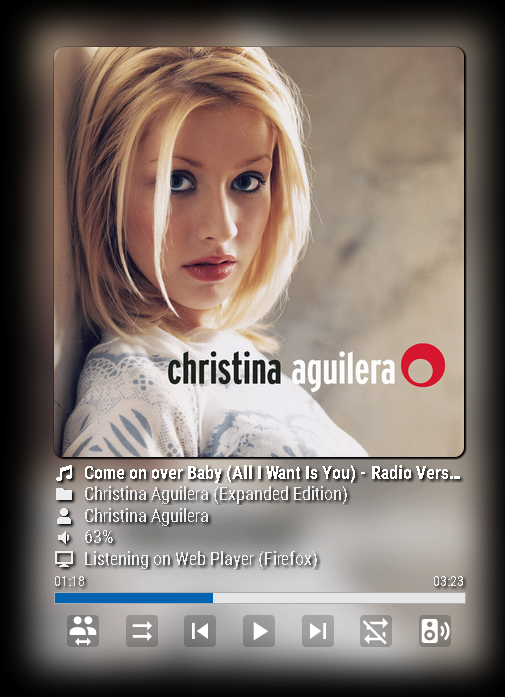
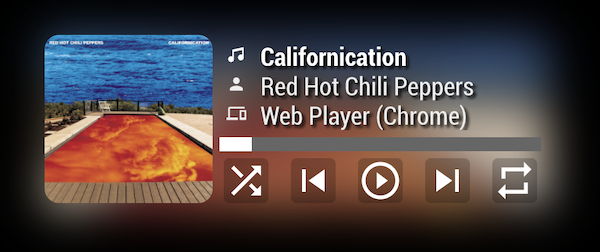
Main Features
- Showing Current playback of any devices
- Playing Controllable by Notification (Play, pause, next, previous, volume)
- Spotify Controllable by Notification (change device, search and play)
[card:eouia/MMM-Spotify]
My MBP was gone a few weeks ago with 12,000 mp3s which I was collecting for my whole life… :(
I’ve never used any streaming service, but now have to.
So I consider to use Spotify. I know there is already some modules about it. Anyway, I need something different. I was playing with Spotify API for my private purpose.Just at that moment , @ejay-ibm wanted to control Spotify with voice command through MMM-AssistantMk2. He asked sometimes and I answered. I asked also sometimes he replied…
And then, Wow, Suddenly This module is born.
Special Thanks to @ejay-ibm. He gave me great inspiration and motivation to complete this (and real coworking also).TODO
I’ll add touch interface to control Spotify. (somedays)
-
@etayl : and ? what’s the problem ?
-
@Bugsounet I am using Spotify free account do not pay for the Premium,can I just download Spotify to MP3 by using any third-party tool and then add music on my mirror?
-
Hello, I do not see the point of answering this question, MagicMirror and his team will NEVER respond to this
-
@JAMJAMT that is not legal.
none of us could advise u to do such a thing.
-
hi all
I have installed spotify but can only play the sound on my smartphone and my google nest mini, how can I play the sound through the speakers of the raspberry pi
spotify does appear in the MagicMirror -
@raf Spotify requires a supporting player.
librespot or raspotify
note these are both installed in the base system outside mm.
once u install and start them, you should see the pi device in your phone app Spotify player to transfer play to.
I have installed the Spotify Connect app.on windows and my desktop linux, and can play on my pi, and see what is playing on mm
-
@sdetweil
its only for premium users ?
Hello! It looks like you're interested in this conversation, but you don't have an account yet.
Getting fed up of having to scroll through the same posts each visit? When you register for an account, you'll always come back to exactly where you were before, and choose to be notified of new replies (either via email, or push notification). You'll also be able to save bookmarks and upvote posts to show your appreciation to other community members.
With your input, this post could be even better 💗
Register Login