MagicMirror Forum
    • Recent
    • Tags
    • Unsolved
    • Solved
    • MagicMirror² Repository
    • Documentation
    • 3rd-Party-Modules
    • Donate
    • Discord
    • Register
    • Login
    A New Chapter for MagicMirror: The Community Takes the Lead
    Read the statement by Michael Teeuw here.

    How do I access my Pi from an externel network to install modules and change config.js?

    Scheduled Pinned Locked Moved General Discussion
    22 Posts 7 Posters 8.8k Views 6 Watching
    Loading More Posts
    • Oldest to Newest
    • Newest to Oldest
    • Most Votes
    Reply
    • Reply as topic
    Log in to reply
    This topic has been deleted. Only users with topic management privileges can see it.
    • htilburgsH Offline
      htilburgs @MWel1977
      last edited by

      @MWel1977 Or make use of builtin VNC with a VPN, what also can run on the Pi. But Teamviewer would be the most simple to use.

      (still trying to learn JS, but not afraid to ask and AI is my best friend) ☺

      1 Reply Last reply Reply Quote 0
      • S Offline
        sdetweil
        last edited by sdetweil

        With TeamViewer you don’t have to open a port

        Sam

        How to add modules

        learning how to use browser developers window for css changes

        1 Reply Last reply Reply Quote 1
        • ? Offline
          A Former User @MWel1977
          last edited by

          @MWel1977
          I recommend dataplicity.com for one device, it’s free. And easy to use.

          M 1 Reply Last reply Reply Quote 1
          • M Offline
            MWel1977 @Guest
            last edited by

            @Sean that dataplicity is only commandline right?
            And they also have an app for my smartphone (Android) I see.
            Does that mean I can control my Pi (via commandline) from any place in the world?
            Without port forwarding? Or does this require port forwarding?

            ? 2 Replies Last reply Reply Quote 0
            • ? Offline
              A Former User @MWel1977
              last edited by A Former User

              @MWel1977
              It has web interface (and web terminal shell also).
              You don’t need to make port forwarding. dataplicity makes some tunneling through it’s service between your RPI and dataplicity server. You can connect to your RPI through dataplicity server with dedicated static domain name - wormhole (looks some funny however), then can control your RPI(or any other linux based machine) remotely. It will have same domain name even when you change the network.
              Free version has some limited features, but I think it’s enough for usual usage.

              1 Reply Last reply Reply Quote 0
              • ? Offline
                A Former User @MWel1977
                last edited by

                @MWel1977
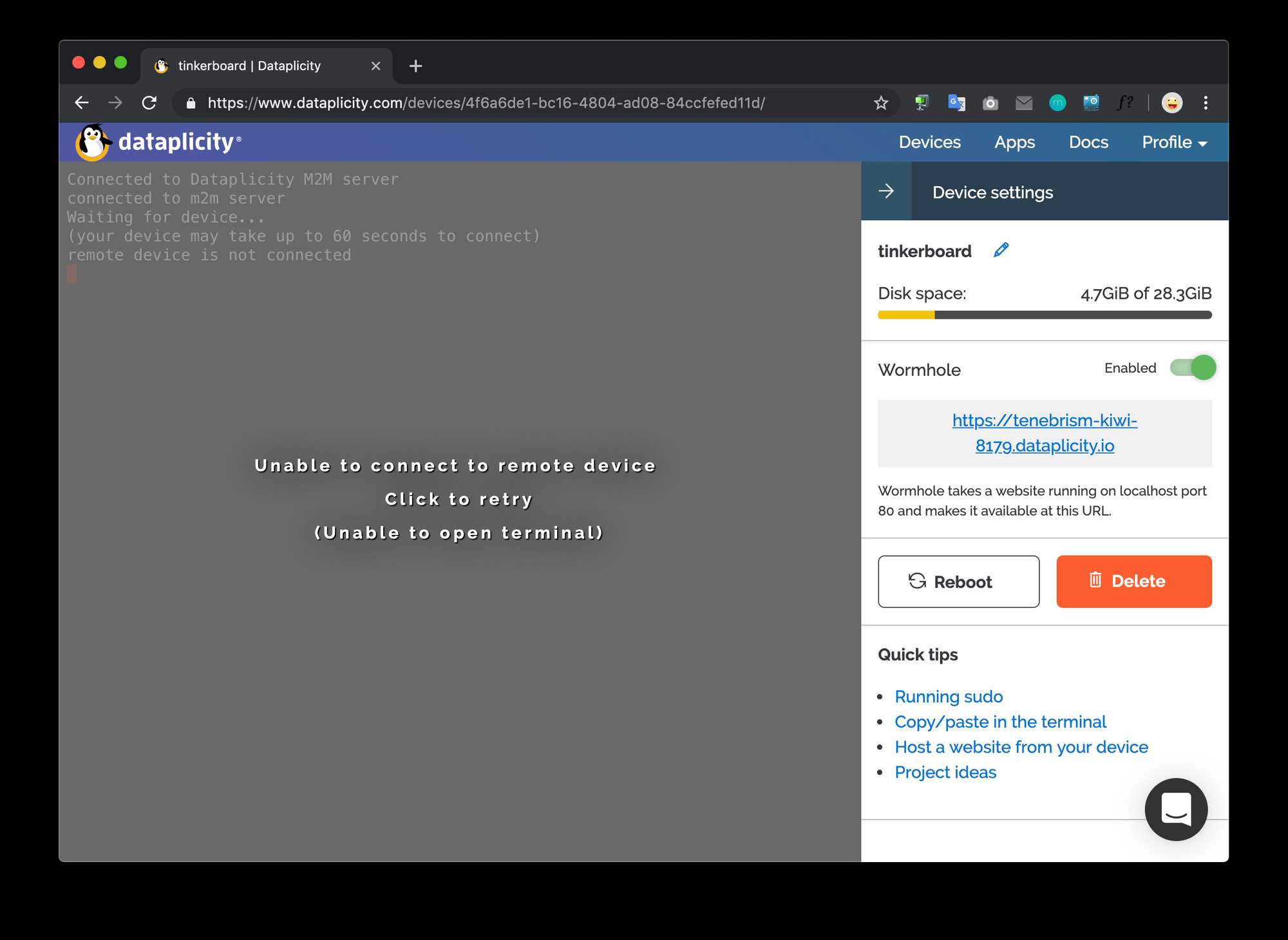
                Web terminal looks like this;
                0_1555405125136_t.png

                M 1 Reply Last reply Reply Quote 1
                • M Offline
                  MWel1977 @Guest
                  last edited by

                  @Sean Nice!
                  But it still is commandline correct? No desktop view of the pi.
                  Seeing this I like to have 1 program that connects to my pi that on a laptop can show me the Pi’s desktop (remote desktop) but on my Android smartphone uses the commandline. Teamviewer has only the remote desktop…and that’s on a smartphone not great. But using the commandline completely is at the moment to much for me.
                  I do use JuiceSSH on my smartphone When I’m at home) for simple things like checking folders and stuff. But to customize the MM2 I do would like to have a desktop enviroment for now.
                  But I’ll have a look at this option as well! Thanks for pointing it out! :grinning_face: :thumbs_up: :thumbs_up:

                  ? 1 Reply Last reply Reply Quote 0
                  • ? Offline
                    A Former User @MWel1977
                    last edited by

                    @MWel1977
                    Hmmm… I think you need just Accessing RPI from an external network To install modules and change config.js. Those could be done with just terminal shell.
                    Anyway, you might have your own needs. VNC or teamViewer could be the one. but as you know, it needs some tricks of port forwarding. Choice is yours.

                    M 1 Reply Last reply Reply Quote 0
                    • M Offline
                      MWel1977 @Guest
                      last edited by

                      @Sean :smiling_face_with_open_mouth_cold_sweat: :smiling_face_with_open_mouth_cold_sweat: It’s just I’m not that familiar with doing everything via the command shell. Installing modules via the shell that I can do.
                      But I haven’t changed the config.js via the shell yet.
                      is it simple as: “sudo nano /MagicMirror/Config/config.js”?

                      thedoorsfanaticT 1 Reply Last reply Reply Quote 0
                      • thedoorsfanaticT Offline
                        thedoorsfanatic @MWel1977
                        last edited by thedoorsfanatic

                        @MWel1977
                        I am a beginner and use VNC viewer (which has a desktop view of my Raspi) on my work computer and my android smartphone
                        https://www.realvnc.com/de/connect/docs/raspberry-pi.html#raspberry-pi-setup

                        My Smart Mirror YouTube playlist: https://www.youtube.com/playlist?list=PL9Iv_4Mvy6o2tnvdhNBstVWNefgUP9ELp

                        M bheplerB 2 Replies Last reply Reply Quote 0
                        • M Offline
                          MWel1977 @thedoorsfanatic
                          last edited by

                          @thedoorsfanatic WOW!!! :fearful_face: :fearful_face: WAIT…WHAT???:dizzy_face: :dizzy_face:
                          That’s you in the youtube vid? And you controle your mirror using a tablet with a webinterface?? HOW??? I want that too!

                          thedoorsfanaticT 1 Reply Last reply Reply Quote 0
                          • thedoorsfanaticT Offline
                            thedoorsfanatic @MWel1977
                            last edited by thedoorsfanatic

                            @MWel1977
                            That is very easy and just a module you have to install:
                            https://github.com/Jopyth/MMM-Remote-Control

                            and I don’t know anything about programming or linux. My YouTube playlist shows what I have achieved so far

                            My Smart Mirror YouTube playlist: https://www.youtube.com/playlist?list=PL9Iv_4Mvy6o2tnvdhNBstVWNefgUP9ELp

                            M 1 Reply Last reply Reply Quote 0
                            • M Offline
                              MWel1977 @thedoorsfanatic
                              last edited by

                              @thedoorsfanatic
                              I have seen this modules but I thought it was a inscreen module and not a remote controle via a web interface.
                              I currently have MMM-Pages to show different modules on different pages. Like on your smartphone. I use 2 ultrasonic sensors to move left and right through the pages.
                              Have the hardware al in place in the frame since last week and now I’m setting up the MM2 again … because I lost/misplaced my original SD-card… :confounded_face: :confounded_face:
                              What HAT are you using for the voice control by the way?

                              thedoorsfanaticT 1 Reply Last reply Reply Quote 0
                              • thedoorsfanaticT Offline
                                thedoorsfanatic @MWel1977
                                last edited by

                                @MWel1977
                                There are many threads concerning that topic
                                This might be the wrong place to continue that discussion. Just comment under my video

                                I use a module which I have found on github but is not published under the 3rd party modules

                                My Smart Mirror YouTube playlist: https://www.youtube.com/playlist?list=PL9Iv_4Mvy6o2tnvdhNBstVWNefgUP9ELp

                                M 1 Reply Last reply Reply Quote 0
                                • lolobyteL Offline
                                  lolobyte
                                  last edited by

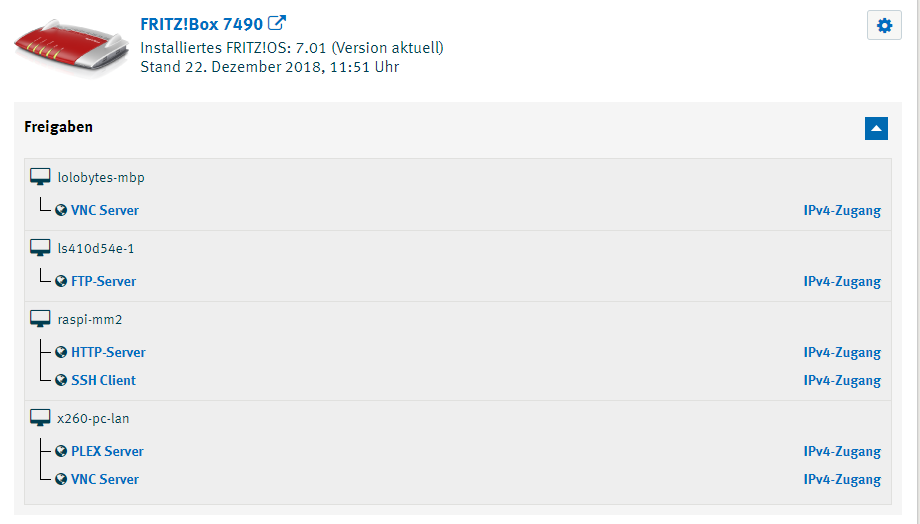
                                  Possible with any DynDNS Provider such „No-IP.com“, „dyndns.com“ or „ANYDNS“.

                                  I use the „MyFritz!“ DynDNS service delivered with my Fritz!Box router.

                                  Very easy to setup.
                                  Only necessary to enable „Port Forwarding“ for your MM2 pi and you have access from any location of the world.
                                  http://raspi-mm2.xxxxxxxxxxxxxxxxxx.myfritz.net:8080/
                                  Works great.
                                  0_1555413392090_Portfreigaben.PNG

                                  1 Reply Last reply Reply Quote 1
                                  • M Offline
                                    MWel1977 @thedoorsfanatic
                                    last edited by

                                    " Just comment under my video"

                                    I just did. :smiling_face: :grinning_face_with_smiling_eyes:

                                    1 Reply Last reply Reply Quote 0
                                    • bheplerB Offline
                                      bhepler Module Developer @thedoorsfanatic
                                      last edited by

                                      @thedoorsfanatic - Interesting. RealVNC has built the infrastructure to create a middleman VNC server and made it free. For five free-of-charge installations, that’s a hell of a deal. Much easier than my C&C installation. The downside is that you have to trust the RealCNC people (shouldn’t be a problem. But I trust nobody. Professional habit.)

                                      1 Reply Last reply Reply Quote 0
                                      • bheplerB Offline
                                        bhepler Module Developer
                                        last edited by

                                        For those who want to do it the hard way, I have a tutorial on using cloud VMs to provide a means to connect to your Mirrors. I designed it for multiple mirrors of unlimited number.

                                        I’ll be up front about this: My way is complicated and provides only SSH access to your mirrors. But it is about as secure as you’re going to find. It doesn’t rely on installing unknown services on your Mirror Pi (Dataplicity, RealVNC). It’s all open source and SSH key protected.


                                        1 Reply Last reply Reply Quote 0

                                        Hello! It looks like you're interested in this conversation, but you don't have an account yet.

                                        Getting fed up of having to scroll through the same posts each visit? When you register for an account, you'll always come back to exactly where you were before, and choose to be notified of new replies (either via email, or push notification). You'll also be able to save bookmarks and upvote posts to show your appreciation to other community members.

                                        With your input, this post could be even better 💗

                                        Register Login

                                        • 1
                                        • 2
                                        • 1 / 2
                                        • First post
                                          Last post
                                        Enjoying MagicMirror? Please consider a donation!
                                        MagicMirror created by Michael Teeuw.
                                        Forum managed by Sam, technical setup by Karsten.
                                        This forum is using NodeBB as its core | Contributors
                                        Contact | Privacy Policy