Read the statement by Michael Teeuw here.
MMM-Fuel zeigt nur Lade...... MMM-Fuel show only load......
-
@biebermann you can also read this for more details https://github.com/MichMich/MagicMirror/issues/2671
-
I did update to latest MM version 2.17.1, but the MMM-Fuel just says loading (laden). My config hasn’t changed since months.
Any idea?
-
@andyyy which fuel provider are you using? tankerkoenig, spritpreisrechner or nsw
-
@strawberry-3-141
tankerkoenig I am using from the beginning. In Germany there is no other API I could you I suppose.
-
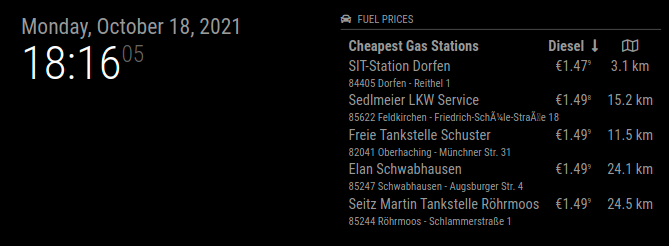
@andyyy I just tested it, please make sure you use the newest version of MagicMirror + dependencies to contain the fix https://github.com/MichMich/MagicMirror/pull/2674
-
@strawberry-3-141
I am on the latest MM version, but something screwed up in the background.
I did load the backup with MM 2.16 and started over again. No success.
Eventually I loaded my oldest available backup with MM 2.9. Interestingly, all modules still worked in this old setup incl. MMM Fuel. From there I updated the MM to 2.17.1 and surprisingly MMM Fuel kept working. :)
Apart from the fuel module 3 other module seem to be incompatible with latest MM version resulting in a black screen on startup. Most likely some required dependencies got removed in the MM core.
It would be great if we could introduce a community maintained compatiblity list of all 3rd party modules. I mean the status “maintained” or not gives a hint, but it does not necessarily mean it will not work any longer.
For now, I am happy. :)
-
@andyyy said in MMM-Fuel zeigt nur Lade...... MMM-Fuel show only load......:
it would be great if we could introduce a community maintained compatiblity list
we have that list, which is really not well maintained
3rd party modules
https://github.com/MichMich/MagicMirror/wiki/3rd-party-modulesas for black screen
we’ve been talking about that non stop for almost 4 months.
request
valid-url
rrule-altare the three libraries removed. all the failures are because module authors didn’t document their dependency on them.
which one I needed will be shown in the mm startup messages.
-
Hello everyone,
i have the problem, when the pi started , the MMM-Fuel modules shows me “load…” sometimes i can see the module, but most times i see the loading screen.
any ideas why?
and can i see the price from e10 and e5?my config
{
module: “MMM-Fuel”,
position: ‘bottom_bar’,
config: {
updateInterval: 200,
api_key: “my key”,
lat: 49.56324,
lng: 11.34776,
types: [“e5, e10”],
sortBy: [“e5”, “e10”],
}
}, -
@fufu1408 I had the thame Problem, but i solved it.
The Problem is nodered and the dependencies which are neede by the module.
- fs-extra
- node-fetch
They need node > 12 !
How to solve:
- Update your System: sudo apt-get update && sudo apt-get upgrade
- Install NodeRed: bash <(curl -sL https://raw.githubusercontent.com/node-red/linux-installers/master/deb/update-nodejs-and-nodered) --node14
- be patient. This will take about 20-30 minutes !! The Script will do ALL the work for you!!
- install fs-extra + node-fetsch: npm install fs-extra node_fetch
- Update your MM: git pull
- Install MM with: npm install (from inside your MM Directory)
- Update MMM-Fuel: git pull
- Install MMM-Fuel: npm install (from inside your MMM-Fuel Directory)
Restart your System !!
Thats it !!

Hello! It looks like you're interested in this conversation, but you don't have an account yet.
Getting fed up of having to scroll through the same posts each visit? When you register for an account, you'll always come back to exactly where you were before, and choose to be notified of new replies (either via email, or push notification). You'll also be able to save bookmarks and upvote posts to show your appreciation to other community members.
With your input, this post could be even better 💗
Register Login