MagicMirror Forum
    • Recent
    • Tags
    • Unsolved
    • Solved
    • MagicMirror² Repository
    • Documentation
    • 3rd-Party-Modules
    • Donate
    • Discord
    • Register
    • Login
    A New Chapter for MagicMirror: The Community Takes the Lead
    Read the statement by Michael Teeuw here.

    I can't get mmm-screencast to work

    Scheduled Pinned Locked Moved Unsolved Troubleshooting
    59 Posts 6 Posters 27.9k Views 6 Watching
    Loading More Posts
    • Oldest to Newest
    • Newest to Oldest
    • Most Votes
    Reply
    • Reply as topic
    Log in to reply
    This topic has been deleted. Only users with topic management privileges can see it.
    • J Offline
      jste84 @JerryP
      last edited by

      @JerryP I’ve copied your config and still can’t find the device. When I try and cast YouTube. The only device that shows is my Nvidia shield 😓

      F 1 Reply Last reply Reply Quote 0
      • F Offline
        fribse @jste84
        last edited by

        @jste84 Are the pi on wifi or cable? It could be due to mDNS not propagating across wired/wireless.

        J 1 Reply Last reply Reply Quote 0
        • J Offline
          jste84 @fribse
          last edited by jste84

          @fribse its wifi… Is there a way to check/fix this?

          F JerryPJ 2 Replies Last reply Reply Quote 0
          • F Offline
            fribse @jste84
            last edited by

            @jste84 As long as the devices are on the same, ie. both on cable, or both on wifi, then you should be good.
            One thing I wonder though, the shield, is that on cable? It could be client isolation, if you have that activated on your wifi, then it won’t work.

            J 1 Reply Last reply Reply Quote 0
            • JerryPJ Offline
              JerryP @jste84
              last edited by JerryP

              @jste84

              lets try to pull the module!!

              Navigate to the modules directory via the follow command:

              cd MagicMirror/modules/MMM-Screencast
              git pull
              npm install

              F J 2 Replies Last reply Reply Quote 0
              • F Offline
                fribse @JerryP
                last edited by

                @JerryP said in I can't get mmm-screencast to work:

                nam install

                Is that a new command? :-D

                S 1 Reply Last reply Reply Quote 1
                • S Offline
                  sdetweil @fribse
                  last edited by

                  @fribse typo. npm

                  Sam

                  How to add modules

                  learning how to use browser developers window for css changes

                  1 Reply Last reply Reply Quote 0
                  • J Offline
                    jste84 @JerryP
                    last edited by

                    @JerryP ok so have done this. Git pull says up to date.

                    Npm install - installs with 12 vulnerabilities…

                    JerryPJ 1 Reply Last reply Reply Quote 0
                    • JerryPJ Offline
                      JerryP @jste84
                      last edited by

                      @jste84 OK.
                      And now when you reboot the mirror.
                      Are u using the same wifi network for our phone and mirror. to broadcast YouTube?? Frome your laptop it’s not working. “At my place only the phone and iPad can connect the module”

                      J 1 Reply Last reply Reply Quote 0
                      • J Offline
                        jste84 @fribse
                        last edited by

                        @fribse Shield is WiFi too…

                        1 Reply Last reply Reply Quote 0
                        • J Offline
                          jste84 @JerryP
                          last edited by

                          @JerryP same Wifi network for the mirror and shield.

                          Reboot and when I open YouTube… Still no luck finding the mirror

                          JerryPJ 1 Reply Last reply Reply Quote 0
                          • JerryPJ Offline
                            JerryP @jste84
                            last edited by

                            @jste84
                            Can you try to put de Nvidia shield down. (unplug the power) and is I’t than possible tot see the screencast on the mirror (maybe reboot the mirror after you hef unplug the Nvidia shield)
                            and kan you post one more time te config.

                            J 1 Reply Last reply Reply Quote 0
                            • J Offline
                              jste84 @JerryP
                              last edited by jste84

                              @JerryP so tried unplugging the shield when I hit the cast button it says no devices found.

                              module: 'MMM-Screencast',
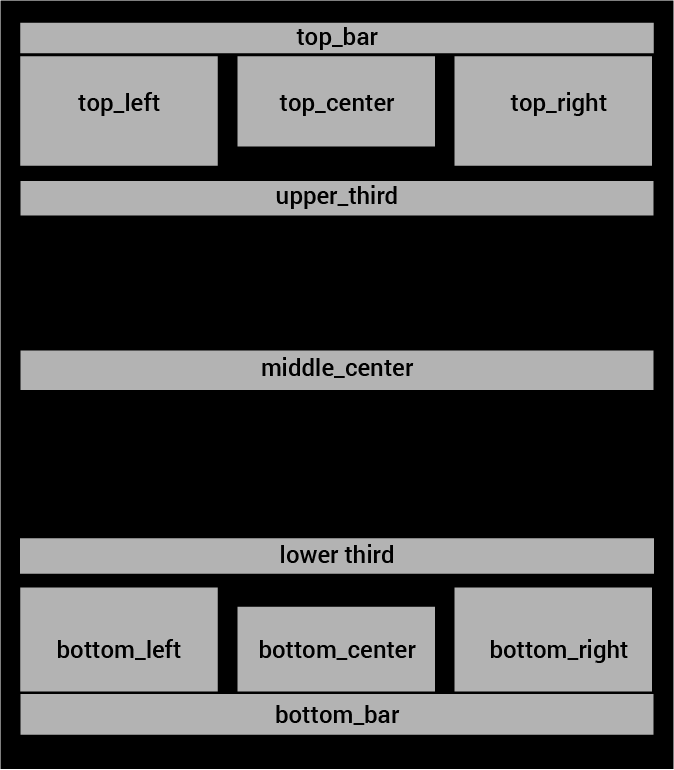
                              		position: 'bottom_right', 
                              		config: {
                              			position: 'center', 
                              			castName: 'Mirror',
                              			height: 300,
                              			width: 500,
                              		}},
                              
                              S JerryPJ 2 Replies Last reply Reply Quote 0
                              • S Offline
                                sdetweil @jste84
                                last edited by

                                @jste84 did u check to see if there are any errors, pm2 logs or dev window. sounds like the listen for incoming requests is not setup

                                u will have to have adresss:“0.0.0.0”, and ipWhitelist:[]

                                to allow machines (phone table laptop…) to connect to the mm server running the module

                                Sam

                                How to add modules

                                learning how to use browser developers window for css changes

                                J 1 Reply Last reply Reply Quote 1
                                • J Offline
                                  jste84 @sdetweil
                                  last edited by

                                  @sdetweil how do I check for those?

                                  The address and ipWhitelist are both set this way.

                                  JerryPJ 1 Reply Last reply Reply Quote 0
                                  • JerryPJ Offline
                                    JerryP @jste84
                                    last edited by

                                    @jste84 so tried unplugging the shield when I hit the cast button it says no devices found.

                                    I’m thinking that you want something that’s not possible. Or I’m confused.
                                    The Shield is a different device. so unplug the power of it.
                                    Than take a phone whits is on the seem wifi network as the mirror
                                    Then use your phone en pick a movie on YouTube.com
                                    and hit the cast button.

                                    Your config looks oke.
                                    The pull is als don
                                    so I don’t know why it’s not working

                                    IMG_8749.jpg
                                    In the picture you can see my 2 mirrors.
                                    “Huiskamer”
                                    “Spiegeltje”

                                    1 Reply Last reply Reply Quote 0
                                    • JerryPJ Offline
                                      JerryP @jste84
                                      last edited by JerryP

                                      @jste84

                                      var config = {
                                      	address: "0.0.0.0"
                                      	port: 8080,
                                      	ipWhitelist: ["127.0.0.1", "::ffff:127.0.0.1", "::1"],
                                      	useHttps: false, 		
                                      	httpsPrivateKey: "", 
                                      	httpsCertificate: "", 
                                      
                                      	language: "nl",
                                      	timeFormat: 24,
                                      	units: "metric",
                                      modules: 
                                      

                                      This is my part of de var (ip handeling)

                                      S J 2 Replies Last reply Reply Quote 0
                                      • S Offline
                                        sdetweil @JerryP
                                        last edited by

                                        @JerryP your whitelist says only apps inside mirror can connect

                                        use

                                        ipWhitelist:[],

                                        Sam

                                        How to add modules

                                        learning how to use browser developers window for css changes

                                        JerryPJ 1 Reply Last reply Reply Quote 0
                                        • JerryPJ Offline
                                          JerryP @sdetweil
                                          last edited by

                                          @sdetweil i removed the ip adres of the laptop an tv.
                                          But for the mmm-screencast module is That no problem

                                          S 1 Reply Last reply Reply Quote 0
                                          • S Offline
                                            sdetweil @JerryP
                                            last edited by

                                            @JerryP why cant u start allowing everything, and tighten it up later.

                                            Sam

                                            How to add modules

                                            learning how to use browser developers window for css changes

                                            1 Reply Last reply Reply Quote 0

                                            Hello! It looks like you're interested in this conversation, but you don't have an account yet.

                                            Getting fed up of having to scroll through the same posts each visit? When you register for an account, you'll always come back to exactly where you were before, and choose to be notified of new replies (either via email, or push notification). You'll also be able to save bookmarks and upvote posts to show your appreciation to other community members.

                                            With your input, this post could be even better 💗

                                            Register Login

                                            • 1
                                            • 2
                                            • 3
                                            • 2 / 3
                                            • First post
                                              Last post
                                            Enjoying MagicMirror? Please consider a donation!
                                            MagicMirror created by Michael Teeuw.
                                            Forum managed by Sam, technical setup by Karsten.
                                            This forum is using NodeBB as its core | Contributors
                                            Contact | Privacy Policy