MagicMirror Forum
    • Recent
    • Tags
    • Unsolved
    • Solved
    • MagicMirror² Repository
    • Documentation
    • 3rd-Party-Modules
    • Donate
    • Discord
    • Register
    • Login
    A New Chapter for MagicMirror: The Community Takes the Lead
    Read the statement by Michael Teeuw here.

    Creating a module to display daily horoscopes

    Scheduled Pinned Locked Moved Solved Development
    26 Posts 7 Posters 21.7k Views 6 Watching
    Loading More Posts
    • Oldest to Newest
    • Newest to Oldest
    • Most Votes
    Reply
    • Reply as topic
    Log in to reply
    This topic has been deleted. Only users with topic management privileges can see it.
    • Y Offline
      YoungHomie
      last edited by

      Hello all,
      Is there an easy way/would someone be interested in writing the code for a module that would display daily horoscopes?
      I might have my terminology butchered, but can this be done with an RSS feed?
      I attempted to use the 3rd party module specific for that, but all I got was a header.
      Ex: The display was “Dec 20 Aquarius”
      Where what I want it to actually say the horoscope.

      I also tried taking the default news feed module and pasting the link to an RSS feed (again terminology probably butchered) and that time it scrolled through the different headers rather than remaining on one like above.

      Thanks for any and all help.

      brobergB 1 Reply Last reply Reply Quote 0
      • morozgrafixM Offline
        morozgrafix Moderator
        last edited by

        @YoungHomie I may be interested in developing something like that as my first module. Although I’m not very much into horoscopes, do you know good sources (possibly with RSS feeds) that can be used for it?

        1 Reply Last reply Reply Quote 0
        • brobergB Offline
          broberg Project Sponsor @YoungHomie
          last edited by

          @YoungHomie the newsfeed module is basically a rss reader, find a rss stream and past it in ad the url and it will be displayed as the news are being displayed

          cowboysdudeC 1 Reply Last reply Reply Quote 1
          • cowboysdudeC Offline
            cowboysdude Module Developer @broberg
            last edited by cowboysdude

            @broberg said in Creating a module to display daily horoscopes:

            @YoungHomie the newsfeed module is basically a rss reader, find a rss stream and past it in ad the url and it will be displayed as the news are being displayed

            That was my 1st thought however… I don’t think he wants to read all of them… and the newsfeed fades… so perhaps another simple module that allows the user to input what ‘sign’ they want to show… or in case of more than one in the house then allow for an ‘array’ of choices…

            1 Reply Last reply Reply Quote 0
            • morozgrafixM Offline
              morozgrafix Moderator
              last edited by morozgrafix

              I believe that OP already attempted to use newsfeed, but since it only displays title of the each newsfeed item and not the description he was getting something along the lines of Dec 20 Aquarius displayed on the screen.

              I’ve looked around and found a way to get Daily and Weekly feeds in JSON form and started to create a small prototype for the module. Will be happy to share it here once it is a bit more solidified and ready to be tested. (I never wrote a module from scratch, so it’s a good learning experience for me).

              1 Reply Last reply Reply Quote 0
              • morozgrafixM Offline
                morozgrafix Moderator
                last edited by morozgrafix

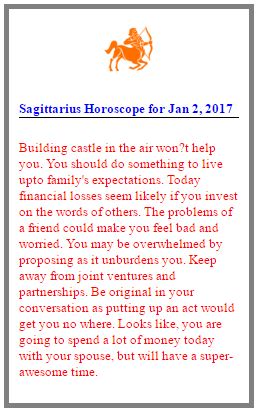
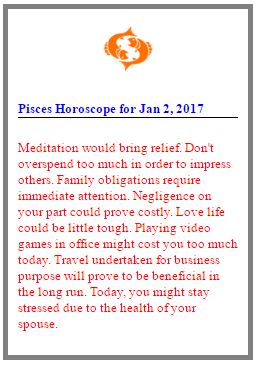
                Here is an initial draft of the styling (I’m testing in Chrome on my Mac at the moment, haven’t had time to throw it on RasPi yet). Feedback is welcome:
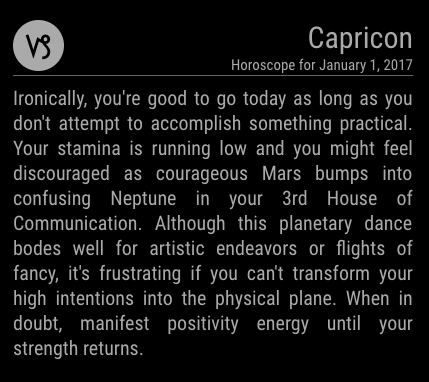
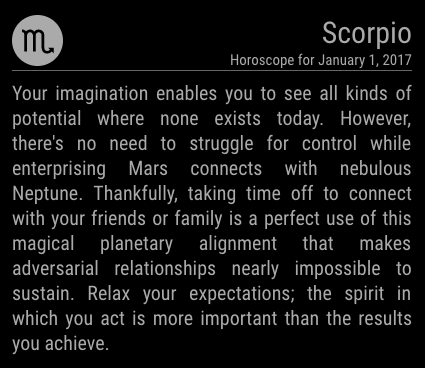
                0_1483338845023_Screen Shot 2017-01-01 at 10.33.44 PM.png

                0_1483339783461_Screen Shot 2017-01-01 at 10.49.13 PM.png

                cowboysdudeC 1 Reply Last reply Reply Quote 4
                • cowboysdudeC Offline
                  cowboysdude Module Developer @morozgrafix
                  last edited by

                  @morozgrafix said in Creating a module to display daily horoscopes:

                  Here is an initial draft of the styling (I’m testing in Chrome on my Mac at the moment, haven’t had time to throw it on RasPi yet). Feedback is welcome:

                  0_1483338845023_Screen Shot 2017-01-01 at 10.33.44 PM.png

                  0_1483339783461_Screen Shot 2017-01-01 at 10.49.13 PM.png

                  Love it! LOL I was in process of building just about the same thing… it may be a tad different but mine is about done too :)

                  Nice to see members who can answering the call for those who can’t!! LOVE THIS PLACE!

                  1 Reply Last reply Reply Quote 0
                  • cowboysdudeC Offline
                    cowboysdude Module Developer
                    last edited by cowboysdude

                    0_1483379145070_horo.JPG
                    0_1483379226186_horo1.JPG

                    Colors are wrong right now and needs a bit more styling but this was the one I’ve been working on…

                    morozgrafixM 1 Reply Last reply Reply Quote 0
                    • morozgrafixM Offline
                      morozgrafix Moderator @cowboysdude
                      last edited by

                      @cowboysdude Very nice! What feed are you using for data? I found not very official way to consume API from https://www.yahoo.com/style/horoscope Don’t know if that source is any good, since I’m very clueless about horoscopes.

                      1 Reply Last reply Reply Quote 0
                      • morozgrafixM Offline
                        morozgrafix Moderator
                        last edited by

                        I’ve pushed my initial work for the module to GitHub. This is my very first MM module and I probably missed something obvious. Please get in touch with me if you have a suggestion or feature request (filing GH Issue is a great way to do it). Once I feel comfortable and possibly have some beta testers I will add a separate thread for this module. Thanks.

                        Repo is here: https://github.com/morozgrafix/MMM-horoscope

                        1 Reply Last reply Reply Quote 0
                        • morozgrafixM Offline
                          morozgrafix Moderator
                          last edited by

                          This topic can probably be marked as “solved” - module thread is here https://forum.magicmirror.builders/topic/1370/mmm-horoscope

                          D 1 Reply Last reply Reply Quote 1
                          • D Offline
                            djbosman @morozgrafix
                            last edited by

                            @morozgrafix
                            Hi!
                            I am a rank NOOB who has just managed to get the Magic Mirror going.
                            I then tried to add the Horoscope Module , but it only displays: “Aligning Stars …”.

                            I have placed all the extracted files from Github , in the: /home/pi/MagicMirror/modules/MMM-horoscope/ folder.

                            Then I edited the config.js to include:

                            },
                            {
                            module: ‘MMM-horoscope’,
                            position: ‘top_right’, // This can be any of the regions.
                            config: {
                            // See ‘Configuration options’ for additional options and more information.
                            sign: ‘aries’, // Zodiac sign
                            }
                            }

                            What else should I be doing?

                            I’ll be grateful for any help!

                            Danie Bosman

                            morozgrafixM 1 Reply Last reply Reply Quote 0
                            • morozgrafixM Offline
                              morozgrafix Moderator @djbosman
                              last edited by morozgrafix

                              @djbosman Hi Danie,

                              In the code snippet that you’ve posted (it’s a good idea to use markdown for code snippets) it looks like you are possibly using “fancy quotes”. Make sure that your config.js file has these ' or " and not these ‘ or “ (it’s possible that they were only converted in your post on the forum and your config is ok). Additionally make sure you have a comma after last } bracket as shown below:

                              		{
                              			module: 'MMM-horoscope',
                              			position: 'top_right', // This can be any of the regions.
                              			config: {
                              				// See ‘Configuration options’ for additional options and more information.
                              				sign: 'aries', // Zodiac sign
                              				}
                              		},
                              

                              Also since this module is using node helper you may need to restart electron app for MM to pickup module helper for horoscopes.
                              You should see these lines in the console log when you do npm start:

                              Connecting socket for: MMM-horoscope
                              Starting NodeHelper for MMM-horoscopemodule.
                              

                              Hope this helps and thanks for trying out my module.

                              P.S. I just added instructions about restarting MM in the README

                              1 Reply Last reply Reply Quote 0
                              • P Offline
                                pflnpi0305
                                last edited by Jopyth

                                i add this and get black screen only when i add the horoscope. maybe i dont know hot to install it lol. am i doing something wrong? any help is appreciated.

                                /* Magic Mirror Config Sample
                                 *
                                 * By Michael Teeuw http://michaelteeuw.nl
                                 * MIT Licensed.
                                 */
                                
                                var config = {
                                	port: 8080,
                                	ipWhitelist: ["127.0.0.1", "::ffff:127.0.0.1", ],
                                
                                	language: 'en',
                                	timeFormat: 12,
                                	units: 'imperial',
                                
                                	modules: [
                                		{
                                			module: 'alert',
                                		},
                                		{
                                			module: "updatenotification",
                                			position: "top_bar"
                                		},
                                		{
                                			module: 'clock',
                                			position: 'top_left'
                                		},
                                		{
                                			module: 'calendar',
                                			header: 'MY CALENDAR',
                                			position: 'top_left',
                                			config: {
                                			fetchInterval: 1 * 60 * 1000,
                                				calendars: [
                                					{
                                						symbol: 'calendar-check-o ',
                                						url: 'webcal://www.calendarlabs.com/templates/ical/US-Holidays.ics'
                                		},
                                                {
                                                                                url: 'https://calendar.google.com/calendar/ical/5ddp1drsb3mib0a6piof8h0f8s%40group.calendar.google.com/private-xxxxxxxxxxxxxxx'
                                           
                                                                           }
                                				 ]
                                			 }
                                		},
                                		{
                                			module: 'compliments',
                                			position: 'lower_third'
                                
                                               },
                                              {
                                			
                                			module: 'MMM-horoscope',
                                    			position: 'bottom_right',  
                                    			config: {
                                      				
                                      				sign: 'aries', // Zodiac sign
                                                }
                                		
                                      
                                 		},
                                		{
                                		        module: 'currentweather',
                                			position: 'top_right',
                                			config: {
                                				units: 'imperial',
                                         			location: '',
                                				locationID: '',  //ID from http://www.openweathermap.org
                                				appid: 'xxxxxxxxxxxxxxxx'
                                				
                                				
                                			}
                                		},		
                                		{
                                			module: 'MMM-Remote-Control'


                                		},
                                		{
                                		
                                			module: 'MMM-WunderGround',
                                    			position: 'top_right',
                                    			config: {
                                       				 apikey: 'xxxxxxxxxxxxxxxx', // private; don't share!
                                        			 pws: 'CA/FONTANA', 
                                        			 hourly: '1',
                                       			         fctext: '1',
                                        			 fcdaycount: "5",
                                        			 fcdaystart: "0",
                                        			 hourlyinterval: "3",
                                        			 hourlycount: "2",
                                        			 alerttime: 10000,
                                        			 alerttruncatestring: "english:",
                                    			         roundTmpDecs: 1,
                                    				 UseCardinals: 0,
                                    				 layout: "horizontal",
                                    				sysstat: 0
                                			}
                                		},
                                		{
                                			module: 'newsfeed',
                                			position: 'bottom_bar',
                                			config: {
                                				feeds: [
                                					{
                                						
                                						title: "Google News",
                                						url: "https://news.google.com/news?cf=all&hl=en&pz=1&ned=us&output=rss"
                                		},
                                            	{
                                						title: "New York Times",
                                	                    			url:       "http://www.nytimes.com/services
                                                                             /xml/rss/nyt/HomePage.xml"
                                                },
                                                {
                                        				        title: "BBC Sci-Tech",
                                						url: "http://feeds.bbci.co.uk/news/video_and_audio/technology/rss.xml?edition=uk"
                                					}
                                				],
                                				showSourceTitle: true,
                                				showPublishDate: true,
                                				maxNewsItems: 0,
                                				updateInterval: 10 * 1000,
                                				reloadInterval:  2 * 60 * 1000
                                			}
                                		},
                                	]
                                
                                    };
                                
                                
                                /*************** DO NOT EDIT THE LINE BELOW ***************/
                                if (typeof module !== 'undefined') {module.exports = config;}
                                
                                morozgrafixM 1 Reply Last reply Reply Quote 0
                                • cowboysdudeC Offline
                                  cowboysdude Module Developer
                                  last edited by cowboysdude

                                  @pflnpi0305

                                  Run that through this: http://javascriptbeautifier.com/

                                  to clean that up… lots of spaces in there… may not be the problem but it could become a problem at some point and it’s easier to read through it when it’s formatted ;)

                                  But I do believe your problem is right here:

                                  url: “http://www.nytimes.com/services
                                  /xml/rss/nyt/HomePage.xml”

                                  That’s not valid… needs to be:

                                  url: “http://www.nytimes.com/services/xml/rss/nyt/HomePage.xml”

                                  1 Reply Last reply Reply Quote 2
                                  • morozgrafixM Offline
                                    morozgrafix Moderator @pflnpi0305
                                    last edited by

                                    @pflnpi0305 I believe that @cowboysdude is correct about that line spilling over. It needs to be on one line. When in doubt you can always paste your config.js at http://jshint.com/ and see if there are any errors (one warning about undefined variable module is ok)

                                    cowboysdudeC 1 Reply Last reply Reply Quote 1
                                    • cowboysdudeC Offline
                                      cowboysdude Module Developer @morozgrafix
                                      last edited by cowboysdude

                                      @morozgrafix said in Creating a module to display daily horoscopes:

                                      @pflnpi0305 I believe that @cowboysdude is correct about that line spilling over. It needs to be on one line. When in doubt you can always paste your config.js at http://jshint.com/ and see if there are any errors (one warning about undefined variable module is ok)

                                      Home away from home LOL AND off topic but Thanks and congrats on being a mod :)

                                      1 Reply Last reply Reply Quote 1
                                      • P Offline
                                        pflnpi0305
                                        last edited by

                                        so i fixed it and added it the the java beautifier link and thenadded it back to my config.js folder and rebootbut still black screen.
                                        cant use npm start
                                        is it because im using pm2 to autostart my mirror?

                                        morozgrafixM 1 Reply Last reply Reply Quote 0
                                        • morozgrafixM Offline
                                          morozgrafix Moderator @pflnpi0305
                                          last edited by morozgrafix

                                          @pflnpi0305 if you are using pm2 then you can restart mm with pm2 restart mm, to stop it you would run pm2 stop mm, to list processes managed by pm2 you would do pm2 list and to start you would run pm2 start mm

                                          If you are still have issues, post your latest version of config.js here again. Are you getting any errors?

                                          1 Reply Last reply Reply Quote 0
                                          • P Offline
                                            pflnpi0305
                                            last edited by pflnpi0305

                                            so i also dropped my config in jshint.comand and javascriptbeautifier.com and all is well…i dont know what im missing. if i remove the horoscope everything works well but if i have it then it wont work.

                                                          var config = {
                                            port: 8080,
                                            ipWhitelist: [ "127.0.0.1", "::ffff:127.0.0.1", "::1", "::ffff:192.168.1.1/24" ],
                                            language: "en",
                                            timeFormat: 12,
                                            units: "imperial",
                                            modules: [ {
                                                module: "MMM-Admin-Interface"
                                            }, {
                                                module: "alert"
                                            }, {
                                                module: "updatenotification",
                                                position: "top_bar"
                                            }, {
                                                module: "clock",
                                                position: "top_left"
                                            }, {
                                                module: "calendar",
                                                header: "MY CALENDAR",
                                                position: "top_left",
                                                config: {
                                                    fetchInterval: 1 * 60 * 1000,
                                                    calendars: [ {
                                                        symbol: "calendar-check-o ",
                                                        url: "webcal://www.calendarlabs.com/templates/ical/US-Holidays.ics"
                                                    }, {
                                                        url:"https://calendar.google.com/calendar/ical/5ddp1drsb3mib0a6piof8h0f8s%40group.calendar.google.com/private-xxxxxxxxxxxxxxx/basic.ics"
                                                    } ]
                                                }
                                            }, {
                                                module: "compliments",
                                                position: "lower_third"
                                            }, {
                                                module: "currentweather",
                                                position: "top_right",
                                                config: {
                                                    units: "imperial",
                                                    location: "FONTANA/CA",
                                                    locationID: "",
                                                    appid: "xxxxxxxxxxxxxx"
                                                }
                                            }, {
                                                module: "MMM-Remote-Control"
                                            }, {
                                                module: "MMM-WunderGround",
                                                position: "top_right",
                                                config: {
                                                    apikey: "xxxxxxx",
                                                    pws: "CA/FONTANA",
                                                    hourly: "1",
                                                    fctext: "1",
                                                    fcdaycount: "5",
                                                    fcdaystart: "0",
                                                    hourlyinterval: "3",
                                                    hourlycount: "2",
                                                    alerttime: 10000,
                                                    alerttruncatestring: "english:",
                                                    roundTmpDecs: 1,
                                                    UseCardinals: 0,
                                                    layout: "horizontal",
                                                    sysstat: 0
                                                }
                                            }, {
                                                module: "MMM-Globe",
                                                position: "center",
                                                config: {
                                                    style: "geoColor",
                                                    imageSize: 300,
                                                    ownImagePath: "",
                                                    updateInterval: 10 * 60 * 1000
                                                }
                                            }, {
                                                module: "MMM-horoscope",
                                                position: "bottom_right",
                                                config: {
                                                    sign: "aries"
                                                }
                                            }, {
                                                module: "newsfeed",
                                                position: "bottom_bar",
                                                config: {
                                                    feeds: [ {
                                                        title: "Google News",
                                                        url: "https://news.google.com/news?cf=all&hl=en&pz=1&ned=us&output=rss"
                                                    }, {
                                                        title: "New York Times",
                                                        url: "http://www.nytimes.com/services/xml/rss/nyt/HomePage.xml"
                                                    }, {
                                                        title: "BBC Sci-Tech",
                                                        url: "http://feeds.bbci.co.uk/news/video_and_audio/technology/rss.xml?edition=uk"
                                                    } ],
                                                    showSourceTitle: true,
                                                    showPublishDate: true,
                                                    maxNewsItems: 0,
                                                    updateInterval: 10 * 1000,
                                                    reloadInterval: 2 * 60 * 1000
                                                }
                                            } ]
                                            };
                                            
                                            if ("undefined" !== typeof module) module.exports = config;

                                            
                                            morozgrafixM 1 Reply Last reply Reply Quote 0

                                            Hello! It looks like you're interested in this conversation, but you don't have an account yet.

                                            Getting fed up of having to scroll through the same posts each visit? When you register for an account, you'll always come back to exactly where you were before, and choose to be notified of new replies (either via email, or push notification). You'll also be able to save bookmarks and upvote posts to show your appreciation to other community members.

                                            With your input, this post could be even better 💗

                                            Register Login

                                            • 1
                                            • 2
                                            • 1 / 2
                                            • First post
                                              Last post
                                            Enjoying MagicMirror? Please consider a donation!
                                            MagicMirror created by Michael Teeuw.
                                            Forum managed by Sam, technical setup by Karsten.
                                            This forum is using NodeBB as its core | Contributors
                                            Contact | Privacy Policy