MagicMirror Forum
    • Recent
    • Tags
    • Unsolved
    • Solved
    • MagicMirror² Repository
    • Documentation
    • 3rd-Party-Modules
    • Donate
    • Discord
    • Register
    • Login
    A New Chapter for MagicMirror: The Community Takes the Lead
    Read the statement by Michael Teeuw here.

    [MMM-JaST] Just another Stock Ticker (new: version 2.x)

    Scheduled Pinned Locked Moved Utilities
    166 Posts 37 Posters 208.8k Views 39 Watching
    Loading More Posts
    • Oldest to Newest
    • Newest to Oldest
    • Most Votes
    Reply
    • Reply as topic
    Log in to reply
    This topic has been deleted. Only users with topic management privileges can see it.
    • JalibuJ Offline
      Jalibu Module Developer @earnestrichards
      last edited by Jalibu

      @earnestrichards I sent you a PM.
      I think you are not on the feat/useYahoo branch.

      No matter. I have now made the feature branch the master.

      1 Reply Last reply Reply Quote 0
      • K Offline
        Koert 0
        last edited by

        Hi @jalibu ,

        It works (for the most of my Stocks). The ticker is showing me the correct value but not an increase/decrease in percent (for 2 of 10 stocks).

        can you help me with this error message?

        thank you in advance!

        0|mm       | [31.03.2021 11:25.10.250] [ERROR] WARNING! Could not validate config file. Starting with default configuration. Please correct syntax errors at or above this line: /home/pi/MagicMirror/config/config.js:58
        0|mm       | 			stocks: [
        0|mm       | 			^^^^^^
        0|mm       | 
        0|mm       | SyntaxError: Unexpected identifier
        0|mm       |     at Module._compile (internal/modules/cjs/loader.js:896:18)
        0|mm       |     at Object.Module._extensions..js (internal/modules/cjs/loader.js:986:10)
        0|mm       |     at Module.load (internal/modules/cjs/loader.js:816:32)
        0|mm       |     at Module._load (internal/modules/cjs/loader.js:728:14)
        0|mm       |     at Function.Module._load (electron/js2c/asar.js:748:26)
        0|mm       |     at Module.require (internal/modules/cjs/loader.js:853:19)
        0|mm       |     at require (internal/modules/cjs/helpers.js:74:18)
        0|mm       |     at loadConfig (/home/pi/MagicMirror/js/app.js:70:12)
        0|mm       |     at App.start (/home/pi/MagicMirror/js/app.js:217:3)
        0|mm       |     at Object.<anonymous> (/home/pi/MagicMirror/js/electron.js:129:7)
        0|mm       | [31.03.2021 11:25.11.849] [WARN]  (electron) The default value of app.allowRendererProcessReuse is deprecated, it is currently "false".  It will change to be "true" in Electron 9.  For more information please check https://github.com/electron/electron/issues/18397
        0|mm       | [31.03.2021 11:28.30.123] [WARN]  (electron) The default value of app.allowRendererProcessReuse is deprecated, it is currently "false".  It will change to be "true" in Electron 9.  For more information please check https://github.com/electron/electron/issues/18397
        0|mm       | [31.03.2021 11:34.45.284] [WARN]  (electron) The default value of app.allowRendererProcessReuse is deprecated, it is currently "false".  It will change to be "true" in Electron 9.  For more information please check https://github.com/electron/electron/issues/18397
        0|mm       | [31.03.2021 11:41.15.680] [WARN]  (electron) The default value of app.allowRendererProcessReuse is deprecated, it is currently "false".  It will change to be "true" in Electron 9.  For more information please check https://github.com/electron/electron/issues/18397
        
        1 Reply Last reply Reply Quote 0
        • earnestrichardsE Offline
          earnestrichards
          last edited by

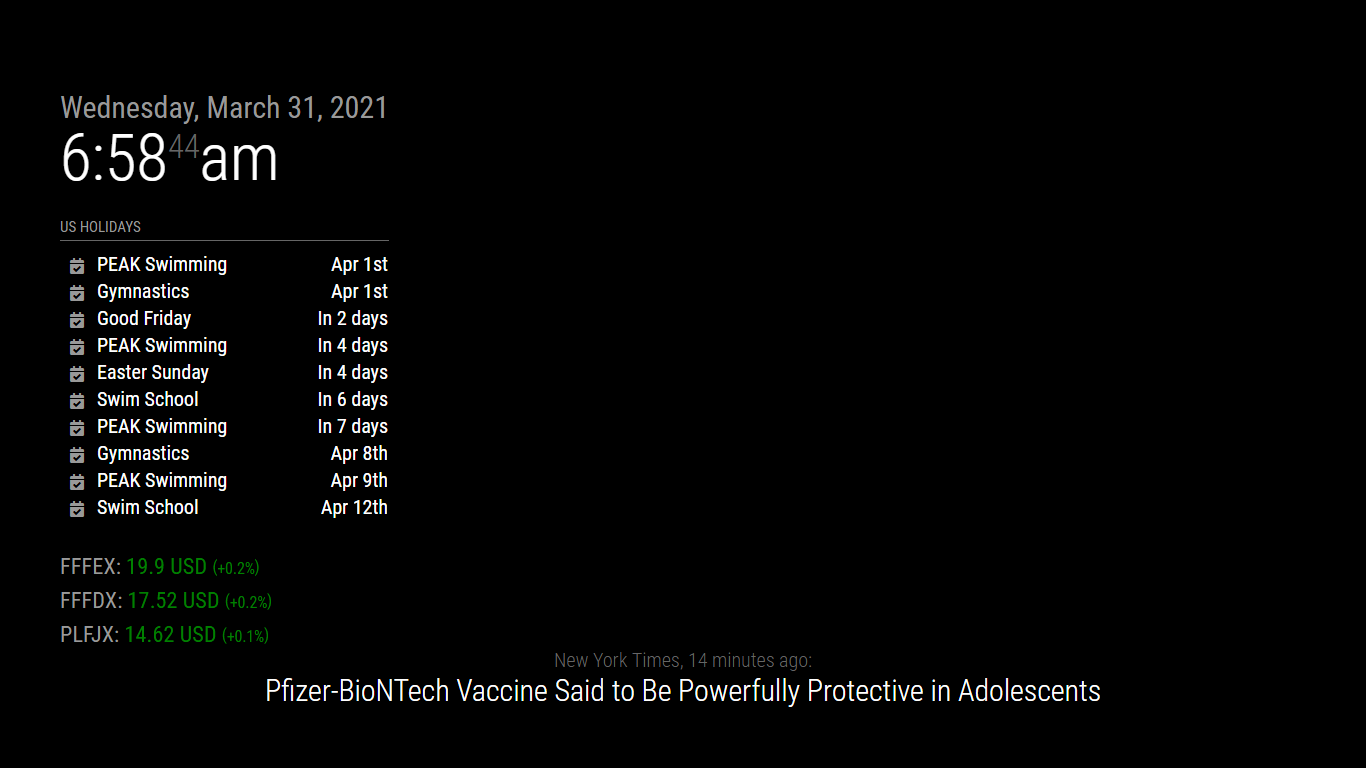
          :man_facepalming: As I have read so many times here on the forum… Read. The. Instructions. Thanks!!!
          79807da2-2086-47f3-968c-f9bec364d618-image.png

          1 Reply Last reply Reply Quote 0
          • J Offline
            jack819
            last edited by

            I am very new to all of this but have been able to install every module so far. I had the old one working fine until the other day when it would not update the stocks. Then I discovered it was updated so I removed the old one and installed the new one as directed. I copied the config file directly to the config.js but I keep getting an error. When I run the config check it keeps coming back as below:

            pi@raspberrypi:~/MagicMirror $ npm run config:check
            
            > magicmirror@2.14.0 config:check /home/pi/MagicMirror
            > node js/check_config.js
            
            [01.04.2021 06:41.32.155] [INFO]  Checking file...  /home/pi/MagicMirror/config/config.js
            [01.04.2021 06:41.32.210] [ERROR] Your configuration file contains syntax errors :(
            [01.04.2021 06:41.32.212] [ERROR] Line 109 col 3 Parsing error: Unexpected token stocks```
            

            Any ideas? Like I said, the config file is copied right from the sample. Line 109 is the stocks : [ line from the sample.

            S JalibuJ 2 Replies Last reply Reply Quote 0
            • S Offline
              sdetweil @jack819
              last edited by

              @jack819 is there a comma on the end of line 108?

              Sam

              How to add modules

              learning how to use browser developers window for css changes

              J 1 Reply Last reply Reply Quote 0
              • J Offline
                jack819 @sdetweil
                last edited by

                @sdetweil
                There was not a comma (like I said, I am new to this). I did add one but now I just get a black screen when I start Magic Mirror. Nothing seems to load.

                S 1 Reply Last reply Reply Quote 0
                • S Offline
                  sdetweil @jack819
                  last edited by

                  @jack819 and when u look at the messages in the window where u started MM???

                  did u do an npm install in the module folder after git clone?

                  Sam

                  How to add modules

                  learning how to use browser developers window for css changes

                  S 1 Reply Last reply Reply Quote 0
                  • S Offline
                    sdetweil @sdetweil
                    last edited by

                    @jack819 said in [MMM-JaST] Just another Stock Ticker (new: version 2.0.0):

                    did u do an npm install in the module folder after git clone?

                    I see the instructions do not say to change to the module folder before doing the npm i
                    I submitted an issue to the modules github repo

                    Sam

                    How to add modules

                    learning how to use browser developers window for css changes

                    1 Reply Last reply Reply Quote 1
                    • J Offline
                      jack819
                      last edited by

                      Bear with me, I am new to this:

                      I got to the modules folder in terminal, copied the git command, hit enter. Once that happened, I typed in the npm i command. It appears it was still in the module folder.

                      S 1 Reply Last reply Reply Quote 0
                      • S Offline
                        sdetweil @jack819
                        last edited by

                        @jack819 to install a module (read the link below in my signature)

                        cd ~/MagicMirror/modules
                        git clone   url from module
                        cd module_name
                        npm i
                        

                        you need the module folder to be the current folder to do the dependency install

                        Sam

                        How to add modules

                        learning how to use browser developers window for css changes

                        1 Reply Last reply Reply Quote 1
                        • R Offline
                          RIKKO14
                          last edited by

                          Hello,
                          I am French.
                          Since The data is now fetched from Yahoo’s finance API. I would like to try again to install this module but beforehand I would like to know how we find the symbols for the stocks ​​we want to have and present them like this:
                          {name: “BASF”, symbol: “BAS.DE”, quantity: 10},
                          {name: “SAP”, symbol: “SAP.DE”, quantity: 15},
                          {name: “Henkel”, symbol: “HEN3.DE”},
                          {name: “Alibaba”, symbol: “BABA”}
                          ]
                          }
                          }

                          The stocks ​​that interest me are:
                          CAC 40
                          Dow jones
                          Euro stoxx 50
                          Crédit Agricole.

                          Thank you

                          JalibuJ 1 Reply Last reply Reply Quote 0
                          • R Offline
                            RIKKO14
                            last edited by

                            I tried to install this module with the stocks in examples but I had a problem of “Electron rebuild” because of black screen, I do not know how to make an “electron rebuild” so I deleted the module and the modules of my MM reappeared.
                            how to do an “electron rebuild”?

                            1 Reply Last reply Reply Quote 0
                            • JalibuJ Offline
                              Jalibu Module Developer @RIKKO14
                              last edited by Jalibu

                              Bonjour @rikko14,

                              an easy way to get your Stock Symbols is as follows:

                              • Open https://finance.yahoo.com and just search for your favorite stocks (i.e. BMW)
                              • Click on Search result
                              • URL should now be like https://finance.yahoo.com/quote/BMW.DE?p=BMW.DE&.tsrc=fin-srch where BMW.DE is the symbol.

                              This module should not cause any problems with Electron. But there was a mistake in the installation documentation. Please make sure to change into the MMM-Jast module’s folder before you execute the “npm i” command. Please check the latest installation instructions, as they are now fixed.

                              1 Reply Last reply Reply Quote 0
                              • JalibuJ Offline
                                Jalibu Module Developer @jack819
                                last edited by

                                @jack819 That was my mistake in the documentation. It is fixed now.

                                uros76U 1 Reply Last reply Reply Quote 0
                                • uros76U Offline
                                  uros76 @Jalibu
                                  last edited by

                                  @jalibu
                                  This is an awesome module, thanks!
                                  Is there a way to cut away decimal numbers on displayed asset price? I have limited space on my MM display and don’t need to see decimals…

                                  My magicmirror projects: https://forum.magicmirror.builders/post/79889, https://forum.magicmirror.builders/post/93241 and https://forum.magicmirror.builders/post/94586

                                  JalibuJ 1 Reply Last reply Reply Quote 0
                                  • JalibuJ Offline
                                    Jalibu Module Developer @uros76
                                    last edited by Jalibu

                                    @uros76
                                    I liked your idea and added this feature. Please checkout the latest version and check the README for instructions for your configuration.

                                    Please let me know if you’re facing any issues, as I did not have the time for extensive testing.

                                    Changes v.2.1.0

                                    • You can now configure the number of decimals for stock values (default: 2) and percentages (default: 1)
                                    • Decimal separator symbols are now localized by the browser’s locale, as most of the countries use a comma instead of a dot.
                                    • The stock’s name field is optional now. If it is not set, the stock’s official trade name will be used.
                                    uros76U 1 Reply Last reply Reply Quote 0
                                    • uros76U Offline
                                      uros76 @Jalibu
                                      last edited by

                                      @jalibu you sir are a legend! Thanks a lot for such quick implementation of decimals idea. I just pulled the latest version and it works. Virtual beer for you :beer_mug:

                                      My magicmirror projects: https://forum.magicmirror.builders/post/79889, https://forum.magicmirror.builders/post/93241 and https://forum.magicmirror.builders/post/94586

                                      1 Reply Last reply Reply Quote 0
                                      • JalibuJ Offline
                                        Jalibu Module Developer
                                        last edited by

                                        The latest version has some major improvements for localizations in number formatting (i.e $123.45 en-US vs. 123,45 EUR de-DE)

                                        Please check it out and let me know if you‘re facing issues.

                                        1 Reply Last reply Reply Quote 0
                                        • MartinLoidoltM Offline
                                          MartinLoidolt
                                          last edited by

                                          Hello Jalibu,
                                          first and foremost i want to say that your module is very nice.
                                          But I want to ask you if it is possible to show the whole depot and not just the growth?
                                          Furthermore it would be nice to have the option to disable the color.
                                          Thanks for your Work!

                                          JalibuJ 1 Reply Last reply Reply Quote 0
                                          • JalibuJ Offline
                                            Jalibu Module Developer @MartinLoidolt
                                            last edited by

                                            @martinloidolt
                                            Thank you for your comment and your ideas.

                                            I’ll add this as soon.

                                            L 1 Reply Last reply Reply Quote 0

                                            Hello! It looks like you're interested in this conversation, but you don't have an account yet.

                                            Getting fed up of having to scroll through the same posts each visit? When you register for an account, you'll always come back to exactly where you were before, and choose to be notified of new replies (either via email, or push notification). You'll also be able to save bookmarks and upvote posts to show your appreciation to other community members.

                                            With your input, this post could be even better 💗

                                            Register Login

                                            • 1
                                            • 2
                                            • 3
                                            • 4
                                            • 5
                                            • 8
                                            • 9
                                            • 3 / 9
                                            • First post
                                              Last post
                                            Enjoying MagicMirror? Please consider a donation!
                                            MagicMirror created by Michael Teeuw.
                                            Forum managed by Sam, technical setup by Karsten.
                                            This forum is using NodeBB as its core | Contributors
                                            Contact | Privacy Policy