Read the statement by Michael Teeuw here.
read csv-data and put it in an array
-
why for TODAY ? and not for current MONTH ?
getDon:getDom: function() { var self = this; var wrapper = document.createElement("div"); // tell MM to call and get our content Log.log("LOOK >>>>>>" + JSON.stringify(this.active_birthdays)) // add this line self.updateDom(); // before this line in the notification code.. for(var birthday of Object.keys(this.active_birthdays)) { for(var name of this.active_birthdays[birthday]) { var m = document.createElement("div"); Log.log("BIRTHDAY >> " + birthday); Log.log("NAME >> " + name); m.innerText = birthday + " " + name; wrapper.appendChild(m); } } // pass the created content back to MM to add to DOM. return wrapper; } -
@Perlchamp said in read csv-data and put it in an array:
// tell MM to call and get our contentLog.log(“LOOK >>>>>>” + JSON.stringify(this.active_birthdays)) // add this line
self.updateDom();not that way
			      // save the persons name and age on the list
			      self.active_birthdays[birth_date].push({'name':birthday.name, 'age': now.diff(moment(birthday.birth,'DD.MM.YYYY'), 'years') })
			   }
			}

			// tell MM to call and get our content
Log.log(JSON.stringify(this.active_birthdays))		  // add this line
			self.updateDom();                 // before this line
		}
sorry, didn’t see the ‘month’.
still doesn’t matter, that birthday is for january, so nothing to show for may
change this compare to do only month
		  // if the date is the same or later, don't use time of day
		   if(birth_date_moment.startOf('day').isSameOrAfter(now.startOf('day')) &&
		   	  birth_date_moment.startOf('day').isSameOrBefore(birthday_time_window.startOf('day'))
hint, google get month from moment
-
i got this:
[2020-05-02 18:10:50.465] [LOG] {} (/home/dirk/MagicMirror/modules/MMM-Logging/node_helper.js:34 Class.socketNotificationReceived)for each entry. i have 5 birthdays in may …
-
@Perlchamp look in the console log, MMM-Logging is redirecting everything there
my mmm-logging config{ module: 'MMM-Logging', disabled: false, config: { // Module functions out of the box with nothing set here. // See below for configurable options. echoLocal: true, echoRemote: true, overwriteBrowserMethods: true, format: "{{message}} ({{folder}}/{{file}}:{{line}} {{method}})", } }, -
i could send you the three files (node_helper.js, MMM-Perlchamp.js, birthdays.csv) via email ?

-
@Perlchamp sent chat message
-
node_helper.js:
var NodeHelper = require("node_helper");
var moment = require("moment");
// add require of other javascripot components here
// var xxx = require('yyy'); here
const csv = require("csvtojson");
var birthdaysArray = [];

module.exports = NodeHelper.create({

	init(){
		console.log("init module helper MMM-Perlchamp");
	},

	start() {

	},

	stop(){
		console.log("Stopping module helper: ",this.name);
	},

	// handle messages from our module// each notification indicates a different messages
	// payload is a data structure that is different per message.. up to you to design this
	socketNotificationReceived(notification, payload) {
		var self = this;
		console.log("Starting module helper: ",this.name);

		// convert the csv-file into a JSON-String
		const csvFilePath = this.path + '/data/birthdays.csv';
		csv()
		.fromFile(csvFilePath)
		.then(function(jsonObj) {
			JSON.stringify(jsonObj);

			// send data to [modulname].js
			self.sendSocketNotification("HAVEDATA", jsonObj);
		})

		// if config message from module
		if (notification === "CONFIG") {
			// save payload config info
			this.config = payload;
			// wait 15 seconds, send a message back to module
			setTimeout(()=> {this.sendSocketNotification("message_from_helper"," this is a test_message")}, 15000);
		}
		else if(notification === "????2") {

		}
	},
});
MMM-Perlchamp.js:
Module.register("MMM-Perlchamp", {

	defaults: {
		language: "de",
		dimmEntries: true   // true: dims entries and the associated
							//       symbol when the date has expired.
							// false: delete entries and the associated
							//        symbol when the date has expired.
	},

	active_birthdays: {

	},


	init: function(){
		Log.log(this.name + " is in init!");
	},

	start: function(){
		Log.log("Starting module: " + this.name);

		// Set locale
		moment.locale(config.language);
	},

	loaded: function(callback) {
		Log.log(this.name + " is loaded!");
		callback();
	},

	// return list of other functional scripts to use, if any (like require in node_helper)
	getScripts: function() {
		return	["moment.js"];
	},

	// return list of stylesheet files to use if any
	getStyles: function() {
		return 	[this.data.path + "/css/MMM-Perlchamp.css"];
	},


	// only called if the module header was configured in module config in config.js
	getHeader: function() {
		return this.data.header;
	},

	// messages received from other modules and the system (NOT from your node helper)
	// payload is a notification dependent data structure
	notificationReceived: function(notification, payload, sender) {
		// once everybody is loaded up
		if(notification === "ALL_MODULES_STARTED"){
			// send our config to our node_helper
			this.sendSocketNotification("CONFIG",this.config);
		}
		if (sender) {
			Log.log(this.name + " received a module notification: " + notification + " from sender: " + sender.name);
		} else {
			Log.log(this.name + " received a system notification: " + notification);
		}
	},

	// messages received from from your node helper (NOT other modules or the system)
	// payload is a notification dependent data structure, up to you to design between module and node_helper
	socketNotificationReceived: function(notification, payload) {
		if(notification === "HAVEDATA") {

			var self = this;
			Log.log(this.name + " received a socket notification: " + notification + " - Payload: " + payload);
			var now = moment();
			for(var birthday of payload) {
				// get 1st 5 chars of birthdate, thru month
				// we will use this as the key in the hash
				var birth_date = birthday.birth.substring(0,5);

				// get the birthday as a moment in this year, for comparing
				var birth_date_moment = moment(birth_date + now.year(),"DD.MMYYYY");

				// u can add days to a moment object and then compare
				//     if the birthdate is before that date (and after now)
				//     so within the next xx days

				// if the date is the same or later, don't use time of day
				if(birth_date_moment.startOf('day').isSameOrAfter(now.startOf('day')) &&
		   	  birth_date_moment.startOf('day').isSameOrBefore(birthday_time_window.startOf('day'))) {

					// birthday is in this month
					// check the hash if we've seen anything for today yet
					// if we haven't see this date yet
					if(this.active_birthdays[birth_date] == undefined){

						//  create the holder for its info (array of
						//		names) in the hash
						this.active_birthdays[birth_date] = [];
					}
					// save the persons name on the list
					self.active_birthdays[birth_date].push({'name':birthday.name, 'age': now.diff(moment(birthday.birth,'DD.MM.YYYY'), 'years') })
			   }
			}
//					this.active_birthdays[birth_date].push(birthday.name);
//					this.active_birthdays[birth_date].push(birthday.name);
//				}
//
//			}
			Log.log("this.active_birthdays >>>>> ", this.active_birthdays);

/*
//			var currentMonth = new Date().toLocaleDateString('en', {month:'2-digit'});
			var currentMonth = moment().format("MM");
			var result = Object.entries(payload
			.filter(({birth}) => birth.split('.')[1] === currentMonth)
			.reduce((a, {birth, name}) => {
				const day = +birth.split('.')[0];
				a[day] = [...(a[day] || []), name];
				return a
			}, {})
			).map(([day, name]) => ({day, name})).sort((a, b) => +a.day - b.day);
			console.log("LISTE >> ", result);
*/


			// tell MM to call and get our content
			self.updateDom();
		}
	},

	// system notification your module is being hidden
	// typically you would stop doing UI updates (getDom/updateDom) if the module is hidden
	suspend: function() {

	},

	// system notification your module is being unhidden/shown
	// typically you would resume doing UI updates (getDom/updateDom) if the module is shown
	resume: function() {

	},

	// this is the major worker of the module, it provides the displayable content for this module
	getDom: function() {
		var self = this;
		var wrapper = document.createElement("div");

		// tell MM to call and get our content
Log.log(JSON.stringify(this.active_birthdays))    // add this line
			self.updateDom();                          // before this line in the notification code..

		for(var birthday of Object.keys(this.active_birthdays)) {
			for(var name of this.active_birthdays[birthday]) {
				var m = document.createElement("div");
				Log.log("BIRTHDAY >> " + birthday);
				Log.log("NAME >> " + name);
				m.innerText = birthday + " " + name;
				wrapper.appendChild(m);
			}
		}

		// pass the created content back to MM to add to DOM.
		return wrapper;
	}
})
birthdays.csv in folder MMM-Perlchamp/data:
birth,name
03.01.1940,aaa AAAAA
06.01.1969,bbb BBBBB
15.02.1939,ccc CCCCC
07.03.1972,ddd DDDDD
10.05.1969,eee EEEEE
16.05.2012,fff FFFFF
16.05.1988,ggg GGGGG
27.05.2002,hhh HHHHH
08.07.1976,iiii IIIII
13.07.1914,jjj JJJJJ
27.08.1968,kkk KKKKK
21.09.1967,lll LLLLL
13.10.1965,mmm MMMMM
16.10.2010,nnn NNNNN
23.10.1941,ooo OOOOO
19.12.1935,ppp PPPPP
MMM-Perlchamp.css in folder MMM-Perlchamp/css
.MMM-Perlchamp header { letter-spacing: 0.1em; text-transform: uppercase; font-size: 20px; font-family: "Roboto Condensed", Arial, Helvetica, sans-serif; font-weight: 400; border-bottom: 1px solid #444444; line-height: 20px; padding-bottom: 5px; color: #ffffff; /* font-variant: small-caps; */ } -
@Perlchamp said in read csv-data and put it in an array:
  		if(birth_date_moment.startOf('day').isSameOrAfter(now.startOf('day')) &&
     	  birth_date_moment.startOf('day').isSameOrBefore(birthday_time_window.startOf('day'))) {
yes it only shows for today+some possible offset… I said u had to fix that to do month comparison
-
shame on me, sorry for that. now it’s changed to:
if(birth_date_moment.startOf('month').isSameOrAfter(now.startOf('month')) &&
					birth_date_moment.startOf('month').isSameOrBefore(birthday_time_window.startOf('month'))) {
nothing changed, i have configured the terminal-window to scroll about 3000 (!) lines, but can’t see the beginning …

-
@Perlchamp redirect the terminal window to a file and edit that
do this in the code
// if the date is the same or later, don't use time of day //if(birth_date_moment.startOf('day').isSameOrAfter(now.startOf('day')) && // birth_date_moment.startOf('day').isSameOrBefore(birthday_time_window.startOf('day'))) { */ if( birth_date_moment.month() == now.month() ){ -
done, it’s frozen now. must restart …
-
question:
in thesocketNotificationReceived: function(notification, payload) { if(notification === "HAVEDATA") { var self = this; ...payload should be the variable in which the jsonString is saved ?
-
@Perlchamp it has the jsonObj from the node_helper
u can call it anything, its just a name
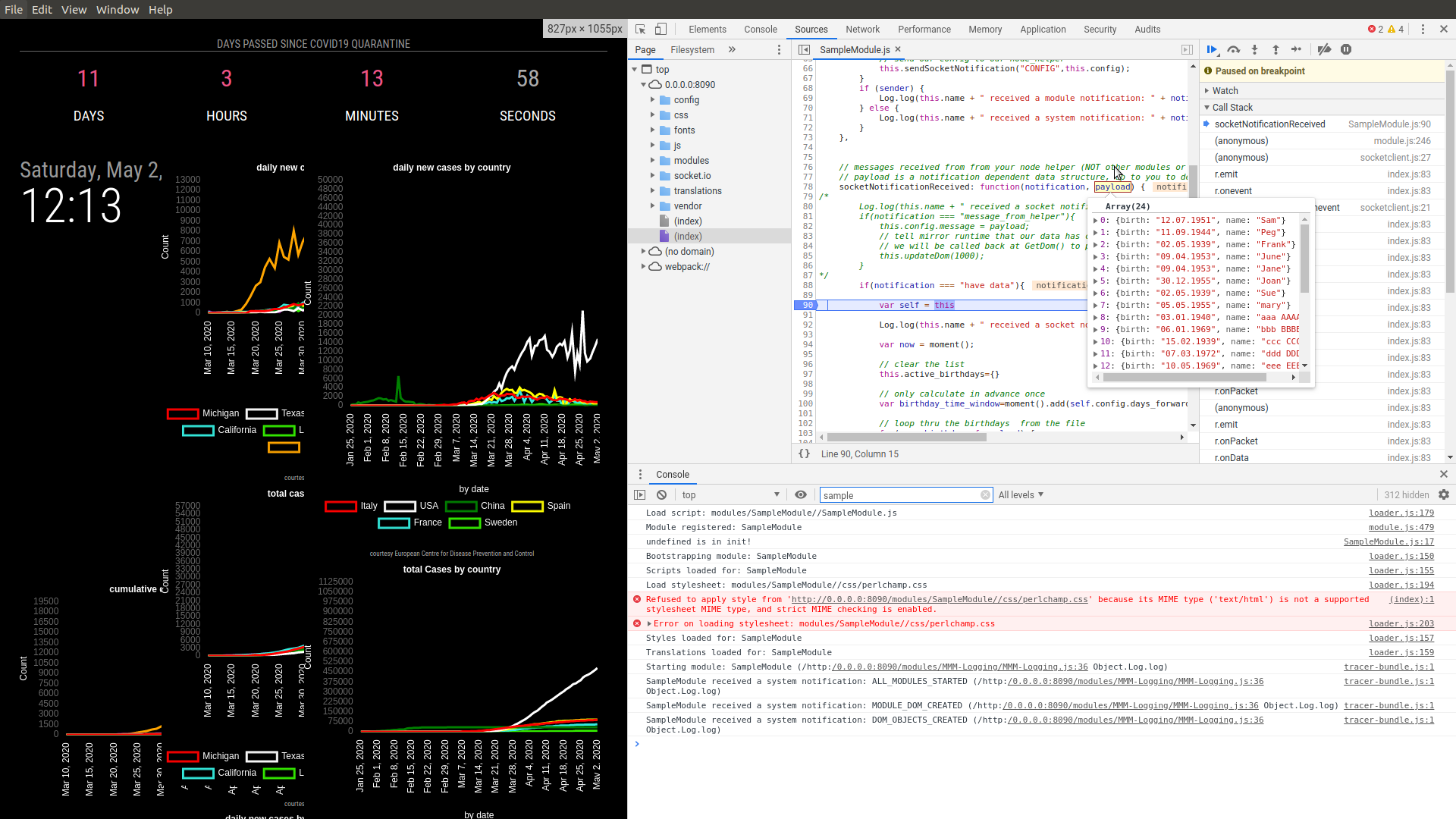
so, if you put a stop right on the var self = this
and then cursor over the work payload infunction(notification, payload)it will show you that object content, and u can go up and click on parts to make them expand to examine the contents
-
ok, there is a light at the end of the tunnel:

-
code was changed to add ages
in getDom()
			for(var name of this.active_birthdays[birthday]) {
				var m = document.createElement("div");
				Log.log("BIRTHDAY >> " + birthday);
				Log.log("NAME >> " + name);
				m.innerText = birthday + " " + name;
				wrapper.appendChild(m);
			}
now is
for(var person of this.active_birthdays[birthday]){ var m=document.createElement('div') // create your table row here m.innerText=birthday+ ' '+ person.name+' age='+person.age wrapper.appendChild(m) } -
great, thanks !
to your information:
there are NO semikolons in your posted code. within them it goes ! -
@Perlchamp end of line ; are not required… I cut/pasted that code out of the running module
-
without i have a black screen, with everythings fine.
another information:
age must be +1 but i think i will solve this alone. if not i’m too stuipid for this all :-)
so i can create my table now. but i see:
people who has birthday the same day:
date should be displayed once, and the names in the same, separated by -
@Perlchamp ok, I think you can fix those… age is a date diff()… add to results
edit: age needs more work that just number… because they were comparing MONTH, but age was exact days.
so I change my bd to may, but TODAY I am 68… in may i WILL BE 69 (in the future)
so if TODAY or before, do NOT add one, if tomorrow or after (in the month) add 1 -
i think, too. thanks very much, sam. I don’t know how to thank you Thank you very much !
you’re great !
and it is up to you whether you publish this module. I will not adorn myself with foreign feathers!

Hello! It looks like you're interested in this conversation, but you don't have an account yet.
Getting fed up of having to scroll through the same posts each visit? When you register for an account, you'll always come back to exactly where you were before, and choose to be notified of new replies (either via email, or push notification). You'll also be able to save bookmarks and upvote posts to show your appreciation to other community members.
With your input, this post could be even better 💗
Register Login