MagicMirror Forum
    • Recent
    • Tags
    • Unsolved
    • Solved
    • MagicMirror² Repository
    • Documentation
    • 3rd-Party-Modules
    • Donate
    • Discord
    • Register
    • Login
    A New Chapter for MagicMirror: The Community Takes the Lead
    Read the statement by Michael Teeuw here.

    Update auf 2.13.0

    Scheduled Pinned Locked Moved General Discussion
    65 Posts 4 Posters 24.9k Views 4 Watching
    Loading More Posts
    • Oldest to Newest
    • Newest to Oldest
    • Most Votes
    Reply
    • Reply as topic
    Log in to reply
    This topic has been deleted. Only users with topic management privileges can see it.
    • kusselinK Offline
      kusselin
      last edited by kusselin

      the screen is always black :-(

      i ihink i have to save the config and i have to install magic mirror new…

      what do you think?

      1 Reply Last reply Reply Quote 0
      • kusselinK Offline
        kusselin
        last edited by

        after a new installation…can i also copie the save config and all is good?

        S 2 Replies Last reply Reply Quote 0
        • S Offline
          sdetweil @kusselin
          last edited by

          @kusselin upgrade didn’t touch the config, it should be the same as before

          Sam

          How to add modules

          learning how to use browser developers window for css changes

          1 Reply Last reply Reply Quote 0
          • S Offline
            sdetweil @kusselin
            last edited by

            @kusselin if a NEW install, then u would have to reinstall all the modules and update the config

            Sam

            How to add modules

            learning how to use browser developers window for css changes

            1 Reply Last reply Reply Quote 0
            • kusselinK Offline
              kusselin
              last edited by

              @sdetweil said in Update auf 2.13.0:

              if a NEW install, then u would have to reinstall all the modules and update the config

              o.k i musst have to install all the modules again and then i can copie the config in the config folder…right?

              And please can you send me a link how i can install about the console the ltest magic mirror please…

              Thanks

              S 1 Reply Last reply Reply Quote 0
              • kusselinK Offline
                kusselin
                last edited by

                can you tell me why the screen is now black?

                1 Reply Last reply Reply Quote 0
                • S Offline
                  sdetweil @kusselin
                  last edited by

                  @kusselin install is the same place u got the upgrade script

                  https://github.com/sdetweil/MagicMirror_scripts

                  why are u trying to install again??

                  black screen

                  probably one of the lang files with comments
                  switch to the develop branch

                  git checkout develop
                  

                  Sam

                  How to add modules

                  learning how to use browser developers window for css changes

                  1 Reply Last reply Reply Quote 0
                  • kusselinK Offline
                    kusselin
                    last edited by

                    @sdetweil said in Update auf 2.13.0:

                    git checkout develop

                    o.k. can you help me once again please that i have a picture…

                    pi@raspberrypi:~ $ cd MagicMirror
                    pi@raspberrypi:~/MagicMirror $ git checkout develop
                    error: Pfadspezifikation 'develop' stimmt mit keinen git-bekannten Dateien überein.
                    
                    
                    S 1 Reply Last reply Reply Quote 0
                    • S Offline
                      sdetweil @kusselin
                      last edited by

                      @kusselin see here

                      https://forum.magicmirror.builders/topic/13774/2-13-back-screen-translation-file-error-fix/2

                      Sam

                      How to add modules

                      learning how to use browser developers window for css changes

                      1 Reply Last reply Reply Quote 0
                      • kusselinK Offline
                        kusselin
                        last edited by kusselin

                        sorry…its not going with:

                        cd ~/MagicMirror
                        git fetch origin develop:develop
                        git checkout develop


                        after a restart i see fast an white screen and the the black screen :-( and nothing happend

                        S 1 Reply Last reply Reply Quote 0
                        • S Offline
                          sdetweil @kusselin
                          last edited by

                          @kusselin open the developers console, ctrl-shit-i on the mirror, or chrome from your pc if allowed,

                          select the tab labeled ‘console’, and scroll up to see any errors…

                          Sam

                          How to add modules

                          learning how to use browser developers window for css changes

                          1 Reply Last reply Reply Quote 0
                          • kusselinK Offline
                            kusselin
                            last edited by

                            i can´t see a mistake…you?
                            image1.jpg

                            S 1 Reply Last reply Reply Quote 0
                            • S Offline
                              sdetweil @kusselin
                              last edited by

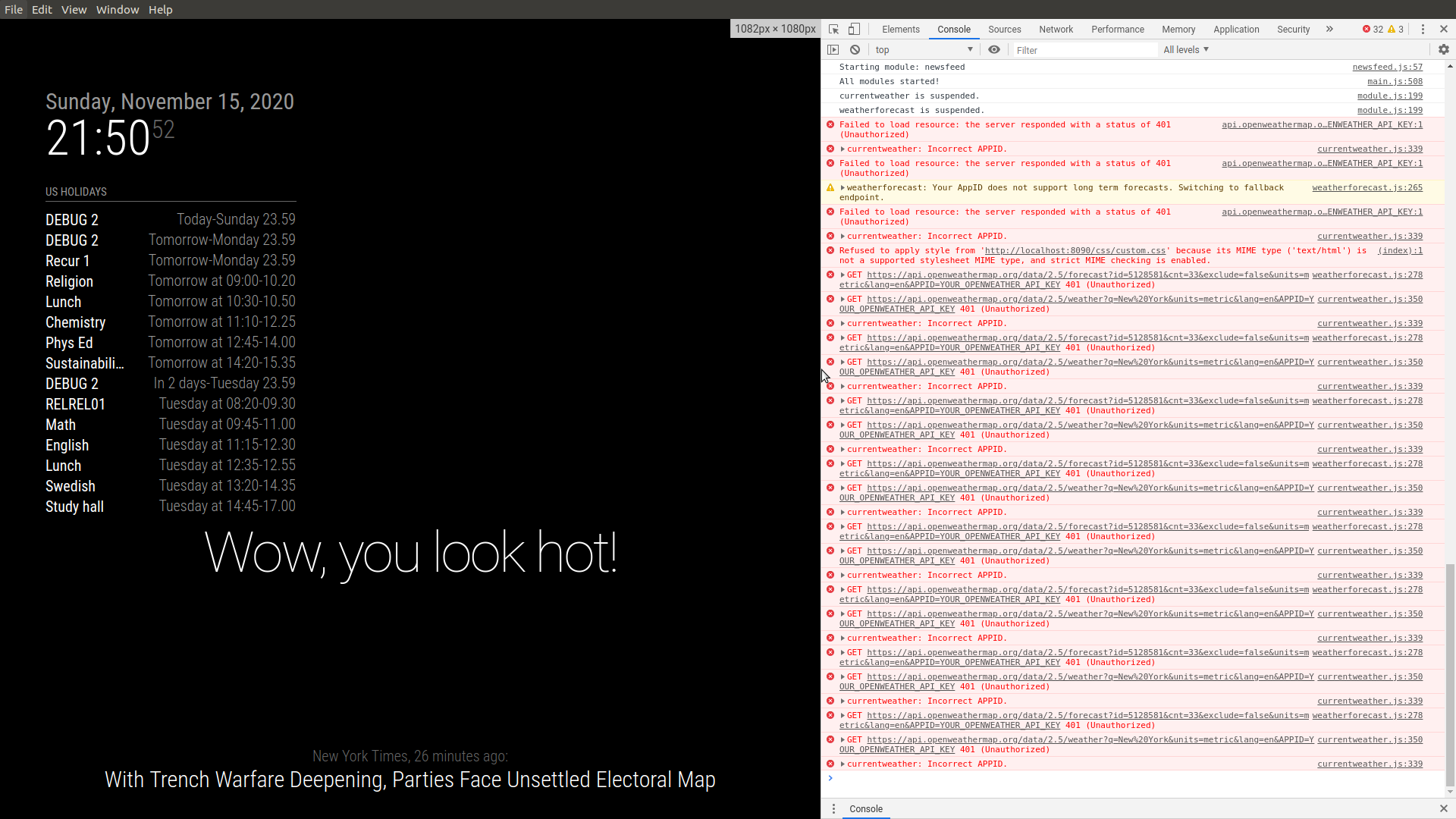
                              @kusselin select the tab labeled ‘console’,
                              Screenshot at 2020-11-15 21-50-52.png

                              Sam

                              How to add modules

                              learning how to use browser developers window for css changes

                              1 Reply Last reply Reply Quote 0
                              • kusselinK Offline
                                kusselin
                                last edited by

                                @sdetweil said in Update auf 2.13.0:

                                select the tab labeled ‘console’,

                                i haven´t it

                                image1.jpeg

                                S 1 Reply Last reply Reply Quote 0
                                • S Offline
                                  sdetweil @kusselin
                                  last edited by

                                  @kusselin this is ON the mirror system right?

                                  or you did

                                  address: "0.0.0.0",
                                  ipWhitelist:[],


                                  or your pi, so you can open browser from pc

                                  Sam

                                  How to add modules

                                  learning how to use browser developers window for css changes

                                  1 Reply Last reply Reply Quote 0
                                  • kusselinK Offline
                                    kusselin
                                    last edited by kusselin

                                    Initializing MagicMirror. main.js:487:8
                                    Loading core translation file: translations/de.json translator.js:129:9
                                    Loading core translation fallback file: translations/en.json translator.js:154:9
                                    Load script: modules/default/alert//alert.js loader.js:176:9
                                    Module registered: alert module.js:513:6
                                    Bootstrapping module: alert loader.js:148:7
                                    Load script: modules/default/alert/notificationFx.js loader.js:176:9
                                    Scripts loaded for: alert loader.js:153:8
                                    Load stylesheet: modules/default/alert/notificationFx.css loader.js:195:9
                                    Load stylesheet: vendor/css/font-awesome.css loader.js:195:9
                                    Styles loaded for: alert loader.js:155:9
                                    alert - Load translation: translations/de.json translator.js:100:9
                                    alert - Load translation fallback: translations/en.json translator.js:102:9
                                    Translations loaded for: alert loader.js:157:10
                                    Load script: modules/default/updatenotification//updatenotification.js loader.js:176:9
                                    Module registered: updatenotification module.js:513:6
                                    Bootstrapping module: updatenotification loader.js:148:7
                                    Scripts loaded for: updatenotification loader.js:153:8
                                    Styles loaded for: updatenotification loader.js:155:9
                                    Translations loaded for: updatenotification loader.js:157:10
                                    Load script: modules/default/clock//clock.js loader.js:176:9
                                    Module registered: clock module.js:513:6
                                    Bootstrapping module: clock loader.js:148:7
                                    Load script: vendor/node_modules/moment/min/moment-with-locales.js loader.js:176:9
                                    Load script: vendor/node_modules/moment-timezone/builds/moment-timezone-with-data.js loader.js:176:9
                                    Load script: vendor/node_modules/suncalc/suncalc.js loader.js:176:9
                                    Scripts loaded for: clock loader.js:153:8
                                    Load stylesheet: modules/default/clock/clock_styles.css loader.js:195:9
                                    Styles loaded for: clock loader.js:155:9
                                    Translations loaded for: clock loader.js:157:10
                                    Load script: modules/default/calendar//calendar.js loader.js:176:9
                                    Module registered: calendar module.js:513:6
                                    Bootstrapping module: calendar loader.js:148:7
                                    File already loaded: moment.js loader.js:236:9
                                    Scripts loaded for: calendar loader.js:153:8
                                    Load stylesheet: modules/default/calendar/calendar.css loader.js:195:9
                                    File already loaded: font-awesome.css loader.js:236:9
                                    Styles loaded for: calendar loader.js:155:9
                                    Translations loaded for: calendar loader.js:157:10
                                    Bootstrapping module: calendar loader.js:148:7
                                    File already loaded: moment.js loader.js:236:9
                                    Scripts loaded for: calendar loader.js:153:8
                                    File already loaded: calendar.css loader.js:236:9
                                    File already loaded: font-awesome.css loader.js:236:9
                                    Styles loaded for: calendar loader.js:155:9
                                    Translations loaded for: calendar loader.js:157:10
                                    Load script: modules/MMM-OpenmapWeather//MMM-OpenmapWeather.js loader.js:176:9
                                    Module registered: MMM-OpenmapWeather module.js:513:6
                                    Bootstrapping module: MMM-OpenmapWeather loader.js:148:7
                                    File already loaded: moment.js loader.js:236:9
                                    Scripts loaded for: MMM-OpenmapWeather loader.js:153:8
                                    Load stylesheet: vendor/node_modules/weathericons/css/weather-icons.css loader.js:195:9
                                    Load stylesheet: modules/MMM-OpenmapWeather/MMM-OpenmapWeather.css loader.js:195:9
                                    Styles loaded for: MMM-OpenmapWeather loader.js:155:9
                                    Translations loaded for: MMM-OpenmapWeather loader.js:157:10
                                    Load script: modules/default/weatherforecast//weatherforecast.js loader.js:176:9
                                    Module registered: weatherforecast module.js:513:6
                                    Bootstrapping module: weatherforecast loader.js:148:7
                                    File already loaded: moment.js loader.js:236:9
                                    Scripts loaded for: weatherforecast loader.js:153:8
                                    File already loaded: weather-icons.css loader.js:236:9
                                    Load stylesheet: modules/default/weatherforecast/weatherforecast.css loader.js:195:9
                                    Styles loaded for: weatherforecast loader.js:155:9
                                    Translations loaded for: weatherforecast loader.js:157:10
                                    Load script: modules/MMM-Remote-Control//MMM-Remote-Control.js loader.js:176:9
                                    Check MagicMirror version for module 'MMM-Remote-Control' - Minimum version:  2.4.0 - Current version: 2.13.0 module.js:505:7
                                    Version is ok! module.js:507:8
                                    Module registered: MMM-Remote-Control module.js:513:6
                                    Bootstrapping module: MMM-Remote-Control loader.js:148:7
                                    Scripts loaded for: MMM-Remote-Control loader.js:153:8
                                    Load stylesheet: modules/MMM-Remote-Control/remote-control.css loader.js:195:9
                                    Styles loaded for: MMM-Remote-Control loader.js:155:9
                                    Translations loaded for: MMM-Remote-Control loader.js:157:10
                                    Load script: modules/MMM-SoccerLiveScore//MMM-SoccerLiveScore.js loader.js:176:9
                                    Module registered: MMM-SoccerLiveScore module.js:513:6
                                    Bootstrapping module: MMM-SoccerLiveScore loader.js:148:7
                                    File already loaded: moment.js loader.js:236:9
                                    Scripts loaded for: MMM-SoccerLiveScore loader.js:153:8
                                    File already loaded: font-awesome.css loader.js:236:9
                                    Load stylesheet: modules/MMM-SoccerLiveScore/MMM-SoccerLiveScore.css loader.js:195:9
                                    Styles loaded for: MMM-SoccerLiveScore loader.js:155:9
                                    Translations loaded for: MMM-SoccerLiveScore loader.js:157:10
                                    Load script: modules/MMM-Tankerkoenig//MMM-Tankerkoenig.js loader.js:176:9
                                    Check MagicMirror version for module 'MMM-Tankerkoenig' - Minimum version:  2.2.0 - Current version: 2.13.0 module.js:505:7
                                    Version is ok! module.js:507:8
                                    Module registered: MMM-Tankerkoenig module.js:513:6
                                    Bootstrapping module: MMM-Tankerkoenig loader.js:148:7
                                    Scripts loaded for: MMM-Tankerkoenig loader.js:153:8
                                    Load stylesheet: modules/MMM-Tankerkoenig/MMM-Tankerkoenig.css loader.js:195:9
                                    Styles loaded for: MMM-Tankerkoenig loader.js:155:9
                                    MMM-Tankerkoenig - Load translation: i18n/de.json translator.js:100:9
                                    MMM-Tankerkoenig - Load translation fallback: i18n/en.json translator.js:102:9
                                    Translations loaded for: MMM-Tankerkoenig loader.js:157:10
                                    Load script: modules/MMM-SmartWebDisplay//MMM-SmartWebDisplay.js loader.js:176:9
                                    Module registered: MMM-SmartWebDisplay module.js:513:6
                                    Bootstrapping module: MMM-SmartWebDisplay loader.js:148:7
                                    Scripts loaded for: MMM-SmartWebDisplay loader.js:153:8
                                    Load stylesheet: modules/MMM-SmartWebDisplay/MMM-SmartWebDisplay.css loader.js:195:9
                                    Styles loaded for: MMM-SmartWebDisplay loader.js:155:9
                                    Translations loaded for: MMM-SmartWebDisplay loader.js:157:10
                                    Load script: modules/MMM-ioBroker//MMM-ioBroker.js loader.js:176:9
                                    Module registered: MMM-ioBroker module.js:513:6
                                    Bootstrapping module: MMM-ioBroker loader.js:148:7
                                    Scripts loaded for: MMM-ioBroker loader.js:153:8
                                    Load stylesheet: modules/MMM-ioBroker/MMM-ioBroker.css loader.js:195:9
                                    Styles loaded for: MMM-ioBroker loader.js:155:9
                                    Translations loaded for: MMM-ioBroker loader.js:157:10
                                    Load script: modules/MMM-FRITZ-Box-Callmonitor//MMM-FRITZ-Box-Callmonitor.js loader.js:176:9
                                    Check MagicMirror version for module 'MMM-FRITZ-Box-Callmonitor' - Minimum version:  2.0.0 - Current version: 2.13.0 module.js:505:7
                                    Version is ok! module.js:507:8
                                    Module registered: MMM-FRITZ-Box-Callmonitor module.js:513:6
                                    Bootstrapping module: MMM-FRITZ-Box-Callmonitor loader.js:148:7
                                    File already loaded: moment.js loader.js:236:9
                                    Scripts loaded for: MMM-FRITZ-Box-Callmonitor loader.js:153:8
                                    File already loaded: font-awesome.css loader.js:236:9
                                    Load stylesheet: modules/MMM-FRITZ-Box-Callmonitor/MMM-FRITZ-Box-Callmonitor.css loader.js:195:9
                                    Styles loaded for: MMM-FRITZ-Box-Callmonitor loader.js:155:9
                                    MMM-FRITZ-Box-Callmonitor - Load translation: translations/de.json translator.js:100:9
                                    Uncaught SyntaxError: JSON.parse: expected double-quoted property name at line 5 column 3 of the JSON data
                                        onreadystatechange http://192.168.200.151:8080/js/translator.js:22
                                    translator.js:22:19
                                    
                                    
                                    S 1 Reply Last reply Reply Quote 0
                                    • S Offline
                                      sdetweil @kusselin
                                      last edited by

                                      @kusselin said in Update auf 2.13.0:

                                      MMM-FRITZ-Box-Callmonitor - Load translation: translations/de.json translator.js:100:9
                                      Uncaught SyntaxError: JSON.parse: expected double-quoted property name at line 5 column 3 of the JSON data

                                      yes, this is the translation file error

                                      edit the MMM-FRITZ-Box-Callmonitor/translations/de.json and remove the comment

                                        // keep the error messages short
                                      

                                      Sam

                                      How to add modules

                                      learning how to use browser developers window for css changes

                                      1 Reply Last reply Reply Quote 0
                                      • kusselinK Offline
                                        kusselin
                                        last edited by kusselin

                                        @sdetweil said in Update auf 2.13.0:

                                        yes, this is the translation file error
                                        edit the MMM-FRITZ-Box-Callmonitor/translations/de.json and remove the comment

                                        Hi Sam,

                                        this is the de.json in the translation folder of MM-Fritzbox Callmonitor:

                                        {
                                          "title": "Eingehender Anruf",
                                          "noCall": "Keine kürzlichen Anrufe.",  
                                        
                                          // keep the error messages short
                                          "calllist_parse_error": "Anrufliste unlesbar.",
                                          "phonebook_parse_error": "Telefonbuch unlesbar.",
                                          "vcf_parse_error": "vCard unlesbar.",
                                          "login_error": "Logindaten falsch?",
                                          "network_error": "FRITZ!Box nicht erreichbar.",
                                          "unknown_error": "Unbekannter Fehler."
                                        

                                        and what musst i do now and edit? Sorry for my questions…and you thanks

                                        S 1 Reply Last reply Reply Quote 0
                                        • kusselinK Offline
                                          kusselin
                                          last edited by

                                          o.k…the newest stand. I have deinstalled the MM-Callmonitor an now i can see the MM on my screen.

                                          Thanks a lot sdetweil.

                                          1 Reply Last reply Reply Quote 0
                                          • S Offline
                                            sdetweil @kusselin
                                            last edited by

                                            @kusselin on your paste of the de.json

                                            Remove the line that starts with
                                            //

                                            Comments are not allowed in json

                                            Sam

                                            How to add modules

                                            learning how to use browser developers window for css changes

                                            1 Reply Last reply Reply Quote 0

                                            Hello! It looks like you're interested in this conversation, but you don't have an account yet.

                                            Getting fed up of having to scroll through the same posts each visit? When you register for an account, you'll always come back to exactly where you were before, and choose to be notified of new replies (either via email, or push notification). You'll also be able to save bookmarks and upvote posts to show your appreciation to other community members.

                                            With your input, this post could be even better 💗

                                            Register Login

                                            • 1
                                            • 2
                                            • 3
                                            • 4
                                            • 3 / 4
                                            • First post
                                              Last post
                                            Enjoying MagicMirror? Please consider a donation!
                                            MagicMirror created by Michael Teeuw.
                                            Forum managed by Sam, technical setup by Karsten.
                                            This forum is using NodeBB as its core | Contributors
                                            Contact | Privacy Policy