MagicMirror Forum
    • Recent
    • Tags
    • Unsolved
    • Solved
    • MagicMirror² Repository
    • Documentation
    • 3rd-Party-Modules
    • Donate
    • Discord
    • Register
    • Login
    A New Chapter for MagicMirror: The Community Takes the Lead
    Read the statement by Michael Teeuw here.

    What is your backup and restore method?

    Scheduled Pinned Locked Moved Troubleshooting
    18 Posts 10 Posters 8.0k Views 15 Watching
    Loading More Posts
    • Oldest to Newest
    • Newest to Oldest
    • Most Votes
    Reply
    • Reply as topic
    Log in to reply
    This topic has been deleted. Only users with topic management privileges can see it.
    • B Offline
      BillyTheKid9588
      last edited by

      My mirror configuration has taken some time to get right and i’m curious to know people’s back up and restore methods in case of system failure.

      I’ve seen some backup the whole sd, some just the config file, i see advantages and disadvantages to both of these. If the sd is backed up, maybe the module code is out of date, if just the config file, there is the potential to lose Raspbian specific settings.

      Curious to know how people approach this.

      1 Reply Last reply Reply Quote 0
      • SnilleS Offline
        Snille Module Developer
        last edited by Snille

        Hi there! Manual “backup” of the config, CSS and compliments files when I change them (just copying it to my server). Then when reinstalling, I’m using a script (that I can wget down to the new install) containing all modules to reinstall and it copy back the config, CSS and compliments from the backup location… :)

        See script below…

        #!/bin/bash
        
        ## ----------------------------------------------------------------------------
        ## Snilles automatic module clone and install script for MM2.
        ## ----------------------------------------------------------------------------
        
        ## Don't forget to add your public SSH key to your GIT profile!
        ## If you don't, nothing will be cloned!
        
        ## If you don't have an SSH key. This is how you get one.
        ## Generate SSH key(s).
        # cd ~
        # ssh-keygen -t rsa
        
        ## Press: Enter, Enter, Enter...
        
        ## See the public Key...
        # cat /home/pi/.ssh/id_rsa.pub
        
        ## Copy the SSH public key and add it to your GIT SSH keys on GitHUB.
        
        ## ----------------------------------------------------------------------------
        ## Config below.
        ## ----------------------------------------------------------------------------
        
        # System to install (what config to use).
        ## Housesystems Server Install
        Toinstall='house'
        ## NUC install (On the actual Mirror, this is not used anymore)
        #Toinstall='NUC'
        
        # Real Name of the config file.
        ConfigName='config.js'
        
        ## The Install Folder.
        ## Local install.
        ## On NUC
        #User='/home/snille'
        ## On Raspberry Pi
        #User='/home/pi'
        ## Install om Homesystems Server.
        User='/var/www/html/magicmirror'
        
        ## The module install directory.
        Moddir=$User'/MagicMirror/modules'
        
        ## Configuration and other files backup location (from previous installation).
        DownloadFrom='https://yoursite.com/mmbackup/'
        
        ## Configuration file. 
        Files[1]='config-'$Toinstall'.js'
        ## Where to put the Configuration file.
        Dirs[1]=$User'/MagicMirror/config/'
        
        ## Custom CSS file.
        Files[2]='custom.css'
        ## Where to put the CSS file.
        Dirs[2]=$User'/MagicMirror/css/'
        
        ## Custom screen on/off scripts.
        Files[3]='screen.sh'
        ## Where to put the screen script files.
        Dirs[3]=$User'/'
        
        ## Not used moved to "screen.sh"
        #Files[4]='turnoffscreen.sh'
        #Dirs[4]=$User'/'
        #Files[5]='turnonscreen.sh'
        #Dirs[5]=$User'/'
        
        ## Custom Magic Mirror update script.
        Files[6]='update.sh'
        ## Where to put the update script file.
        Dirs[6]=$User'/'
        
        ## Custom compliment files.
        Files[7]='compliments-Snille.json'
        ## Where to put the compliment file.
        Dirs[7]=$User'/MagicMirror/modules/default/compliments/'
        
        Files[8]='compliments-Camilla.json'
        Dirs[8]=$User'/MagicMirror/modules/default/compliments/'
        
        Files[9]='compliments-Louise.json'
        Dirs[9]=$User'/MagicMirror/modules/default/compliments/'
        
        #Files[10]='compliments-Martin.json'
        #Dirs[10]=$User'/MagicMirror/modules/default/compliments/'
        
        # Start file for the MagigMirror
        Files[11]='MacigMirror.sh'
        Dirs[11]=$User'/'
        
        ## Package file
        Packfile='package.json'
        
        ## All the modules repos from Git.
        Repos[1]='git@github.com:Snille/MMM-HideAll.git'
        Repos[2]='git@github.com:matteodanelli/MMM-cryptocurrency.git'
        Repos[3]='git@github.com:basknol/MMM-Globe.git'
        Repos[4]='git@github.com:Snille/MMM-Modulebar.git'
        Repos[5]='git@github.com:Snille/MMM-ModuleScheduler.git'
        Repos[6]='git@github.com:CatoAntonsen/MMM-MotionEye.git'
        Repos[7]='git@github.com:Gyran/MMM-plex-recently-added.git'
        Repos[8]='git@github.com:Snille/MMM-Profilepicture.git'
        Repos[9]='git@github.com:tosti007/MMM-ProfileSwitcher.git'
        Repos[10]='git@github.com:Jopyth/MMM-Remote-Control.git'
        Repos[11]='git@github.com:Snille/MMM-Sonos.git'
        Repos[12]='git@github.com:brobergp/MMM-TextClock.git'
        Repos[13]='git@github.com:tosti007/MMM-TouchNavigation.git'
        Repos[14]='git@github.com:bugsounet/MMM-Tools.git'
        Repos[15]='git@github.com:timdows/MMM-JsonTable.git'
        Repos[16]='git@github.com:derekn/MMM-TautulliActivity.git'
        #Repos[17]='git@github.com:Snille/MMM-IFTTT.git' # For development of the IFTTT module, the one below is used.
        Repos[18]='git@github.com:jc21/MMM-IFTTT.git'
        Repos[19]='git@github.com:NolanKingdon/MMM-MoonPhase.git'
        Repos[20]='git@github.com:Snille/MMM-homeassistant-sensors.git'
        #Repos[21]='git@github.com:schnibel/MMM-Memo.git' # Replaced by module below, I changed some things.
        Repos[22]='git@github.com:Snille/MMM-Memo.git'
        Repos[23]='git@github.com:almerica/MMM-ImageFit.git'
        Repos[24]='git@github.com:Snille/MMM-Videoplayer.git'
        Repos[25]='git@github.com:MartinGris/MMM-GoogleMaps-Tracking.git'
        
        ## ----------------------------------------------------------------------------
        
        ## Start!
        cd "$Moddir"
        for t in "${Repos[@]}"
        	do
        		git clone $t
        		#echo "Cloning $t"
        done
        
        echo "Cloning Done."
        echo "Now npm installing..."
        
        for f in *;
        	do
        		if [[ -d $f ]]; then
        			installmodule=$(basename $f)
        			[[ $installmodule =~ ^(default|node_modules)$ ]] && continue
        			cd "$installmodule"
        			if [ -e "$Packfile" ]; then
        #				npm install --production
        				npm install
        			fi
        			cd ".."
        		fi
        	done
        
        echo "Download and install done."
        echo "Now restoring backup files from $DownloadFrom."
        
        ## Counts through the array of files (and uses the dirs to know where to put them).
        for ((i=1; i<=${#Files[@]}; i++)); do
        	if [[ $(wget $DownloadFrom${Files[i]} -O-) ]] 2>/dev/null
        	then
        		wget $DownloadFrom${Files[i]}
        		printf 'Moving %s to %s...\n\n' "${Files[i]}" "${Dirs[i]}"
        		mv ${Files[i]} ${Dirs[i]}
        	fi
        done
        
        ## Rename the config.
        mv ${Dirs[1]}${Files[1]} ${Dirs[1]}$ConfigName
        
        echo "Installation and restore done!"
        echo "You can now start your Magic Mirror."
        
        exit


        If you cant find it, make it and share it!
        Modules: MMM-homeassistant-sensors, MMM-Modulebar, MMM-Profilepicture, MMM-Videoplayer

        1 Reply Last reply Reply Quote 2
        • swvalentiS Offline
          swvalenti Project Sponsor
          last edited by

          @Snille Can you dumb this down a little bit for me please, trying to use this…I created key and added to github but not sure how to do the rest.

          SnilleS 1 Reply Last reply Reply Quote 0
          • karsten13K Offline
            karsten13
            last edited by

            my approach …

            The following script must be executed in the magicmirror folder and creates another script restore.sh. This result script should be saved (on my server it is under git control) and can be executed (again in the magicmirror folder) to restore the old system (or bringing the old config to a new system).

            #!/bin/sh
            
            base="$(cd "$(dirname "$0")" && pwd)"
            
            restore="$base/restore.sh"
            config="${1:-config/config.js}"
            css="css/custom.css"
            modules="modules"
            
            # Tests
            [ -f "$base/$config" ] || (echo "config.js does not exists" && exit 1)
            [ -f "$base/$css" ] || (echo "custom.css does not exists" && exit 1)
            [ -d "$base/$modules" ] || (echo "modules directory does not exists" && exit 1)
            
            
            echo "#!/bin/sh" > $restore
            echo "" >> $restore
            echo "base=\"\$(cd \"\$(dirname \"\$0\")\" && pwd)\"" >> $restore
            
            echo "" >> $restore
            
            echo "mkdir -p \$base/config" >> $restore
            echo "mkdir -p \$base/css" >> $restore
            echo "mkdir -p \$base/modules" >> $restore
            
            echo "" >> $restore
            
            echo "cat > \$base/$config <<\"EOF\"" >> $restore
            cat <$base/$config >> $restore
            echo "EOF" >> $restore
            echo "" >> $restore
            
            echo "cat > \$base/$css <<\"EOF\"" >> $restore
            cat <$base/$css >> $restore
            echo "EOF" >> $restore
            echo "" >> $restore
            
            for dir in $(find "$modules" -maxdepth 1 -mindepth 1 -type d)
            do
              [ -f "$dir/.git/config" ] && mods="$mods $(cat $dir/.git/config | grep 'url = ' | sed 's|.*url = ||g')"
            done
            
            for repo in $mods
            do
              echo "cd \$base/$modules && git clone $repo" >> $restore
            done
            
            echo "" >> $restore
            
            for repo in $mods
            do
              moddir="$modules/$(echo $repo | sed -r 's|.*\/(.*)|\1|g;s|.git||g')"
              [ -f "$base/$moddir/package.json" ] && echo "cd \$base/$moddir && npm install" >> $restore
            done
            
            echo "Created restore script $restore" 
            
            chmod +x $restore
            
            1 Reply Last reply Reply Quote 2
            • swvalentiS Offline
              swvalenti Project Sponsor
              last edited by

              @karsten13 Looks good but same thing I am not grasping how to implement this…sorry

              1 Reply Last reply Reply Quote 0
              • SnilleS Offline
                Snille Module Developer @swvalenti
                last edited by

                @swvalenti Ok… :)
                You need a “server” (a location where you can “wget” files from for this to work.
                I have a specific backup directory on my own webserver, but you can use any server as long as you can wget from it.

                Then the “Toinstall” part is just me having more the one config files in the backup dir.
                Basically I have 2 different install possibility’s “house” and “NUC”.
                So my backup config files are named “config-house.js” and config-NUC.js".
                I enable the one I want to restore.

                “ConfigName” is the actual name of the config file when it’s copied to it’s destination. This is probably always going to be “config.js” for the MM2. :)

                “User” is in what directory the “MagicMirror” is located (when you cloned it).

                “Moddir” is where your modules will be installed (this is probably always going to the same for MM2 as well).

                “DownloadFrom” is where to download your backed up files from.

                Then it’s just two "array"s with the files and folders with the backup files and where to copy them when restoring.
                Files[1] = “file1-to-copy”
                Dirs[1] = “Where/to/copy/file-1”
                And so on…

                Files[3] Is the script I use to set the screen to sleep and wake it up (Using MMM-Remote-Control).
                Files[4] Is the script I use to automatically update the mirror and the modules (manually).

                Files[7-9] It’s the “compliment-files” (used in the compliments module).

                And Files[11] Is the MagicMirror start script I use (for starting the mirror with pm2).

                “Packfile” Is the name of the file to look for when installing moduls. If it’s there, the npm install will be executed when installing the module.

                Last but not least it’s all the git-repos for the modules I use in my mirror.
                These will be cloned in the “Moddir” and installed (with npm if “Packfile” exists").

                That’s about it. :)

                Let me know if you have any more questions. :)

                If you cant find it, make it and share it!
                Modules: MMM-homeassistant-sensors, MMM-Modulebar, MMM-Profilepicture, MMM-Videoplayer

                1 Reply Last reply Reply Quote 0
                • LusbuebL Offline
                  Lusbueb
                  last edited by

                  i use this tool:

                  https://www.linux-tips-and-tricks.de/en/backup/

                  every night I make a full backup of all 4 Raspi as a TAR file to a NAS on my network. then i shrink and convert the TAR files into an IMG file (read Framps Linux-Tips-and-Tricks).

                  so I can always make a new SD card with my Win10 and Win32 Disk Imager.

                  B 1 Reply Last reply Reply Quote 2
                  • swvalentiS Offline
                    swvalenti Project Sponsor
                    last edited by

                    @Lusbueb I have a Buffalo NAS LS I am trying to backup too but can’t figure out the right path to add to sudo nano /etc/fstab

                    LusbuebL 1 Reply Last reply Reply Quote 0
                    • B Offline
                      BillyTheKid9588 @Lusbueb
                      last edited by

                      @Lusbueb this looks interesting.

                      Do you stop mm before the back up?

                      LusbuebL 1 Reply Last reply Reply Quote 0
                      • bheplerB Offline
                        bhepler Module Developer
                        last edited by

                        The only information that is unique to my mirror is the module configuration. I just back up the config.js file whenever I make a change to the mirror configuration. If the mirror needs to be rebuilt, I can quickly build a slick Buster installation, SSH into the Pi, run the installation script, drop the backup config.js to the config folder and then do a half-dozen git clone commands.

                        Once the mirror is up & running, I can do the boring maintenance stuff (apt get update && apt get upgrade) and just let it run in the background.

                        1 Reply Last reply Reply Quote 1
                        • LusbuebL Offline
                          Lusbueb @swvalenti
                          last edited by Lusbueb

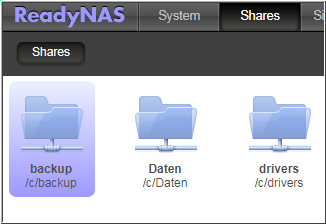
                          @swvalenti on my Netgeras ReadyNAS i have enabled NFS and SMB and a Share named backup (everyone has full-access)
                          07cc27f0-c849-4a19-9028-df4b36274fbf-image.png

                          i start the raspibackup.sh-Script with this helper-Script named raspiBackupNfsWrapper.sh

                          #!/bin/bash
                          
                          #######################################################################################################################
                          #
                          # 	Sample script which checks whether a nfsserver is available and exports a specific directory
                          # 	and then starts raspiBackup
                          #
                          #######################################################################################################################
                          #
                          #   Copyright # (C) 2017,2018 - framp at linux-tips-and-tricks dot de
                          #
                          #   This program is free software: you can redistribute it and/or modify
                          #   it under the terms of the GNU General Public License as published by
                          #   the Free Software Foundation, either version 3 of the License, or
                          #   (at your option) any later version.
                          #
                          #   This program is distributed in the hope that it will be useful,
                          #   but WITHOUT ANY WARRANTY; without even the implied warranty of
                          #   MERCHANTABILITY or FITNESS FOR A PARTICULAR PURPOSE.  See the
                          #   GNU General Public License for more details.
                          #
                          #   You should have received a copy of the GNU General Public License
                          #   along with this program.  If not, see <http://www.gnu.org/licenses/>.
                          #
                          #######################################################################################################################
                          
                          NFSSERVER="192.168.192.10"
                          NFSDIRECTORY="/c/backup"
                          MOUNTPOINT="/backup"
                          
                          VERSION="0.0.3"
                          
                          # add pathes if not already set (usually not set in crontab)
                          
                          if [[ -e /bin/grep ]]; then
                             PATHES="/usr/local/sbin /usr/local/bin /usr/sbin /usr/bin /sbin /bin"
                             for p in $PATHES; do
                                if ! /bin/grep -E -q "[^:]$p[:$]" <<< $PATH; then
                                   [[ -z $PATH ]] && export PATH=$p || export PATH="$p:$PATH"
                                fi
                             done
                          fi
                          
                          function cleanup() {
                          	umount -f $MOUNTPOINT
                          }
                          
                          trap cleanup SIGINT SIGTERM EXIT
                          
                          if ping -c1 -w3 $NFSSERVER &>/dev/null; then
                          	if showmount -e $NFSSERVER | grep -q $NFSDIRECTORY; then
                          		echo "Mouting $NFSSERVER:$NFSDIRECTORY to $MOUNTPOINT"
                          		mount -t nfs -o soft,vers=3 $NFSSERVER:$NFSDIRECTORY $MOUNTPOINT
                          		if (( $? > 0 )); then
                          			echo "Failed to mount $NFSSERVER:$NFSDIRECTORY"
                          			exit 42
                          		fi
                          		raspiBackup7412.sh
                          		rc=$?
                          		if (( $rc > 0 )); then
                          			echo "raspiBackup failed with rc $rc"
                          			exit $rc
                          		fi
                          	else
                          		echo "Server $NFSSERVER does not provide $NFSDIRECTORY"
                          		exit 1
                          	fi
                          else
                          	echo "Server $NFSSERVER not online"
                          	exit 1
                          fi


                          Will this be helpfull for you?

                          Regards Peter

                          1 Reply Last reply Reply Quote 1
                          • LusbuebL Offline
                            Lusbueb @BillyTheKid9588
                            last edited by

                            @BillyTheKid9588 yes, in the raspiBackup.conf i have this to lines to stop an start MM:

                            
                            # commands to stop services before backup separated by &
                            DEFAULT_STOPSERVICES="sudo -u pi pm2 stop mm && systemctl stop lighttpd"
                            
                            # commands to start services after backup separated by &
                            DEFAULT_STARTSERVICES="systemctl start lighttpd && sudo -u pi pm2 start mm"


                            Will this be helpfull for you?

                            Regards Peter

                            1 Reply Last reply Reply Quote 1
                            • C Offline
                              Cyric
                              last edited by

                              For my backup I tried to just make an image of my card, so if something were to ever go wrong, I could just reimage my card and it would work. Well, we lost power yesterday, and something went wrong. I formatted the card, re imaged it, and it eventually booted after some errors. The problem was that my config.js was corrupted or something, because I couldn’t edit it anymore. I’ve tried to reimage it again, but i’ve now gotten a different set of errors and a debian load screen i’ve never seen before. No idea where I went wrong.

                              S 1 Reply Last reply Reply Quote 0
                              • S Offline
                                sdetweil @Cyric
                                last edited by sdetweil

                                @Cyric there is a false sense of security w sd cards. the memory technology used is write once. the bits cannot be reused

                                the software does not know this… the hardware does the work under the covers and say Success!
                                even when its not.

                                once the bits are used, the card is dead. may turn read only or may start exhibiting corrupted files ( the software does not know)

                                this technology is great for cameras and music, low write activity… not so much for os’s that page, write log files… or apps like mm that constantly cause log files

                                I think, based on your description your card is used up. time for a new one…

                                I changed my pis to boot from SD card, but run from ssd (same technology, just really bigger)

                                ps. I have lost 10 sd cards to this problem over the last 4 years…

                                Sam

                                How to add modules

                                learning how to use browser developers window for css changes

                                P 1 Reply Last reply Reply Quote 1
                                • P Offline
                                  pastormingle @sdetweil
                                  last edited by

                                  @sdetweil I have a 32gb UHS-I that has my current configuration that I wanted to backup and also clone it to a new ssd that is same type and size… My question is this I have cloned it but when I copy it to the new ssd it says that it isn’t the same sizes… But it is the same type of card… Can the image be reduced? What can I do to clone to a new ssd?

                                  cowboysdudeC 1 Reply Last reply Reply Quote 0
                                  • cowboysdudeC Offline
                                    cowboysdude Module Developer @pastormingle
                                    last edited by

                                    https://www.raspberrystreet.com/learn/how-to-boot-raspberrypi-from-usb-ssd

                                    There may be an easier way but this helped me.

                                    swvalentiS 1 Reply Last reply Reply Quote 1
                                    • swvalentiS Offline
                                      swvalenti Project Sponsor @cowboysdude
                                      last edited by

                                      @cowboysdude said in What is your backup and restore method?:

                                      https://www.raspberrystreet.com/learn/how-to-boot-raspberrypi-from-usb-ssd

                                      There may be an easier way but this helped me.

                                      @cowboysdude You the man that worked well for me and easy to follow!

                                      cowboysdudeC 1 Reply Last reply Reply Quote 1
                                      • cowboysdudeC Offline
                                        cowboysdude Module Developer @swvalenti
                                        last edited by

                                        @swvalenti Yes but this ONLY works for an RPI4… So I KNOW someone is going to see this and try it on a 3 and come back with ‘it doesn’t work’… it does.

                                        You can also do it on a 3 but it’s different…

                                        https://thepi.io/how-to-boot-your-raspberry-pi-from-a-usb-mass-storage-device/

                                        Just replying here so I can save myself trouble when someone tries it LOL

                                        1 Reply Last reply Reply Quote 0

                                        Hello! It looks like you're interested in this conversation, but you don't have an account yet.

                                        Getting fed up of having to scroll through the same posts each visit? When you register for an account, you'll always come back to exactly where you were before, and choose to be notified of new replies (either via email, or push notification). You'll also be able to save bookmarks and upvote posts to show your appreciation to other community members.

                                        With your input, this post could be even better 💗

                                        Register Login

                                        • 1 / 1
                                        • First post
                                          Last post
                                        Enjoying MagicMirror? Please consider a donation!
                                        MagicMirror created by Michael Teeuw.
                                        Forum managed by Sam, technical setup by Karsten.
                                        This forum is using NodeBB as its core | Contributors
                                        Contact | Privacy Policy