Read the statement by Michael Teeuw here.
MMM-MercedesMe
-
Description:
This module is to show Mercedes vehicle’s fuel/electric charge and available range on Magic Mirror. Multiple instance (cars) are supported with different display style.
Screenshots:
Single Dial

Two Dial

Download:
Your suggestions/feedback and pull requests are welcome :)
Thanks:
- Thanks to this forum and community to make this wonderful framework.
- Jerry P for testing this module on live car data
Version 1.0.0
- Charging/Fuel Status
- Available range
-
@ashishtank Nicely done.
-
@ashishtank Your welkom for testing. And I’m happy to see the data of mij own Mercedes at mine MagicMirror.
-
Hello.
Thank you.
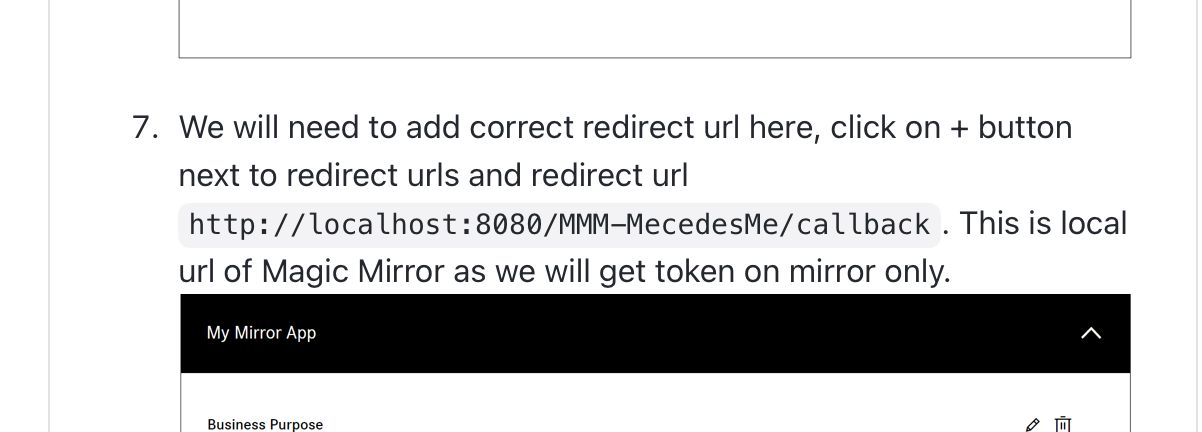
I’m desperate today because the Authenticate didn’t work. I made it easy for myself and marked and copied. I didn’t pay attention to the fact that I copied the error. An “r” at Mercedes means a lot.
-
@kar1507
Sharp. And is i’t now working??? -
@JerryP
But after I inserted the “r” I was able to log into MercedesMe.
Unfortunately I can’t say more because we don’t have an electric Mercedes.
Unfortunately we have a pure gasoline engine, so the module is unfortunately not for me.
I have to wait until someone makes a suitable module. -
@kar1507 Whit type of Mercedes car and year you own??
Whare you frome? -
@JerryP
We have been driving a Mercedes B Class (W247) built in 2019 since December last year.
I’m from Germany Berlin. -
@kar1507
Oke, do you have a MercedesME dongle or a bilt in version.The dongle is only working when the Phone is pairing.
And a bilt is has is one 4G account.The W247 is posible to gif the fuel status.
But than you must be chains in the config the type of vehicle to petrol or diesel.And I think als a other API of the developer page
-
@kar1507 Sorry for the inconvenience and thanks for pointing out the issue. I will correct it in the documentation, it must be a typo as we tested this multiple times.
-
@kar1507 This module is for both electric and other type of cars if supported by MercedesMe Api. did you set the correct vehicle type and correct scope ? as indicated here ? https://github.com/ashishtank/MMM-MercedesMe/blob/main/README.md
for non electric vehicle set the correct vehicle type and scope should be
mb:vehicle:mbdata:vehiclestatus offline_accessalso instead of elecrtic vehicle you need to subscribe to vehicle status in mercedes portal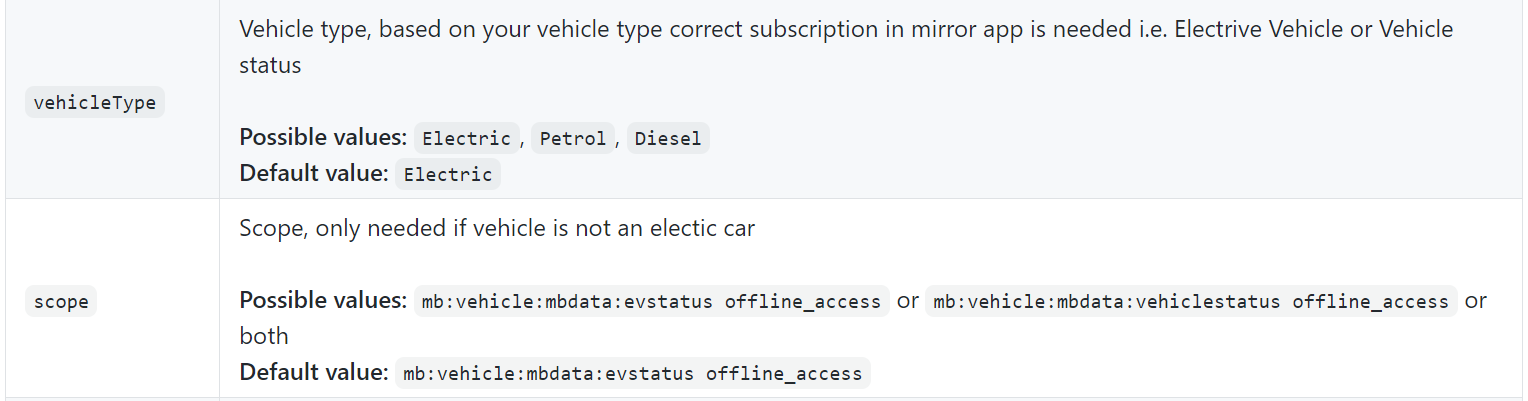
-
@JerryP
Our car has 4G in it. I can switch on the parking heater in the Mercedes mobile phone app.
Open and close doors and control windows remotely.
I changed the config to petrol. I also used the API for non-electrics. -
@ashishtank
I have adjusted both data (vehicle type and scope) in node_helper.js
Unfortunately I have a bug somewhere. Unfortunately it shows nothing. -
@kar1507 do you have logs in console or from dev tools ?
-
@ashishtank
Hello.
I set up my Magic Mirror again.
I’ve been working on the project for 2 weeks.
So I honestly don’t know where to find the exact logs.
I also have the debug mode on but first have to see where I can find the log.
Sorry, just start with the matter. -
@kar1507 if you start your mirror with pm2
do pm2 statusthen pm2 logs --lines=100
will show 100 lines of the logged info…
same stuff that is displayed after npm startpm2 flush to clear the logs
-
Good Morning
Thank You sdetweil
Here my log:/home/pi/.pm2/logs/MagicMirror-error.log last 100 lines: 0|MagicMir | npm ERR! code ELIFECYCLE 0|MagicMir | npm ERR! errno 1 0|MagicMir | npm ERR! magicmirror@2.14.0 start: `DISPLAY="${DISPLAY:=:0}" ./node_modules/.bin/electron js/electron.js` 0|MagicMir | npm ERR! Exit status 1 0|MagicMir | npm ERR! 0|MagicMir | npm ERR! Failed at the magicmirror@2.14.0 start script. 0|MagicMir | npm ERR! This is probably not a problem with npm. There is likely additional logging output above. 0|MagicMir | 0|MagicMir | npm ERR! A complete log of this run can be found in: 0|MagicMir | npm ERR! /home/pi/.npm/_logs/2021-02-11T08_58_44_432Z-debug.log 0|MagicMir | [11.02.2021 09:59.18.142] [WARN] You're using a full whitelist configuration to allow for all IPs 0|MagicMir | [11.02.2021 09:59.20.163] [WARN] (electron) The default value of app.allowRendererProcessReuse is deprecated, it is currently "false". It will change to be "true" in Electron 9. For more information please check https://github.com/electron/electron/issues/183970|MagicMir | [11.02.2021 09:59.18.193] [LOG] Connecting socket for: MMM-MercedesMe 0|MagicMir | [11.02.2021 09:59.18.195] [LOG] Starting node_helper for Mercedes Me 0|MagicMir | [11.02.2021 09:59.38.750] [LOG] Init token from file./modules/MMM-MercedesMe/tokens.json 0|MagicMir | [11.02.2021 09:59.38.764] [LOG] Client id 2051c078-7e58-4758-a508-cabafe8d1317 0|MagicMir | [11.02.2021 09:59.38.772] [LOG] Current token is expired or does not exists 0|MagicMir | [11.02.2021 09:59.38.945] [INFO] Checking git for module: MMM-MercedesMe 0|MagicMirror | [11.02.2021 10:01.33.024] [LOG] 0|MagicMirror | Handle OAuth request 0|MagicMirror | [11.02.2021 10:01.33.036] [LOG] https://id.mercedes-benz.com/as/authorization.oauth2?response_type=code&client_id=2051c078-7e58-4758-a508-cabafe8d1317&&redirect_uri=http://localhost:8080/MMM-MercedesMe/callback&scope=mb:vehicle:mbdata:fuelstatus&state=0ec4726f-662b-40d5-bb07-ad649bd085ec 0|MagicMirror | [11.02.2021 10:01.47.680] [LOG] 0|MagicMirror | Vehicle data url https://api.mercedes-benz.com/vehicledata/v2/vehicles/WDD247047/containers/fuelstatus 0|MagicMirror | [11.02.2021 10:01.47.685] [LOG] 0|MagicMirror | Vehicle data url https://api.mercedes-benz.com/vehicledata/v2/vehicles/WDD247047/containers/fuelstatus 0|MagicMirror | [11.02.2021 10:01.47.715] [LOG] 0|MagicMirror | Vehicle data url https://api.mercedes-benz.com/vehicledata/v2/vehicles/WDD247047/containers/fuelstatus 0|MagicMirror | [11.02.2021 10:01.47.719] [LOG] Vehicle data url https://api.mercedes-benz.com/vehicledata/v2/vehicles/WDD247047/containers/fuelstatus 0|MagicMirror | [11.02.2021 10:02.07.183] [LOG] 0|MagicMirror | Vehicle data url https://api.mercedes-benz.com/vehicledata/v2/vehicles/WDD247047/containers/fuelstatus 0|MagicMirror | [11.02.2021 10:02.07.198] [LOG] 0|MagicMirror | Vehicle data url https://api.mercedes-benz.com/vehicledata/v2/vehicles/WDD247047/containers/fuelstatus 0|MagicMirror | [11.02.2021 10:02.07.233] [LOG] 0|MagicMirror | Vehicle data url https://api.mercedes-benz.com/vehicledata/v2/vehicles/WDD247047/containers/fuelstatus 0|MagicMirror | [11.02.2021 10:02.07.241] [LOG] Vehicle data url https://api.mercedes-benz.com/vehicledata/v2/vehicles/WDD247047/containers/fuelstatus ´´´ -
Hello.
Thank you @ashishtank @sdetweil @JerryP
It works now and the data is displayed. -
@kar1507 Good to know that issues is solved, may be it was temporary issue from Mercedes Api, they have some downtime every now and then. Also I noticed that you have not included offline_access scope in config ? if you do not include that then refresh token will not be generated and thus you will need to re login again and again once the access token is expirers.
-
@kar1507
cen you post a picture of the screen???


Hello! It looks like you're interested in this conversation, but you don't have an account yet.
Getting fed up of having to scroll through the same posts each visit? When you register for an account, you'll always come back to exactly where you were before, and choose to be notified of new replies (either via email, or push notification). You'll also be able to save bookmarks and upvote posts to show your appreciation to other community members.
With your input, this post could be even better 💗
Register Login