Read the statement by Michael Teeuw here.
MMM-MercedesMe
-
@pyrophoenix Let me know if changing the scope solves the issue. I will update the documentation accordingly.
-
@ashishtank Hi! Unfortunatly it didn’t :/ Mercedes are looking at this matter and they will get back to me normally on Monday.
Thanks again for your help and I’ll keep you informed!
-
When i press “Authenticate” i only get “Handle OAuth callback” in the Log and nothing more.
Any Ideas?
Mit freundlichen Grüßen
Andreas -
@andreas-heins Is your configuration correct ? if you have already logged in then it will not display login screen and will directly get token. Did you check if tokens.json file is created and updated after authentication ?
-
@ashishtank i checkend my configuration and now i have another error „ 400 - Invalid redirect_uri“.
-
@andreas-heins looks like you are missing Step 7 from https://github.com/ashishtank/MMM-MercedesMe documentation. Please check, also which version of Magic Mirror are you using ? there are breaking changes in v2.15 in MM core and issue i have not fixed for my module yet.
-
@ashishtank hello i folow all steps and i had initial auth form
i install oauth module ( explain by sdetweil in gitlab issues).
My was created correctly but i receive no data.My version of MM is 2.15
in mm log i found this
0|MagicMirror | [28.06.2021 22:13.20.726] [ERROR]
0|MagicMirror | Failed to fetch git data for MMM-homeassistant-sensors: Error: block timeout reached
0|MagicMirror | [28.06.2021 22:13.21.674] [LOG]
0|MagicMirror | 403 - Forbidden
0|MagicMirror | [28.06.2021 22:13.21.678] [LOG]
0|MagicMirror | 403 - Forbidden
0|MagicMirror | [28.06.2021 22:13.21.866] [LOG]thk in advance
-
@rogers0072002 sorry is not good log
0|MagicMirror | Vehicle data url https://api.mercedes-benz.com/vehicledata/v2/vehicles/WDCXXXXXXXXXXXXXX/containers/fuelstatus
0|MagicMirror | [28.06.2021 22:35.42.737] [LOG]
0|MagicMirror | 403 - Forbidden
0|MagicMirror | [28.06.2021 22:38.15.691] [LOG]
0|MagicMirror | Vehicle data url https://api.mercedes-benz.com/vehicledata/v2/vehicles/WDCXXXXXXXXXXXXXX/containers/fuelstatus
0|MagicMirror | [28.06.2021 22:38.16.209] [LOG]
0|MagicMirror | 403 - Forbidden
0|MagicMirror | [28.06.2021 22:38.21.119] [INFO] -
@rogers0072002 As per logs it looks like you have not added scope or token is not valid can you delete the tokens.json file and try login again ? make sure you have linked right scope (electric or fuel) in the Mercedes app.
-
Hello.
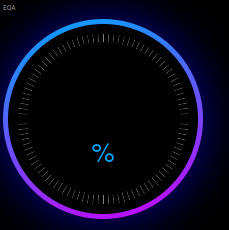
Lovely looking module. Having some trouble with mine. The single dial displays, but doesn’t seem to have pulled any data from Mercedes. I did not ever get an authenticate option after installing…
Did pm2 restart mm and then watched pm2 logs… only thing relevant I could see was:
0|mm  | [24.11.2021 13:58.46.575] [ERROR]
0|mm  | Whoops! There was an uncaught exception...
0|mm  | [24.11.2021 13:58.46.583] [ERROR]
0|mm  | TypeError: Cannot read property 'toLowerCase' of undefined
0|mm  |     at Class.getVehicleDataUrl (/home/pi/MagicMirror/modules/MMM-MercedesMe/node_helper.js:146:32)
0|mm  |     at Class.socketNotificationReceived (/home/pi/MagicMirror/modules/MMM-MercedesMe/node_helper.js:106:25)
0|mm  |     at Socket.<anonymous> (/home/pi/MagicMirror/js/node_helper.js:112:11)
0|mm  |     at Socket.emit (events.js:210:5)
0|mm  |     at Socket.onevent (/home/pi/MagicMirror/node_modules/socket.io/dist/socket.js:253:20)
0|mm  |     at Socket.socket.onevent (/home/pi/MagicMirror/js/node_helper.js:105:13)
0|mm  |     at Socket._onpacket (/home/pi/MagicMirror/node_modules/socket.io/dist/socket.js:216:22)
0|mm  |     at /home/pi/MagicMirror/node_modules/socket.io/dist/client.js:205:28
0|mm  |     at processTicksAndRejections (internal/process/task_queues.js:75:11)
0|mm  | [24.11.2021 13:58.46.588] [ERROR]
0|mm  | MagicMirror will not quit, but it might be a good idea to check why this happened. Maybe no internet connection?
0|mm  | [24.11.2021 13:58.46.593] [ERROR]
0|mm  | If you think this really is an issue, please open an issue on GitHub: https://github.com/MichMich/MagicMirror/issues
I cannot see a tokens.json in the ~/MagicMirror/modules/MMM-MercedesMe folder to try that option.
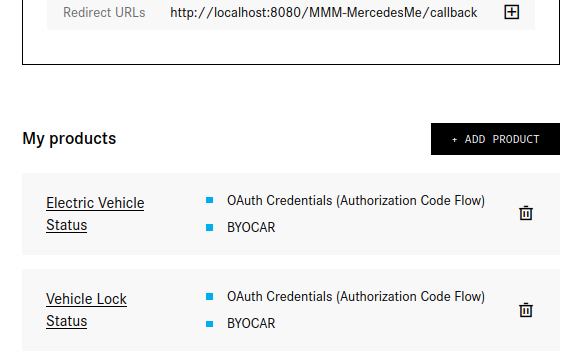
I have the following products enabled in developer portal:
Appreciate any tips, thanks.
Matt -
@matt216 Can you check if request package is installed ? you can do so with below command
npm install request --save -
@ashishtank ran command (added 47 packages), reloaded MM, same issue :(
Appreciate the help
-
@matt216 did you set the
vehicleTypecorrectly in config. is the config variable in correct case ?switch (config.vehicleType.toLowerCase()) { <--- error on this line. case 'diesel': vehicleStatus = 'fuelstatus'; } -
@ashishtank my vehicle is electric, so I didn’t include that in the config as it’s the default.
I just tried addingvehicleType: 'Electric'but nothing changed.
Any advice on logs I can check? I feel a bit unhelpful here… :)
Matt
-
Hi together,
is this module still active. Tried to register my project with mercedes but there is no purchase model ’ FREE’ as mentioned on the Github page. Only a Business model is available without
any details regarding the cost. Has anyone tried it and has experience with this model. It sound like it is only for business professionals.
Thanks in advance folks
Hello! It looks like you're interested in this conversation, but you don't have an account yet.
Getting fed up of having to scroll through the same posts each visit? When you register for an account, you'll always come back to exactly where you were before, and choose to be notified of new replies (either via email, or push notification). You'll also be able to save bookmarks and upvote posts to show your appreciation to other community members.
With your input, this post could be even better 💗
Register Login