MagicMirror Forum
    • Recent
    • Tags
    • Unsolved
    • Solved
    • MagicMirror² Repository
    • Documentation
    • 3rd-Party-Modules
    • Donate
    • Discord
    • Register
    • Login
    A New Chapter for MagicMirror: The Community Takes the Lead
    Read the statement by Michael Teeuw here.

    MMM-OpenWeatherForecast - Replacement for MMM-DarkSkyForecast

    Scheduled Pinned Locked Moved Utilities
    256 Posts 55 Posters 631.7k Views 57 Watching
    Loading More Posts
    • Oldest to Newest
    • Newest to Oldest
    • Most Votes
    Reply
    • Reply as topic
    Log in to reply
    This topic has been deleted. Only users with topic management privileges can see it.
    • C Offline
      chris1971 @sdetweil
      last edited by chris1971

      @sdetweil
      pirateweather is another module next to openweather? Sorry for the dumb question…
      Then I will try to go with Openweather acc. the description…

      S 1 Reply Last reply Reply Quote 0
      • S Offline
        sdetweil @chris1971
        last edited by

        @chris1971 no. pirateweather.net provides an API that looks like the dark sky API.

        so the dark sky module could be made to work again

        Sam

        How to add modules

        learning how to use browser developers window for css changes

        C 1 Reply Last reply Reply Quote 0
        • C Offline
          chris1971 @sdetweil
          last edited by

          @sdetweil this would be cool. Will try and give a feedback soon.

          1 Reply Last reply Reply Quote 0
          • C Offline
            chris1971
            last edited by chris1971

            I tried several API tokens from Pirateweather without success… But the old DarkSky APi is working again - I assume it will work only until March31st… :disappointed_face:

            S 1 Reply Last reply Reply Quote 0
            • S Offline
              sdetweil @chris1971
              last edited by

              @chris1971 you would have to change the dark sky module to use the pirate weather url too

              Sam

              How to add modules

              learning how to use browser developers window for css changes

              1 Reply Last reply Reply Quote 0
              • C Offline
                chris1971
                last edited by

                Do you have additional information what to change?
                Thx

                S 1 Reply Last reply Reply Quote 0
                • S Offline
                  sdetweil @chris1971
                  last edited by

                  @chris1971 no, but the pirateweather.net site would probably tell you

                  Sam

                  How to add modules

                  learning how to use browser developers window for css changes

                  1 Reply Last reply Reply Quote 0
                  • C Offline
                    chris1971
                    last edited by chris1971

                    Tried to install MMM-OpenWeatherForecast acc. the description and got a lot of errors during installation:

                    npm ERR! Linux 4.9.41-v7+

                    npm ERR! argv “/usr/bin/node” “/usr/bin/npm” “install”

                    npm ERR! node v6.12.0

                    npm ERR! npm v3.10.10

                    npm ERR! path /home/pi/MagicMirror/modules/MMM-OpenWeatherForecast/node_modules/.staging/@iarna/cli-64fafd25

                    npm ERR! code ENOENT

                    npm ERR! errno -2

                    npm ERR! syscall rename

                    npm ERR! enoent ENOENT: no such file or directory, rename ‘/home/pi/MagicMirror/modules/MMM-OpenWeatherForecast/node_modules/.staging/@iarna/cli-64fafd25’ -> ‘/home/pi/MagicMirror/modules/MMM-OpenWeatherForecast/node_modules/npm/node_modules/@iarna/cli’

                    npm ERR! enoent ENOENT: no such file or directory, rename ‘/home/pi/MagicMirror/modules/MMM-OpenWeatherForecast/node_modules/.staging/@iarna/cli-64fafd25’ -> ‘/home/pi/MagicMirror/modules/MMM-OpenWeatherForecast/node_modules/npm/node_modules/@iarna/cli’

                    npm ERR! enoent This is most likely not a problem with npm itself

                    npm ERR! enoent and is related to npm not being able to find a file.

                    npm ERR! enoent

                    npm ERR! Please include the following file with any support request:

                    npm ERR! /home/pi/MagicMirror/modules/MMM-OpenWeatherForecast/npm-debug.log<

                    After modification of the config and npm start I got a black screen and had to reset the system by disconnection from power supply. Any recommendations?

                    S 1 Reply Last reply Reply Quote 0
                    • S Offline
                      sdetweil @chris1971
                      last edited by

                      @chris1971 said in MMM-OpenWeatherForecast - Replacement for MMM-DarkSkyForecast:

                      npm ERR! node v6.12.0
                      npm ERR! npm v3.10.10

                      WAY downlevel…

                      should be node 16 and npm 8

                      use my install script, it sets up everything…
                      see https://github.com/sdetweil/MagicMirror_scripts

                      Sam

                      How to add modules

                      learning how to use browser developers window for css changes

                      1 Reply Last reply Reply Quote 0
                      • C Offline
                        chris1971
                        last edited by chris1971

                        I only have to type <“$(curl -sL https://raw.githubusercontent.com/sdetweil/MagicMirror_scripts/master/upgrade-script.sh)”> in the command line and the Update will be done automatically? No changes to the existing System?

                        S 1 Reply Last reply Reply Quote 0
                        • S Offline
                          sdetweil @chris1971
                          last edited by

                          @chris1971 no type, just copy paste ( use ssh VM from desktop/laptop)

                          but still it’s a two part process, check by default, advise, make no changes

                          then rerun with Parm at the end to DO the upgrade

                          if you are ALREADY at the latest release, it will abort, unless that Parm is force

                          Sam

                          How to add modules

                          learning how to use browser developers window for css changes

                          1 Reply Last reply Reply Quote 0
                          • BerkSmash1984B Offline
                            BerkSmash1984
                            last edited by BerkSmash1984

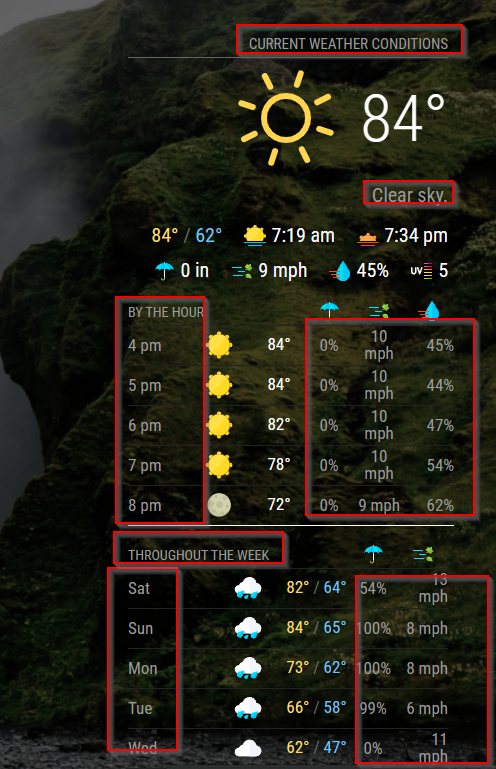
                            Awesome module! Question for you: I am using MMM-Wallpaper and some of the text can be hard to read during certain wallpapers. I looked in the MMM-OpenWeatherForecast.css file but did not see an obvious place to change the color for the text highlighted in the red boxes below. I would like to set them to white (#FFFFFF). Can you tell me where in that css to set that? Thanks for your help!
                            9b26e7ea-ca02-4335-909f-bbf64836c8ee-image.png

                            S 1 Reply Last reply Reply Quote 0
                            • S Offline
                              sdetweil @BerkSmash1984
                              last edited by

                              @BerkSmash1984 I do not know … but you can find out thru using the developers console

                              see
                              https://forum.magicmirror.builders/topic/14862/help-with-a-couple-css-issues?_=1679584458559

                              Sam

                              How to add modules

                              learning how to use browser developers window for css changes

                              BerkSmash1984B 1 Reply Last reply Reply Quote 0
                              • BerkSmash1984B Offline
                                BerkSmash1984 @sdetweil
                                last edited by

                                @sdetweil
                                Thank you! I will dig into it via the dev console

                                BKeyportB 1 Reply Last reply Reply Quote 0
                                • BKeyportB Offline
                                  BKeyport Module Developer @BerkSmash1984
                                  last edited by BKeyport

                                  @BerkSmash1984

                                  It uses the defaults from MagicMirror for grey text. I use:

                                  root {
                                  	--color-text: #DDD;
                                  	--color-text-dimmed: #666;
                                  	--color-text-bright: #fff;
                                        --color-background: #000;
                                  	
                                  }
                                  
                                  /* Originals: 
                                    --color-text: #999;
                                    --color-text-dimmed: #666;
                                    --color-text-bright: #fff;
                                    --color-background: #000;
                                  /*

                                  The "E" in "Javascript" stands for "Easy"

                                  BKeyportB BerkSmash1984B 3 Replies Last reply Reply Quote 0
                                  • BKeyportB Offline
                                    BKeyport Module Developer @BKeyport
                                    last edited by

                                    Anyone know how to get the entire table to center within the region? I don’t want to center the contents, only the position of the table being built by the app.

                                    thanks!

                                    The "E" in "Javascript" stands for "Easy"

                                    S 1 Reply Last reply Reply Quote 0
                                    • S Offline
                                      sdetweil @BKeyport
                                      last edited by

                                      @BKeyport

                                      position: relative
                                      either use margin or x and width, margin is easier

                                      Sam

                                      How to add modules

                                      learning how to use browser developers window for css changes

                                      BKeyportB 1 Reply Last reply Reply Quote 0
                                      • BKeyportB Offline
                                        BKeyport Module Developer @sdetweil
                                        last edited by

                                        @sdetweil the problem is that I can’t find the right CSS class to apply it to.

                                        The "E" in "Javascript" stands for "Easy"

                                        S 1 Reply Last reply Reply Quote 0
                                        • S Offline
                                          sdetweil @BKeyport
                                          last edited by sdetweil

                                          @BKeyport did u use the dev console to examine the content? click on the element u mean to adjust?
                                          https://forum.magicmirror.builders/topic/14862/help-with-a-couple-css-issues?_=1679584458559

                                          may not be a class, so you would have to select more … just have to be careful if the table is in a div, in a div… then its ‘size’ and position are relative to the parent (div) …

                                          .modulename table {
                                          position: relative
                                          ...
                                          ...
                                          }
                                          

                                          this is my goto for figuring out the selector ( the thing before the { )
                                          https://www.w3schools.com/cssref/css_selectors.php

                                          look at the css for the form in MMM-Config

                                          https://github.com/sdetweil/MMM-Config/blob/main/webform.css

                                          selector doesn’t have to start with a class…
                                          note in the cheat sheet its ALWAYS selects ALL elements that match

                                          Sam

                                          How to add modules

                                          learning how to use browser developers window for css changes

                                          BKeyportB 1 Reply Last reply Reply Quote 0
                                          • BKeyportB Offline
                                            BKeyport Module Developer @BKeyport
                                            last edited by BKeyport

                                            @BerkSmash1984 FYI, there’s more ways to make things easier to read - fade the background - or add a background to the modules themselves.

                                            Here’s how to add a background to the modules:

                                            the .5 is the opacity in this case, I’ve got it set to 50% visible.

                                            .module {
                                              background-color: rgba(0,0,0,.5); 
                                            }
                                            

                                            The "E" in "Javascript" stands for "Easy"

                                            BKeyportB 1 Reply Last reply Reply Quote 0

                                            Hello! It looks like you're interested in this conversation, but you don't have an account yet.

                                            Getting fed up of having to scroll through the same posts each visit? When you register for an account, you'll always come back to exactly where you were before, and choose to be notified of new replies (either via email, or push notification). You'll also be able to save bookmarks and upvote posts to show your appreciation to other community members.

                                            With your input, this post could be even better 💗

                                            Register Login

                                            • 1
                                            • 2
                                            • 6
                                            • 7
                                            • 8
                                            • 9
                                            • 10
                                            • 11
                                            • 12
                                            • 13
                                            • 8 / 13
                                            • First post
                                              Last post
                                            Enjoying MagicMirror? Please consider a donation!
                                            MagicMirror created by Michael Teeuw.
                                            Forum managed by Sam, technical setup by Karsten.
                                            This forum is using NodeBB as its core | Contributors
                                            Contact | Privacy Policy