MagicMirror Forum
    • Recent
    • Tags
    • Unsolved
    • Solved
    • MagicMirror² Repository
    • Documentation
    • 3rd-Party-Modules
    • Donate
    • Discord
    • Register
    • Login
    A New Chapter for MagicMirror: The Community Takes the Lead
    Read the statement by Michael Teeuw here.

    MMM-Multimonth

    Scheduled Pinned Locked Moved Troubleshooting
    12 Posts 3 Posters 3.6k Views 3 Watching
    Loading More Posts
    • Oldest to Newest
    • Newest to Oldest
    • Most Votes
    Reply
    • Reply as topic
    Log in to reply
    This topic has been deleted. Only users with topic management privileges can see it.
    • G Offline
      George
      last edited by

      Hello everybody!
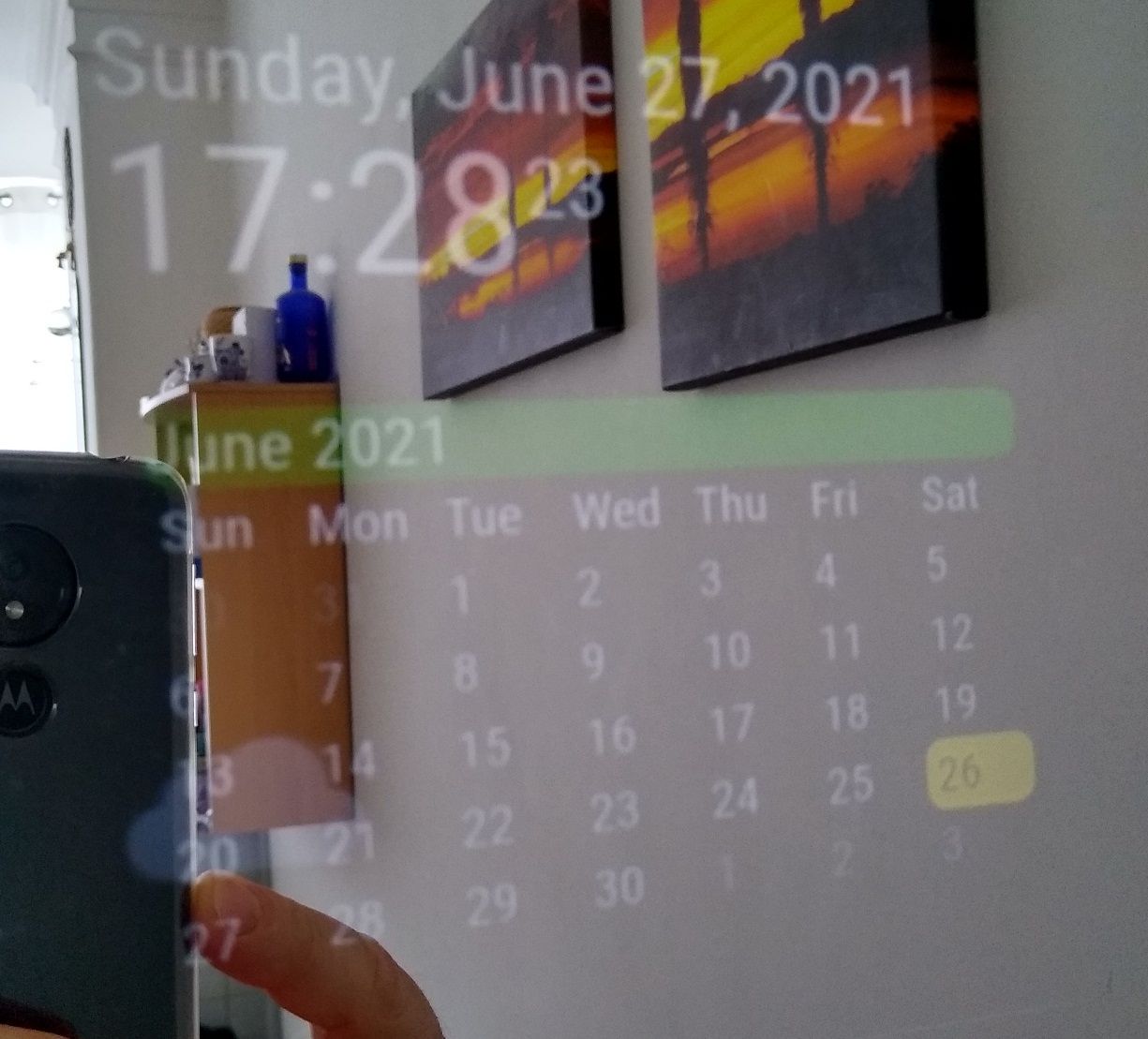
      A few months ago I installed MMM-Multimonth. It worked without problems but lately it behaves strangely. The date does not change at 24.00, it change at 12.00. I did not change anything in the configuration. Has anyone had this problem before?
      Thanks,
      IMG_20210601_070136384_HDR.jpg
      IMG_20210601_183629199_HDR.jpg

      BKeyportB 1 Reply Last reply Reply Quote 0
      • BKeyportB Offline
        BKeyport Module Developer @George
        last edited by

        @george That is an odd one. I’m not experiencing that one myself. It might be a cache issue.

        By the way, I’m the (co) author and the maintainer.

        I’ll look at it to see if there’s a reason, but I’m not sure why it would happen.

        The "E" in "Javascript" stands for "Easy"

        BKeyportB 1 Reply Last reply Reply Quote 0
        • BKeyportB Offline
          BKeyport Module Developer @BKeyport
          last edited by

          @bkeyport I did some checking, and MMM-M sets up the trigger to reset at 0 hours, 0 minutes, 0 seconds every day, so it’s not something I can fix. Do you have your system clock off from the Mirror’s clock or something like that?

          The "E" in "Javascript" stands for "Easy"

          G 1 Reply Last reply Reply Quote 0
          • G Offline
            George @BKeyport
            last edited by

            @bkeyport , The watch is ok. Yesterday I restarted it in the afternoon and now it works correctly. When I restarted it in the morning, the date did not change correctly. Could this be a problem? I use this calendar in two mirrors. I restarted the second mirror last time in the afternoon and it works correctly.

            BKeyportB 1 Reply Last reply Reply Quote 0
            • BKeyportB Offline
              BKeyport Module Developer @George
              last edited by

              @george I honestly don’t know. Let’s summon some help here - @sdetweil - can you explain this situation above?

              start: function (){
              		 var timer = setInterval(()=>{
              		 this.updateDom()
              		}, moment().add(1, 'days').hours(0).minutes(0).seconds(0)-moment())
              	},    
              

              it seems to me this would work to reset at midnight, but according to George here, it’s not working - can you help me figure it out, or summon in someone that can?

              Thanks.

              The "E" in "Javascript" stands for "Easy"

              S 1 Reply Last reply Reply Quote 1
              • S Do not disturb
                sdetweil @BKeyport
                last edited by

                @bkeyport that will fire a day from now. whenever now is…

                Sam

                How to add modules

                learning how to use browser developers window for css changes

                BKeyportB 1 Reply Last reply Reply Quote 0
                • BKeyportB Offline
                  BKeyport Module Developer @sdetweil
                  last edited by

                  @sdetweil Thanks.

                  @George I think I got a solution, it’s working on my end.

                  To test - on your pi’s console (preferably from SSH so you can watch the Mirror’s screen) :

                  update the software:

                  cd ~\magicmirror\modules\MMM-Multimonth
                  git pull
                  

                  Restart your Mirror software via whatever method you use to load it. (Example: pm2 restart mm)

                  timedatectl set-ntp false 
                  

                  You’ll have to authenticate. On my system, the usual login is #1.

                  Then,

                  sudo date -s "23:59:00" 
                  

                  Watch your Pi Mirror screen, it’ll switch to a minute before midnight, and track. At midnight, it should move the highlight to the next day.

                  sudo date -s "11:59:00" 
                  

                  Watch again, it shouldn’t move to the next day at noon.

                  timedatectl set-ntp true
                  

                  This will reset your time & date to correct time again, and resume normal operation. Like the above operation, you’ll need to authenticate.

                  That way you don’t have to stay up. :)

                  Please let me know.

                  The "E" in "Javascript" stands for "Easy"

                  G 2 Replies Last reply Reply Quote 0
                  • G Offline
                    George @BKeyport
                    last edited by

                    @bkeyport , work, thanks, good job! :)

                    1 Reply Last reply Reply Quote 0
                    • G Offline
                      George @BKeyport
                      last edited by

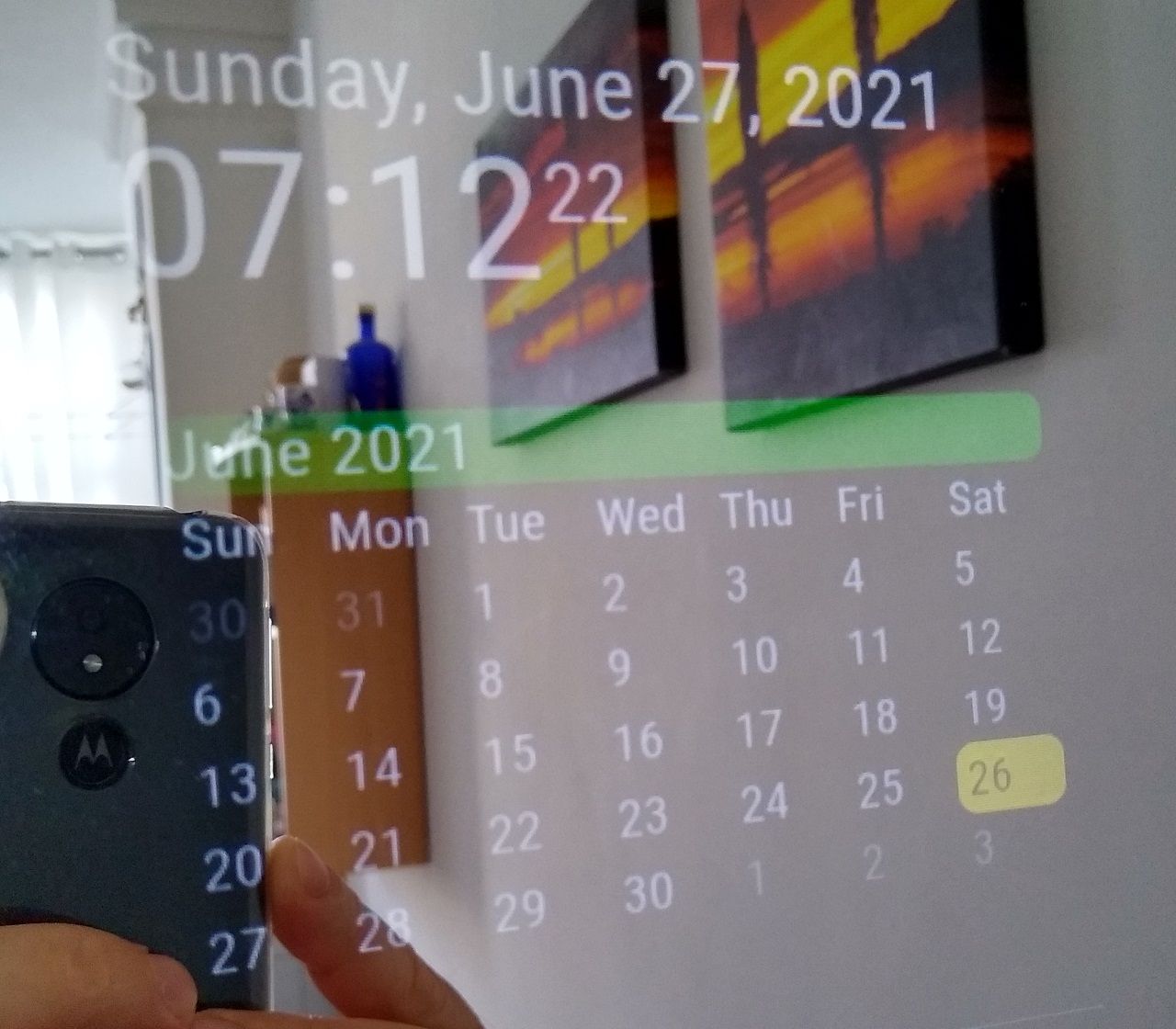
                      @bkeyport , hi, after you made the last change to the module, I deleted it and installed it again. Everything was OK. A few days ago, I restarted the mirror. It’s been a day late since then. If I restart it in the morning (am) it’s ok. The problem occurs if I restart it in the afternoon (pm). IMG_20210627_071222551_HDR.jpg IMG_20210627_172822772_HDR.jpg
                      BKeyportB 1 Reply Last reply Reply Quote 0
                      • BKeyportB Offline
                        BKeyport Module Developer @George
                        last edited by BKeyport

                        @george Odd. I didn’t change anything except add a file for MMM-Config. I’ll look at it.

                        Confirmed. Nothing changed, nothing I can do can make it break.

                        @sdetweil @cowboysdude @Mykle1 – anyone wanna help with this? Please? I’m pretty sure at this point it’s not my module.

                        The "E" in "Javascript" stands for "Easy"

                        S 2 Replies Last reply Reply Quote 0
                        • S Do not disturb
                          sdetweil @BKeyport
                          last edited by

                          @bkeyport actually above, I see it highlighting the 26th, but text says 27th in both cases…

                          in the previous it was only one side that was wrong… now both are

                          looking at the code now

                          Sam

                          How to add modules

                          learning how to use browser developers window for css changes

                          1 Reply Last reply Reply Quote 0
                          • S Do not disturb
                            sdetweil @BKeyport
                            last edited by

                            @bkeyport the only code that sets the highlighting is
                            starting at line 82

                            so, I would change the css to unique colors for the 3 lines, (2 have different classes but same color)

                            								if (currentWeekday.day() == 0 || currentWeekday.day() == 6) {
                            									output += "<div class='current_day_weekend'>" + currentWeekday.format("D") + "</div>";
                            								} else {
                            									output += "<div class='current_day'>" + currentWeekday.format("D") + "</div>";

                            								}
                            							} else {
                            								output += "<div class='current_day'>" + currentWeekday.format("D") + "</div>";
                            
                            								if (currentWeekday.day() == 0 || currentWeekday.day() == 6) {
                            									output += "<div class='current_day_weekend'>" + currentWeekday.format("D") + "</div>";
                            								} else {
                            									output += "<div class='current_day'>" + currentWeekday.format("D") + "</div>";
                            								}
                            							} else {
                            								output += "<div class='current_day'>" + currentWeekday.format("D") + "</div>";
                            

                            Sam

                            How to add modules

                            learning how to use browser developers window for css changes

                            1 Reply Last reply Reply Quote 0

                            Hello! It looks like you're interested in this conversation, but you don't have an account yet.

                            Getting fed up of having to scroll through the same posts each visit? When you register for an account, you'll always come back to exactly where you were before, and choose to be notified of new replies (either via email, or push notification). You'll also be able to save bookmarks and upvote posts to show your appreciation to other community members.

                            With your input, this post could be even better 💗

                            Register Login

                            • 1 / 1
                            • First post
                              Last post
                            Enjoying MagicMirror? Please consider a donation!
                            MagicMirror created by Michael Teeuw.
                            Forum managed by Sam, technical setup by Karsten.
                            This forum is using NodeBB as its core | Contributors
                            Contact | Privacy Policy