MagicMirror Forum
    • Recent
    • Tags
    • Unsolved
    • Solved
    • MagicMirror² Repository
    • Documentation
    • 3rd-Party-Modules
    • Donate
    • Discord
    • Register
    • Login
    A New Chapter for MagicMirror: The Community Takes the Lead
    Read the statement by Michael Teeuw here.

    Changing MMM-Traffic into using TomTom API

    Scheduled Pinned Locked Moved Development
    17 Posts 2 Posters 5.9k Views 2 Watching
    Loading More Posts
    • Oldest to Newest
    • Newest to Oldest
    • Most Votes
    Reply
    • Reply as topic
    Log in to reply
    This topic has been deleted. Only users with topic management privileges can see it.
    • R Offline
      rxlDavid @sdetweil
      last edited by rxlDavid

      @sdetweil
      hi,
      I changed the API Return, there is an option to get it back in JSON.
      What do you mean with write message to the console? & where/when should I execute “npm start >somefile.txt”

      S 3 Replies Last reply Reply Quote 0
      • S Offline
        sdetweil @rxlDavid
        last edited by

        @rxldavid

        write message to console
        console,log(“some message”+variable+…)

        Sam

        How to add modules

        learning how to use browser developers window for css changes

        1 Reply Last reply Reply Quote 0
        • S Offline
          sdetweil @rxlDavid
          last edited by

          @rxldavid u probably use pm2, so

          pm2 stop all
          

          then

          cd ~/MagicMirror
          

          then u can

          npm start >somefile.txt
          

          ctrl-c to end

          repeat til working

          Sam

          How to add modules

          learning how to use browser developers window for css changes

          1 Reply Last reply Reply Quote 0
          • S Offline
            sdetweil @rxlDavid
            last edited by

            @rxldavid the json data u posted is not valid… something is missing after the trailing comma

            Sam

            How to add modules

            learning how to use browser developers window for css changes

            R 1 Reply Last reply Reply Quote 0
            • R Offline
              rxlDavid @sdetweil
              last edited by

              @sdetweil
              I know, it was just an extinct, since it used private Data,
              I updated it to the full return with random Data

              S 1 Reply Last reply Reply Quote 0
              • S Offline
                sdetweil @rxlDavid
                last edited by

                @rxldavid if u put it thru the formatter

                {
                  "formatVersion": "0.0.12",
                  "routes": [
                    {
                      "summary": {
                        "lengthInMeters": 1147,
                        "travelTimeInSeconds": 140,
                        "trafficDelayInSeconds": 0,
                        "trafficLengthInMeters": 0,
                        "departureTime": "2021-09-19T17:16:54+02:00",
                        "arrivalTime": "2021-09-19T17:19:14+02:00"
                      },
                      "legs": [
                        {
                          "summary": {
                            "lengthInMeters": 1147,
                            "travelTimeInSeconds": 140,
                            "trafficDelayInSeconds": 0,
                            "trafficLengthInMeters": 0,
                            "departureTime": "2021-09-19T17:16:54+02:00",
                            "arrivalTime": "2021-09-19T17:19:14+02:00"
                          },
                          "points": [
                            {
                              "latitude": 52.5093,
                              "longitude": 13.42937
                            },
                            {
                              "latitude": 52.50904,
                              "longitude": 13.42913
                            },
                            {
                              "latitude": 52.50895,
                              "longitude": 13.42904
                            },
                            {
                              "latitude": 52.50868,
                              "longitude": 13.4288
                            },
                            {
                              "latitude": 52.5084,
                              "longitude": 13.42857
                            },
                            {
                              "latitude": 52.50816,
                              "longitude": 13.42839
                            },
                            {
                              "latitude": 52.50791,
                              "longitude": 13.42825
                            },
                            {
                              "latitude": 52.50757,
                              "longitude": 13.42772
                            },
                            {
                              "latitude": 52.50752,
                              "longitude": 13.42785
                            },
                            {
                              "latitude": 52.50742,
                              "longitude": 13.42809
                            },
                            {
                              "latitude": 52.50735,
                              "longitude": 13.42824
                            },
                            {
                              "latitude": 52.5073,
                              "longitude": 13.42837
                            },
                            {
                              "latitude": 52.50696,
                              "longitude": 13.4291
                            },
                            {
                              "latitude": 52.50673,
                              "longitude": 13.42961
                            },
                            {
                              "latitude": 52.50619,
                              "longitude": 13.43092
                            },
                            {
                              "latitude": 52.50608,
                              "longitude": 13.43116
                            },
                            {
                              "latitude": 52.50574,
                              "longitude": 13.43195
                            },
                            {
                              "latitude": 52.50564,
                              "longitude": 13.43218
                            },
                            {
                              "latitude": 52.50528,
                              "longitude": 13.43299
                            },
                            {
                              "latitude": 52.50513,
                              "longitude": 13.43336
                            },
                            {
                              "latitude": 52.505,
                              "longitude": 13.43366
                            },
                            {
                              "latitude": 52.50464,
                              "longitude": 13.43451
                            },
                            {
                              "latitude": 52.50451,
                              "longitude": 13.43482
                            },
                            {
                              "latitude": 52.50444,
                              "longitude": 13.43499
                            },
                            {
                              "latitude": 52.50418,
                              "longitude": 13.43564
                            },
                            {
                              "latitude": 52.50364,
                              "longitude": 13.4369
                            },
                            {
                              "latitude": 52.50343,
                              "longitude": 13.43738
                            },
                            {
                              "latitude": 52.5033,
                              "longitude": 13.43767
                            },
                            {
                              "latitude": 52.50275,
                              "longitude": 13.43873
                            }
                          ]
                        }
                      ],
                      "sections": [
                        {
                          "startPointIndex": 0,
                          "endPointIndex": 28,
                          "sectionType": "TRAVEL_MODE",
                          "travelMode": "car"
                        }
                      ]
                    }
                  ]
                }
                

                Sam

                How to add modules

                learning how to use browser developers window for css changes

                R 1 Reply Last reply Reply Quote 0
                • R Offline
                  rxlDavid @sdetweil
                  last edited by

                  @sdetweil
                  this is also the view Tomtom provided me.
                  but I don’t get what I need to change.
                  right now I got the following error in the console:
                  [19.09.2021 17:22.10.688] [ERROR] Failed to fetch git data for MMM-Traffic: Erro r: block timeout reached

                  S 1 Reply Last reply Reply Quote 0
                  • S Offline
                    sdetweil @rxlDavid
                    last edited by

                    @rxldavid that is from the updateNotifcation module which has a bug … fixed in next release

                    after u got the data, then what did u do?

                    Sam

                    How to add modules

                    learning how to use browser developers window for css changes

                    R 1 Reply Last reply Reply Quote 0
                    • R Offline
                      rxlDavid @sdetweil
                      last edited by

                      @sdetweil
                      Sorry, Tomtom provides a website which returns the data.
                      So it wasn’t my MagicMirror returning it

                      S 1 Reply Last reply Reply Quote 0
                      • S Offline
                        sdetweil @rxlDavid
                        last edited by

                        @rxldavid javascript provides a built in library call JSON

                        which provides 2 useful functions

                        parse (text) = converts to javascript object
                        stringify(object,routine(most if the time u would use null ),indentation ) = returns string of text

                        so then u could

                        console.log("mesage="+JSON.stringify(pointer_to_data_returned_from_api))
                        

                        to see it on the console (or somefile.txt if u redirect to a file)

                        Sam

                        How to add modules

                        learning how to use browser developers window for css changes

                        R 1 Reply Last reply Reply Quote 0
                        • R Offline
                          rxlDavid @sdetweil
                          last edited by rxlDavid

                          @sdetweil
                          I do know I think this project is too hard for me lol
                          I now changed this:

                            getCommute: function (api_url) {
                              var self = this;
                              fetch('https://api.tomtom.com/routing/1/calculateRoute/4x.xxx%2C9.xxx%3A4x.xxx%2C9.xx/json?avoid=unpavedRoads&key=<key>')
                          	  .then(console.log('API SUCESS')
                                .then(json => {
                                  self.duration = Math.round(json.routes[0].duration / 60);
                                  self.errorMessage = self.errorDescription = undefined;
                                  self.loading = false;
                                  self.updateDom();
                                })
                                .catch(e => {
                                  self.errorMessage = payload.error.message;
                                  self.errorDescription = payload.error.description;
                                  self.loading = false;
                                  self.updateDom();
                                });
                          
                            },
                          

                          Now the "loading does not even appear I don’t know if that’s good or bad, but I cant even see my (console.log(‘API SUCESS’) in the .txt

                          S 1 Reply Last reply Reply Quote 0
                          • S Offline
                            sdetweil @rxlDavid
                            last edited by

                            @rxldavid ah, you are doing this in the modulename.js side, not node_helper…

                            all messages in the modulename are shown in the developers window console

                            ctrl-shift-i on the MM screen,

                            select the console tab in the window that pops up

                            u can filter to messages from a module by adding some unique part of the module name to the filter field (middle above the list of messages)

                            Sam

                            How to add modules

                            learning how to use browser developers window for css changes

                            R 1 Reply Last reply Reply Quote 0
                            • R Offline
                              rxlDavid
                              last edited by

                              This post is deleted!
                              R 1 Reply Last reply Reply Quote 0
                              • R Offline
                                rxlDavid @sdetweil
                                last edited by rxlDavid

                                @sdetweil
                                So I forgot to close a bracket, so now its again showing the Loading screen.
                                I get the following error:
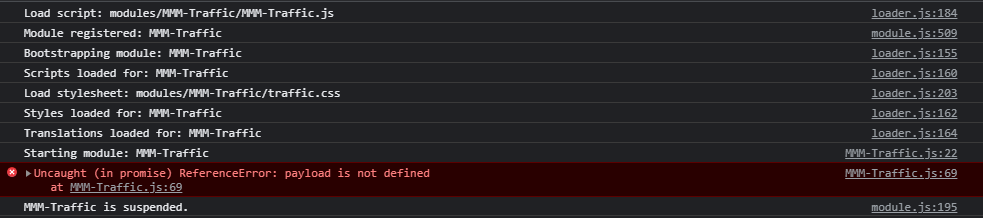
                                Screenshot_2.png
                                What does the :69 mean?

                                Edit: this is line 69

                                 .catch(e => {
                                        Line 69 self.errorMessage = payload.error.message;
                                        self.errorDescription = payload.error.description;
                                        self.loading = false;
                                        self.updateDom();
                                      });
                                
                                1 Reply Last reply Reply Quote 0
                                • R Offline
                                  rxlDavid @rxlDavid
                                  last edited by rxlDavid

                                  @sdetweil
                                  The Same Error accured for Line 70, so I both commented those 2 lines.
                                  Now I get no Error, and the Loading disappeared, it now says:

                                  Screenshot_4.png

                                  1 Reply Last reply Reply Quote 0

                                  Hello! It looks like you're interested in this conversation, but you don't have an account yet.

                                  Getting fed up of having to scroll through the same posts each visit? When you register for an account, you'll always come back to exactly where you were before, and choose to be notified of new replies (either via email, or push notification). You'll also be able to save bookmarks and upvote posts to show your appreciation to other community members.

                                  With your input, this post could be even better 💗

                                  Register Login

                                  • 1 / 1
                                  • First post
                                    Last post
                                  Enjoying MagicMirror? Please consider a donation!
                                  MagicMirror created by Michael Teeuw.
                                  Forum managed by Sam, technical setup by Karsten.
                                  This forum is using NodeBB as its core | Contributors
                                  Contact | Privacy Policy