MagicMirror Forum
    • Recent
    • Tags
    • Unsolved
    • Solved
    • MagicMirror² Repository
    • Documentation
    • 3rd-Party-Modules
    • Donate
    • Discord
    • Register
    • Login
    A New Chapter for MagicMirror: The Community Takes the Lead
    Read the statement by Michael Teeuw here.

    MMM-CalDAV

    Scheduled Pinned Locked Moved Productivity
    97 Posts 10 Posters 40.3k Views 9 Watching
    Loading More Posts
    • Oldest to Newest
    • Newest to Oldest
    • Most Votes
    Reply
    • Reply as topic
    Log in to reply
    This topic has been deleted. Only users with topic management privileges can see it.
    • M Offline
      MMRIZE @Tiller
      last edited by MMRIZE

      @Tiller said in MMM-CalDAV:

      CALDAV_SERVICE_USERNAME=
      CALDAV_SERVICE_USERNAME=

      For SYNOLOGY

      SYNOLOGY_username=username1
      SYNOLOGY_password=password1

      I think you may have confusing the username and password for the server and the module.

      SYNOLOGY_username=username1
      SYNOLOGY_password=password1
      

      This is for your Synology Caldav Server, usually it is your account id/password to login Synology Server (Or Synology calendar account)

      CALDAV_SERVICE_USERNAME=username2
      CALDAV_SERVICE_PASSWORD=password2
      

      This is a different thing. It is used for your MM calendar module. This module provide a secure calendar ics host by itself with this auth information. You should need to set your calendar config like this;

      // default calendar module.
      {
        module: "calendar",
        position: "top_left",
        config: {
          calendars: [
            {
              symbol: "calendar-check",
              url: "http://localhost:8080/CALDAV/SYNOLOGY_Family.ics",
              auth: { // REQUIRED
                user: 'username2', // <= used here (CALDAV_SERVICE_USERNAME)
                pass: 'password2', // <= used here (CALDAV_SERVICE_PASSWORD)
                method: 'basic'
              }
            },
      ...
      
      T 1 Reply Last reply Reply Quote 0
      • T Offline
        Tiller @MMRIZE
        last edited by

        Thank you for your quick reply.

        @sdetweil I’m not using pm2 at the moment, but I could try to do it and check the logs.

        @MMRIZE sorry, my bad. I changed the password for the post, it’s correct in my .env but not working.

        I’m not exactly sure about the Synology url
        synology.com says I should use
        http://192.168.x.x:5000/caldav
        and than log in with my username and password

        But an older link is (seems there was an update)
        http://192.168.x.x:5000/caldav/username/ejialfjl/

        If I’m using the last one in the browser, it is downloading an .ics file.

        But it’s not working with both urls.

        Maybe I should try to reinstall everything?

        S M 3 Replies Last reply Reply Quote 0
        • S Offline
          sdetweil @Tiller
          last edited by

          @Tiller if you are not using pm2 then the errors would be shown where you do npm start

          Sam

          How to add modules

          learning how to use browser developers window for css changes

          1 Reply Last reply Reply Quote 0
          • S Offline
            sdetweil @Tiller
            last edited by

            @Tiller no reinstall

            can you show us the new url(#2) in config.js,
            assume you are still using the env variables

            Sam

            How to add modules

            learning how to use browser developers window for css changes

            1 Reply Last reply Reply Quote 0
            • M Offline
              MMRIZE @Tiller
              last edited by

              @Tiller
              CalDAV is different to general ics hosting.

              Usually, the URL of Synology CalDAV accessing would be;

              https://IP_OR_URL:5001/caldav/
              http://IP_OR_URL:5000/caldav/
              

              Anyway, there would be some log to diagnosis. Can you show the frontend and backend logs?

              C T 2 Replies Last reply Reply Quote 0
              • C Offline
                caw @MMRIZE
                last edited by

                @MMRIZE

                Hi,

                i´ve got the same problem. I´m completly new to magicmirror but the integration of my Synology CalDAV should be the main part of it.

                i´ve tried several combinations and addresses but no one worked for me.

                maybe its possible to get a “step - by - step” Tutorial.

                hopefully you can help :)

                M 1 Reply Last reply Reply Quote 0
                • M Offline
                  MMRIZE @caw
                  last edited by

                  @caw

                  https://github.com/MMRIZE/MMM-CalDAV/wiki

                  1. Install
                  cd <Your MagicMirror directory>/modules
                  git clone https://github.com/MMRIZE/MMM-CalDAV
                  cd MMM-CalDAV
                  npm install
                  
                  1. There would be .env (It would be hidden, so you should check it with ls -al or equivalent for your environment/OS)
                    image

                  If not there, copy it from env.example

                  cp env.example .env
                  
                  1. Open your Synology Calendar. You can open it from your Synology Package Center Or installed app lists. Usually it will have http(s)://<IP_OR_URL>:<PORT(5000 or 5001)>/?launchApp=SYNO.Cal.Application as URL so you can open it on the browser.

                  You will see something like this.
                  image

                  1. Get the CadDAV account. Copy or memo the URL. Usually URL will have http(s)://<IP_OR_URL>:<PORT_5000_OR_5001>/caldav/ format.
                    image
                  image
                  1. Back to the terminal. Open the .env file with your favourite editor. Then, fulfil these lines.
                    image

                  2. Then configure the MMM-CalDAV module and the calendar module like this.
                    image

                  Carefully See the configuration of the calendar module.

                  1. Then run the MagicMirror.
                    At the very first execution, some time would be needed for CalDAV calendars to be reflected on the screen. So, just stop the MagicMirror.

                  If CalDAV calendars would be success to be derived, the log will say something like this.

                  [2024-09-03 22:52:01.461] [LOG]   [CALDAV] File: SYNOLOGY_test.ics is refreshed.
                  

                  And there be files to be hosted in the service directory like these;
                  image

                  I have two calendars, My Calendar and test, so there would be 2 hidden ics files generated, service/.SYNOLOGY_My_20Calendar.ics and service/.SYNOLOGY_test.ics.

                  But the real URL consumed by the calendar module would be http://localhost:8080/CALDAV/SYNOLOGY_test.ics, don’t be confused.

                  1. Rerun the MM again. Now on the screen, your hosting calendar will be served.
                    image
                  C 1 Reply Last reply Reply Quote 0
                  • C Offline
                    caw @MMRIZE
                    last edited by

                    @MMRIZE said in MMM-CalDAV:

                    Hi thank you very much for the really fast supply.

                    the strange thing is that i configured it like you said. but if im running it the magicmirror it is showing me that the “Site is not reachable” (The Synology default page)

                    if im running MM just without the CALDAV Module it´s working.

                    I´m running the MM in Docker on the Synology.

                    M 1 Reply Last reply Reply Quote 0
                    • M Offline
                      MMRIZE @caw
                      last edited by

                      @caw could you show me the capture of error message to know what happened?

                      C 1 Reply Last reply Reply Quote 0
                      • C Offline
                        caw @MMRIZE
                        last edited by sdetweil

                        @MMRIZE if i´m adding the

                         {
                        		module :"MMM-CalDAV",
                        		config: {
                        			servers: [
                        				{
                        					envPrefix: "SYNOLOGY_",
                        					serverUrl: "https://myownsynologyadress.de/caldav/",
                        			],
                        		},
                        	},
                        

                        following error occurs

                        67dabd85-84e5-4b0a-bd0e-749d4ba4e3c6-grafik.png

                        M S 3 Replies Last reply Reply Quote 0
                        • M Offline
                          MMRIZE @caw
                          last edited by

                          @caw said in MMM-CalDAV:

                          following error occurs

                          67dabd85-84e5-4b0a-bd0e-749d4ba4e3c6-grafik.png

                          ???
                          I cannot understand the context. What did you do? The image seems like that something on the browser.

                          Does your MagicMirror is executed on the Synology NAS with Docker?

                          1 Reply Last reply Reply Quote 0
                          • M Offline
                            MMRIZE @caw
                            last edited by

                            @caw said in MMM-CalDAV:

                            {
                            module :“MMM-CalDAV”,
                            config: {
                            servers: [
                            {
                            envPrefix: “SYNOLOGY_”,
                            serverUrl: “https://myownsynologyadress.de/caldav/”,
                            ],
                            },
                            },

                            And you’ve missed a closing brace in your code.

                             {
                            		module :"MMM-CalDAV",
                            		config: {
                            			servers: [
                            				{
                            					envPrefix: "SYNOLOGY_",
                            					serverUrl: "https://myownsynologyadress.de/caldav/",
                                                             }, // <-- HERE
                            			],
                            		},
                            	},
                            
                            C 1 Reply Last reply Reply Quote 0
                            • C Offline
                              caw @MMRIZE
                              last edited by

                              @MMRIZE yes the image is a screen from the browser. MM is running till i add the Caldav-Module. So i assume I missconfigured something. The missing bracket did not solve the problem in the log:

                              2024/09/04 15:33:13 stderr if (key?.startsWith(prefix)) {
                              2024/09/04 15:33:13 stderr [04.09.2024 15:33.13.728] [ERROR] /opt/magic_mirror/modules/MMM-CalDAV/node_helper.js:14
                              2024/09/04 15:33:13 stderr [04.09.2024 15:33.13.727] [ERROR] Whoops! There was an uncaught exception…
                              2024/09/04 15:33:13 stdout [04.09.2024 15:33.13.726] [LOG] No helper found for module: MMM-Carousel.
                              2024/09/04 15:33:13 stdout [04.09.2024 15:33.13.726] [LOG] No helper found for module: clock.
                              2024/09/04 15:33:13 stdout [04.09.2024 15:33.13.725] [LOG] Module helper loaded: updatenotification
                              2024/09/04 15:33:13 stderr at /opt/magic_mirror/js/app.js:166:6
                              2024/09/04 15:33:13 stderr at loadNextModule (/opt/magic_mirror/js/app.js:164:5)
                              2024/09/04 15:33:13 stdout [04.09.2024 15:33.13.725] [LOG] Initializing new module helper …
                              2024/09/04 15:33:13 stderr at loadModule (/opt/magic_mirror/js/app.js:126:19)
                              2024/09/04 15:33:13 stderr at require (internal/modules/cjs/helpers.js:74:18)
                              2024/09/04 15:33:13 stderr at Module.require (internal/modules/cjs/loader.js:887:19)
                              2024/09/04 15:33:13 stdout [04.09.2024 15:33.13.725] [LOG] No helper found for module: alert.
                              2024/09/04 15:33:13 stderr at Function.Module._load (internal/modules/cjs/loader.js:708:14)
                              2024/09/04 15:33:13 stderr at Module.load (internal/modules/cjs/loader.js:863:32)
                              2024/09/04 15:33:13 stdout [04.09.2024 15:33.13.724] [LOG] Loading module helpers …
                              2024/09/04 15:33:13 stderr at Object.Module._extensions…js (internal/modules/cjs/loader.js:1027:10)
                              2024/09/04 15:33:13 stderr at Module._compile (internal/modules/cjs/loader.js:963:27)
                              2024/09/04 15:33:13 stderr at wrapSafe (internal/modules/cjs/loader.js:915:16)
                              2024/09/04 15:33:13 stderr SyntaxError: Unexpected token ‘.’

                              S 1 Reply Last reply Reply Quote 0
                              • S Offline
                                sdetweil @caw
                                last edited by

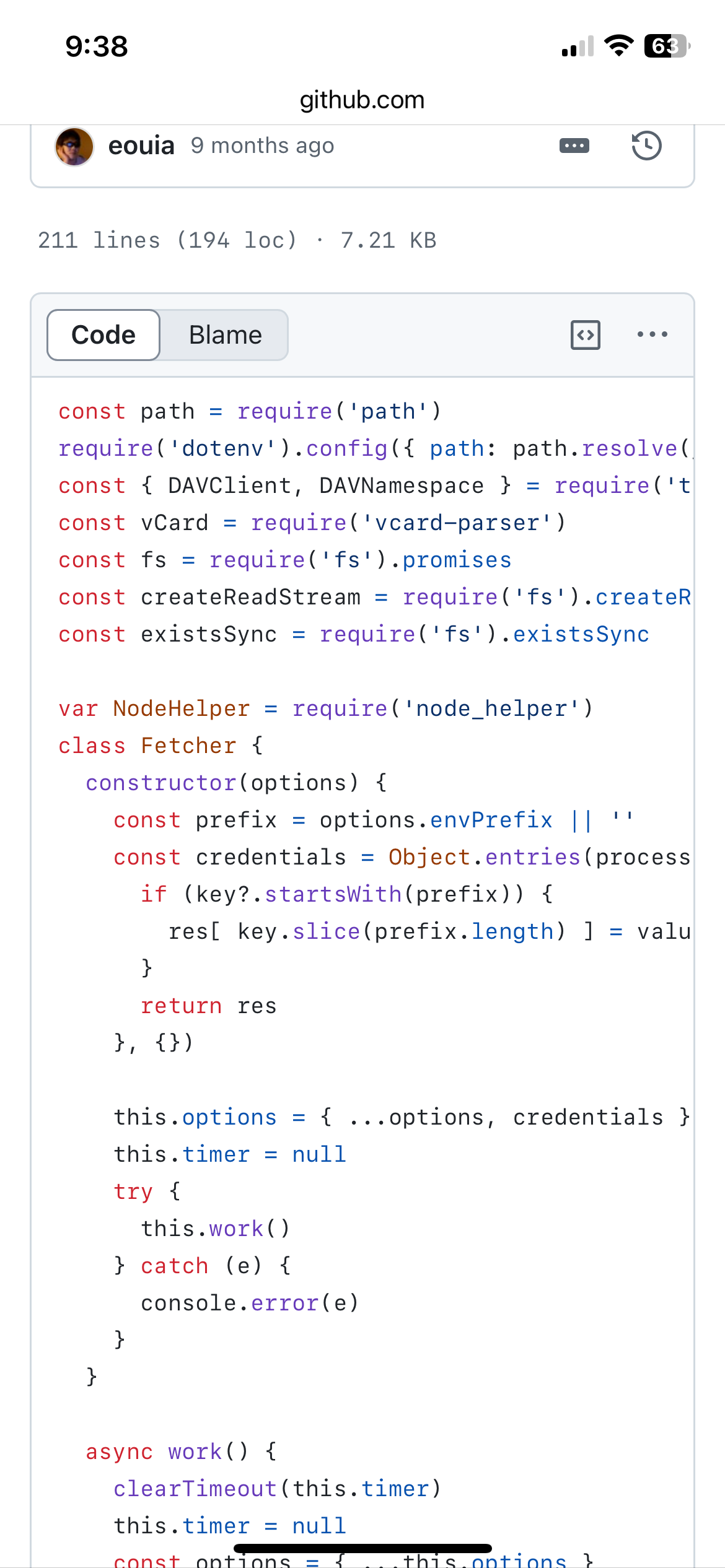
                                @caw because you are running in server mode, the version of nodejs matters.

                                your version is way down level

                                the ?. syntax shown on line 14 is from the latest js version
                                IMG_0187.png

                                Sam

                                How to add modules

                                learning how to use browser developers window for css changes

                                C 1 Reply Last reply Reply Quote 0
                                • C Offline
                                  caw @sdetweil
                                  last edited by

                                  @sdetweil thank you very much for the information - but now i have another problem to get it updated can you help me with this?

                                  S 1 Reply Last reply Reply Quote 0
                                  • S Offline
                                    sdetweil @caw
                                    last edited by

                                    @caw what environment are you running?

                                    Sam

                                    How to add modules

                                    learning how to use browser developers window for css changes

                                    C 1 Reply Last reply Reply Quote 0
                                    • C Offline
                                      caw @sdetweil
                                      last edited by

                                      @sdetweil im running the docker container on a Synology NAS

                                      S 1 Reply Last reply Reply Quote 0
                                      • S Offline
                                        sdetweil @caw
                                        last edited by

                                        @caw what docker container?

                                        Sam

                                        How to add modules

                                        learning how to use browser developers window for css changes

                                        C 1 Reply Last reply Reply Quote 0
                                        • S Offline
                                          sdetweil @caw
                                          last edited by

                                          @caw said in MMM-CalDAV:

                                          "https://myownsynologyadress.de/caldav/

                                          https: means you have a certificate for that address and have configured MMM-Caldav to run in secure mode

                                          is that true?

                                          typically one uses mmm-caldav to read from the foreign calendar, and emit ics data for the local machine

                                          and make it available thru a url request (which causes the MMM-Caldav module to provide the data live)

                                          http://mmIP:mmPort/caldav
                                          

                                          or shorthand for this same system is (using the default mm port)

                                          http://localhost:8080/caldav
                                          

                                          depending on how MM is configured,
                                          address: and ipWhitelist, by default it rejects ALL requests from OUTSIDE systems
                                          so your loop back at - https://myownsynologyadress.de would be rejected…

                                          I use cloudflare to map outside requests to my systems thr a tunnel, so I have https (cert provided by cloudflare) and have reconfigured my MagicMirror to allow any incoming request

                                          address: "0.0.0.0",
                                          ipWhitelist:[],
                                          

                                          Sam

                                          How to add modules

                                          learning how to use browser developers window for css changes

                                          C 1 Reply Last reply Reply Quote 0
                                          • C Offline
                                            caw @sdetweil
                                            last edited by

                                            @sdetweil im running the “container manager” on the nas and the container by bastilimbach installation guide by https://mariushosting.com/how-to-install-magicmirror-on-your-synology-nas/

                                            S 1 Reply Last reply Reply Quote 0

                                            Hello! It looks like you're interested in this conversation, but you don't have an account yet.

                                            Getting fed up of having to scroll through the same posts each visit? When you register for an account, you'll always come back to exactly where you were before, and choose to be notified of new replies (either via email, or push notification). You'll also be able to save bookmarks and upvote posts to show your appreciation to other community members.

                                            With your input, this post could be even better 💗

                                            Register Login

                                            • 1
                                            • 2
                                            • 3
                                            • 4
                                            • 5
                                            • 3 / 5
                                            • First post
                                              Last post
                                            Enjoying MagicMirror? Please consider a donation!
                                            MagicMirror created by Michael Teeuw.
                                            Forum managed by Sam, technical setup by Karsten.
                                            This forum is using NodeBB as its core | Contributors
                                            Contact | Privacy Policy