MagicMirror Forum
    • Recent
    • Tags
    • Unsolved
    • Solved
    • MagicMirror² Repository
    • Documentation
    • 3rd-Party-Modules
    • Donate
    • Discord
    • Register
    • Login
    A New Chapter for MagicMirror: The Community Takes the Lead
    Read the statement by Michael Teeuw here.

    MMM-CalDAV

    Scheduled Pinned Locked Moved Productivity
    97 Posts 10 Posters 40.3k Views 9 Watching
    Loading More Posts
    • Oldest to Newest
    • Newest to Oldest
    • Most Votes
    Reply
    • Reply as topic
    Log in to reply
    This topic has been deleted. Only users with topic management privileges can see it.
    • C Offline
      caw @sdetweil
      last edited by

      @sdetweil im running the “container manager” on the nas and the container by bastilimbach installation guide by https://mariushosting.com/how-to-install-magicmirror-on-your-synology-nas/

      S 1 Reply Last reply Reply Quote 0
      • C Offline
        caw @sdetweil
        last edited by

        @sdetweil i used ipv64 to receive a certificate - but for now i dont want to get any caldav from outside or do i missunderstand something?

        S 1 Reply Last reply Reply Quote 0
        • S Offline
          sdetweil @caw
          last edited by

          @caw said in MMM-CalDAV:

          bastilimbach

          that image is 4 years old, so not running the latest node or MM…

          the install doc https://docs.magicmirror.builders/getting-started/installation.html#alternative-installation-methods
          references this docker image
          https://gitlab.com/khassel/magicmirror

          Sam

          How to add modules

          learning how to use browser developers window for css changes

          C 1 Reply Last reply Reply Quote 0
          • S Offline
            sdetweil @caw
            last edited by

            @caw because the ics generated by MMM-Caldav is only needed on this same machine I would use

            http://localhost:mmport/CALDAV

            in the calendar module.

            I am guessing your cert is connected to your internet IP address (ISP router)
            which is then port forwarded to the MM machine…

            this is an external (from MM’s perspective) request

            MM is configured (be default) to be a closed system on the wall, not allowing any external systems to request the MM page (external means outside the machine MM is running on)

            Sam

            How to add modules

            learning how to use browser developers window for css changes

            1 Reply Last reply Reply Quote 0
            • C Offline
              caw @sdetweil
              last edited by

              @sdetweil i searched for a guide to get the Khassel container running on a Synology NAS but didn’t found anything about it. I tried it by my own but did not work. Do you have a clue how to get it on the Docker on a Synology NAS?

              S 1 Reply Last reply Reply Quote 0
              • S Offline
                sdetweil @caw
                last edited by sdetweil

                @caw my older 416j only has 512mb storage, not enough room to run docker things

                but docker is docker. i thought he specified a compose or command line

                see this
                https://forum.magicmirror.builders/topic/18952/docker-install-on-synology-nas

                Sam

                How to add modules

                learning how to use browser developers window for css changes

                C 1 Reply Last reply Reply Quote 0
                • C Offline
                  caw @sdetweil
                  last edited by

                  @sdetweil @MMRIZE

                  so i got the khassel image running and i think the calendars are found but i get an error:

                  [2024-09-05 22:42:56.488] [ERROR] Error: EACCES: permission denied, open ‘/opt/magic_mirror/modules/MMM-CalDAV/service/.SYNOLOGY_Familien_20Kalender.ics’
                  2024/09/05 22:42:56 stderr [2024-09-05 22:42:56.486] [ERROR] Whoops! There was an uncaught exception…

                  do you have a clue how to fix this? im irritated by the “20” between Familien_20Kalender.ics thats no part of the calendar name…

                  S 1 Reply Last reply Reply Quote 0
                  • S Offline
                    sdetweil @caw
                    last edited by

                    @caw 20 is typically part of a name with a space in it, %20

                    also you have a . (dot) in front of SYNOLOGY_

                    Sam

                    How to add modules

                    learning how to use browser developers window for css changes

                    C 1 Reply Last reply Reply Quote 0
                    • C Offline
                      caw @sdetweil
                      last edited by

                      @sdetweil

                      and do you have any clue where the misstake is? and how can i fix it?

                      S 1 Reply Last reply Reply Quote 0
                      • S Offline
                        sdetweil @caw
                        last edited by

                        @caw i am going to guess

                        remove the dot in front of SYNOLOGY
                        and in the MagicMirror config mke sure there is a space where you see the 20, or make it %20

                        one change at a time

                        Sam

                        How to add modules

                        learning how to use browser developers window for css changes

                        C 1 Reply Last reply Reply Quote 0
                        • C Offline
                          caw @sdetweil
                          last edited by

                          @sdetweil i dont have a dot in front of the Prefix

                          module :“MMM-CalDAV”,
                          config: {
                          servers: [
                          {
                          envPrefix: “SYNOLOGY_”,

                          2024/09/06 01:23:15 stderr path: ‘/opt/magic_mirror/modules/MMM-CalDAV/service/.SYNOLOGY_Simon.ics’
                          2024/09/06 01:23:15 stderr syscall: ‘open’,
                          2024/09/06 01:23:15 stderr code: ‘EACCES’,
                          2024/09/06 01:23:15 stderr errno: -13,
                          2024/09/06 01:23:15 stderr at async saveIcs (/opt/magic_mirror/modules/MMM-CalDAV/node_helper.js:76:7) {
                          2024/09/06 01:23:15 stderr at async Object.writeFile (node:internal/fs/promises:1212:14)
                          2024/09/06 01:23:15 stderr at async open (node:internal/fs/promises:639:25)
                          2024/09/06 01:23:15 stderr [2024-09-06 01:23:15.709] [ERROR] Error: EACCES: permission denied, open ‘/opt/magic_mirror/modules/MMM-CalDAV/service/.SYNOLOGY_Simon.ics’
                          2024/09/06 01:23:15 stderr [2024-09-06 01:23:15.707] [ERROR] Whoops! There was an uncaught exception…

                          2024/09/06 01:23:14 stderr at process.processTicksAndRejections (node:internal/process/task_queues:95:5)
                          2024/09/06 01:23:14 stderr at NodeHelper.checkFetchStatus (/opt/magic_mirror/js/node_helper.js:110:9)
                          2024/09/06 01:23:14 stderr [2024-09-06 01:23:14.687] [ERROR] Calendar Error. Could not fetch calendar: http://localhost:8080/CALDAV/SYNOLOGY_Simon.ics Error: Not Found

                          2024/09/06 01:23:14 stdout [2024-09-06 01:23:14.671] [LOG] [CALDAV] /opt/magic_mirror/modules/MMM-CalDAV/service/.SYNOLOGY_Simon.ics is not found.

                          2024/09/06 01:23:14 stdout [2024-09-06 01:23:14.606] [LOG] Create new calendarfetcher for url: http://localhost:8080/CALDAV/SYNOLOGY_Simon.ics - Interval: 3600000
                          2024/09/06 01:23:14 stdout [2024-09-06 01:23:14.539] [LOG] [CALDAV] Fetching SYNOLOGY_ : caldav …

                          S M karsten13K 3 Replies Last reply Reply Quote 0
                          • S Offline
                            sdetweil @caw
                            last edited by sdetweil

                            @caw said in MMM-CalDAV:

                            @sdetweil i dont have a dot in front of the Prefix

                            module :“MMM-CalDAV”,
                            config: {
                            servers: [
                            {
                            envPrefix: “SYNOLOGY_”,

                            2024/09/06 01:23:15 stderr path: ‘/opt/magic_mirror/modules/MMM-CalDAV/service/.SYNOLOGY_Simon.ics’
                            2024/09/06 01:23:15 stderr syscall: ‘open’,
                            2024/09/06 01:23:15 stderr code: ‘EACCES’,
                            2024/09/06 01:23:15 stderr errno: -13,
                            2024/09/06 01:23:15 stderr at async saveIcs (/opt/magic_mirror/modules/MMM-CalDAV/node_helper.js:76:7) {
                            2024/09/06 01:23:15 stderr at async Object.writeFile (node:internal/fs/promises:1212:14)
                            2024/09/06 01:23:15 stderr at async open (node:internal/fs/promises:639:25)
                            2024/09/06 01:23:15 stderr [2024-09-06 01:23:15.709] [ERROR] Error: EACCES: permission denied, open ‘/opt/magic_mirror/modules/MMM-CalDAV/service/.SYNOLOGY_Simon.ics’
                            2024/09/06 01:23:15 stderr [2024-09-06 01:23:15.707] [ERROR] Whoops! There was an uncaught exception…

                            i dont know what caldav wants in its setup,
                            sorry. you’ll have to wait for @MMRIZE to help

                            Sam

                            How to add modules

                            learning how to use browser developers window for css changes

                            1 Reply Last reply Reply Quote 0
                            • M Offline
                              MMRIZE @caw
                              last edited by

                              @caw

                              [ERROR] Error: EACCES: permission denied, open ‘/opt/magic_mirror/modules/MMM-CalDAV/service/.SYNOLOGY_Simon.ics’

                              I’m not familiar with the Docker setting. Anyway, it seems to be a permission issue. The docker container creation and execution might be performed by different accounts. Or you may need proper permission for those files or directories. However, I have no idea of Docker environment, so that’s all I can say.

                              1 Reply Last reply Reply Quote 0
                              • karsten13K Offline
                                karsten13 @caw
                                last edited by

                                @caw

                                [ERROR] Error: EACCES: permission denied, open ‘/opt/magic_mirror/modules/MMM-CalDAV/service/.SYNOLOGY_Simon.ics’

                                how did you start the container? Please provide full docker run ... command or compose file.

                                C 1 Reply Last reply Reply Quote 0
                                • D Offline
                                  danny607
                                  last edited by

                                  Hello, I am new and wondering what do you name the file env.example to? Second What lines need to be added to the /config/config.js file?
                                  Thanks

                                  S 1 Reply Last reply Reply Quote 0
                                  • S Offline
                                    sdetweil @danny607
                                    last edited by

                                    @danny607 the env file name is typically
                                    .env

                                    note the leading dot

                                    the linux file systems do not have a flag for hidden, so by convention anything with a leading . (dot) will not be shown in file lists unless explicitly requested

                                    Sam

                                    How to add modules

                                    learning how to use browser developers window for css changes

                                    S 1 Reply Last reply Reply Quote 0
                                    • S Offline
                                      sdetweil @sdetweil
                                      last edited by sdetweil

                                      @caw

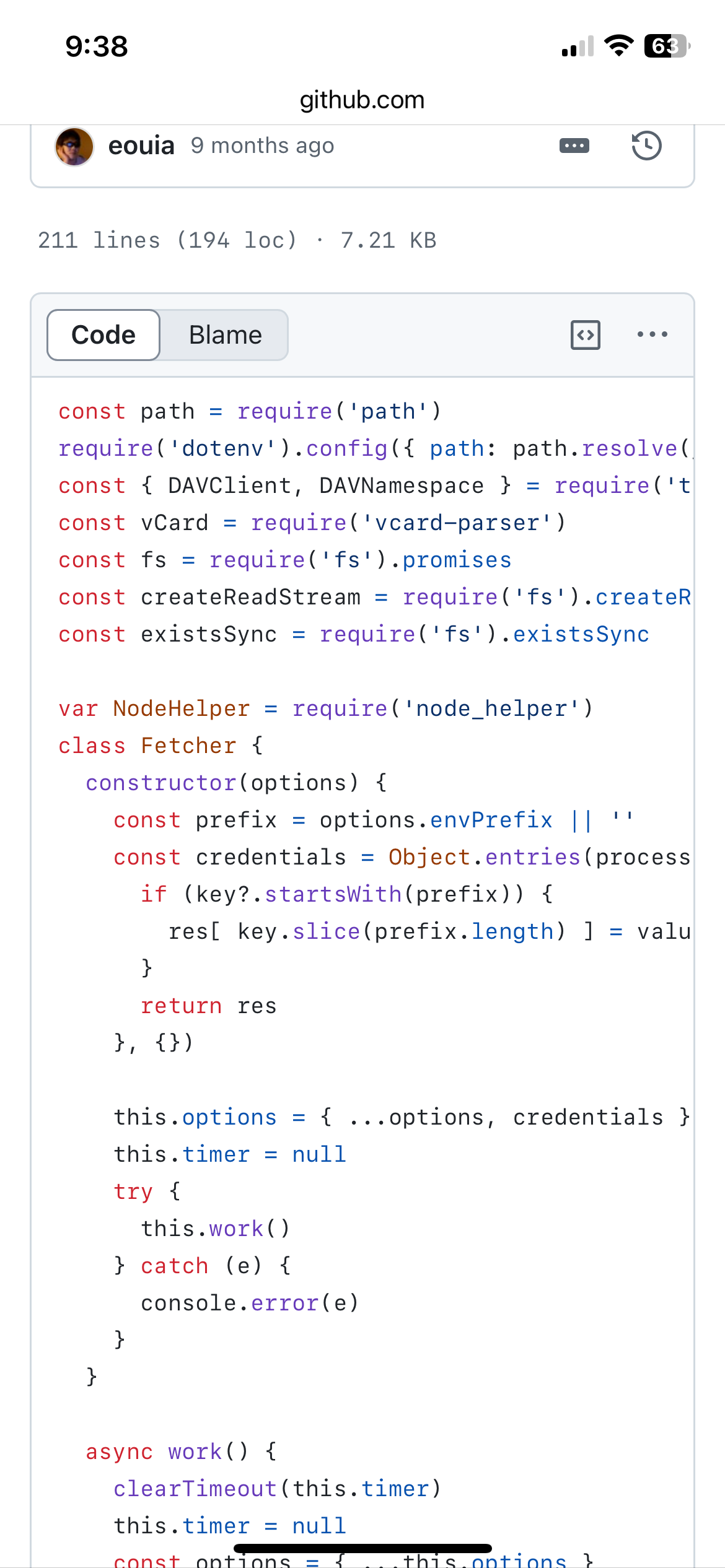
                                      so looking at the code, this module will write out the constructed ICAL format data to

                                        const filePath = path.resolve(__dirname, 'service', '.' + fileName)
                                      

                                      notice the dot… in linux =by convention, file/folder names that start with dot are not shown unless explicitly requested… (making them hidden ‘most’ of the time

                                      SO, the code above is trying to USE a directory ‘service’ (part of this module repo)
                                      in THIS module folder… but write to it…

                                      @karsten13 is the docker volume for where modules are located mapped read/write?? (the compose file doesn’t say)

                                      Sam

                                      How to add modules

                                      learning how to use browser developers window for css changes

                                      karsten13K 1 Reply Last reply Reply Quote 0
                                      • karsten13K Offline
                                        karsten13 @sdetweil
                                        last edited by

                                        @sdetweil said in MMM-CalDAV:

                                        @karsten13 is the docker volume for where modules are located mapped read/write?? (the compose file doesn’t say)

                                        see docs

                                        rw: Read and write access. This is the default if none is specified.

                                        S 1 Reply Last reply Reply Quote 0
                                        • S Offline
                                          sdetweil @karsten13
                                          last edited by sdetweil

                                          @karsten13 thats what I thought

                                          @caw can you ssh logon to your synology and execute a docker command

                                          docker inspect  magicmirror 
                                          

                                          scroll up to look at the mounts section
                                          (this is from a different container, as I don’t have one running MM)

                                          Mounts": [
                                                      {
                                                          "Type": "volume",
                                                          "Name":  
                                          "94f89b1076c681a8dd32a7863d7a867e2077849f0fc53091062aae3797433919",
                                                          "Source": "/var/lib/docker/volumes/94f89b1076c681a8dd32a7863d7a867e2077849f0fc53091062aae3797433919/_data",
                                                          "Destination": "/config",    <---- check for /opt/magic_mirror/modules
                                                          "Driver": "local",
                                                          "Mode": "",
                                                          "RW": true,    <------------    check this , should be true
                                                          "Propagation": ""
                                                      },
                                          

                                          also, how (from where, as what userid?) did you git clone the module, and npm install?

                                          another docker command

                                          docker exec magicmirror ls /opt/magic_mirror/modules -laF

                                          Sam

                                          How to add modules

                                          learning how to use browser developers window for css changes

                                          1 Reply Last reply Reply Quote 1
                                          • C Offline
                                            caw @karsten13
                                            last edited by

                                            @karsten13

                                            i used:

                                            docker run -d --user root --name magicmirror
                                            -p 8036:8080
                                            -v /volume1/docker/magicmirror/config:/opt/magic_mirror/config
                                            -v /volume1/docker/magicmirror/modules:/opt/magic_mirror/modules
                                            -v /volume1/docker/magicmirror/customcss:/opt/magic_mirror/customcss
                                            -e TZ=Europe/Berlin
                                            –restart always
                                            registry.gitlab.com/khassel/magicmirror

                                            S 1 Reply Last reply Reply Quote 0

                                            Hello! It looks like you're interested in this conversation, but you don't have an account yet.

                                            Getting fed up of having to scroll through the same posts each visit? When you register for an account, you'll always come back to exactly where you were before, and choose to be notified of new replies (either via email, or push notification). You'll also be able to save bookmarks and upvote posts to show your appreciation to other community members.

                                            With your input, this post could be even better 💗

                                            Register Login

                                            • 1
                                            • 2
                                            • 3
                                            • 4
                                            • 5
                                            • 2 / 5
                                            • First post
                                              Last post
                                            Enjoying MagicMirror? Please consider a donation!
                                            MagicMirror created by Michael Teeuw.
                                            Forum managed by Sam, technical setup by Karsten.
                                            This forum is using NodeBB as its core | Contributors
                                            Contact | Privacy Policy