MagicMirror Forum
    • Recent
    • Tags
    • Unsolved
    • Solved
    • MagicMirror² Repository
    • Documentation
    • 3rd-Party-Modules
    • Donate
    • Discord
    • Register
    • Login
    A New Chapter for MagicMirror: The Community Takes the Lead
    Read the statement by Michael Teeuw here.

    [HOW_TO] MagicMirror as Desktop Wallpaper (all platform : updated)

    Scheduled Pinned Locked Moved Tutorials
    23 Posts 8 Posters 21.9k Views 9 Watching
    Loading More Posts
    • Oldest to Newest
    • Newest to Oldest
    • Most Votes
    Reply
    • Reply as topic
    Log in to reply
    This topic has been deleted. Only users with topic management privileges can see it.
    • M
      MMRIZE @doctorwhen
      last edited by MMRIZE

      @doctorwhen
      Interesting. I know pcmanfm can set desktop wallpaper with image, but is it possible also application to locate in background layer?

      Anyway, now we can do it natively since 2.17

      doctorwhenD 1 Reply Last reply
      Reply Quote 0
      • doctorwhenD
        doctorwhen @MMRIZE
        last edited by

        @mmrize no, pcmanfm cannot run an application in the desktop background layer, just a wallpaper image. so, i take my comment back, i did not fully understand what you are talking about. but, now i want to try running magicmirror as my desktop background!

        1 Reply Last reply
        Reply Quote 0
        • L
          lexcyr @MMRIZE
          last edited by

          @mmrize Hello
          i just tried it on Xubuntu, the background stay black for me and not transparent. so i can’t see my desktop icons anymore :(.

          M 1 Reply Last reply
          Reply Quote 0
          • M
            MMRIZE @lexcyr
            last edited by

            @lexcyr
            In the Linux environment, some additional options might be needed or modified (I mentioned it in README)
            Anyway, you’ve said;

            so i can’t see my desktop icons anymore

            It means, your MM is not placed on the desktop layer, but normal application layer. (And your transparent setting also doesn’t work)
            I doubt you probably miss these;

            • Your MM might not be 2.17.
            • Or your configuration was wrong.
            1 Reply Last reply
            Reply Quote 0
            • O
              OscarVsp
              last edited by

              Hello, thank for this !

              I’ve followed configuration for linux, and i also had to add the custom css content to have transparency. It works well expect one issue: the mouse click don’t go through magicmirror, so i can’t click on folder/app on the desktop.

              Is it normal, and am i supposed to only use the menu to launch app or am i missing something ? I looked on the electron documentation but i didn’t found answer to this…

              Thanks for your help

              M 3 Replies Last reply
              Reply Quote 0
              • M
                MMRIZE @OscarVsp
                last edited by

                @OscarVsp

                I’ve tested MacOS and Windows, but not Linux, sorry. But Electron Manual says type: 'desktop' options would work on Linux Environment too.
                What kind of Linux are you using?

                1 Reply Last reply
                Reply Quote 0
                • M
                  MMRIZE @OscarVsp
                  last edited by

                  @OscarVsp
                  You can check whether MM is really ‘most-bottomed’. Adjust some CSS to check whether MM is “COVERING but just transparent” against other icons or applications.

                  1 Reply Last reply
                  Reply Quote 1
                  • M
                    MMRIZE @OscarVsp
                    last edited by MMRIZE

                    @OscarVsp

                    • Non-X-11 based Linux Desktop might not work.
                    • This behaviour may severely be dependent on the platform, so in some environment, it might not work.
                    • When some OTHER application occupies the “most-bottomed position” later, MM might be expelled to the foreground. I’m not sure.
                    1 Reply Last reply
                    Reply Quote 0
                    • S sdetweil referenced this topic on
                    • M
                      MMRIZE
                      last edited by

                      Just for confirmation about still-working. (2024-05-16)
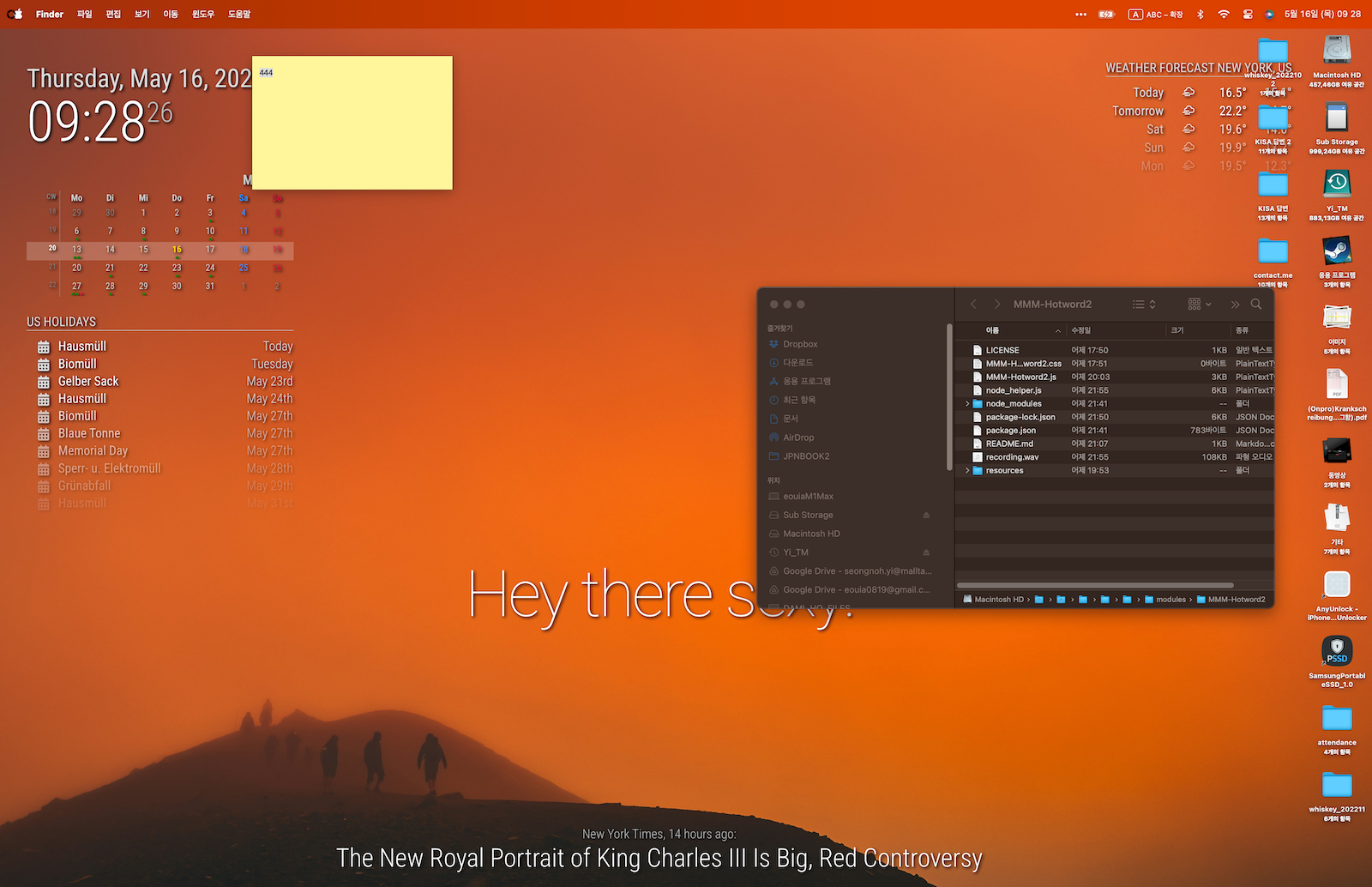
                      스크린샷 2024-05-16 09.28.26.png

                      Both electronOptions and electronSwitches to be added must reside within the config variable in config.js. I didn’t mention it because it seemed obvious. Surprisingly, it seems to be misunderstood as adding this to the end of the file.

                      plainbrokeP 1 Reply Last reply
                      Reply Quote 0
                      • plainbrokeP
                        plainbroke @MMRIZE
                        last edited by

                        @MMRIZE
                        I tried to figure out what and how to make this work. Wow, way above my abilities.
                        Can you make a script for all of it so, us dummies can use it?

                        Slow learner. But trying anyways.
                        MM is on Raspberry Pi 4B w/8gb ram loaded on a 128gb nvme drive.
                        Running Trixie and the latest MM version.

                        M 1 Reply Last reply
                        Reply Quote 0
                        • M
                          MMRIZE @plainbroke
                          last edited by

                          @plainbroke which environment are you using?

                          plainbrokeP 1 Reply Last reply
                          Reply Quote 0
                          • plainbrokeP
                            plainbroke @MMRIZE
                            last edited by

                            @MMRIZE
                            MM latest and windows 10

                            Slow learner. But trying anyways.
                            MM is on Raspberry Pi 4B w/8gb ram loaded on a 128gb nvme drive.
                            Running Trixie and the latest MM version.

                            M 1 Reply Last reply
                            Reply Quote 0
                            • M
                              MMRIZE @plainbroke
                              last edited by

                              @plainbroke can you install MM on your windows and be able to run it? Or should we start from there?

                              J plainbrokeP 2 Replies Last reply
                              Reply Quote 0
                              • J
                                JohnGalt @MMRIZE
                                last edited by

                                @MMRIZE
                                Do you know whether the install script developed and maintained by @sdetweil would install on various specified versions of Windows [E.G. Win7, Win 8, Win 8.1, Win 10 or Win 11]? if that script will install on the various implementations of Windows, that would likely solve this question of how to do it.

                                M S 2 Replies Last reply
                                Reply Quote 0
                                • M
                                  MMRIZE @JohnGalt
                                  last edited by

                                  @JohnGalt
                                  To be honest, I always install MM on various env, manually by myself. Never with his script. So my experience will not be helpful.
                                  Anyway,
                                  Even in windows (I installed MM many times on Windows) it is always same.

                                  1. Install git-bash
                                  2. Install nvm-for-windows, then install node js through it.
                                  3. Make a working directory for MM on git-bash terminal.
                                  4. Clone repository of MM on that directory with git command.
                                  5. Edit some path in package.json for Windows.
                                  6. execute npm install.
                                  7. Make config.js, custom.css
                                  8. For fonts and bundle, install them.

                                  Well, For me it’s not difficult at all but I recommend @sdetweil ‘s script for beginners. As far as I know, it will work on all Windows version.

                                  S J 2 Replies Last reply
                                  Reply Quote 1
                                  • S
                                    sdetweil @JohnGalt
                                    last edited by sdetweil

                                    @JohnGalt the script does NOT work on windows… it is bash only

                                    but install on windows is easy too…
                                    (well, node and npm excluded)
                                    the doc has the steps
                                    open a command prompt (cmd.exe)
                                    use nvm to install node version needed
                                    https://docs.magicmirror.builders/getting-started/installation.html#other-operating-systems

                                    Sam

                                    How to add modules

                                    learning how to use browser developers window for css changes

                                    1 Reply Last reply
                                    Reply Quote 0
                                    • S
                                      sdetweil @MMRIZE
                                      last edited by

                                      @MMRIZE no NOT need git bash
                                      MM runs under cmd.exe just fine

                                      Sam

                                      How to add modules

                                      learning how to use browser developers window for css changes

                                      M 1 Reply Last reply
                                      Reply Quote 0
                                      • M
                                        MMRIZE @sdetweil
                                        last edited by

                                        @sdetweil
                                        I prefer bash. For similar experience with real -NIX/MacOS.

                                        1 Reply Last reply
                                        Reply Quote 1
                                        • J
                                          JohnGalt @MMRIZE
                                          last edited by

                                          @MMRIZE
                                          OK - thanks. Maybe I will give it a try…

                                          1 Reply Last reply
                                          Reply Quote 0
                                          • plainbrokeP
                                            plainbroke @MMRIZE
                                            last edited by

                                            @MMRIZE
                                            No I have tried several times and it will not do one of the steps I forget which one now it has been a while but I do not really want my laptop to have MM on it too.
                                            I was thinking I could use my current MM on my rpi, and show it as a screen saver type thing with this. Sorry I miss understood.


                                            Slow learner. But trying anyways.
                                            MM is on Raspberry Pi 4B w/8gb ram loaded on a 128gb nvme drive.
                                            Running Trixie and the latest MM version.

                                            1 Reply Last reply
                                            Reply Quote 0

                                            Hello! It looks like you're interested in this conversation, but you don't have an account yet.

                                            Getting fed up of having to scroll through the same posts each visit? When you register for an account, you'll always come back to exactly where you were before, and choose to be notified of new replies (either via email, or push notification). You'll also be able to save bookmarks and upvote posts to show your appreciation to other community members.

                                            With your input, this post could be even better 💗

                                            Register Login

                                            • 1
                                            • 2
                                            • 1 / 2
                                            • First post
                                              Last post
                                            Enjoying MagicMirror? Please consider a donation!
                                            MagicMirror created by Michael Teeuw.
                                            Forum managed by Sam, technical setup by Karsten.
                                            This forum is using NodeBB as its core | Contributors
                                            Contact | Privacy Policy