MagicMirror Forum
    • Recent
    • Tags
    • Unsolved
    • Solved
    • MagicMirror² Repository
    • Documentation
    • 3rd-Party-Modules
    • Donate
    • Discord
    • Register
    • Login
    A New Chapter for MagicMirror: The Community Takes the Lead
    Read the statement by Michael Teeuw here.

    Display JSON data from an api

    Scheduled Pinned Locked Moved Requests
    15 Posts 6 Posters 10.9k Views 5 Watching
    Loading More Posts
    • Oldest to Newest
    • Newest to Oldest
    • Most Votes
    Reply
    • Reply as topic
    Log in to reply
    This topic has been deleted. Only users with topic management privileges can see it.
    • P Offline
      PeppaPigKilla
      last edited by

      Hi

      I want to be able to display some data that is delivered in JSON format

      I ideally would like to be able to create a category with several titles in each and eah of the titles will get dynamic data produced by the API I will be using. Has anyone made anything like this or know how to make this ?

      Thank you

      1 Reply Last reply Reply Quote 0
      • P Offline
        PeppaPigKilla
        last edited by

        To add more to this.

        This is the output of the API

        {"player":{"username":"peppapigkilla","platform":"uplay","ubisoft_id":"bb2c294b-d691-4708-863f-a55242d3270e","indexed_at":"2016-05-29T16:03:49.884Z","updated_at":"2017-01-29T11:38:10.755Z","stats":{"ranked":{"has_played":true,"wins":21,"losses":9,"wlr":2.333,"kills":153,"deaths":127,"kd":1.205,"playtime":42600},"casual":{"has_played":true,"wins":468,"losses":383,"wlr":1.222,"kills":3019,"deaths":2212,"kd":1.365,"playtime":729250.0},"overall":{"revives":92,"suicides":21,"reinforcements_deployed":1765,"barricades_built":985,"steps_moved":4027174420,"bullets_fired":94519,"bullets_hit":27318,"headshots":1193,"melee_kills":23,"penetration_kills":329,"assists":927},"progression":{"level":109,"xp":9128}}}}
        

        I want to create a block that displasy this information.
        Not all of it, just some.

        This is a bot i use on my discord
        alt text

        Essentially just the information on this.

        1 Reply Last reply Reply Quote 0
        • L Offline
          looolz
          last edited by

          Did you get any traction with this? I’m looking for similar solutions; Display fields from JSON formatted file.

          1 Reply Last reply Reply Quote 0
          • cowboysdudeC Offline
            cowboysdude Module Developer
            last edited by

            You would need to create a module to do this…

            1 Reply Last reply Reply Quote 0
            • M Offline
              mortenbirkelund
              last edited by

              You could take a look at the MMM-Rest… It doesnt have the ability to read json but could be modified. If you do modify it to accept json, please let me know as I am also looking for a way to do this.

              https://forum.magicmirror.builders/topic/1851/mmm-rest-reading-json

              cowboysdudeC 1 Reply Last reply Reply Quote 0
              • cowboysdudeC Offline
                cowboysdude Module Developer @mortenbirkelund
                last edited by cowboysdude

                @mortenbirkelund it would be easier to just write a new module for it… hacking something will probably not give you the results you want.

                What is the address of the api?

                1 Reply Last reply Reply Quote 0
                • L Offline
                  looolz
                  last edited by

                  @cowboysdude

                  Thanks, yes. Do you happen to know of a module that successfully loads data from a JSON file? Seems like such a simple thing to do.

                  and @mortenbirkelund
                  Thanks for the suggestion. I don’t have the skills to make this, yet.

                  cowboysdudeC 1 Reply Last reply Reply Quote 0
                  • M Offline
                    mortenbirkelund
                    last edited by

                    @cowboysdude said in Display JSON data from an api:

                    it would be easier to just write a new module for it…

                    Perhaps. I just guessed a the rest module could be a good starting point.

                    1 Reply Last reply Reply Quote 1
                    • cowboysdudeC Offline
                      cowboysdude Module Developer @looolz
                      last edited by

                      @looolz Where is the info coming from? What is the api address?

                      L 1 Reply Last reply Reply Quote 0
                      • L Offline
                        looolz @cowboysdude
                        last edited by

                        @cowboysdude There is no API. In this case it’s just shell scripts that write out JSON files. I could modify the shell script to write out the files anyhow I want.

                        1 Reply Last reply Reply Quote 0
                        • yawnsY Offline
                          yawns Moderator
                          last edited by

                          So this is just a JSON file which is sitting on your raspberry, right?
                          The approach would be the same as with the compliments.js module loading a local file with additional statements.
                          That shouldn’t be too difficult. I could try to tackle this, but I need to complete another module first which is waiting for so long already … too much to do and no time :(

                          L 1 Reply Last reply Reply Quote 0
                          • L Offline
                            looolz @yawns
                            last edited by

                            @yawns Thanks for the reply!

                            Well, the JSON-file would be hosted on a server, so a http-path to the file would do the job for sure. A common way to do this that I’ve seen is installing Dropbox on a server, and sharing out the JSON file via a public link.

                            ooom416354O 1 Reply Last reply Reply Quote 0
                            • ooom416354O Offline
                              ooom416354 @looolz
                              last edited by

                              @looolz I am actually trying to do this also. I have JSON data I’m pulling from an API and am able to present it on a page when I click a button but am not entirely sure how to map this over to an actual MM2 module. I’m trying to follow the documentation and it’s overwhelming for someone with limited JS experience! Is there a generic module already created which can be used to kind of re-point the URL to use any JSON feed, change the returned field names and obviously update the results on the mirror?

                              1 Reply Last reply Reply Quote 0
                              • yawnsY Offline
                                yawns Moderator
                                last edited by

                                :D
                                I just noticed @PeppaPigKilla was the one asking for a UbisoftStats display and @looolz was asking for some different usecase

                                @looolz: do you have an example of your JSON file?

                                1 Reply Last reply Reply Quote 0
                                • L Offline
                                  looolz
                                  last edited by looolz

                                  The big elephant in the room here is that Panic’s StatusBoard did this and is now dead. They discontinued their iPad app in November, and users from all over the world are looking for something to replace it with. MagicMirror is the perfect replacement, but it lacks the most popular module: The Graph Module. When the Graph Module in Statusboard is fed just one number, it displays the number with a name, instead of the graph. I think a good solution would be to base further MMM development based on the same JSON structure that has already been established in the StatusBoard community. Examples:

                                  {
                                  
                                  "graph": {
                                  
                                  "title" : "IKKE BEHANDLET",
                                  
                                  "total" : true,
                                  
                                  "datasequences" : [
                                  
                                  {
                                  
                                  "title" : "Datasupport",
                                  
                                  "datapoints" : [
                                  
                                  { "title" : "Antall", "value" : 3 }
                                  
                                  ] } ] } }
                                  

                                  This will in StatusBoard look like this:
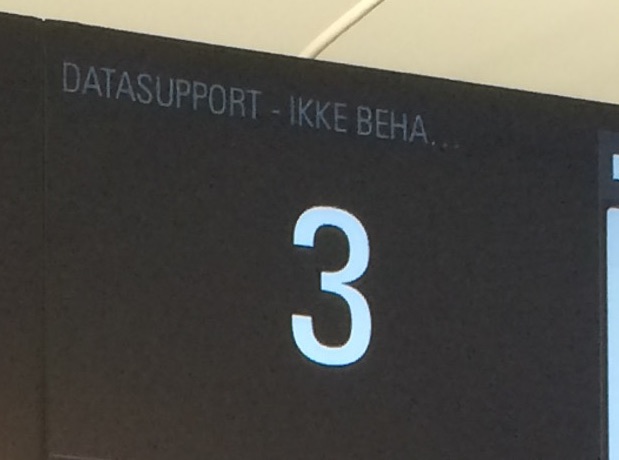
                                  0_1488397034636_datasupport-ikkebehandlet.jpg

                                  If however, the same module is used, and pointed to this JSON-file:

                                  {
                                  
                                  "graph" : {
                                  
                                  "title" : "Prod-Redigering : antall saker opprettet",
                                  
                                  "total" : true,
                                  
                                  "datasequences" : [
                                  
                                  {
                                  
                                  "title" : "Uke 29",
                                  
                                  "datapoints" : [
                                  
                                  {"title" : "Mandag", "value" : 0 },
                                  
                                  {"title" : "Tirsdag", "value" : 4 },
                                  
                                  {"title" : "Onsdag", "value" : 0 },
                                  
                                  {"title" : "Torsdag" , "value" : 3 },
                                  
                                  {"title" : "Fredag", "value" : 2 }
                                  
                                  ]
                                  
                                  }
                                  
                                  ]
                                  
                                  }
                                  
                                  }
                                  

                                  That will produce this nice Column Graph:
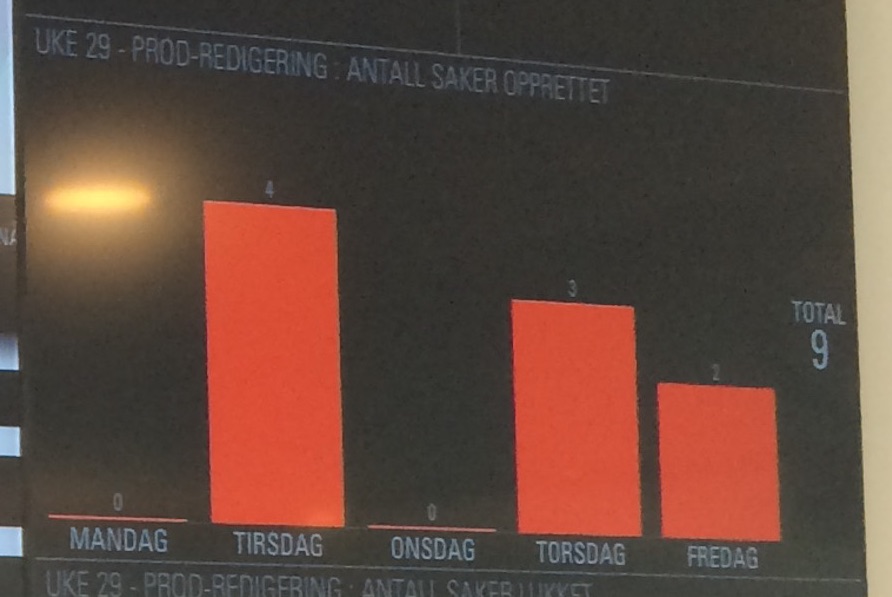
                                  0_1488397213531_produke.jpg

                                  The whitepaper still exists here: https://library.panic.com/statusboard/graph_tutorial/

                                  If someone needs motivation to look into this, please check the comments here:
                                  https://panic.com/blog/the-future-of-status-board/

                                  1 Reply Last reply Reply Quote 0

                                  Hello! It looks like you're interested in this conversation, but you don't have an account yet.

                                  Getting fed up of having to scroll through the same posts each visit? When you register for an account, you'll always come back to exactly where you were before, and choose to be notified of new replies (either via email, or push notification). You'll also be able to save bookmarks and upvote posts to show your appreciation to other community members.

                                  With your input, this post could be even better 💗

                                  Register Login

                                  • 1 / 1
                                  • First post
                                    Last post
                                  Enjoying MagicMirror? Please consider a donation!
                                  MagicMirror created by Michael Teeuw.
                                  Forum managed by Sam, technical setup by Karsten.
                                  This forum is using NodeBB as its core | Contributors
                                  Contact | Privacy Policy