MagicMirror Forum
    • Recent
    • Tags
    • Unsolved
    • Solved
    • MagicMirror² Repository
    • Documentation
    • 3rd-Party-Modules
    • Donate
    • Discord
    • Register
    • Login
    A New Chapter for MagicMirror: The Community Takes the Lead
    Read the statement by Michael Teeuw here.

    MMM-Carousel not displaying

    Scheduled Pinned Locked Moved Forum
    96 Posts 4 Posters 73.1k Views 4 Watching
    Loading More Posts
    • Oldest to Newest
    • Newest to Oldest
    • Most Votes
    Reply
    • Reply as topic
    Log in to reply
    This topic has been deleted. Only users with topic management privileges can see it.
    • P
      pastormingle @Wenike
      last edited by sdetweil

      @wenike this is what i have in my config.js but it’s still not displaying.

                      { 
                              module: 'MMM-Carousel',
                              config: {
                              transitionInterval: 10000,
                              ignoreModules: ['clock', 'alert'],
                              mode: 'slides',
                      slides: [
                          ['helloworld','calendar'],
                          ['weatherforecast','weather'],
                          ]}
                      },	 
      
      S 1 Reply Last reply
      Reply Quote 0
      • S
        sdetweil @pastormingle
        last edited by sdetweil

        @pastormingle do you have all those modules defined in your config.js?

        helloworld is not usually there
        weatherforecast isn’t used lately

        MagicMirror can only show or hide modules. it does not dynamically load them

        so whatever is enabled in config.js is used

        carousel, like pages, face reco , profile switcher, etc, just degolines and idea for showing selected modules content.

        pages and carousel ground them and display on demand (pages) or timed (carousel)
        or some other trigger (face reco content by discovered user)

        Sam

        How to add modules

        learning how to use browser developers window for css changes

        1 Reply Last reply
        Reply Quote 0
        • P
          pastormingle
          last edited by sdetweil

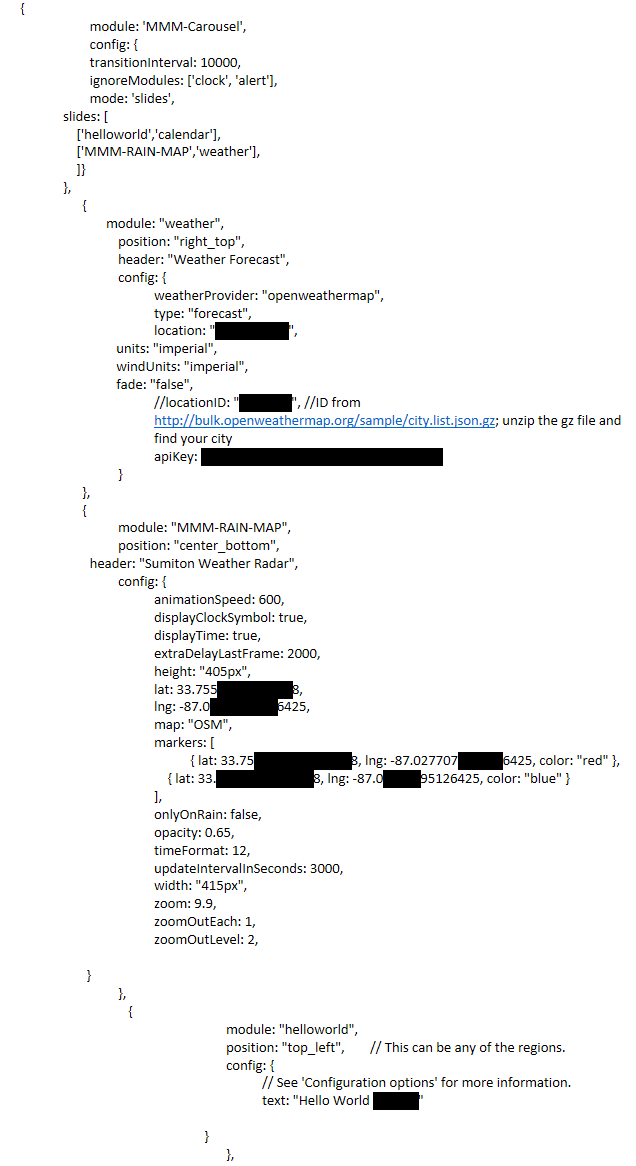
          Heres my config…
          133ed01a-ad59-4194-8d61-f8c7eaec8a3a-image.png

           { 
                                  module: 'MMM-Carousel',
                                  config: {
                                  transitionInterval: 10000,
                                  ignoreModules: ['clock', 'alert'],
                                  mode: 'slides',
                          slides: [
                              ['helloworld','calendar'],
                              ['MMM-RAIN-MAP','weather'],
                              ]}
                          },	 
          		{
                          	module: "weather",
          			position: "right_top",
          			header: "Weather Forecast",
          			config: {
          				weatherProvider: "openweathermap",
          				type: "forecast",
          				location: "Sumiton, US",
                                          units: "imperial",
                                          windUnits: "imperial",
                                          fade: "false",
          				//locationID: "5128581", //ID from http://bulk.openweathermap.org/sample/city.list.json.gz; unzip the gz file and find your city
          				apiKey: "2f0339fa6aa1b719849a3562a0c18d11"
          			}
          		},
          		{
          			module: "MMM-RAIN-MAP",
          			position: "center_bottom",
                                  header: "Sumiton Weather Radar", 
          			config: {
          				animationSpeed: 600,
          				displayClockSymbol: true,
          				displayTime: true,
          				extraDelayLastFrame: 2000,
          				height: "405px",
          				lat: 33.75563027313188,
          				lng: -87.02770795126425,
          				map: "OSM",
          				markers: [
          					{ lat: 33.7556305527313188, lng: -87.0277075595126425, color: "red" },
          				    { lat: 33.75563027313188, lng: -87.02770795126425, color: "blue" }
          				],
          				onlyOnRain: false,
          				opacity: 0.65,
          				timeFormat: 12,
          				updateIntervalInSeconds: 3000,
          				width: "415px",
          				zoom: 9.9,
          				zoomOutEach: 1,
          				zoomOutLevel: 2,
                                        	
                                 }
          			},
          			   {
          						module: "helloworld",
          						position: "top_left",	// This can be any of the regions.
          						config: {
          							// See 'Configuration options' for more information.
          							text: "Hello World 123345"
          			                                
          			                          }
          						},
          
          S 1 Reply Last reply
          Reply Quote 0
          • S
            sdetweil @pastormingle
            last edited by sdetweil

            @pastormingle but u don’t have calendar, altho u specified on a slide

            and without carousel, all those modules display content, right?

            open the developers window, ctrl-shift-i on the keyboard, select the console tab and scroll up

            u can also filter by module with unique part of name in filter field

            car for example

            Sam

            How to add modules

            learning how to use browser developers window for css changes

            P 1 Reply Last reply
            Reply Quote 0
            • P
              pastormingle @sdetweil
              last edited by

              @sdetweil i have a calendar listed but i have multiple calendars.
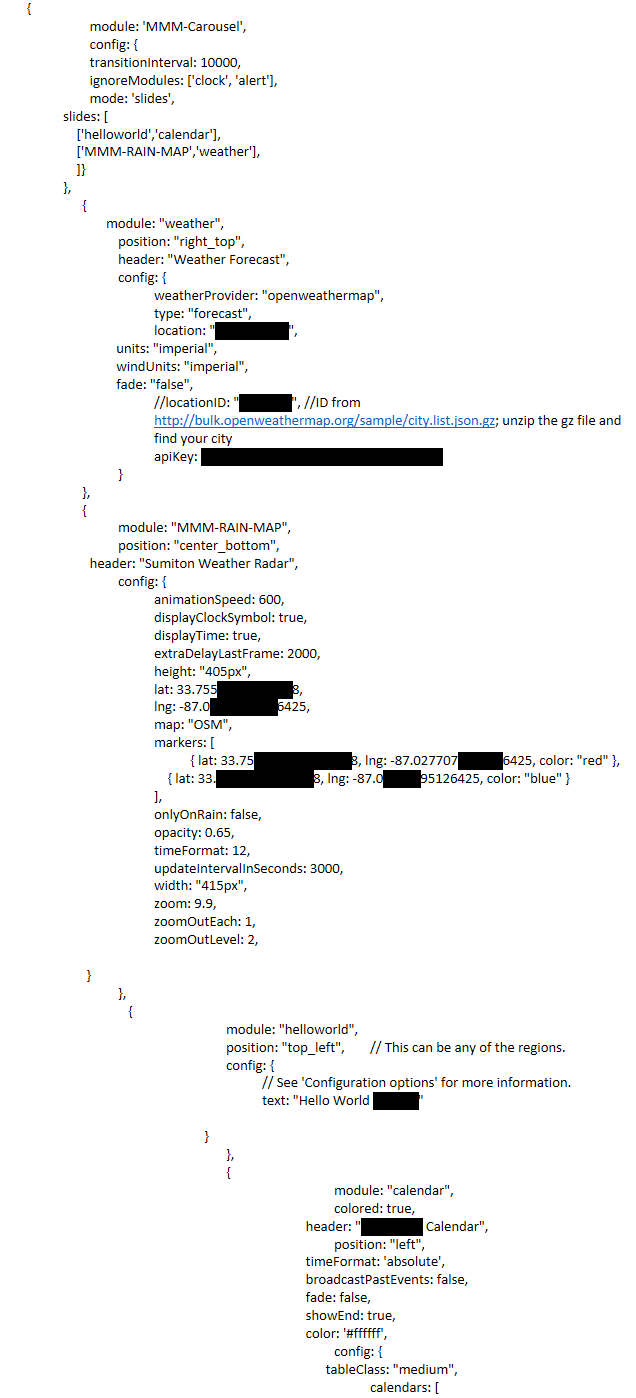
              d577000e-9e4e-4cd9-84b6-3180eb403492-image.png {
              module: ‘MMM-Carousel’,
              config: {
              transitionInterval: 10000,
              ignoreModules: [‘clock’, ‘alert’],
              mode: ‘slides’,
              slides: [
              [‘helloworld’,‘calendar’],
              [‘MMM-RAIN-MAP’,‘weather’],
              ]}
              },
              {
              module: “weather”,
              position: “right_top”,
              header: “Weather Forecast”,
              config: {
              weatherProvider: “openweathermap”,
              type: “forecast”,
              location: “Sumiton, US”,
              units: “imperial”,
              windUnits: “imperial”,
              fade: “false”,
              //locationID: “5128581”, //ID from http://bulk.openweathermap.org/sample/city.list.json.gz; unzip the gz file and find your city
              apiKey: “2f0339fa6aa1b719849a3562a0c18d11”
              }
              },
              {
              module: “MMM-RAIN-MAP”,
              position: “center_bottom”,
              header: “Sumiton Weather Radar”,
              config: {
              animationSpeed: 600,
              displayClockSymbol: true,
              displayTime: true,
              extraDelayLastFrame: 2000,
              height: “405px”,
              lat: 33.75563027313188,
              lng: -87.02770795126425,
              map: “OSM”,
              markers: [
              { lat: 33.7556305527313188, lng: -87.0277075595126425, color: “red” },
              { lat: 33.75563027313188, lng: -87.02770795126425, color: “blue” }
              ],
              onlyOnRain: false,
              opacity: 0.65,
              timeFormat: 12,
              updateIntervalInSeconds: 3000,
              width: “415px”,
              zoom: 9.9,
              zoomOutEach: 1,
              zoomOutLevel: 2,

                                 }
              		},
              		   {
              					module: "helloworld",
              					position: "top_left",	// This can be any of the regions.
              					config: {
              						// See 'Configuration options' for more information.
              						text: "Hello World 123345"
              		                                
              		                          }
              					},
              					{
              								module: "calendar",
              								colored: true,
              					                        header: "Charlottes Calendar",
              								position: "left",
              					                        timeFormat: 'absolute',
              					                        broadcastPastEvents: false,
              					                        fade: false,
              					                        showEnd: true,
              					                        color: '#ffffff',
              								config: {
              					                              tableClass: "medium",
              

              calendars: [

              mumblebajM 1 Reply Last reply
              Reply Quote 0
              • mumblebajM
                mumblebaj Module Developer @pastormingle
                last edited by

                @pastormingle right_top and center_bottom are not positions on the mirror if I am not mistaken. See this link for more information regarding positions: https://forum.magicmirror.builders/topic/286/regions

                Check out my modules at: https://github.com/mumblebaj?tab=repositories
                Check my blog-post: https://mumblebaj.xyz/
                Check my MM Container: https://hub.docker.com/repository/docker/mumblebaj/magicmirror/general

                P S 2 Replies Last reply
                Reply Quote 0
                • P
                  pastormingle @mumblebaj
                  last edited by sdetweil

                  @mumblebaj So I’ve loaded the default config.js just to see if the course module is working at all. I’ve sent to use the global function and still, I see nothing changing on the screen.

                  /* Magic Mirror Config Sample
                   *
                   * By Michael Teeuw https://michaelteeuw.nl
                   * MIT Licensed.
                   *
                   * For more information on how you can configure this file
                   * see https://docs.magicmirror.builders/getting-started/configuration.html#general
                   * and https://docs.magicmirror.builders/modules/configuration.html
                   */
                  let config = {
                  	address: "localhost", 	// Address to listen on, can be:
                  							// - "localhost", "127.0.0.1", "::1" to listen on loopback interface
                  							// - another specific IPv4/6 to listen on a specific interface
                  							// - "0.0.0.0", "::" to listen on any interface
                  							// Default, when address config is left out or empty, is "localhost"
                  	port: 8080,
                  	basePath: "/", 	// The URL path where MagicMirror is hosted. If you are using a Reverse proxy
                  					// you must set the sub path here. basePath must end with a /
                  	ipWhitelist: ["127.0.0.1", "::ffff:127.0.0.1", "::1"], 	// Set [] to allow all IP addresses
                  															// or add a specific IPv4 of 192.168.1.5 :
                  															// ["127.0.0.1", "::ffff:127.0.0.1", "::1", "::ffff:192.168.1.5"],
                  															// or IPv4 range of 192.168.3.0 --> 192.168.3.15 use CIDR format :
                  															// ["127.0.0.1", "::ffff:127.0.0.1", "::1", "::ffff:192.168.3.0/28"],
                  
                  	useHttps: false, 		// Support HTTPS or not, default "false" will use HTTP
                  	httpsPrivateKey: "", 	// HTTPS private key path, only require when useHttps is true
                  	httpsCertificate: "", 	// HTTPS Certificate path, only require when useHttps is true
                  
                  	language: "en",
                  	locale: "en-US",
                  	logLevel: ["INFO", "LOG", "WARN", "ERROR"], // Add "DEBUG" for even more logging
                  	timeFormat: 24,
                  	units: "metric",
                  	// serverOnly:  true/false/"local" ,
                  	// local for armv6l processors, default
                  	//   starts serveronly and then starts chrome browser
                  	// false, default for all NON-armv6l devices
                  	// true, force serveronly mode, because you want to.. no UI on this device
                  
                  	modules: [
                  		{
                  			module: "alert",
                  		},
                  		{
                  			module: "updatenotification",
                  			position: "top_bar"
                  		},
                  		{
                  			module: "clock",
                  			position: "top_left"
                  		},
                  		{
                  			module: "calendar",
                  			header: "US Holidays",
                  			position: "top_left",
                  			config: {
                  				calendars: [
                  					{
                  						symbol: "calendar-check",
                  						url: "webcal://www.calendarlabs.com/ical-calendar/ics/76/US_Holidays.ics"					}
                  				]
                  			}
                  		},
                  		{
                  			module: "compliments",
                  			position: "lower_third"
                  		},
                  		{
                  			module: "weather",
                  			position: "top_right",
                  			config: {
                  				weatherProvider: "openweathermap",
                  				type: "current",
                  				location: "New York",
                  				locationID: "5128581", //ID from http://bulk.openweathermap.org/sample/city.list.json.gz; unzip the gz file and find your city
                  				apiKey: "YOUR_OPENWEATHER_API_KEY"
                  			}
                  		},
                  		{
                  			module: "weather",
                  			position: "top_right",
                  			header: "Weather Forecast",
                  			config: {
                  				weatherProvider: "openweathermap",
                  				type: "forecast",
                  				location: "New York",
                  				locationID: "5128581", //ID from http://bulk.openweathermap.org/sample/city.list.json.gz; unzip the gz file and find your city
                  				apiKey: "YOUR_OPENWEATHER_API_KEY"
                  			}
                  		},
                  		{
                  			module: "newsfeed",
                  			position: "bottom_bar",
                  			config: {
                  				feeds: [
                  					{
                  						title: "New York Times",
                  						url: "https://rss.nytimes.com/services/xml/rss/nyt/HomePage.xml"
                  					}
                  				],
                  				showSourceTitle: true,
                  				showPublishDate: true,
                  				broadcastNewsFeeds: true,
                  				broadcastNewsUpdates: true
                  			}
                  		},
                          {
                              module: 'MMM-Carousel',
                              config: {
                                  transitionInterval: 10000,
                                  ignoreModules: [''],
                                  mode: 'global'
                              }
                          }
                   	]
                  };
                  
                  /*************** DO NOT EDIT THE LINE BELOW ***************/
                  if (typeof module !== "undefined") {module.exports = config;}
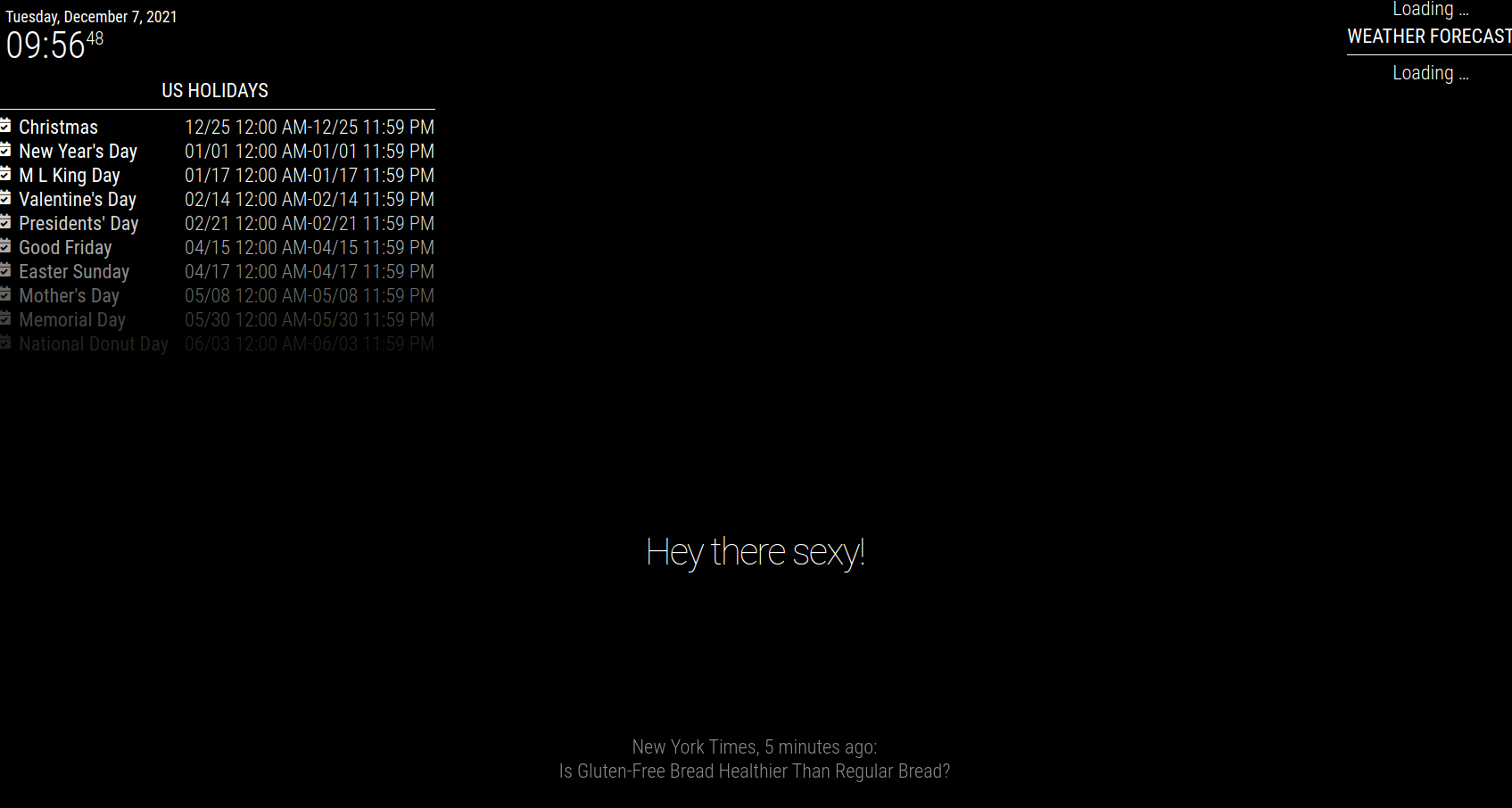
                  

                  592e9333-72de-4f7c-a7c9-b835060614ef-image.png

                  mumblebajM 1 Reply Last reply
                  Reply Quote 0
                  • mumblebajM
                    mumblebaj Module Developer @pastormingle
                    last edited by

                    @pastormingle said in MMM-Carousel not displaying:

                    MMM-Carousel

                    Just a silly question, when you installed the module. did you go into the MMM-Carousel folder and ran npm install?

                    Check out my modules at: https://github.com/mumblebaj?tab=repositories
                    Check my blog-post: https://mumblebaj.xyz/
                    Check my MM Container: https://hub.docker.com/repository/docker/mumblebaj/magicmirror/general

                    P 1 Reply Last reply
                    Reply Quote 0
                    • S
                      sdetweil @mumblebaj
                      last edited by

                      @pastormingle @mumblebaj also see position here

                      https://docs.magicmirror.builders/modules/configuration.html

                      Sam

                      How to add modules

                      learning how to use browser developers window for css changes

                      1 Reply Last reply
                      Reply Quote 0
                      • P
                        pastormingle @mumblebaj
                        last edited by

                        @mumblebaj said in MMM-Carousel not displaying:

                        npm install

                        not a silly question as it’s not in the install readme file…

                        Installation

                        Run these commands at the root of your magic mirror install.

                        cd modules
                        git clone https://github.com/shbatm/MMM-Carousel
                        

                        Using the module

                        To use this module, add the following configuration block to the modules array in the config/config.js file:

                        S mumblebajM 2 Replies Last reply
                        Reply Quote 0
                        • S
                          sdetweil @pastormingle
                          last edited by

                          @pastormingle doesn’t have a node helper, so doesn’t need an npm install

                          Sam

                          How to add modules

                          learning how to use browser developers window for css changes

                          mumblebajM 1 Reply Last reply
                          Reply Quote 0
                          • mumblebajM
                            mumblebaj Module Developer @pastormingle
                            last edited by

                            @pastormingle Yes, you have to run nom install in the module folder. I saw that the module has a package.json with dependencies. I just installed it on my machine and it works. One thing to note, it only rotates modules that occupying the same position on the mirror. I have 2 modules that occupy the top_right position and those are rotating and the others remain unchanged when using the global config option.

                            Check out my modules at: https://github.com/mumblebaj?tab=repositories
                            Check my blog-post: https://mumblebaj.xyz/
                            Check my MM Container: https://hub.docker.com/repository/docker/mumblebaj/magicmirror/general

                            P 1 Reply Last reply
                            Reply Quote 0
                            • mumblebajM
                              mumblebaj Module Developer @sdetweil
                              last edited by

                              @sdetweil Hi Sam, For my understanding. What about dependencies in the package.json? If those are not default with MM then you have to run npm install I would think? Or is my understanding incorrect?

                              Check out my modules at: https://github.com/mumblebaj?tab=repositories
                              Check my blog-post: https://mumblebaj.xyz/
                              Check my MM Container: https://hub.docker.com/repository/docker/mumblebaj/magicmirror/general

                              S 1 Reply Last reply
                              Reply Quote 0
                              • P
                                pastormingle @mumblebaj
                                last edited by

                                @mumblebaj do you have an example of your config?

                                P mumblebajM 2 Replies Last reply
                                Reply Quote 0
                                • P
                                  pastormingle @pastormingle
                                  last edited by

                                  @pastormingle I sent my weather module to use the same as the clock position but still nothing…

                                  1 Reply Last reply
                                  Reply Quote 0
                                  • mumblebajM
                                    mumblebaj Module Developer @pastormingle
                                    last edited by

                                    @pastormingle I used one of the default.

                                                module: 'MMM-Carousel',
                                                config: {
                                                    transitionInterval: 10000,
                                                    ignoreModules: [],
                                                    mode: 'positional',
                                                    top_left: {enabled: true, ignoreModules: [], overrideTransitionInterval: 15000},
                                                    top_right: {enabled: true, ignoreModules: ['currentweather']}
                                                }
                                            },
                                    

                                    Just tested the Global option and it works fine and rotates all the modules one by one.
                                    Here is the config for global

                                                module: 'MMM-Carousel',
                                                config: {
                                                    transitionInterval: 10000,
                                                    ignoreModules: ['clock'],
                                                    mode: 'global'
                                                }
                                            }

                                    Check out my modules at: https://github.com/mumblebaj?tab=repositories
                                    Check my blog-post: https://mumblebaj.xyz/
                                    Check my MM Container: https://hub.docker.com/repository/docker/mumblebaj/magicmirror/general

                                    P 1 Reply Last reply
                                    Reply Quote 0
                                    • P
                                      pastormingle @mumblebaj
                                      last edited by sdetweil

                                      @mumblebaj hum… this is my config…

                                      /•
                                       *
                                       * By Michael Teeuw https://michaelteeuw.nl
                                       * MIT Licensed.
                                       *
                                       * For more information on how you can configure this file
                                       * see https://docs.magicmirror.builders/getting-started/configuration.html#general
                                       * and https://docs.magicmirror.builders/modules/configuration.html
                                       */
                                      let config = {
                                      	address: "localhost", 	// Address to listen on, can be:
                                      							// - "localhost", "127.0.0.1", "::1" to listen on loopback interface
                                      							// - another specific IPv4/6 to listen on a specific interface
                                      							// - "0.0.0.0", "::" to listen on any interface
                                      							// Default, when address config is left out or empty, is "localhost"
                                      	port: 8080,
                                      	basePath: "/", 	// The URL path where MagicMirror is hosted. If you are using a Reverse proxy
                                      					// you must set the sub path here. basePath must end with a /
                                      	ipWhitelist: ["127.0.0.1", "::ffff:127.0.0.1", "::1"], 	// Set [] to allow all IP addresses
                                      															// or add a specific IPv4 of 192.168.1.5 :
                                      															// ["127.0.0.1", "::ffff:127.0.0.1", "::1", "::ffff:192.168.1.5"],
                                      															// or IPv4 range of 192.168.3.0 --> 192.168.3.15 use CIDR format :
                                      															// ["127.0.0.1", "::ffff:127.0.0.1", "::1", "::ffff:192.168.3.0/28"],
                                      
                                      	useHttps: false, 		// Support HTTPS or not, default "false" will use HTTP
                                      	httpsPrivateKey: "", 	// HTTPS private key path, only require when useHttps is true
                                      	httpsCertificate: "", 	// HTTPS Certificate path, only require when useHttps is true
                                      
                                      	language: "en",
                                      	locale: "en-US",
                                      	logLevel: ["INFO", "LOG", "WARN", "ERROR"], // Add "DEBUG" for even more logging
                                      	timeFormat: 24,
                                      	units: "metric",
                                      	// serverOnly:  true/false/"local" ,
                                      	// local for armv6l processors, default
                                      	//   starts serveronly and then starts chrome browser
                                      	// false, default for all NON-armv6l devices
                                      	// true, force serveronly mode, because you want to.. no UI on this device
                                      
                                      	modules: [
                                      		{
                                      			module: "alert",
                                      		},
                                      		{
                                      			module: "updatenotification",
                                      			position: "top_bar"
                                      		},
                                      		{
                                      			module: "clock",
                                      			position: "top_left"
                                      		},
                                      		{
                                      			module: "calendar",
                                      			header: "US Holidays",
                                      			position: "top_left",
                                      			config: {
                                      				calendars: [
                                      					{
                                      						symbol: "calendar-check",
                                      						url: "webcal://www.calendarlabs.com/ical-calendar/ics/76/US_Holidays.ics"					}
                                      				]
                                      			}
                                      		},
                                      		{
                                      			module: "compliments",
                                      			position: "lower_third"
                                      		},
                                      		{
                                      			module: "weather",
                                      			position: "top_right",
                                      			config: {
                                      				weatherProvider: "openweathermap",
                                      				type: "current",
                                      				location: "New York",
                                      				locationID: "5128581", //ID from http://bulk.openweathermap.org/sample/city.list.json.gz; unzip the gz file and find your city
                                      				apiKey: "YOUR_OPENWEATHER_API_KEY"
                                      			}
                                      		},
                                      		{
                                      			module: "weather",
                                      			position: "top_left",
                                      			header: "Weather Forecast",
                                      			config: {
                                      				weatherProvider: "openweathermap",
                                      				type: "forecast",
                                      				location: "New York",
                                      				locationID: "5128581", //ID from http://bulk.openweathermap.org/sample/city.list.json.gz; unzip the gz file and find your city
                                      				apiKey: "YOUR_OPENWEATHER_API_KEY"
                                      			}
                                      		},
                                      		{
                                      			module: "newsfeed",
                                      			position: "bottom_bar",
                                      			config: {
                                      				feeds: [
                                      					{
                                      						title: "New York Times",
                                      						url: "https://rss.nytimes.com/services/xml/rss/nyt/HomePage.xml"
                                      					}
                                      				],
                                      				showSourceTitle: true,
                                      				showPublishDate: true,
                                      				broadcastNewsFeeds: true,
                                      				broadcastNewsUpdates: true
                                      			}
                                      		},
                                              {
                                                  module: 'MMM-Carousel',
                                                  config: {
                                                      transitionInterval: 10000,
                                                      ignoreModules: [],
                                                      mode: 'global'
                                                  }
                                              }
                                       	]
                                      };
                                      
                                      /*************** DO NOT EDIT THE LINE BELOW ***************/
                                      if (typeof module !== "undefined") {module.exports = config;}
                                      
                                      mumblebajM S 2 Replies Last reply
                                      Reply Quote 0
                                      • mumblebajM
                                        mumblebaj Module Developer @pastormingle
                                        last edited by

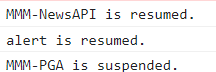
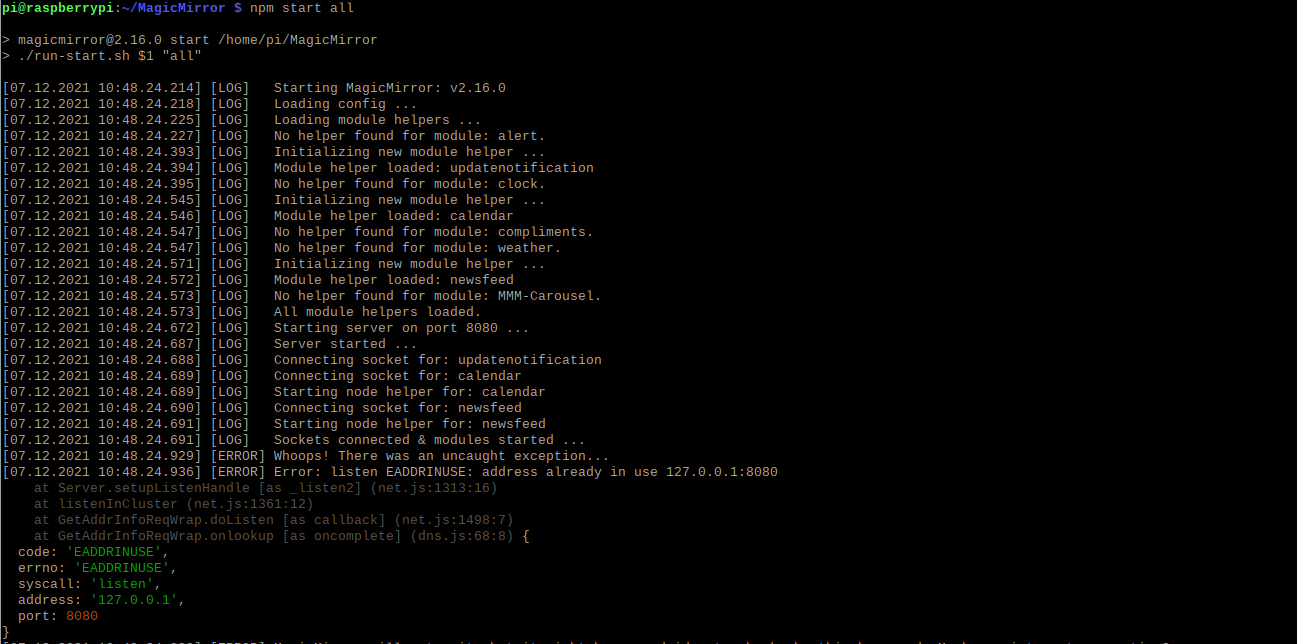
                                        @pastormingle Are there any errors where you start the mirror? I.e. if you do npm start are there any errors in the terminal window or if you use pm2 you can check the pm2 logs. You can also check the Developer Console, do shift_ctrl + i and select the console tab. See if there are any errors there. If no errors you should see something like the below, modules suspended…module resumed
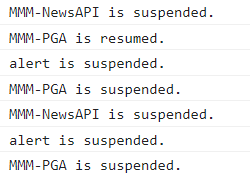
                                        a984130d-1aeb-4cf0-8a06-a93746a19df0-image.png
                                        c18f2dba-fb0f-4f55-b663-d4d47b5e56ce-image.png

                                        Check out my modules at: https://github.com/mumblebaj?tab=repositories
                                        Check my blog-post: https://mumblebaj.xyz/
                                        Check my MM Container: https://hub.docker.com/repository/docker/mumblebaj/magicmirror/general

                                        P 2 Replies Last reply
                                        Reply Quote 0
                                        • S
                                          sdetweil @pastormingle
                                          last edited by

                                          @pastormingle please use code block around config info

                                          Sam

                                          How to add modules

                                          learning how to use browser developers window for css changes

                                          P 1 Reply Last reply
                                          Reply Quote 0
                                          • P
                                            pastormingle @mumblebaj
                                            last edited by

                                            @mumblebaj 4d6e0483-a7d3-4fac-af2c-2e293870112f-image.png

                                            mumblebajM 1 Reply Last reply
                                            Reply Quote 0

                                            Hello! It looks like you're interested in this conversation, but you don't have an account yet.

                                            Getting fed up of having to scroll through the same posts each visit? When you register for an account, you'll always come back to exactly where you were before, and choose to be notified of new replies (either via email, or push notification). You'll also be able to save bookmarks and upvote posts to show your appreciation to other community members.

                                            With your input, this post could be even better 💗

                                            Register Login

                                            • 1
                                            • 2
                                            • 3
                                            • 4
                                            • 5
                                            • 1 / 5
                                            • First post
                                              Last post
                                            Enjoying MagicMirror? Please consider a donation!
                                            MagicMirror created by Michael Teeuw.
                                            Forum managed by Sam, technical setup by Karsten.
                                            This forum is using NodeBB as its core | Contributors
                                            Contact | Privacy Policy