MagicMirror Forum
    • Recent
    • Tags
    • Unsolved
    • Solved
    • MagicMirror² Repository
    • Documentation
    • 3rd-Party-Modules
    • Donate
    • Discord
    • Register
    • Login
    A New Chapter for MagicMirror: The Community Takes the Lead
    Read the statement by Michael Teeuw here.

    MMM-Carousel - how to configure a module multiple times on the SAME page?

    Scheduled Pinned Locked Moved Solved Troubleshooting
    29 Posts 6 Posters 13.3k Views 6 Watching
    Loading More Posts
    • Oldest to Newest
    • Newest to Oldest
    • Most Votes
    Reply
    • Reply as topic
    Log in to reply
    This topic has been deleted. Only users with topic management privileges can see it.
    • KristjanESPERANTOK Offline
      KristjanESPERANTO Module Developer @Fantasmic78
      last edited by

      @fantasmic78 This should be possible with most modules. For example, I do this with MMM-JsonTable. The essential thing is that you use the same carouselId for both module instances.
      Try it that way and let me/us know if you can’t get it to work.

      1 Reply Last reply Reply Quote 0
      • F Offline
        Fantasmic78
        last edited by

        Thanks @sdetweil and @KristjanESPERANTO - I solved the problem now successfully using your hints :thumbs_up_light_skin_tone:

        Using MMM-Pages indeed looked a bit easier to configure - however, it showed one disadvantage: there were no navigation buttons (to select a page manually or to move left/right, like in MMM-Carousel) - I’d like to have these, because I’m planning to use a touchscreen monitor.

        So I went back to MMM-Carousel - and the essential hint was indeed to use the SAME carouselId for ALL same module instances on the SAME page. Actually this is a small flaw in the documentation (the examples there are based on the situation that you have only one instance of a module on a page, and when having another instance on another page, then you need to have a different carouselId).

        So thanks again!

        mumblebajM KristjanESPERANTOK 2 Replies Last reply Reply Quote 1
        • mumblebajM Offline
          mumblebaj Module Developer @Fantasmic78
          last edited by

          @fantasmic78 MMM-page-indicator works with MMM-pages and gives you the ability to select pages manually if you like. You would see the below on the page depending on how many pages you have and it is clickable.

          f50c5739-8cac-4784-89b5-d86bfcf0d2a2-image.png

          Check out my modules at: https://github.com/mumblebaj?tab=repositories
          Check my blog-post: https://mumblebaj.xyz/
          Check my MM Container: https://hub.docker.com/repository/docker/mumblebaj/magicmirror/general

          F 1 Reply Last reply Reply Quote 0
          • KristjanESPERANTOK Offline
            KristjanESPERANTO Module Developer @Fantasmic78
            last edited by

            @fantasmic78 I am glad that I could help.

            It would be good to improve the documentation for such cases. Do you have a concrete suggestion how?

            F 1 Reply Last reply Reply Quote 0
            • plainbrokeP Offline
              plainbroke @Fantasmic78
              last edited by plainbroke

              @fantasmic78
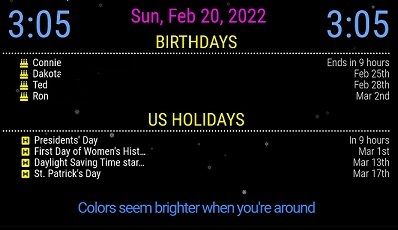
              This is what 2 instances of calendar look like in my carousel setup.
              Capture.JPG

              is that what you are trying to do?

              Slow learner. But trying anyways.
              MM is on Raspberry Pi 4B w/8gb ram loaded on a 128gb nvme drive.
              Running Trixie and the latest MM version.

              F 1 Reply Last reply Reply Quote 0
              • F Offline
                Fantasmic78 @mumblebaj
                last edited by

                @mumblebaj
                Yes, thanks - I’m aware of the MMM-page-indicator, but I prefer the navigation buttons from MMM-Carousel (big left/right icons, in addition to the clickable indicators for the number of pages).

                1 Reply Last reply Reply Quote 1
                • F Offline
                  Fantasmic78 @plainbroke
                  last edited by

                  @plainbroke yes exactly - and I managed to do it like this in the meanwhile.

                  As mentioned in one of the posts above - the key learning was to use the same carouselId for all modules (which I use multiple times) which should be on the same page.

                  So my configuration for MMM-Carousel looks like this now:

                  {
                              module: 'MMM-Carousel',
                              position: 'bottom_bar', // Required only for navigation controls
                              config: {
                                  transitionInterval: 15000,
                                  showPageIndicators: true,
                                  showPageControls: true,
                                  ignoreModules: ['clock', 'alert', 'updatenotification'],
                                  mode: 'slides',
                                  slides: {
                                      "1": [
                                              {name:'calendar', carouselId: "Calendar1"}, // Calendar of Chris
                                              {name:'calendar', carouselId: "Calendar1"}, // Calendar of Karin
                                              'MMM-WeeklySchedule'
                                           ],
                                      "2": [
                                              {name:'calendar', carouselId: "Calendar2"}, // Calendar for trash
                                              {name:'calendar', carouselId: "Calendar2"}, // Calendar for Austrian holidays
                                              {name:'calendar', carouselId: "Calendar2"}, // Calendard for birthdays
                                              'newsfeed'
                                           ],
                                      "3": [
                                              {name:'weather', carouselId: "Weather1"}, // current weather at home
                                              {name:'weather', carouselId: "Weather1"}, // weather forecast at home
                                              {name:'weather', carouselId: "Weather1"}, // weather in some other location
                                              'MMM-network-signal',
                                              'MMM-NetworkConnection'
                                           ],
                                      "4": [
                                              'MMM-GooglePhotos'
                                           ]
                                  }
                              }
                  		},
                  

                  It shows two calendars on the first page, and 3 other calendars on the second page. Further, it shows 3 weather modules on the third page.

                  R 1 Reply Last reply Reply Quote 0
                  • F Offline
                    Fantasmic78 @KristjanESPERANTO
                    last edited by

                    @kristjanesperanto I think the best place for such documentation would be in section “Example - Advanced Slides Carousel” in the README.md. You could use my example configuration (see my other post above)

                    KristjanESPERANTOK 1 Reply Last reply Reply Quote 0
                    • KristjanESPERANTOK Offline
                      KristjanESPERANTO Module Developer @Fantasmic78
                      last edited by

                      Thanks 🙂 I’ve created a Pull Request.

                      1 Reply Last reply Reply Quote 0
                      • R Offline
                        reverendz @Fantasmic78
                        last edited by

                        @Fantasmic78

                        Found this because this is just what I’m trying to do.

                        I’m trying to use the EXT3 calendar showing monthly views.

                        However, when I try the config, one of two things happens:

                        • If I list a position for the additional months, they all show up on the same page.

                        • If I don’t list a position, the other months don’t show up.

                        I can’t seem to get it so that one month shows up with a forward/backward option in Carousel when using MMM-CalendarExt3.

                        If anyone has an example config and can step me through how to set this up with Carousel it’d be greatly appreciated.

                        I liked Carousel because I only want to move the calendar forward, but I’m open to other options. The big thing is: I’m using a touch screen so really want on-screen navigation/click.

                        S 1 Reply Last reply Reply Quote 0
                        • S Offline
                          sdetweil @reverendz
                          last edited by sdetweil

                          @reverendz use mmm-pages, carousel is hard code to use module names.

                          in pages you can define page names , mom, dad , son , daughtrr, weather, shopping, whatever

                          and on each module using the classes:property to specify which page(s) this instance is on

                          i have a setup w 3 CalendarExt3 instances
                          this month, next and next after that

                          Sam

                          How to add modules

                          learning how to use browser developers window for css changes

                          S 1 Reply Last reply Reply Quote 0
                          • S Offline
                            sdetweil @sdetweil
                            last edited by sdetweil

                            @reverendz use MMM-PageIndicator for manual navigation
                            see this post i made showing all the configuration

                            https://forum.magicmirror.builders/post/118877

                            Sam

                            How to add modules

                            learning how to use browser developers window for css changes

                            R 1 Reply Last reply Reply Quote 0
                            • R Offline
                              reverendz @sdetweil
                              last edited by

                              @sdetweil

                              Thank you for the response!

                              So I am a bit lost. I tried pages and after figuring out the “fixed” vs. “pages” bit, I can’t seem to change the page-indicators to buttons.

                              The only thing I found was this:

                              .MMM-page-indicator div.module-content div i:nth-child(2)::before {
                                  content: "\f055";  // <-- icon code goes here
                                  font-family: FontAwesome;
                              }
                              

                              As a newbie, “code goes here” leaves me grasping. Does your link have another solution or is there somewhere I can complete the content?

                              Other than that, I saw someone basically created a custom button module to do the same.

                              S 1 Reply Last reply Reply Quote 0
                              • S Offline
                                sdetweil @reverendz
                                last edited by sdetweil

                                @reverendz sorry you didn’t get the link to the link

                                see here
                                https://forum.magicmirror.builders/post/118877

                                Sam

                                How to add modules

                                learning how to use browser developers window for css changes

                                R 1 Reply Last reply Reply Quote 0
                                • R Offline
                                  reverendz @sdetweil
                                  last edited by

                                  @sdetweil

                                  Thank you. I got the link and I still don’t get it.

                                  I am lost. The icons that show up look like standard MMM-page-indicator buttons.

                                  I added this based on the image, but it probably doesn’t apply since I’m not using the posters icons.

                                  /* MMM-page-indicator config to turn indicator into buttons */
                                  .MMM-page-indicator div module-content div i:nth-child(1):: before { 
                                  font-size: 20px; content: "\f073"; font-family: FontAwesome;
                                  }
                                  .MMM-page-indicator div module-content div i:nth-child(2):: before { 
                                  font-size: 20p; content: "\f2c9"; font-family: FontAwesome;
                                  }
                                  .MMM-page-indicator div module-content div i:nth-child(3):: before { 
                                  font-size: 20px; content: "\f1b9"; font-family: FontAwesome;
                                  }
                                  .MMM-page-indicator div module-content div i:nth-child(4):: before { 
                                  font-size: 20px; content: "|f70c"; font-family: FontAwesome;
                                  }
                                  .MMM-page-indicator div module-content div i:nth-child(5):: before { 
                                  font-size: 20px; content: "\f19d"; font-family: FontAwesome;
                                  }
                                  .MMM-page-indicator div.module-content div i:nth-child(6)::before { 
                                  font-size: 20px; content: " flea";
                                  font-family: FontAwesome;
                                  }
                                  .MMM-page-indicator div module-content div i:nth-child(7):: before { 
                                  font-size:20px; content: "\f03d"; font-family: FontAwesome;
                                  }
                                  .MMM-page-indicator div module-content div i:nth-child(8)::before { 
                                  font-size: 20px; content: "\e5ac" font-family: FontAwesome;
                                  }
                                  .MMM-page-indicator div module-content div i:nth-child(9):: before { 
                                  font-size: 20px; content: "\f5ee"; font-family: FontAwesome;
                                  }
                                  .MMM-page-indicator div module-content div i:nth-child (10): :before { 
                                  font-size: 20px; content: " f013"; font-family: FontAwesome;
                                  }
                                  

                                  I just have 3 pages I want to cycle through that coincide with the EXT3 calendar this month, next month and the one after.

                                  What am I missing?

                                  S 1 Reply Last reply Reply Quote 0
                                  • S Offline
                                    sdetweil @reverendz
                                    last edited by

                                    @reverendz so those are the fonticon numbers for different icons

                                    all that stuff went in custom.css right?

                                    Sam

                                    How to add modules

                                    learning how to use browser developers window for css changes

                                    R 1 Reply Last reply Reply Quote 0
                                    • R Offline
                                      reverendz @sdetweil
                                      last edited by

                                      @sdetweil Yep!

                                      They don’t show up anywhere. Which means I likely missed something major.

                                      I see the regular dots.

                                      S 1 Reply Last reply Reply Quote 0
                                      • S Offline
                                        sdetweil @reverendz
                                        last edited by

                                        @reverendz see the second link in my signature below on how to use the dev window

                                        Sam

                                        How to add modules

                                        learning how to use browser developers window for css changes

                                        R 1 Reply Last reply Reply Quote 0
                                        • R Offline
                                          reverendz @sdetweil
                                          last edited by

                                          @sdetweil

                                          Sure, I’ve been looking at that already.

                                          I figured out I had formatting error.

                                          So I fixed it and now I see icons.

                                          However, they’re still not clickable and do nothing. Fixed the formatting. Now I have a bunch of icons the previous poster mentioned.

                                          .MMM-page-indicator div.module-content div i:nth-child(1)::before { 
                                                  font-size: 20px; 
                                                  content: "\f073"; 
                                                  font-family: FontAwesome;
                                          }
                                          .MMM-page-indicator div.module-content div i:nth-child(2)::before { 
                                                  font-size: 20p; 
                                                  content: "\f2c9"; 
                                                  font-family: FontAwesome;
                                          }
                                          .MMM-page-indicator div.module-content div i:nth-child(3)::before { 
                                                  font-size: 20px; 
                                                  content: "\f1b9"; 
                                                  font-family: FontAwesome;
                                          }
                                          .MMM-page-indicator div.module-content div i:nth-child(4)::before { 
                                                  font-size: 20px; 
                                                  content: "|f70c"; 
                                                  font-family: FontAwesome;
                                          }
                                          .MMM-page-indicator div.module-content div i:nth-child(5)::before { 
                                                  font-size: 20px; 
                                                  content: "\f19d"; 
                                                  font-family: FontAwesome;
                                          }
                                          .MMM-page-indicator div.module-content div i:nth-child(6)::before { 
                                                  font-size: 20px; 
                                                  content: " flea";
                                                  font-family: FontAwesome;
                                          }
                                          .MMM-page-indicator div.module-content div i:nth-child(7)::before { 
                                                  font-size:20px; 
                                                  content: "\f03d"; 
                                                  font-family: FontAwesome;
                                          }
                                          .MMM-page-indicator div.module-content div i:nth-child(8)::before { 
                                                  font-size: 20px; 
                                                  content: "\e5ac"; 
                                                  font-family: FontAwesome;
                                          }
                                          .MMM-page-indicator div.module-content div i:nth-child(9)::before { 
                                                  font-size: 20px; 
                                                  content: "\f5ee"; 
                                                  font-family: FontAwesome;
                                          }
                                          .MMM-page-indicator div.module-content div i:nth-child (10): :before { 
                                                  font-size: 20px; 
                                                  content: " f013"; 
                                                  font-family: FontAwesome;
                                          }
                                          
                                          S 1 Reply Last reply Reply Quote 0
                                          • S Offline
                                            sdetweil @reverendz
                                            last edited by

                                            @reverendz I pasted your def into my custom.css and the icons showed and I can click them

                                            Sam

                                            How to add modules

                                            learning how to use browser developers window for css changes

                                            R 1 Reply Last reply Reply Quote 0

                                            Hello! It looks like you're interested in this conversation, but you don't have an account yet.

                                            Getting fed up of having to scroll through the same posts each visit? When you register for an account, you'll always come back to exactly where you were before, and choose to be notified of new replies (either via email, or push notification). You'll also be able to save bookmarks and upvote posts to show your appreciation to other community members.

                                            With your input, this post could be even better 💗

                                            Register Login

                                            • 1
                                            • 2
                                            • 1 / 2
                                            • First post
                                              Last post
                                            Enjoying MagicMirror? Please consider a donation!
                                            MagicMirror created by Michael Teeuw.
                                            Forum managed by Sam, technical setup by Karsten.
                                            This forum is using NodeBB as its core | Contributors
                                            Contact | Privacy Policy

