MagicMirror Forum
    • Recent
    • Tags
    • Unsolved
    • Solved
    • MagicMirror² Repository
    • Documentation
    • 3rd-Party-Modules
    • Donate
    • Discord
    • Register
    • Login
    A New Chapter for MagicMirror: The Community Takes the Lead
    Read the statement by Michael Teeuw here.

    MMM-CalendarExt3

    Scheduled Pinned Locked Moved Utilities
    689 Posts 82 Posters 2.8m Views 86 Watching
    Loading More Posts
    • Oldest to Newest
    • Newest to Oldest
    • Most Votes
    Reply
    • Reply as topic
    Log in to reply
    This topic has been deleted. Only users with topic management privileges can see it.
    • K Offline
      KD @sdetweil
      last edited by

      @sdetweil Thank you Sam - removed it as well.

      1 Reply Last reply Reply Quote 0
      • A Offline
        almightyyoshi
        last edited by

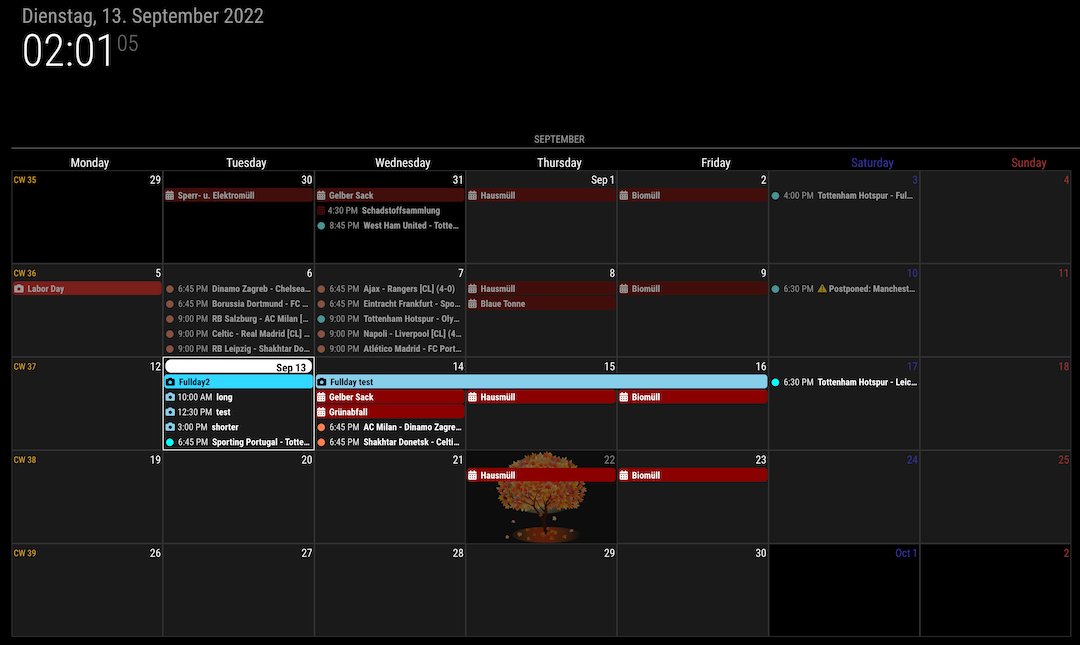
        I’m having a bit of css trouble. I’m trying to display an image in the background of specific cells. It was working in July (in both CX2 and CX3) but has since stopped displaying in either.

        .CX3 .month_09.date_22 { /*first day of fall*/
                opacity:50%;
                background-position:center;
                background-repeat:no-repeat;
                background-image: url('../modules/MMM-CalendarExt3/images/Fall-Tree-small.png');
        }
        
        
        S M 2 Replies Last reply Reply Quote 1
        • S Offline
          sdetweil @almightyyoshi
          last edited by

          @almightyyoshi said in MMM-CalendarExt3:

          .month_09.date_22

          do u need a space between those?

          also see how to use developers window to determine element classes to address for styles
          https://forum.magicmirror.builders/topic/14862/help-with-a-couple-css-issues?_=1663003753793

          Sam

          How to add modules

          learning how to use browser developers window for css changes

          A 1 Reply Last reply Reply Quote 0
          • M Offline
            MMRIZE @almightyyoshi
            last edited by

            @almightyyoshi said in MMM-CalendarExt3:

            opacity:50%;
            background-position:center;
            background-repeat:no-repeat;
            background-image: url(‘…/modules/MMM-CalendarExt3/images/Fall-Tree-small.png’);

            .CX3 .month_9.date_22 {
              ...
            

            cab74851-1023-402d-ab28-d25842084469-image.png

            1 Reply Last reply Reply Quote 0
            • A Offline
              almightyyoshi @sdetweil
              last edited by

              @sdetweil

              Nope. Stupid mistake. Needed to be month_9.date_22.

              S 1 Reply Last reply Reply Quote 1
              • S Offline
                sdetweil @almightyyoshi
                last edited by

                @almightyyoshi ok, I don’t see the difference…

                Sam

                How to add modules

                learning how to use browser developers window for css changes

                A mumblebajM 2 Replies Last reply Reply Quote 0
                • A Offline
                  almightyyoshi @sdetweil
                  last edited by

                  @sdetweil

                  Ha! I was replying to yours. @MMRIZE hadn’t popped up in my feed when I replied. I thought I refreshed when I got on, but possibly not.

                  1 Reply Last reply Reply Quote 0
                  • mumblebajM Offline
                    mumblebaj Module Developer @sdetweil
                    last edited by

                    @sdetweil month_09 (wrong i guess) and month_9 (correct i guess)

                    Check out my modules at: https://github.com/mumblebaj?tab=repositories
                    Check my blog-post: https://mumblebaj.xyz/
                    Check my MM Container: https://hub.docker.com/repository/docker/mumblebaj/magicmirror/general

                    S 1 Reply Last reply Reply Quote 0
                    • S Offline
                      sdetweil @mumblebaj
                      last edited by

                      @mumblebaj dang computers!!! so picky,!

                      Sam

                      How to add modules

                      learning how to use browser developers window for css changes

                      A 1 Reply Last reply Reply Quote 0
                      • A Offline
                        almightyyoshi @sdetweil
                        last edited by

                        @sdetweil

                        What’s worse, I had an example right above it that I knew worked, and I still didn’t register that the 09 was the issue.

                        O 1 Reply Last reply Reply Quote 0
                        • O Offline
                          Ottosophie @almightyyoshi
                          last edited by

                          Hello, since the switch to Cal3, I no longer see any events in my calendar. I tried with the French holiday calendar, and it works, I added lots of events in mine, but nothing worked. Looks like it’s coming from my ICS file. An idea ? (translated with Google)

                          S 1 Reply Last reply Reply Quote 1
                          • S Offline
                            sdetweil @Ottosophie
                            last edited by

                            @Ottosophie did u set a specific list of cals to read from in the cx3 config?
                            did u add a name field to the cal entry in the base calendar module,?

                            I’m guessing
                            I just installed cx3 multiple times without any issue.

                            Sam

                            How to add modules

                            learning how to use browser developers window for css changes

                            O 1 Reply Last reply Reply Quote 0
                            • O Offline
                              Ottosophie @sdetweil
                              last edited by

                              @sdetweil Thank you for your answer, I only restarted my raspberry several times and all my events came back, weird.

                              O 1 Reply Last reply Reply Quote 1
                              • O Offline
                                Ottosophie @Ottosophie
                                last edited by

                                I have another question, is it possible for an event to be written on 2 lines so that we can see the end instead of the 3 small dots? Thanks

                                1 Reply Last reply Reply Quote 0
                                • O Offline
                                  onryanti
                                  last edited by

                                  Is it possible to set this as a rolling calendar forward where only the current week is shown in the top. Dont need the historical days to be shown?

                                  S M 2 Replies Last reply Reply Quote 0
                                  • S Offline
                                    sdetweil @onryanti
                                    last edited by

                                    @onryanti set weeks in view=1

                                    Sam

                                    How to add modules

                                    learning how to use browser developers window for css changes

                                    O O 2 Replies Last reply Reply Quote 0
                                    • M Offline
                                      MMRIZE @onryanti
                                      last edited by

                                      @onryanti

                                      // In the config of the module;
                                      config: {
                                        weekIndex: 0, // From which week the view starts; -1 : last week, 0: this week 2: 2 weeks later, ...
                                        weeksInView: 3, // How many weeks will be shown from `weekIndex`
                                      ...
                                      }
                                      
                                      
                                      1 Reply Last reply Reply Quote 0
                                      • O Offline
                                        onryanti @sdetweil
                                        last edited by

                                        @sdetweil I managed to solve it to show the calendar how I wanted to. Thanks

                                        1 Reply Last reply Reply Quote 0
                                        • O Offline
                                          Ottosophie @sdetweil
                                          last edited by

                                          @sdetweil
                                          I’m already with weeksInView: 1, my screen is in portrait mode, so the boxes are not very wide. I would have liked an automatic lineup. I tried to decrease the font size, but it doesn’t show anything anymore. If anyone has a solution, thanks in advance.

                                          M 1 Reply Last reply Reply Quote 0
                                          • M Offline
                                            MMRIZE @Ottosophie
                                            last edited by MMRIZE

                                            @Ottosophie

                                            // In the config of the module;
                                            config: {
                                              fontSize: '12px', // default would be 18px. 
                                              eventHeight: '16px', // the height of the event block. default would be 22px. usually 4px greater than `fontSize` would be pretty to look.
                                              maxEventLines: 5, // How many events will be displayed in a day cell. The overflowed events will be hidden.
                                            ...
                                            }
                                            

                                            I don’t recommend wrapup long text to the multi-lines in the cell instead of one-line clipped. Because it could make misalignments, it might look more complex to glance at the events and unpretty.

                                            What I suggest are;

                                            • Use with default calendar view or MMM-CalendarExt3Agenda to look for more detailed information for upcoming events. Do you really want the exact title of the events which will come 3 weeks later?
                                            • To distinguish events more clearly, instead of a long title, you can transform it into a shorter obvious form with the acronym, emoji, color…
                                              For example, you can shorten all OOO's birthday to 🎂 OOO. It would be a more intuitive form than lengthy text.
                                            
                                            eventTransformer: (ev) => {
                                              if (ev.title.search('birthday') > -1)  ev.title = '🎂' + ev.title.replace("'s birthday", ' ')
                                              return ev
                                            }
                                            
                                            BKeyportB 1 Reply Last reply Reply Quote 0

                                            Hello! It looks like you're interested in this conversation, but you don't have an account yet.

                                            Getting fed up of having to scroll through the same posts each visit? When you register for an account, you'll always come back to exactly where you were before, and choose to be notified of new replies (either via email, or push notification). You'll also be able to save bookmarks and upvote posts to show your appreciation to other community members.

                                            With your input, this post could be even better 💗

                                            Register Login

                                            • 1
                                            • 2
                                            • 31
                                            • 32
                                            • 33
                                            • 34
                                            • 35
                                            • 60 / 35
                                            • First post
                                              Last post
                                            Enjoying MagicMirror? Please consider a donation!
                                            MagicMirror created by Michael Teeuw.
                                            Forum managed by Sam, technical setup by Karsten.
                                            This forum is using NodeBB as its core | Contributors
                                            Contact | Privacy Policy