Read the statement by Michael Teeuw here.
MMM-CalendarExt3
-
@MMRIZE My language and locale are Norwegian. Using nb in the config file.
-
@MMRIZE Thanks!
-
@Lilleberg said in MMM-CalendarExt3:
error: Your local changes to the following files would be overwritten by merge:
MMM-CalendarExt3.css
MMM-CalendarExt3.jslooks like u modified the module code, and updated cannot be applied til you fix that.
generally you never edit the source files of a module.all config goes in config.js and all css updates go is custom.css
-
Is there an option to hide the week numbers? I’ve managed to remove the ‘cw’ using custom.css (albeit a bit untidy)
-
@bicolorbore586 no config option, just set cw to display:none in custom.css
-
I finally found a touch module that I could easily use for the glance notification and have the payload step as 1. However, two things are happening:
1: on the first press it’s going back to June. Second press goes to April. Third press goes to August. Fourth press goes to December (which would be correct, however, due to the other jumps it could just be random)
2: no events are populating in the glance
Here’s what I have for the button:
{
      module: "MMM-TouchButton",
      position: "top_left",
      config: {
          buttons: [
               {
                name: "Next",
                icon: "fa fa-calendar-days",
                notification: "CX3_GLANCE_CALENDAR",
                payload: {instanceID: [], step: [1]},
                  },
                ]
              },
           },
And here’s my CX3 config:
{
            module: "MMM-CalendarExt3",
            position: "middle_center",
            config: {
                    mode: "month",
                    instanceID: "currentMonth",
                    firstDayOfWeek: 0,
                    useSymbol: true,
                    glanceTime: 60000,
                    calendarSet: [],
            }
        },
Any thoughts?
-
@almightyyoshi
Not real tested, but I think your config should be like this;payload: {step: 1},And about no event populating, It would be related to your
maximumEntries,maximumNumberOfDaysandboradcastPastEventsoptions of defaultcalendarmodule. -
@MMRIZE
That did it. Thanks! -
First off, I’m a complete and utter noob with coding. I’m capable enough to get MagicMirror installed and start adding in some of the 3rd party modules. I’m now trying to get into the space of modifying CSS and such for a little added customization.
I’m trying to something that I think should be simple but I cannot get it work for the life of me. I’ve searched the forum and this topic and found a couple pieces but I’m still struggling. Finally got frustrated enough to create an account and post.
I’m trying to change the color of events based on the title of an event coming from a google calendar. The events are coming in fine, just not changing color.
Based on what I have read, I need to use the eventTransformer function. I have put the following into the config.js file (including the full module for total information).
{
module: "MMM-CalendarExt3",
position: "bottom_bar",
config: {
			mode: "week",
			weekIndex: "0",
			weeksInView: "2",
			firstDayOfWeek: "1",
			maxEventLines: "8",
			fontSize: "25px",
			eventHeight: "16px"
		},
eventTransformer: function(event) {
if (event.title.search('Daycare') > -1) {
event.className = 'Daycare'
				}
			}
		}
then in the custom.css file (Trying hot pink hex so it pops out):
.CX3 .Daycare {
background-color:#FF69B4;
color:#FF69B4;
}
For all I know, that’s completely wrong so any help you can provide will be appreciated!
-
@chadjohn2 Try removing the }, before your event transformer text (it closes that config section but you need the event transformer in that config section). Also, per the github, your code for the event transformer needs to be something like:
eventTransformer: (ev) => { if (ev.title.search('Daycare') > -1) ev.color = '#FF69B4' return ev } -
@Wenike your transformer is only doing style change,
he wants to change the class , so his transformer is ok -
@chadjohn2
There were several issues on your code.-
You didn’t return
eventobject in youreventTransformerfunction.
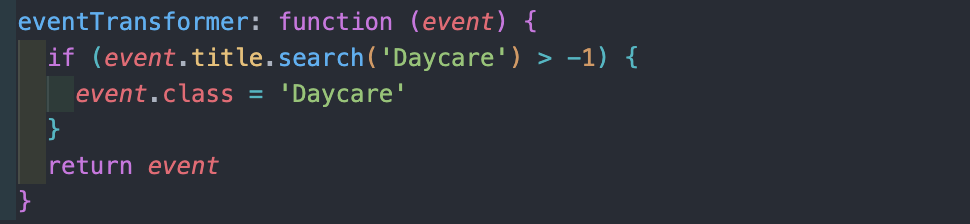
-
CSS(Cascading Style Sheets) has a
Specialityto determine the priority of the definitions by calculation.
Your.CX3 .Daycareis lower than default.CX3 .event.fulldayor.CX3 .event.multiday. So in case of your event is fullday/multiday thing, your color definition would be ignored.
.CX3 .event.Daycareor.CX3 .event.Daycare.fullday, .CX3 .event.Daycare.multidaywould work.
-
-
How do I reference the specific instances of CExt3? Like on different carousel pages, where I would have a month mode on one page and a week mode on another. I have this config:
module: "calendar", position: "top_left", broadcastPastEvents: true, maximumNumberOfDays: 300, config: { instanceId: "FamilyCal", fade: false, colored: true, displaySymbol: false, calendars: [ { name: "Holidays", url: "webcal://www.calendarlabs.com/ical-calendar/ics/76/US_Holidays.ics", color: "rgb(240,175,20)" }, { name: "Dad", url: "https://private.calendar.com", color: "rgb(60,250,60)" }, { name: "Mom", url: "https://private.calendar.com", color: "rgb(250,40,150)" }, { name: "Child", url: "https://private.calendar.com", color: "rgb(180,40,250)" } ] } }, { module: "MMM-CalendarExt3", position: "fullscreen_above", title: "", config: { mode: "month", instanceId: "FamilyMonth", calendarSet: ['Holidays', 'Dad', 'Mom', 'Child'], maxEventLines: 5, firstDayOfWeek: 0, minimalDaysOfNewYear: 1, eventHeight: '18px', useSymbol: false } },*/ { module: "MMM-CalendarExt3", position: "fullscreen_above", title: "", config: { mode: "week", instanceId: "FamilyWeek", weekIndex: -1, weeksInView: 5, calendarSet: ['Holidays', 'Dad', 'Mom', 'Child'], maxEventLines: 5, firstDayOfWeek: 0, minimalDaysOfNewYear: 1, eventHeight: '18px', useSymbol: false } } -
@DDE12 for each module you can ADD classes strings , by using the classes:“…”
property after the
module:“… name”then in pages you can use that name instead of the module name
I prefer to configure pages differently
in pages its
   modules: [
        [  'page1'],
        [  'page2' ]
    ]
then for the modules u want on page1
you add
classes:'page1',and for modules on page2
classes:'page2'you can do the same for fixed, etc
-
@sdetweil
Thank you for looking at this. Is this the proper implementation for your suggestion?modules: [ ['MonthPage'], ['WeeksPage'] { module: "MMM-CalendarExt3", position: "fullscreen_above", classes: 'MonthPage', config: { mode: "month", instanceId: "FamilyMonth", calendarSet: ['Holidays', 'Dad', 'Mom', 'Child'], } }, { module: "MMM-CalendarExt3", position: "fullscreen_above", classes: 'WeeksPage' config: { mode: "week", instanceId: "FamilyWeek", calendarSet: ['Holidays', 'Dad', 'Mom', 'Child'], } }, { module: "MMM-Carousel", config: { mode: 'slides', slides: { "Slide 2": ['MonthPage'], "Slide 3": ['WeeksPage'] } } }, ] -
@DDE12 no, I was giving you the config for the MMM-Pages module.
I don’t use Carousel, so not sure there
-
@sdetweil
Like so…?modules: [ { module: "MMM-CalendarExt3", position: "fullscreen_above", classes: 'MonthPage', config: { mode: "month", instanceId: "FamilyMonth", calendarSet: ['Holidays', 'Dad', 'Mom', 'Child'], } }, { module: "MMM-CalendarExt3", position: "fullscreen_above", classes: 'WeeksPage' config: { mode: "week", instanceId: "FamilyWeek", calendarSet: ['Holidays', 'Dad', 'Mom', 'Child'], } }, { module: 'MMM-pages', config: { modules: [ ['MonthPage'], ['WeeksPage'] ], }, }, } ] -
@DDE12 yes
I would label the pages ( in pages config)
page1
page2cause that is the order they are shown.
you can have as many modules on a page as u want and can fit of course.
-
@sdetweil
Yeah, that would definitely be less confusing. Do I have the classes: “FamilyWeek” and classes: “FamilyMonth” in the right place in the CalenderExt3 config(s)? -
@DDE12 either can be used in css to select elements to style
Hello! It looks like you're interested in this conversation, but you don't have an account yet.
Getting fed up of having to scroll through the same posts each visit? When you register for an account, you'll always come back to exactly where you were before, and choose to be notified of new replies (either via email, or push notification). You'll also be able to save bookmarks and upvote posts to show your appreciation to other community members.
With your input, this post could be even better 💗
Register Login