Read the statement by Michael Teeuw here.
MMM-CalendarExt3
-
@XDmToter
Sure, feel free to contribute anytime.
By the way, MMM-GoogleCalendar will be released to become compatible with the default calendar soon, and then the hotfix tip will be obsoleted. Anyway, I want you to know that always welcome. -
@BKeyport
I’m sorry for not getting back to you sooner. I have forgotten. :)What does mean background highlighting? You can adjust
--cellbgcolorvalue or.cellselector directly to change background color.And for the events list, I gave you a solution of conjuction. with MMM-ModuleMonkeyPatch. Without it, it could not be achieved.
https://forum.magicmirror.builders/topic/16690/mmm-calendarext3/357?_=1697195312657 -
M MMRIZE referenced this topic on
-
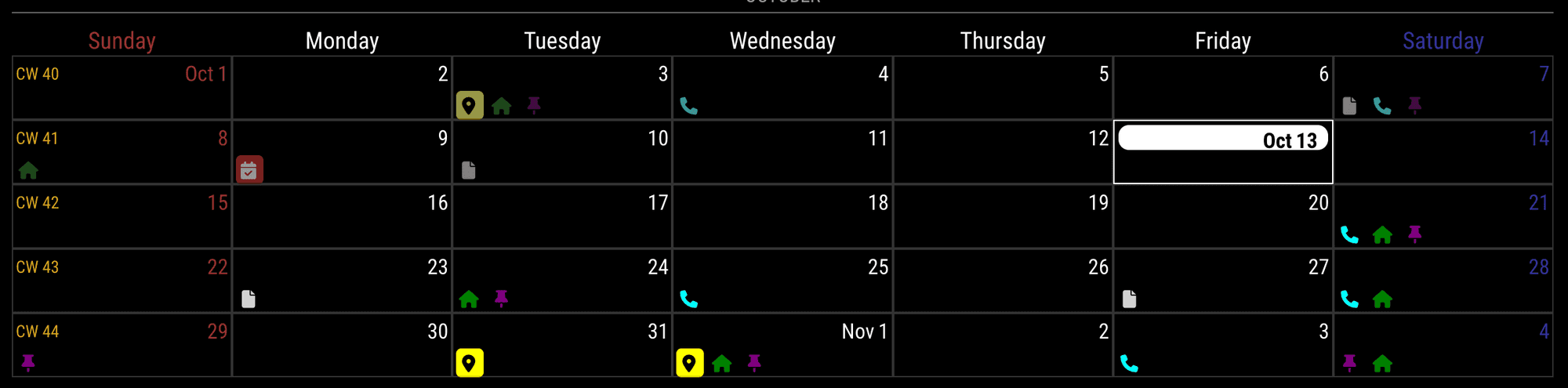
config (MMM-CalendarExt3)
{
  module: "MMM-CalendarExt3",
  position: "bottom_bar",
  config: {
    maxEventLines: 1,
    ...
config (MMM-ModuleMonkeyPatch)
{
  module: "MMM-ModuleMonkeyPatch",
  config: {
    patches: [
      {
        module: "MMM-CalendarExt3",
        method: "getDom",
        patch: function (original, args) {
        let dom = original(args)
        let target = Array.from(dom.querySelectorAll('.event')) || []
          target.forEach((e) => {
            const dt = new Date(+e.dataset.startDate)
            const date = '.date_' + dt.getDate()
            const month = '.month_' + (dt.getMonth() + 1)
            const container = dom.querySelector(`.cell${date + month} .cellBody`)
            if (container) {
              e.classList.add('iconOnly')
              container.appendChild(e)
            }
          })
          return dom
        }
      }
    ]
  }
},
custom.css
.CX3 .eventContainer {
  display: none;
}

.CX3 .cellBody {
  display: flex;
  flex-direction: row;
  justify-content: flex-start;
}

.CX3 .cellBody .event.iconOnly {
  display: inline-flex;
  flex-direction: row;
  height: var(--eventheight);
}

.CX3 .cellBody .event.iconOnly .symbol {
  justify-content: center;
}

.CX3 .event.iconOnly :not(.headline),
.CX3 .event.iconOnly .headline :not(.symbol) {
  display: none;
}

.CX3 .cell {
  background-color: unset;
}
(This patching is not considering overflowing events.)
-
is there a way to set this up to have a rolling 4 or 5 weeks (depending on how its configured) instead of the traditional only one month view. that way you can continually see a few weeks in advance?
please forgive me if this has already been asked/covered. I tried to go through this thread but with 38 pages and a lot of code bits, I didn’t see it.
-
@roth_nj
You don’t have to read entire posts on this thread. Just read the README md first.
And there is the feature description of what you want probably. -
@hrmax23 said in MMM-CalendarExt3:
@MMRIZE Is there a way to show a rolling 4/5 week in the month mode? Basically something like -1 week to +3 weeks rather than showing basically the current month until that month is over.
Also, is there a trick to get the calendar to re-render completely on some interval? On my MM right now, it’s currently showing the current day in the 5th week (i.e. still showing April as the current month). If I restart MM, it will update to show May as current month, but doesn’t seem to do it automatically. I only have 1 scene so not using MMM-Scenes.
@MMRIZE said in MMM-CalendarExt3:
@roth_nj
You don’t have to read entire posts on this thread. Just read the README md first.
And there is the feature description of what you want probably.i did. again, im new to all of this. i am not a programmer at all in any sense. im an ME but did have to take a c++ course like 20 years ago. my brain just doesn’t see this stuff easily. i can read through the readme’s for various modules and get the basic functions but then i have been reading through all the trouble shooting threads about them to get a better understanding on how to actually do it.
at this point im guessing something on the css level with transforming or preprocessing the data?
-
@MMRIZE the background highlighting issue is shown in my screenshot. If you look at October 11 in the shot, you’ll notice the highlight is smaller than the text.
Same goes for the full day event shown on Nov 2, the highlight is blocking the “2” partially.That being said, I’m gonna work on expanding my module to do a big calendar instead. I’m not getting what I want even with monkeypatch, and it’s getting too confused.
-
@roth_nj in the config of the module set the ‘mode’ to week. The add the config option ‘weeksInView’ and set that to 4 or 5
Here’s an extract from mine:{ module: "MMM-CalendarExt3", position: "lower_third", config: { mode: "week", weekIndex: 0, weeksInView: 5,As MMRIZE says, it’s in the readme file (under config details). The re-render, as you say is also listed in there, as one of the intervals.
-
@bicolorbore586 said in MMM-CalendarExt3:
@roth_nj in the config of the module set the ‘mode’ to week. The add the config option ‘weeksInView’ and set that to 4 or 5
Here’s an extract from mine:{ module: "MMM-CalendarExt3", position: "lower_third", config: { mode: "week", weekIndex: 0, weeksInView: 5,As MMRIZE says, it’s in the readme file (under config details). The re-render, as you say is also listed in there, as one of the intervals.
thanks… trust me, i read all that stuff a number of times. it just didn’t click that thats what i meant. im going to go bang my head against the wall now ha ha
-
Have another issue I just recently noticed. I have two different modules running, one in day view showing one week worth of calendar. The other is in month view. The day view is set with dayIndex of 0 so the current day is the first day. Day 7 on the view shows no events although they are shown for that day on the month view calendar. I could not find any similar posts with issues in this thread so hoping someone has seen and can provide some help. Here are screenshots for reference. It is always the last day in the day view, so for right now Tuesday the 24th is where the issue lies. I’ve changed weeksInView to 2 and it was always just the last day of the series.
Week View:

Month View:
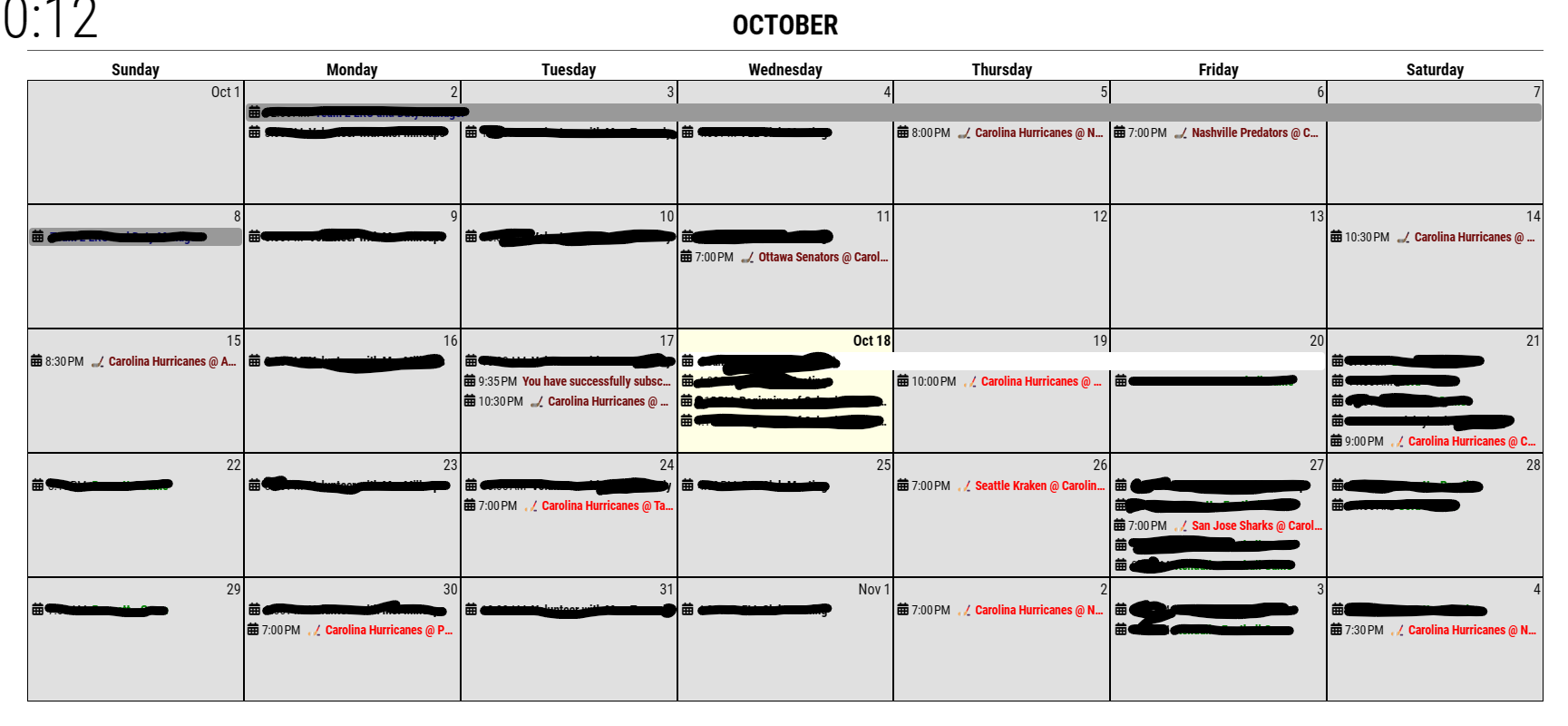
-
@aircliff
Maybe the bug. I’ll inspect it. :) -
@aircliff
I found where the bug lies on.I’ll fix it tomorrow. :)
-
Thank you. I actually played with it quite a bit last week and specifically that line and couldn’t get it to work for me. I would end up adding a second week or multiple extra days. Interested to see what you find as the fix.
-
@aircliff
fixed. (1.6.1)
https://github.com/MMRIZE/MMM-CalendarExt3#history -
@BKeyport said in MMM-CalendarExt3:
@MMRIZE the background highlighting issue is shown in my screenshot. If you look at October 11 in the shot, you’ll notice the highlight is smaller than the text.
give enough
heightto cell headerSame goes for the full day event shown on Nov 2, the highlight is blocking the “2” partially.
Your height of cellHeader is smaller than the fontsize used.
By default it is defined as--cellheaderheightThat being said, I’m gonna work on expanding my module to do a big calendar instead. I’m not getting what I want even with monkeypatch, and it’s getting too confused.
As I showed you, it is possible, but it doesn’t mean easy.
Anyway, this module is not designed to show events like that, however, I introduced to you how to override by monkey-patching, but if you are not satisfied, the only way would be to build a new module for that purpose. -
Worked like a champ. Thanks for the help.
-
Formatting question… not sure if it’s best for to ask here or some place else….
I currently have the icons turned off, and 6 color coded calendars being displayed. Right now there is the small colored dot next to each and I have it color coded and the legend turned on and that’s all good….
How would I go about formatting each entry so it has the “apple” look? Like a light shaded transparent box around each entry that pulled the tint from the calendar color. Also I would then off the colored dots
-
@roth_nj
I think it could be achieved by CSS modification. However, without details, I cannot guess what you exactly want. Do you have a sketch for it?
(By default, this module is designed to imitate the Apple calendar app or Fantastical app. I’m sorry if you think it doesn’t look alike. ) -
@MMRIZE said in MMM-CalendarExt3:
@roth_nj
I think it could be achieved by CSS modification. However, without details, I cannot guess what you exactly want. Do you have a sketch for it?
(By default, this module is designed to imitate the Apple calendar app or Fantastical app. I’m sorry if you think it doesn’t look alike. )sorry if theres any misunderstanding. i think the module is great and works awesome. i have my pi hooked up to a 40" tv that i am going to frame and hang. so with the detail and how close just trying to tweak the visuals now that i have everything functioning well. one of the things i’ve noticed with my set up is the contrast between all the white text and black background. from what i’ve researched it is a drawback to using a TV instead of a computer monitor or smaller device. adjusting the contrast/brightness on the tv itself made the pictures look like crap. i think this will help a by separating the white text from the black background.
what i meant is to have the type of transparent tinted box around (or behind) the calendar entry texts in the style of apples current design looks. heres a quick think i made in powerpoint.
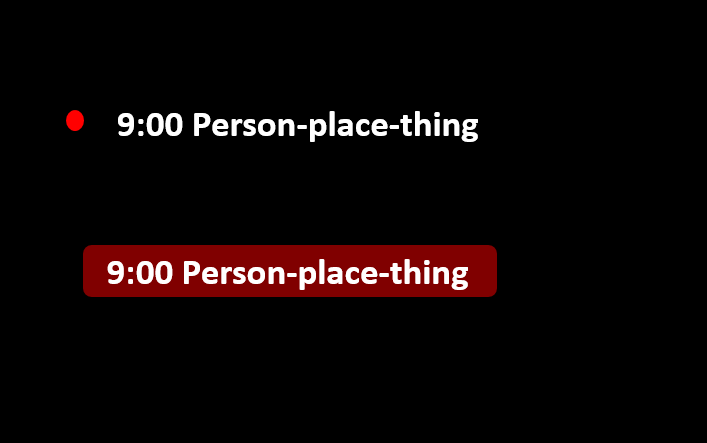
thank you again for all you help
-
@roth_nj
By default, without any modification; This module has 2 style metaphor for event. One is for fullday/multidays event and one is for normal event.
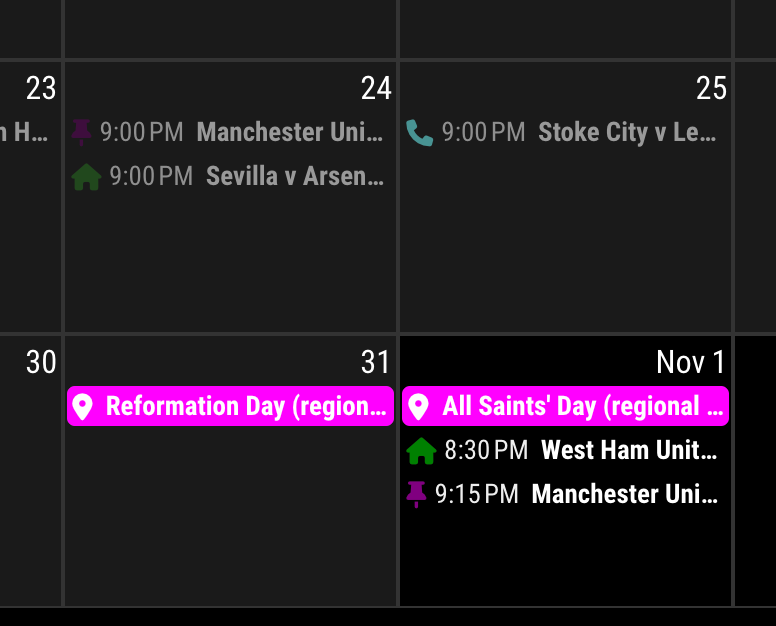
Fullday/multidays event looks a boxed, background-filled to be distinguished with a normal event.Anyway, if you want that a normal event has same looks with fullday events - boxed and filled.
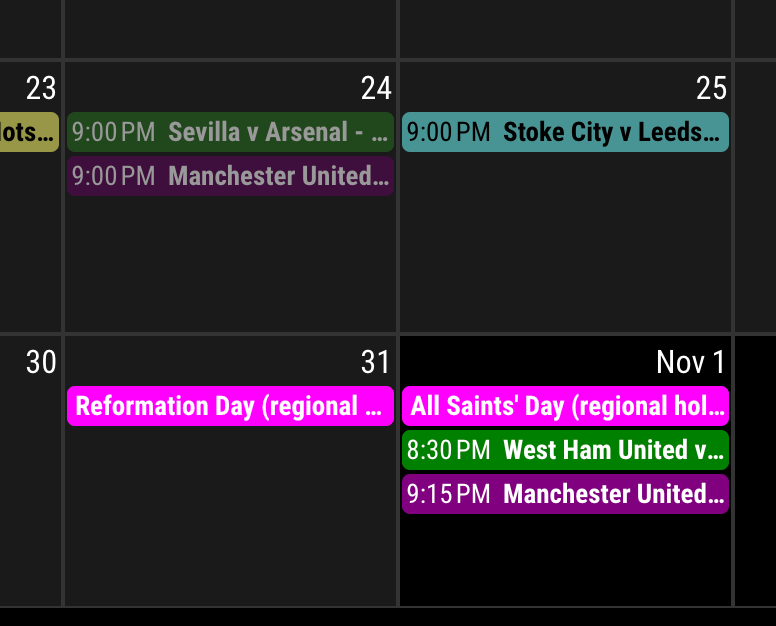
Add these lines to your custom.css
.CX3 .event.singleday .headline:not(.useSymbol)::before,
.CX3 .event.singleday .headline.useSymbol .symbol.noSymbol::before {
  display: none;
}

.CX3 .event.singleday {
  background-color: var(--calendarColor);
  mix-blend-mode: difference;
  border-radius: 4px;
  color: var(--oppositeColor);
}

.CX3 .event:not(.fullday) .headline .time {
  color: var(--oppositeColor);
}

Hello! It looks like you're interested in this conversation, but you don't have an account yet.
Getting fed up of having to scroll through the same posts each visit? When you register for an account, you'll always come back to exactly where you were before, and choose to be notified of new replies (either via email, or push notification). You'll also be able to save bookmarks and upvote posts to show your appreciation to other community members.
With your input, this post could be even better 💗
Register Login