Read the statement by Michael Teeuw here.
MMM-CalendarExt3
-
@aircliff
Maybe the bug. I’ll inspect it. :) -
@aircliff
I found where the bug lies on.I’ll fix it tomorrow. :)
-
Thank you. I actually played with it quite a bit last week and specifically that line and couldn’t get it to work for me. I would end up adding a second week or multiple extra days. Interested to see what you find as the fix.
-
@aircliff
fixed. (1.6.1)
https://github.com/MMRIZE/MMM-CalendarExt3#history -
@BKeyport said in MMM-CalendarExt3:
@MMRIZE the background highlighting issue is shown in my screenshot. If you look at October 11 in the shot, you’ll notice the highlight is smaller than the text.
give enough
heightto cell headerSame goes for the full day event shown on Nov 2, the highlight is blocking the “2” partially.
Your height of cellHeader is smaller than the fontsize used.
By default it is defined as--cellheaderheightThat being said, I’m gonna work on expanding my module to do a big calendar instead. I’m not getting what I want even with monkeypatch, and it’s getting too confused.
As I showed you, it is possible, but it doesn’t mean easy.
Anyway, this module is not designed to show events like that, however, I introduced to you how to override by monkey-patching, but if you are not satisfied, the only way would be to build a new module for that purpose. -
Worked like a champ. Thanks for the help.
-
Formatting question… not sure if it’s best for to ask here or some place else….
I currently have the icons turned off, and 6 color coded calendars being displayed. Right now there is the small colored dot next to each and I have it color coded and the legend turned on and that’s all good….
How would I go about formatting each entry so it has the “apple” look? Like a light shaded transparent box around each entry that pulled the tint from the calendar color. Also I would then off the colored dots
-
@roth_nj
I think it could be achieved by CSS modification. However, without details, I cannot guess what you exactly want. Do you have a sketch for it?
(By default, this module is designed to imitate the Apple calendar app or Fantastical app. I’m sorry if you think it doesn’t look alike. ) -
@MMRIZE said in MMM-CalendarExt3:
@roth_nj
I think it could be achieved by CSS modification. However, without details, I cannot guess what you exactly want. Do you have a sketch for it?
(By default, this module is designed to imitate the Apple calendar app or Fantastical app. I’m sorry if you think it doesn’t look alike. )sorry if theres any misunderstanding. i think the module is great and works awesome. i have my pi hooked up to a 40" tv that i am going to frame and hang. so with the detail and how close just trying to tweak the visuals now that i have everything functioning well. one of the things i’ve noticed with my set up is the contrast between all the white text and black background. from what i’ve researched it is a drawback to using a TV instead of a computer monitor or smaller device. adjusting the contrast/brightness on the tv itself made the pictures look like crap. i think this will help a by separating the white text from the black background.
what i meant is to have the type of transparent tinted box around (or behind) the calendar entry texts in the style of apples current design looks. heres a quick think i made in powerpoint.
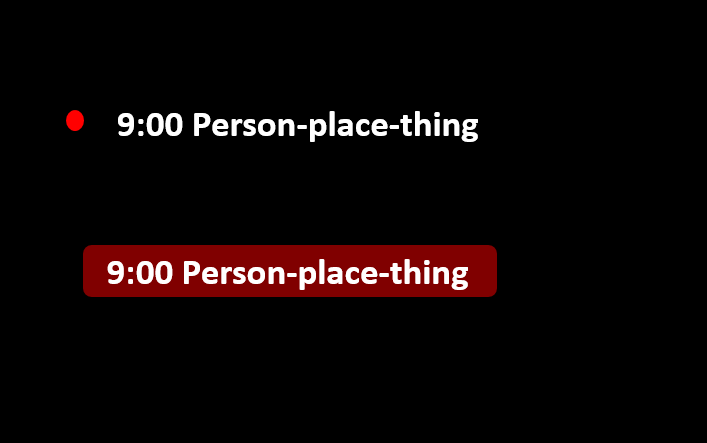
thank you again for all you help
-
@roth_nj
By default, without any modification; This module has 2 style metaphor for event. One is for fullday/multidays event and one is for normal event.
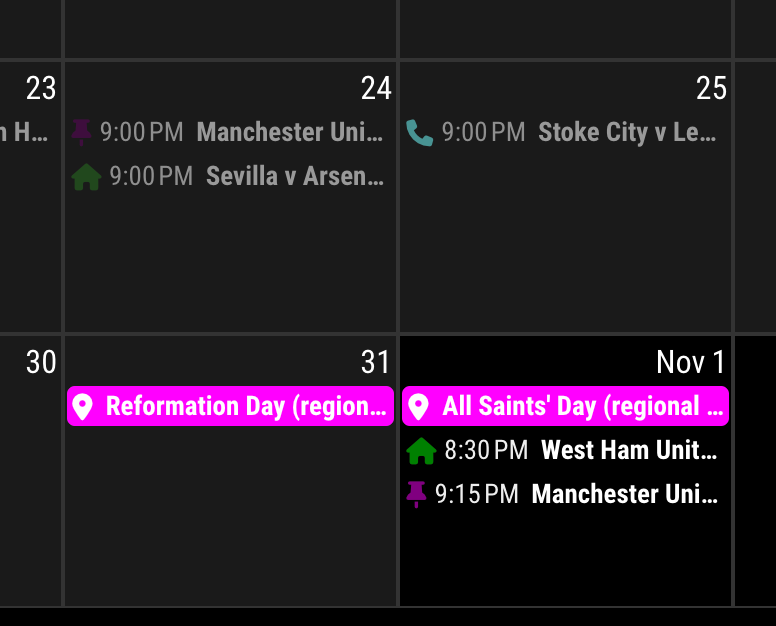
Fullday/multidays event looks a boxed, background-filled to be distinguished with a normal event.Anyway, if you want that a normal event has same looks with fullday events - boxed and filled.
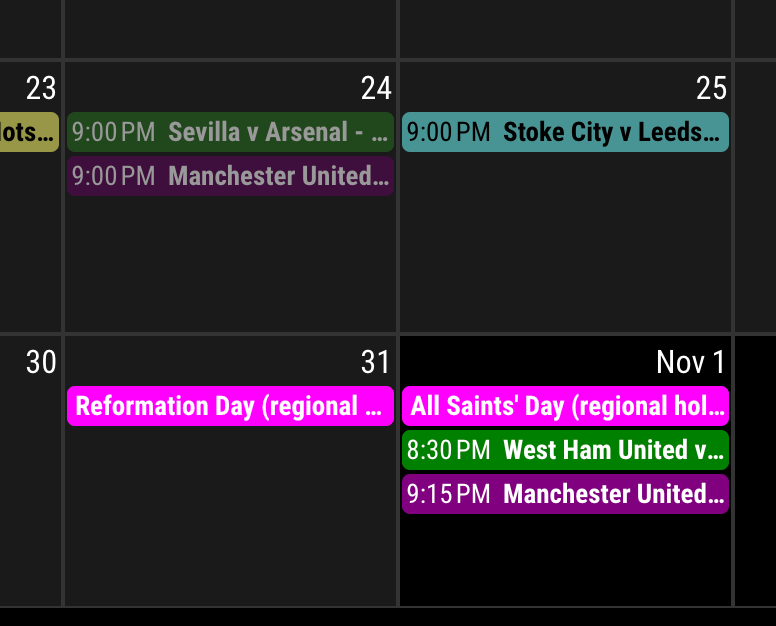
Add these lines to your custom.css
.CX3 .event.singleday .headline:not(.useSymbol)::before, .CX3 .event.singleday .headline.useSymbol .symbol.noSymbol::before { display: none; } .CX3 .event.singleday { background-color: var(--calendarColor); mix-blend-mode: difference; border-radius: 4px; color: var(--oppositeColor); } .CX3 .event:not(.fullday) .headline .time { color: var(--oppositeColor); } -
[UPDATE] 1.7.0
skipof event Object property (Example)skipPassedEventTodayof config- eventTime color in multiday event
more,morePopoverfeature.- Global object check. (For compatible with not browser environment)
- Support
iconify - auto-detect
firstDayOfWeekandminimalDaysOfNewYear weekendsof config
Usually I just describe outlines of update here, but in this update, I need to explain somethings with images, so I did it.
I opened WIKI for some details.
Using Iconify
Even though
fontawesomeis the default icon framework of MM, there are many needs oficonify. And I prefer it to font-awesome. Now you can use iconify icons by config valueuseIconify: true// In your calendar module config defaultSymbolClassName: '', // <-- Important to identify iconify properly. calendars: [ { color: "red", symbol: "flag:us-4x3", url: "https://ics.calendarlabs.com/76/mm3137/US_Holidays.ics?foo" }, { color: "red", symbol: "fa fa-fw fa-flag", // <-- Important when you want to use font-awesome also together. url: "https://ics.calendarlabs.com/76/mm3137/US_Holidays.ics?bar" }, ],WARNING
To useiconify, you should setdefaultSymbolClassName: '',in your default calendar module. Usually, it is enough when you hide the original default calendar module to use with CX3. But if you want to use font-awesome icons together, you should add font-awesome classnames (e.gfa,fas, …) by yourself.displaying startTime and endTime in multi-day event.
a Fullday event doesn’t need startTime and endTime. And there is not enough place to show endTime for a single-day event. But for multi-day events, There would be enough space to display the endTime of the last day of the period. And it would be convenient. The position where the endTime would be displayed will be near the event’s last day.
If you don’t want to show it, add this to your
css/custom.css.CX3 .event.multiday:not(.continueToNextWeek) .headline .endTime { display: none; }morefor overflowed events.By the limitation of
maxEventLines(and due to the resolution of the MM screen), overflowed events on the day had to be ignored. It was inconvenient.Now, CX3 can show how many events are ignored in the day. You can pop over the whole events list of that day by clicking/touching the header of the cell or more marks(White rounded number). The popover contents could be scrollable by touch/drag (if possible)
NOTICE Firefox, Opera Mobile, Samsung Browser cannot handle a new de facto starndard
popoverfeature yet.skipPassedEventToday
Even though it would be helpful to use the new
morefeature, Still overflowed events would be inconvenient. Generally, upcoming events would be more important than past events especially fortoday. So you can skip the past events of today by this option. The skipped events will be shown again when today passes.skipPassedEventToday: false(default)skipPassedEventToday: trueAuto-detect calendar info by locale
Before 1.7.0, the user must manually set
firstDayOfWeekandminimalDaysOfNewYearin the config to calculate the start day of the week, week number, weekend info, etc.Now, this module will calculate that info automatically with
localewithout your manual config forfirstDayOfWeekandminimalDaysOfNewYear(Leave them as blank ornull)For example;
- When you set the locale as
en-US(in the module config or global config), the week starts from Sunday. - When you set the locale as
en-GB, the week starts from Monday. - When you set the locale as
fa-IR, the week starts from Saturday, and the weekend day will be only Friday.
Of course, you can set them up manually by force for the exceptions.
- Not supported natively in legacy browsers.
- To show custom weekend days for your job shift instead of public weekends. (e.g.
weekends: [1, 3, 5]for Mon, Wed, Fri resting) - to adopt a locale but with a different language. (e.g. The Americans living in Germany, so the calendar system itself should be followed by German rule but displayed in English.)
locale: 'en-US', // Displaying things as US English, e.g. MM. DD. YYYY instead of European DD. MM. YYYY firstDayOfWeek: 1, // German ISO rule. The week starts on Monday, not Sunday, as `en-US` minimalDaysOfNewYear: 4,weekendsA new config value,
weekends: [], is introduced. By default, you don’t have to set this by yourself because it is derived from the auto-detection of calendar info from the locale. This field will be fulfilled automatically unless you set it manually in config.
Every day cell hasweekendandweekend_1orweekend_2as its classname.For example,
weekends: [6, 0]means Saturday and Sunday will be considered weekends. Saturday will haveweekend weekend_1and Sunday will haveweekend weekend_2.Style cells with these class names instead of the fixed
weekday_N. You don’t have to know which weekday is a weekend in a specific locale.And more…
-
Is there a step missing when updating? I follow the install or update instructions in GitHub but it never seems to actually update.
-
Try this;
cd ~/MagicMirror/modules/MMM-CalendarExt3
git pull
npm install
git submodule update --init --recursive
Sorry, it may be missing. I’ll add the info on next update. (soon)
-
[UPDATE] 1.7.1
- ADDED
useMarqueeconfig - ADDED
noMarqueeevent Object attribute
From now, too long title will be rolling asmarqueeortickerstyle.

- ADDED
-
@MMRIZE big fan of Ext3 module… I was curious if there is any way to have the calendar setting to be the next 4 weeks? That is a valuable view for me that I currently use on MMM-MyCalendar as it seems to be one of the only calendar’s that supports that.
-
Disregard… I managed to make this work by using week view with week index and week view.
-
@nobbie35
You can use ‘mode:“week”’ and ‘weeksInView:4’(and ‘weekIndex:0’) -
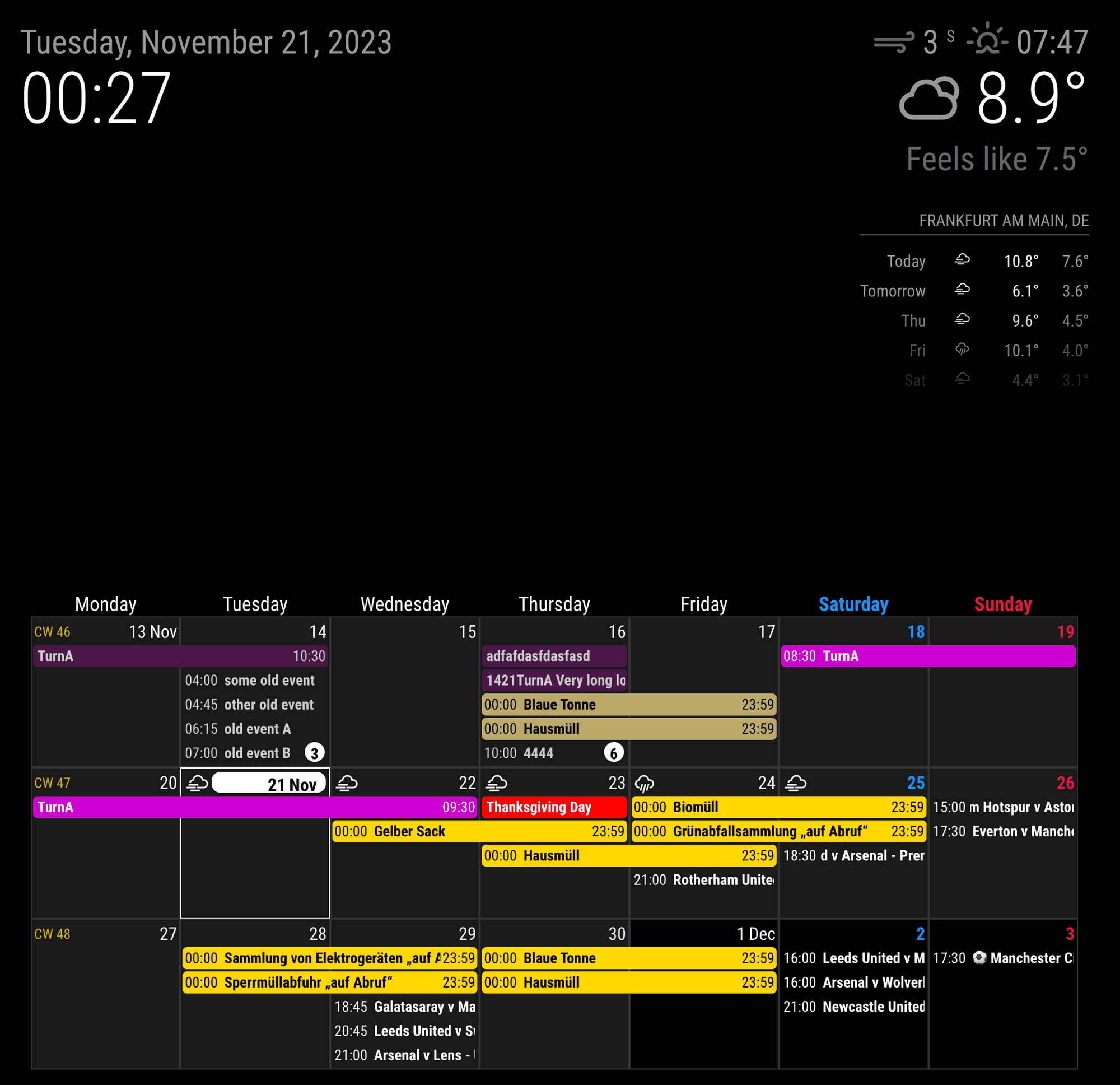
I’ve got this calendar set up almost perfect for my family. Just a couple minor things I would like to modify but am having no luck so far. Wondering if any of you can help. I’m sure I’m missing something easy here, but I would like to remove the little circle icon to the left of the calendar entry. I changed useSymbol to false but it still shows.
Second, how the heck do you get the weather forecast/temp icons up next to the date? I chose useweather-true, displayweathertemp - true, I’ve tried a few of the other weather related fields but no luck. Any help with these would be appreciated.
Also, I’ve tried a couple times now on this post and another, and cannot upload a pic no matter how small. Also wouldn’t accept my Imgur link. Not sure what I’ve done wrong there but I’ll post a pic when I can.
 {
                        module: "MMM-CalendarExt3",
                        position: "bottom_bar",
                        title: "",
                        config: {
                          mode: "",
                          weekIndex: 0,
                          weeksInView: 4,
                          instanceId: "basicCalendar",
                          locale: 'en-EN',
                          maxEventLines: 5,
                          firstDayOfWeek: 0,
                          refreshInterval: 120000,
                          animationSpeed: 0,
                          useSymbol: false,
                          useWeather: true,
                          displayWeatherTemp: true,
                          calendarSet: ['us_holiday','family'],
                }
                },
                {
                        module: "calendar",
                        position: "",
                        config: {
                          broadcastPastEvents: true,
                          calendars: [
                                {
                                  url: "webcal://www.calendarlabs.com/ical-calendar/ics/76/US_Holidays.ics",
                                  name: "us_holiday",
                                  color: "#6699ff"
                                }
                                        ]
                                }
                },
                {
                        module: "calendar",
                        position: "",
                        maximumNumberOfDays: 60,
                        config: {
                          animationSpeed: 0,
                          fetchInterval: 100000,
                          broadcastPastEvents: true,
                          useSymbol: false,
                          calendars: [
                                {
                                  url: "https://calendar.google.com/calendar/ical/*****,
				  name: "family",
                                  color: "yellow",
                                        user: '***@gmail.com',
                                        pass: '***',
                                        method: 'basic'
                                }
                                        ]
                                }
                },
.MMM-CalendarExt3 { margin-bottom: 0px; width: 100%; height: 575px; font-size: 16px; } .CX3 .cw { display:none } .CX3 .event.singleday { border-left:4px solid var(--calendarColor); } .CX3 .event.singleday:not(.useSymbol)::before { content: ''; }  -
- to remove even dot mark on
useSymbol: false; append this into yourcss/custom.css
/* css/custom.css */ .CX3 .event.singleday .headline:not(.useSymbol)::before { display: none; }- To use forecasted weather, you should activate the
weathermodule inforecastmode.
- To attach image; you image should be smaller than 2MB. That’s all.
To link external image; use this syntax.

- to remove even dot mark on
-
@MMRIZE Awesome! Thank you for that. Works just like you said. I did have to put the Weather forecast module below the MMM-Calendarext3 module or else the calendar would not load. Might be something obvious to some but I’m teaching myself as I go.
Hello! It looks like you're interested in this conversation, but you don't have an account yet.
Getting fed up of having to scroll through the same posts each visit? When you register for an account, you'll always come back to exactly where you were before, and choose to be notified of new replies (either via email, or push notification). You'll also be able to save bookmarks and upvote posts to show your appreciation to other community members.
With your input, this post could be even better 💗
Register Login