MagicMirror Forum
    • Recent
    • Tags
    • Unsolved
    • Solved
    • MagicMirror² Repository
    • Documentation
    • 3rd-Party-Modules
    • Donate
    • Discord
    • Register
    • Login
    A New Chapter for MagicMirror: The Community Takes the Lead
    Read the statement by Michael Teeuw here.

    MMM-CalendarExt3

    Scheduled Pinned Locked Moved Utilities
    689 Posts 82 Posters 2.8m Views 86 Watching
    Loading More Posts
    • Oldest to Newest
    • Newest to Oldest
    • Most Votes
    Reply
    • Reply as topic
    Log in to reply
    This topic has been deleted. Only users with topic management privileges can see it.
    • M Offline
      MMRIZE @XDmToter
      last edited by

      @XDmToter
      Read this. https://github.com/MMRIZE/MMM-CalendarExt3#compatible-with-randombrainstormermmm-googlecalendar

      By the way, this is a pure question.
      Google Calendar provides iCAL format(.ics), so the default calendar module can also parse it. Why people use MMM-GoogleCalendar instead of the default calendar? Is there any special thing?
      I ask this because one of the most frequently asked issues is how to use with MMM-GoogleCalendar.

      X 1 Reply Last reply Reply Quote 0
      • M Offline
        MMRIZE @XDmToter
        last edited by

        @XDmToter
        Anyway, I requested PR of MMM-GoogleCalendar to solve this incompatible broadcasting. When @randomBrainstorm adopts the PR, this issue will be solved.

        1 Reply Last reply Reply Quote 0
        • X Offline
          XDmToter @MMRIZE
          last edited by

          @MMRIZE Thank you for your reply. As I understand it, in order to use an ICal URL from Google Calendar, you have to make your calendar Public. Using MMM-GoogleCalendar is Authenticated using an API Token, so your calendar does Not need to be public.

          I tried adding the “preProcessor” settings, but I still get a blank calendar. Does this get added to the “config” section, or the “module” section? I put it inside the config array.

                  {
                      module: "MMM-CalendarExt3",
                      position: "bottom_bar",
                      title: "Family Calendar",
                      config: {
                          mode: "week",
                          instanceId: "basicCalendar",
                          calendarSet: ['famCal'],
                          preProcessor: (e) => {
                              if (e.start?.dateTime) {
                                  e.startDate = new Date(e.start.dateTime).valueOf()
                              } else if (e.start?.date) {
                                  e.startDate = new Date(`${e.start.date}T00:00:00`).valueOf()
                              }
           
                              if (e.end?.dateTime) {
                                  e.endDate = new Date(e.end.dateTime).valueOf()
                              } else if (e.end?.date) {
                                  e.endDate = new Date(`${e.end.date}T00:00:00`).valueOf()
                              }
           
                              e.title = e.summary
                              e.fullDayEvent = (e.start?.date) ? true : false
                              return e
                              }
                      }
                  }
          
          M G 2 Replies Last reply Reply Quote 0
          • M Offline
            MMRIZE @XDmToter
            last edited by

            @XDmToter
            Your configuration seems all right unless you may be missing some brackets matching or commas at the end of the continuous module definitions.

            In MM screen, Ctrl+Shift+i will open dev console. You may see suspicious error messages if they happen.

            X 1 Reply Last reply Reply Quote 0
            • G Offline
              gonzonia @XDmToter
              last edited by

              @XDmToter
              There’s a way to get an iCal URL without making it public. I see this in my “Settings and Sharing” section of Google Calendar. Screenshot 2023-10-11 at 2.28.40 PM.png

              M 1 Reply Last reply Reply Quote 0
              • M Offline
                MMRIZE @gonzonia
                last edited by

                @gonzonia @XDmToter
                But anyway, for shared-calendar (e.g. Family calendar), MMM-GoogleCalendar is worthy. (And there would be the possibility to implement a reminder feature also.)

                I discussed this issue with @randomBrainstorm, and I can bet the fixed version of MMM-GoogleCalendar will be released soon. At that time, the need for conversion will be gone.

                BKeyportB 1 Reply Last reply Reply Quote 0
                • BKeyportB Offline
                  BKeyport Module Developer @MMRIZE
                  last edited by

                  @MMRIZE So, I’ve expanded my calendar larger for a DakBoard like setup, and noticed some cosmetic problems, mostly in background highlighting. Can you take a look and see what’s up?

                  Also, I’d like the icons (using the symbols from calendar) to be row flexed not column flexed.

                  Thanks.

                  https://ibb.co/VL3qnsk

                  		{
                  			module: "MMM-CalendarExt3",
                  			//disabled: true,
                  			position: "top_right",
                  			config: {
                  				fontSize: '31.5px',
                  				eventHeight: '36px',
                  				animationSpeed: 0, 
                  				mode: "month",
                  				headerTitleOptions: {
                  					month: 'long',
                  					year: 'numeric', 
                  				},
                  				minimalDaysOfNewYear: 1,
                  				refreshInterval: 60000,
                  				useWeather: false,
                  				useSymbol: true,
                  				maxEventLines: 4,
                  				firstDayOfWeek: 0,
                  				calendarSet: ["Main", "Holidays", "Seahawks", "Sounders", "Bluejays", "Mariners", "Kraken", "XFL"],
                  			},
                  		},
                  ``` css
                  /* CalendarExt3 */
                  .CX3 {
                    --celllinecolor: #666;
                    --cellbgcolor: rgba(0, 0, 0, 0.5);
                    --cellheaderheight: 25px;
                    --cellfooterheight: 2px;
                    --defaultcolor: #FFF;
                    --eventheight: calc(var(--fontsize) + 4px);
                    --totalheight: calc(var(--eventheight) * var(--maxeventlines));
                    --displayEndTime: none;
                    --displayWeatherTemp: none;
                    font-size: var(--fontsize);
                    color: var(--defaultcolor);
                    line-height: calc(var(--eventheight));
                    min-width: 1280px; 
                  }
                  
                  .module.MMM-CalendarExt3 .module-header {
                  	color: white;
                  	background-color: green;
                  	border-radius: 8px;
                  	text-transform: unset;
                  	font-size: var(--font-size-medium);
                  	line-height: var(--font-size-small)+5;
                  	border: none;
                    }
                  
                  .CX3 .thisMonth {
                    background-color: rgba(0, 0, 0, 0.2);
                  }
                  
                  /* get rid of unwanted elements */
                  .CX3 .event.singleday .headline:not(.useSymbol)::before,
                  .CX3 .event.singleday .headline.useSymbol .symbol.noSymbol::before {
                    content: '⬤';
                    color: var(--calendarColor);
                    display: none;
                    padding-right: 2px;
                    font-size: 75%;
                  }
                  
                  .CX3 .event:not(.fullday) .headline .time {
                    display: none;
                    padding-right: 2px;
                    font-size: 75%;
                    color: #EEE;
                  }
                  
                  .CX3 .weekday_0 {
                    color: #FFF;
                  }
                  
                  .CX3 .weekday_6 {
                    color: #FFF;
                  }
                  
                  .CX3 .cw {
                    font-size: 80%;
                    color: goldenrod;
                    display: none;
                  }
                  
                  .CX3 .cw::before {
                    content: 'CW '
                  }
                  
                  .CX3 .title {
                  	display: none;
                  }
                  

                  The "E" in "Javascript" stands for "Easy"

                  M 2 Replies Last reply Reply Quote 0
                  • X Offline
                    XDmToter @MMRIZE
                    last edited by

                    @MMRIZE
                    I found the issue.

                    # grep broadcastEvents modules/MMM-GoogleCalendar/MMM-GoogleCalendar.js 
                        broadcastEvents: false,
                    
                    # grep broadcastEvents modules/default/calendar/calendar.js 
                    		broadcastEvents: true,
                    

                    broadcastEvents defaults to False in MMM-GoogleCalendar.

                    There is no mention of this in your README.md You might consider adding that under your “Compatible with randomBrainstormer/MMM-GoogleCalendar” Section.

                    M 1 Reply Last reply Reply Quote 0
                    • M Offline
                      MMRIZE @XDmToter
                      last edited by

                      @XDmToter
                      That is not my fault. Which is not compatible with default calendar module is MMM-GoogleCalendar, not mine.

                      As I wrote in readme, CX3 and her sibling modules don’t parse calendar files directly by themselves. They need “event provider” like default calendar module which can emit events as notification.
                      And if some module can/cannot broadcast notifications by its config; that is not CX3’s job. Read the module’s guide carefully.

                      X 1 Reply Last reply Reply Quote 0
                      • X Offline
                        XDmToter @MMRIZE
                        last edited by

                        @MMRIZE said in MMM-CalendarExt3:

                        @XDmToter
                        That is not my fault.

                        I understand that. I wasn’t saying it’s anything you need to fix. I was just saying that you could mention in your readme, under the “Compatible with randomBrainstormer/MMM-GoogleCalendar” section, that setting “broadcastEvents; true” in the MMM-GoogleCalendar config is also required. If you would like, I can fork your project, add this one line to the readme and submit a pull request. I just thought it would be easier for you to do it.

                        M 1 Reply Last reply Reply Quote 0
                        • M Offline
                          MMRIZE @XDmToter
                          last edited by

                          @XDmToter
                          Sure, feel free to contribute anytime.
                          By the way, MMM-GoogleCalendar will be released to become compatible with the default calendar soon, and then the hotfix tip will be obsoleted. Anyway, I want you to know that always welcome.

                          1 Reply Last reply Reply Quote 0
                          • M Offline
                            MMRIZE @BKeyport
                            last edited by

                            @BKeyport
                            I’m sorry for not getting back to you sooner. I have forgotten. :)

                            What does mean background highlighting? You can adjust --cellbgcolor value or .cell selector directly to change background color.

                            And for the events list, I gave you a solution of conjuction. with MMM-ModuleMonkeyPatch. Without it, it could not be achieved.
                            https://forum.magicmirror.builders/topic/16690/mmm-calendarext3/357?_=1697195312657

                            BKeyportB 1 Reply Last reply Reply Quote 0
                            • M MMRIZE referenced this topic on
                            • M Offline
                              MMRIZE @BKeyport
                              last edited by MMRIZE

                              @BKeyport

                              9017c76f-acef-485e-8f3c-6258307df0ec-image.png

                              config (MMM-CalendarExt3)

                              {
                                module: "MMM-CalendarExt3",
                                position: "bottom_bar",
                                config: {
                                  maxEventLines: 1,
                                  ...
                              

                              config (MMM-ModuleMonkeyPatch)

                              {
                                module: "MMM-ModuleMonkeyPatch",
                                config: {
                                  patches: [
                                    {
                                      module: "MMM-CalendarExt3",
                                      method: "getDom",
                                      patch: function (original, args) {
                                      let dom = original(args)
                                      let target = Array.from(dom.querySelectorAll('.event')) || []
                                        target.forEach((e) => {
                                          const dt = new Date(+e.dataset.startDate)
                                          const date = '.date_' + dt.getDate()
                                          const month = '.month_' + (dt.getMonth() + 1)
                                          const container = dom.querySelector(`.cell${date + month} .cellBody`)
                                          if (container) {
                                            e.classList.add('iconOnly')
                                            container.appendChild(e)
                                          }
                                        })
                                        return dom
                                      }
                                    }
                                  ]
                                }
                              },
                              

                              custom.css

                              .CX3 .eventContainer {
                                display: none;
                              }
                              
                              .CX3 .cellBody {
                                display: flex;
                                flex-direction: row;
                                justify-content: flex-start;
                              }
                              
                              .CX3 .cellBody .event.iconOnly {
                                display: inline-flex;
                                flex-direction: row;
                                height: var(--eventheight);
                              }
                              
                              .CX3 .cellBody .event.iconOnly .symbol {
                                justify-content: center;
                              }
                              
                              .CX3 .event.iconOnly :not(.headline),
                              .CX3 .event.iconOnly .headline :not(.symbol) {
                                display: none;
                              }
                              
                              .CX3 .cell {
                                background-color: unset;
                              }
                              

                              (This patching is not considering overflowing events.)

                              1 Reply Last reply Reply Quote 0
                              • R Offline
                                roth_nj
                                last edited by

                                is there a way to set this up to have a rolling 4 or 5 weeks (depending on how its configured) instead of the traditional only one month view. that way you can continually see a few weeks in advance?

                                please forgive me if this has already been asked/covered. I tried to go through this thread but with 38 pages and a lot of code bits, I didn’t see it.

                                M B 2 Replies Last reply Reply Quote 0
                                • M Offline
                                  MMRIZE @roth_nj
                                  last edited by

                                  @roth_nj
                                  You don’t have to read entire posts on this thread. Just read the README md first.
                                  And there is the feature description of what you want probably.

                                  1 Reply Last reply Reply Quote 0
                                  • R Offline
                                    roth_nj @hrmax23
                                    last edited by

                                    @hrmax23 said in MMM-CalendarExt3:

                                    @MMRIZE Is there a way to show a rolling 4/5 week in the month mode? Basically something like -1 week to +3 weeks rather than showing basically the current month until that month is over.

                                    Also, is there a trick to get the calendar to re-render completely on some interval? On my MM right now, it’s currently showing the current day in the 5th week (i.e. still showing April as the current month). If I restart MM, it will update to show May as current month, but doesn’t seem to do it automatically. I only have 1 scene so not using MMM-Scenes.

                                    @MMRIZE said in MMM-CalendarExt3:

                                    @roth_nj
                                    You don’t have to read entire posts on this thread. Just read the README md first.
                                    And there is the feature description of what you want probably.

                                    i did. again, im new to all of this. i am not a programmer at all in any sense. im an ME but did have to take a c++ course like 20 years ago. my brain just doesn’t see this stuff easily. i can read through the readme’s for various modules and get the basic functions but then i have been reading through all the trouble shooting threads about them to get a better understanding on how to actually do it.

                                    at this point im guessing something on the css level with transforming or preprocessing the data?

                                    1 Reply Last reply Reply Quote 0
                                    • BKeyportB Offline
                                      BKeyport Module Developer @MMRIZE
                                      last edited by BKeyport

                                      @MMRIZE the background highlighting issue is shown in my screenshot. If you look at October 11 in the shot, you’ll notice the highlight is smaller than the text.
                                      Same goes for the full day event shown on Nov 2, the highlight is blocking the “2” partially.

                                      That being said, I’m gonna work on expanding my module to do a big calendar instead. I’m not getting what I want even with monkeypatch, and it’s getting too confused.

                                      The "E" in "Javascript" stands for "Easy"

                                      M 1 Reply Last reply Reply Quote 0
                                      • B Offline
                                        bicolorbore586 @roth_nj
                                        last edited by bicolorbore586

                                        @roth_nj in the config of the module set the ‘mode’ to week. The add the config option ‘weeksInView’ and set that to 4 or 5
                                        Here’s an extract from mine:

                                        {
                                        			module: "MMM-CalendarExt3",
                                        			position: "lower_third",
                                        			config: {
                                        				mode: "week",
                                        				weekIndex: 0,
                                        				weeksInView: 5,


                                        As MMRIZE says, it’s in the readme file (under config details). The re-render, as you say is also listed in there, as one of the intervals.

                                        R 1 Reply Last reply Reply Quote 0
                                        • R Offline
                                          roth_nj @bicolorbore586
                                          last edited by

                                          @bicolorbore586 said in MMM-CalendarExt3:

                                          @roth_nj in the config of the module set the ‘mode’ to week. The add the config option ‘weeksInView’ and set that to 4 or 5
                                          Here’s an extract from mine:

                                          {
                                          			module: "MMM-CalendarExt3",
                                          			position: "lower_third",
                                          			config: {
                                          				mode: "week",
                                          				weekIndex: 0,
                                          				weeksInView: 5,


                                          As MMRIZE says, it’s in the readme file (under config details). The re-render, as you say is also listed in there, as one of the intervals.

                                          thanks… trust me, i read all that stuff a number of times. it just didn’t click that thats what i meant. im going to go bang my head against the wall now ha ha

                                          1 Reply Last reply Reply Quote 0
                                          • A Offline
                                            aircliff
                                            last edited by aircliff

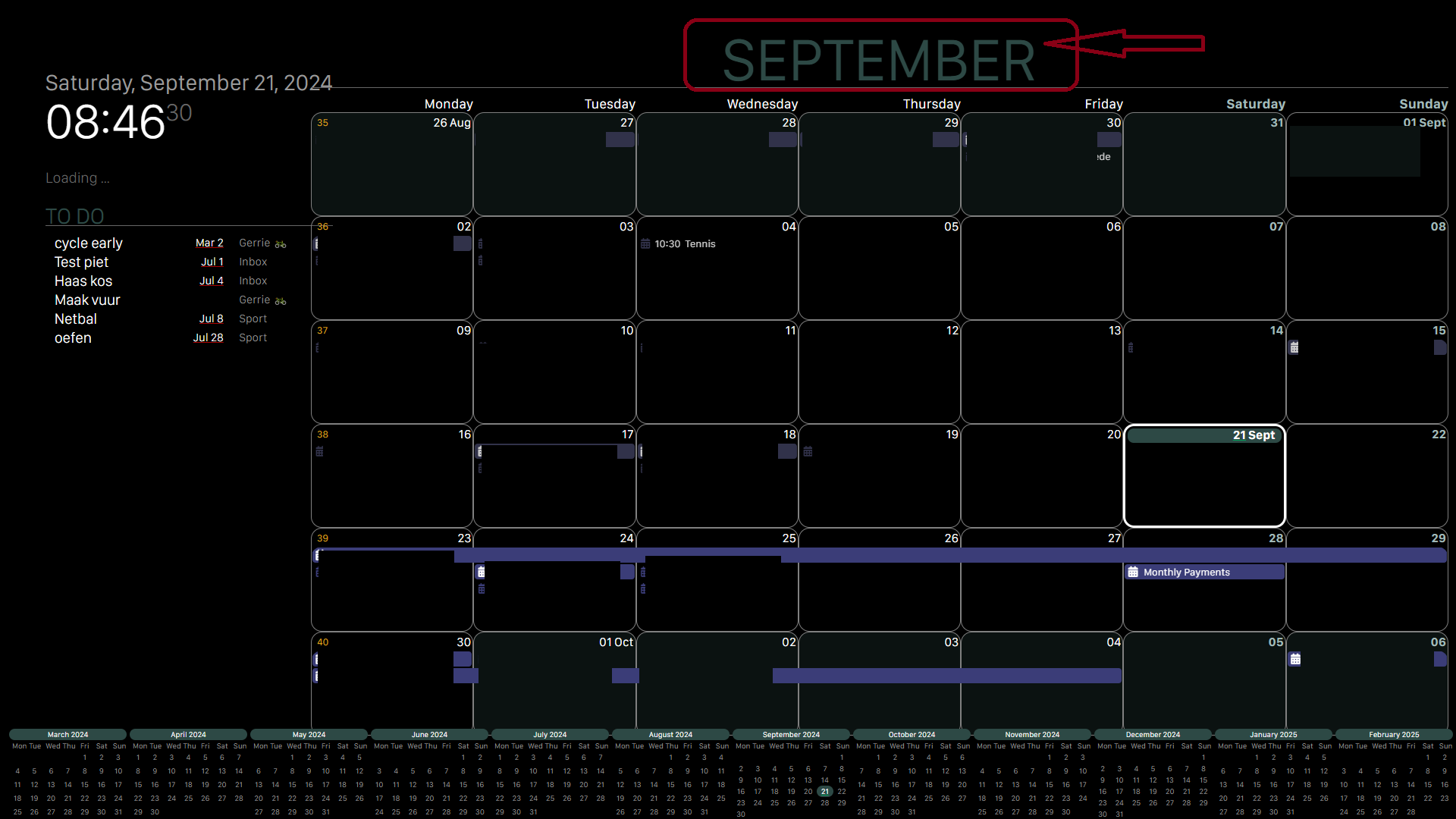
                                            Have another issue I just recently noticed. I have two different modules running, one in day view showing one week worth of calendar. The other is in month view. The day view is set with dayIndex of 0 so the current day is the first day. Day 7 on the view shows no events although they are shown for that day on the month view calendar. I could not find any similar posts with issues in this thread so hoping someone has seen and can provide some help. Here are screenshots for reference. It is always the last day in the day view, so for right now Tuesday the 24th is where the issue lies. I’ve changed weeksInView to 2 and it was always just the last day of the series.

                                            Week View:
                                            ad6951bd-e51a-4da0-b6f1-f86901dd2746-image.png

                                            Month View:
                                            3dc9d351-be9b-4776-8774-0a2ecaf1223b-image.png

                                            M 2 Replies Last reply Reply Quote 0

                                            Hello! It looks like you're interested in this conversation, but you don't have an account yet.

                                            Getting fed up of having to scroll through the same posts each visit? When you register for an account, you'll always come back to exactly where you were before, and choose to be notified of new replies (either via email, or push notification). You'll also be able to save bookmarks and upvote posts to show your appreciation to other community members.

                                            With your input, this post could be even better 💗

                                            Register Login

                                            • 1
                                            • 2
                                            • 17
                                            • 18
                                            • 19
                                            • 20
                                            • 21
                                            • 34
                                            • 35
                                            • 19 / 35
                                            • First post
                                              Last post
                                            Enjoying MagicMirror? Please consider a donation!
                                            MagicMirror created by Michael Teeuw.
                                            Forum managed by Sam, technical setup by Karsten.
                                            This forum is using NodeBB as its core | Contributors
                                            Contact | Privacy Policy