Read the statement by Michael Teeuw here.
MMM-CalendarExt3
-
@princemaxwell
CX3 doesn’t connect or fetch calendar server. That error probably has been caused by default calendar module. -
@princemaxwell
CX3*s do not use nodeJS at all, so they are not related to your error messages. The modules are executed on the browser level, not on the server-side node environment, so they could not affect server-side processes like calendar fetching.
Your error message (UND_ERR_SOCKET) is caused by theundicinode module; it may be used inside of the default calendar module to connect through HTTP/1.1. That error usually happens when the connection is closed by long waits or prior preemption.
There is a weird thing. As far as I know, the default calendar module depends onnode-ical, which usesaxiosinstead ofundici. So I wonder why and from where this error message comes.To make things simple clearly;
- Backup your current
config.jsin the safe area. - Create a new
config.js, and remove all other not-releated modules like MMM-Planetarium, MMM-soccer, … Leave onlyclock,calendarandMMM-CalendarExt3modules. - Begin with one or two calendars, not all the calendars.
- Try to execute MM again, and let’s see what happens.
- After confirmation that a small qty of calendars has no issue, add more calendars.
- After confirmation that there is no issue with the calendars, try adding more modules one by one.
(A possible reason, I guess, is that your modules are racing to use the network/dest-server severely. For example, your calendars look being rescanned every minutes. You may need to rearrange the interval of the schedule.)
- Backup your current
-
@MMRIZE calendar uses built in fetch to get the ics file. we do not have node-ical fetch it for us ( the prior ical lib did not provide fetch)
-
@sdetweil said in MMM-CalendarExt3:
@MMRIZE calendar uses built in fetch to get the ics file. we do not have node-ical fetch it for us ( the prior ical lib did not provide fetch)
If so, this is really weird where the
undicimodule is used. -
@MMRIZE undici is the implementation code of fetch
-
@MMRIZE
Thanks for your answer.I cleaned up my config.js and only had following modules in it:
- alert
- updatenotification
- clock
- calendar
- MMM-CalendarExt3
No matter how many calendars I have activated, the default calendar loads all entries quite quickly, although you can notice that the “large” calendars with many entries took a few seconds to load (sometimes up to 20-30 seconds).
Nevertheless, I deleted the fetchInterval (31000) in the default calendar, so the default value of 300000 is now active.
After the default calendar displayed all entries, it took at least another 10 minutes for them to appear in the MMM-CalendarExt3.
Why is this taking so long? They are sent to MMM-CalendarExt3 via “broadcastEvents” or what?
I took a look at the sizes of my calendar:
- Calendar 1: 1,068,804 bytes
- Calendar 2: 697,796 bytes
- Calendar 3: 398,683 bytes
- Calendar 4: 150,176 bytes
- Calendar 5: 73,128 bytes
- Calendar 6: 70,476 bytes
- Calendar 7: 23,940 bytes
- Calendar 8: 17,221 bytes
Calendars 6-8 are displayed relatively quickly in MMM-CalendarExt3, calendar 5 a little later. The others require the previously mentioned 5-10 minutes.
Could it have something to do with size?
-
@princemaxwell can you show the console log of mm with the timestamps for the broadcasts from the default calendar?
be careful as these message now expose the calendar url string…
-
No problem, i removed fragments from the share link and named them like my list above, sorted by size, cal-8 is the smallest filesize.
> magicmirror@2.26.0 start > DISPLAY="${DISPLAY:=:0}" ./node_modules/.bin/electron js/electron.js [20.03.2024 15:28.52.845] [LOG] Starting MagicMirror: v2.26.0 [20.03.2024 15:28.52.851] [LOG] Loading config ... [20.03.2024 15:28.52.856] [DEBUG] config template file not exists, no envsubst [20.03.2024 15:28.52.862] [LOG] Loading module helpers ... [20.03.2024 15:28.52.864] [LOG] No helper found for module: alert. [20.03.2024 15:28.52.898] [LOG] Initializing new module helper ... [20.03.2024 15:28.52.898] [LOG] Module helper loaded: updatenotification [20.03.2024 15:28.52.900] [LOG] No helper found for module: clock. [20.03.2024 15:28.53.231] [LOG] Initializing new module helper ... [20.03.2024 15:28.53.232] [LOG] Module helper loaded: calendar [20.03.2024 15:28.53.234] [LOG] No helper found for module: MMM-CalendarExt3. [20.03.2024 15:28.53.235] [LOG] All module helpers loaded. [20.03.2024 15:28.53.244] [LOG] Starting server on port 8080 ... [20.03.2024 15:28.53.275] [LOG] Server started ... [20.03.2024 15:28.53.278] [LOG] Connecting socket for: updatenotification [20.03.2024 15:28.53.280] [LOG] Starting module helper: updatenotification [20.03.2024 15:28.53.281] [LOG] Connecting socket for: calendar [20.03.2024 15:28.53.282] [LOG] Starting node helper for: calendar [20.03.2024 15:28.53.283] [LOG] Sockets connected & modules started ... [20.03.2024 15:28.53.918] [LOG] Launching application. [20.03.2024 15:28.57.031] [LOG] Create new calendarfetcher for url: https://p63-caldav.icloud.com/published/2/MTA-cal-2 - Interval: 3600000 [20.03.2024 15:28.57.194] [LOG] Create new calendarfetcher for url: https://p63-caldav.icloud.com/published/2/MTA-cal-4 - Interval: 3600000 [20.03.2024 15:28.57.198] [LOG] Create new calendarfetcher for url: https://p63-caldav.icloud.com/published/2/MTA-cal-3 - Interval: 3600000 [20.03.2024 15:28.57.201] [LOG] Create new calendarfetcher for url: https://p29-caldav.icloud.com/published/2/ODA-cal-1 - Interval: 3600000 [20.03.2024 15:28.57.205] [LOG] Create new calendarfetcher for url: https://p63-caldav.icloud.com/published/2/MTA-cal-5 - Interval: 3600000 [20.03.2024 15:28.57.208] [LOG] Create new calendarfetcher for url: https://i.cal.to/ical/3/borussiadortmund/bundesliga-spielplan/cal-6.ics - Interval: 3600000 [20.03.2024 15:28.57.217] [LOG] Create new calendarfetcher for url: https://i.cal.to/ical/77/nrw/ferien/cal-8.ics - Interval: 3600000 [20.03.2024 15:28.57.221] [LOG] Create new calendarfetcher for url: https://i.cal.to/ical/61/nrw/feiertage/cal-7.ics - Interval: 3600000 [20.03.2024 15:28.57.224] [INFO] updatenotification: Updater Class Loaded! [20.03.2024 15:28.57.225] [INFO] updatenotification: Checking PM2 using... [20.03.2024 15:28.57.227] [INFO] Checking git for module: MMM-CalendarExt3 [20.03.2024 15:28.57.290] [INFO] Checking git for module: MagicMirror [20.03.2024 15:28.57.729] [INFO] Calendar-Fetcher: Broadcasting 2 events from https://i.cal.to/ical/61/nrw/feiertage/cal-7.ics. [20.03.2024 15:28.57.825] [INFO] Calendar-Fetcher: Broadcasting 1 events from https://i.cal.to/ical/77/nrw/ferien/cal-8.ics. [20.03.2024 15:28.59.069] [INFO] Calendar-Fetcher: Broadcasting 5 events from https://i.cal.to/ical/3/borussiadortmund/bundesliga-spielplan/cal-6.ics. [20.03.2024 15:29.00.814] [INFO] Calendar-Fetcher: Broadcasting 4 events from https://p63-caldav.icloud.com/published/2/MTA-cal-5. [20.03.2024 15:29.00.869] [INFO] updatenotification: You are using pm2 with MagicMirror [20.03.2024 15:29.02.223] [INFO] Calendar-Fetcher: Broadcasting 1 events from https://p63-caldav.icloud.com/published/2/MTA-cal-4. [20.03.2024 15:29.04.265] [INFO] Calendar-Fetcher: Broadcasting 7 events from https://p63-caldav.icloud.com/published/2/MTA-cal-3. [20.03.2024 15:29.49.438] [INFO] Calendar-Fetcher: Broadcasting 8 events from https://p63-caldav.icloud.com/published/2/MTA-cal-2. [20.03.2024 15:30.30.417] [INFO] Calendar-Fetcher: Broadcasting 12 events from https://p29-caldav.icloud.com/published/2/ODA-cal-1. -
@princemaxwell
Now I know what happens. Your symptom is not related with any errors.
Let me explain the process.- Each calendar parsing/fetching in the calendar module will take some time, a few seconds or some dozen seconds. How long will it take is unpredictable.
- The default calendar module will refresh itself and broadcast accumulated events on any calendar fetched. So, in some unlucky cases, the module may flicker due to too-short-term refreshing.
- CX3’s view is very complex and heavy for redrawing frequently. To avoid that flickering, CX3 will wait some time after any broadcasted event arrives (
waitFetch: 5000ms by default) to check whether the following broadcasting will arrive in the short term. If no other followed broadcasting happens, stop waiting and process collected events at that moment and draw the view. - This means that if you have 8 calendars and 5 calendars complete fetching in 4 seconds and the other 3 calendars may take over 10 seconds, only the events from the earlier 5 calendars will be collected and prepared to show before the first rendering time(waitFetch 5000ms).
- After the first rendering, the remaining 3 calendars may complete fetching. CX3 receives those events but does not render them instantly to avoid flickering. The rendering will be done every
refreshInterval(by default 10 minutes) with stocked events that are received during that period. - That is the reason why some of your calendars will be shown the first time, but others are applied after 10 minutes.
So, you may have these options.
-
Do nothing. Just wait 10 minutes; the lazy events will normally be applied to CX3 from the second refreshing cycle. Calendar events are not regarded as needing urgent, instant reflection. Your MM may stay on for a long time. Ten minutes after the first bootup will not be a big issue, and your family will not care.
-
Or Give enough long
waitFetch. Your log showed that almost 2 minute is needed to complete fetching 8 calendars entirely.waitFetch: 1000 * 60 * 2may work. (The default value is 5000ms, not 300000) (This means you need 2 minutes before drawing the CX3 view at first time.) -
Or Give shorter
refreshIntervalto redraw and reflect the change of events. The default value is1000 * 60 * 10(10 minutes) But you can assign shorter. But 99.99% of refreshing will deal unchanged same events. So I think it is a kind of waste. Anyway, if you want instant reflection, give it shorter value.
-
All right, that makes complete sense.
I understand that now.CX3 initially only recognizes broadcast events and does not know how many calendars are configured and waits until all of them have been processed.
(The default value is 5000ms, not 300000)
By the way, with the 300000 I meant the time from the default calendar, the “fetchInterval”, whose default value is: 300000 (5 minutes).
I tried the 2nd option, unfortunately it doesn’t work, I set it to 1000 * 60 * 2, but it takes exactly 10 minutes.
When and how often is waitFetch executed, just once? I would have expected CX3 to notice a broadcast and then update according to waitFetch.
-
@princemaxwell
waitFetchwill be applied only to the very first broadcast notification. If you setwaitFetch: 120000, this sequence will happen (I’ll assume the calendar module is described before CX3 in config.js)- the calendar module starts the parsing of calendars.
- CX3 module starts. Library is loaded and the DOM is prepared. It is now ready to receive the events.
- The first calendars might complete its fetching. then calendar module will broadcast the events at that moment.
- CX3 receive the first broadcasted events. Wait 120000ms(2 minute) from that moment to get other lazy broadcasting coming.
- Other calendars might be fetched. But some might still need to be completed.
- Anyway, after 120000ms from the first broadcast, CX3 will draw the events that have arrived till then. (It means the view of CX3 is shown for the first time after at least 2 minutes from the boot)
- Then after 10minutes(
refreshInterval), CX3 will refresh again. Maybe until then, all calendars would have been fetched.(I hope.)
Anyway your log was showing the 1st calendar fetching as below;
[20.03.2024 15:28.57.729] [INFO] Calendar-Fetcher: Broadcasting 2 events from ...And the 8th fetching ;
[20.03.2024 15:30.30.417] [INFO] Calendar-Fetcher: Broadcasting 12 events from ...It takes 93 seconds to complete. So I think
waitFetch: 120000(120 seconds) would be enough; however, if there are still missing events, the possible reasons would be;- It takes more than 120 seconds at that moment randomly to complete fetching of all calendars since first fetching,
- some calendars were too fast-fetched before CX3 was ready. so they were missed. (all modules are loaded and starts sequentially, so if you have certain number of modules, CX3 may not be ready until that moment.)
Of course, you can adjust the order of modules in config, assign needed values of
waitFetchandrefreshIntervalto show the entire events properly on the first boot time.But, my suggestion is,
Just leave them and do nothing.
After 10 minutes from the first bootup, everything will be OK. Your MM might be rebooted at midnight or in the morning on real-life usage. MM would stay turned on all day or for several days. So literally, nobody will care, even realize there had been some missing events on the bootup time. You don’t have to make an effort to solve this unworthy issue. -
The standards are absolutely sufficient for everyday use.
But while I position the modules and adapt the CSS to my own wishes and test the functions of the modules, the long time is rather annoying and I wanted to shorten it.
I have now activated the following config and restarted.
I recorded the contents of the screen and looked at exactly when and what happened.{ module: "MMM-CalendarExt3", position: "middle_center", disabled: false, waitFetch: 1000 * 60 * 2, refreshInterval: 1000 * 60 * 2, }, { module: "MMM-CalendarExt3Agenda", position: "top_center", disabled: false, waitFetch: 1000 * 60 * 2, refreshInterval: 1000 * 60 * 2, title: "Kalender", config: { instanceId: "basicCalendar", locale: 'de', firstDayOfWeek: 1, startDayIndex: -1, endDayIndex: 10, calendarSet: [] } },The result is that the config is ignored.
-
CX3 starts after the calendar module and displayed the first entries of the 3 small calendars as soon as they appeared.
-
CX3 only refreshes after 10 minutes. You can tell this by the display briefly disappearing and then fading in again. Then all entries are included.
-
CX3A also starts after the calendar module and also shows the entries of the 3 small calendars directly.
-
CX3A refreshes after 30 minutes (default?). Even then, all entries are included.
Apparently waitFetch is ignored for both, otherwise, according to your explanation, the first entries would only appear after waitFetch. But these are there immediately as soon as the module has been loaded.
Other configurations are also ignored. For example, I used this for testing:
mode: ‘day’,
But i only get the week view.
When i change it in MMM-CalendarExt3.js, then it works.Why is the config ignored or what am I missing?
-
-
@princemaxwell
You did a simple mistake. Configuration parameters of the module should be placed inside of the module’sconfig:{}. -
Oh no, that’s embarrassing. I completely overlooked that and of course it works now. So often you look at what the problem could be and just don’t see it.
Thank you very much for your help!
-
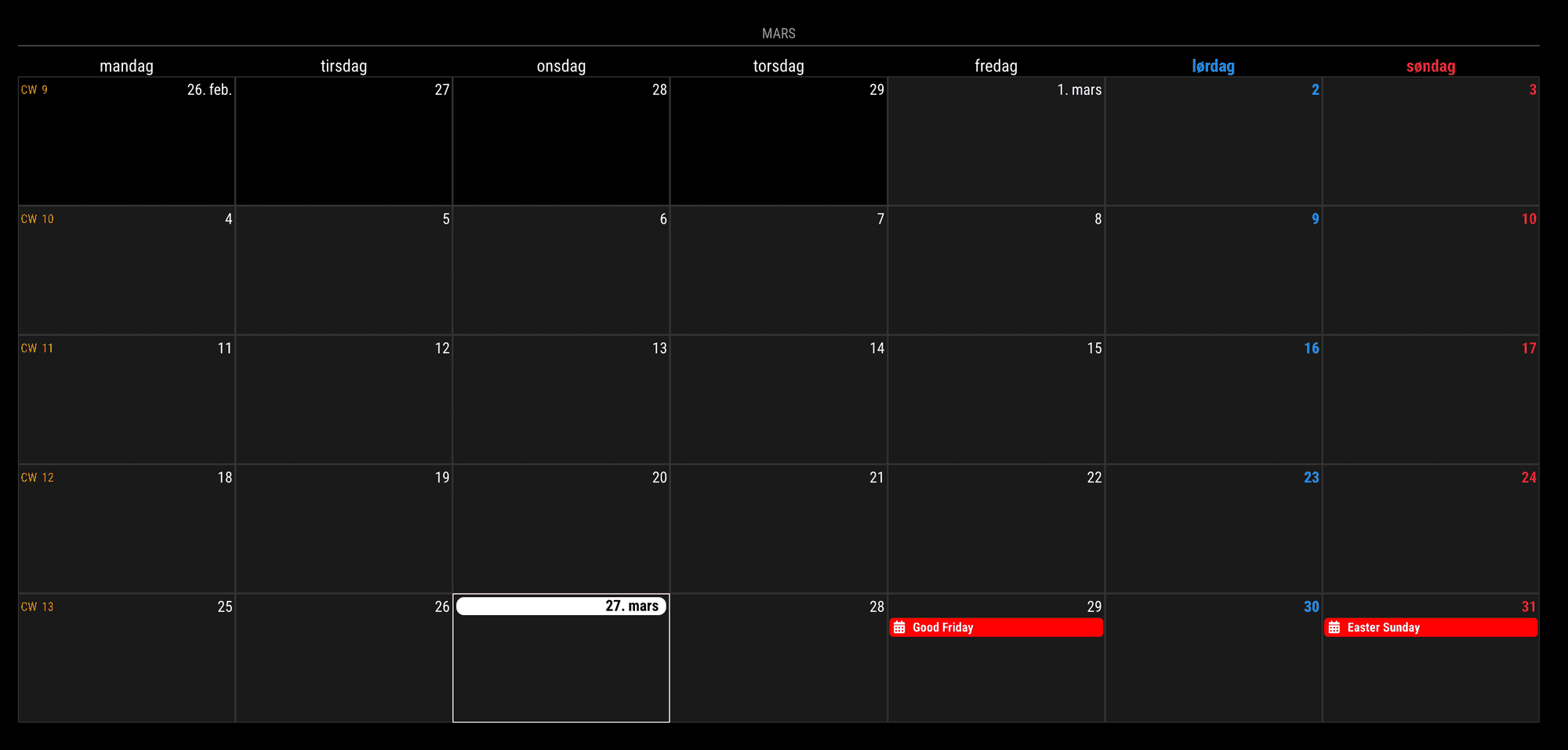
I can’t get this to work, just has this basic config, and it is just empty, got the orginal calender app to show the events, but can’t see anything in the MMM-CalendarExt3 module, just the name of the month “Mars”…
_modules: [ { module: "calendar", //Removing this to hide default calendar module position: "top_left", config: { broadcastPastEvents: true, // <= IMPORTANT to see past events calendars: [ { instanceId: "basicCalendar", name: "us_holiday", // <= RECOMMENDED to assign name color: "red", // <= RECOMMENDED to assign color url: "webcal://www.calendarlabs.com/ical-calendar/ics/76/US_Holidays.ics" } ] } }, { module: "MMM-CalendarExt3", position: "top_bar", title: "Kalender", config: { mode: "month", instanceId: "basicCalendar", locale: 'no-NO', // Norwegian, ref https://www.localeplanet.com/java/no-NO/index.html maxEventLines: 5, firstDayOfWeek: 1, } }, ]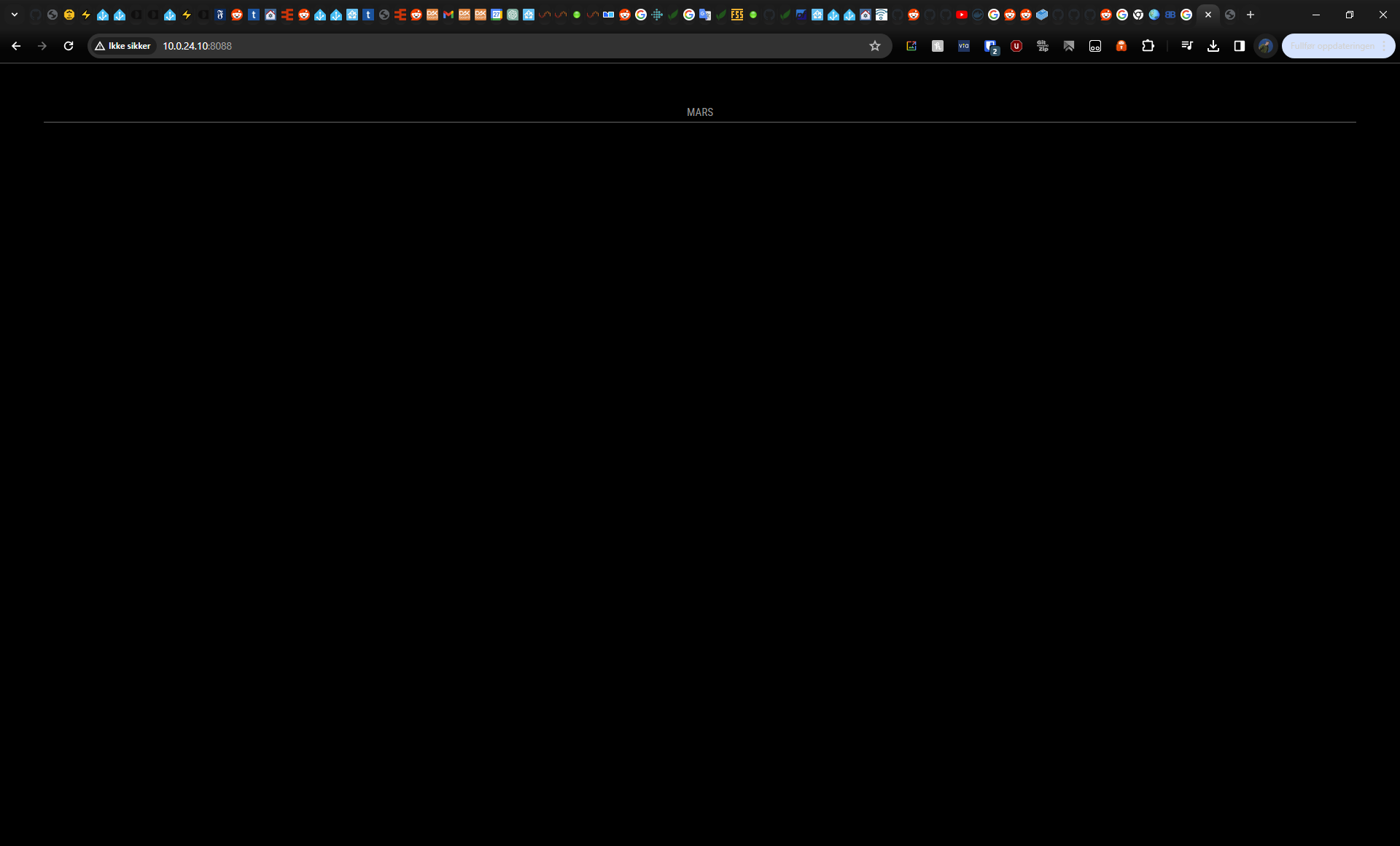
docker start log:
text error warn system array login ---Ensuring UID: 99 matches user--- ---Ensuring GID: 100 matches user--- ---Setting umask to 000--- ---Checking for optional scripts--- ---No optional script found, continuing--- ---Taking ownership of data...--- ---Starting...--- ---Force Update enabled!--- v2.26.0.tar.gz 100%[===================>] 381.10K --.-KB/s in 0.1s ---Successfully downloaded MagicMirror² v2.26.0!--- rm: refusing to remove '.' or '..' directory: skipping '/magicmirror2/.' rm: refusing to remove '.' or '..' directory: skipping '/magicmirror2/..' MagicMirror-2.26.0/ MagicMirror-2.26.0/.editorconfig MagicMirror-2.26.0/.eslintignore MagicMirror-2.26.0/.eslintrc.json MagicMirror-2.26.0/.gitattributes MagicMirror-2.26.0/.github/ MagicMirror-2.26.0/.github/CONTRIBUTING.md MagicMirror-2.26.0/.github/FUNDING.yaml MagicMirror-2.26.0/.github/ISSUE_TEMPLATE.md MagicMirror-2.26.0/.github/PULL_REQUEST_TEMPLATE.md MagicMirror-2.26.0/.github/codecov.yaml MagicMirror-2.26.0/.github/dependabot.yaml MagicMirror-2.26.0/.github/header.png MagicMirror-2.26.0/.github/stale.yaml MagicMirror-2.26.0/.github/workflows/ MagicMirror-2.26.0/.github/workflows/automated-tests.yaml MagicMirror-2.26.0/.github/workflows/depsreview.yaml MagicMirror-2.26.0/.github/workflows/enforce-pullrequest-rules.yaml MagicMirror-2.26.0/.gitignore MagicMirror-2.26.0/.husky/ MagicMirror-2.26.0/.husky/pre-commit MagicMirror-2.26.0/.npmrc MagicMirror-2.26.0/.prettierignore MagicMirror-2.26.0/.prettierrc.json MagicMirror-2.26.0/.stylelintrc.json MagicMirror-2.26.0/CHANGELOG.md MagicMirror-2.26.0/Collaboration.md MagicMirror-2.26.0/LICENSE.md MagicMirror-2.26.0/README.md MagicMirror-2.26.0/clientonly/ MagicMirror-2.26.0/clientonly/index.js MagicMirror-2.26.0/config/ MagicMirror-2.26.0/config/config.js.sample MagicMirror-2.26.0/css/ MagicMirror-2.26.0/css/custom.css.sample MagicMirror-2.26.0/css/main.css MagicMirror-2.26.0/fonts/ MagicMirror-2.26.0/fonts/package-lock.json MagicMirror-2.26.0/fonts/package.json MagicMirror-2.26.0/fonts/roboto.css MagicMirror-2.26.0/index.html MagicMirror-2.26.0/installers/ MagicMirror-2.26.0/installers/mm.sh MagicMirror-2.26.0/jest.config.js MagicMirror-2.26.0/js/ MagicMirror-2.26.0/js/animateCSS.js MagicMirror-2.26.0/js/app.js MagicMirror-2.26.0/js/check_config.js MagicMirror-2.26.0/js/class.js MagicMirror-2.26.0/js/defaults.js MagicMirror-2.26.0/js/deprecated.js MagicMirror-2.26.0/js/electron.js MagicMirror-2.26.0/js/loader.js MagicMirror-2.26.0/js/logger.js MagicMirror-2.26.0/js/main.js MagicMirror-2.26.0/js/module.js MagicMirror-2.26.0/js/node_helper.js MagicMirror-2.26.0/js/server.js MagicMirror-2.26.0/js/server_functions.js MagicMirror-2.26.0/js/socketclient.js MagicMirror-2.26.0/js/translator.js MagicMirror-2.26.0/js/utils.js MagicMirror-2.26.0/jsconfig.json MagicMirror-2.26.0/module-types.ts MagicMirror-2.26.0/modules/ MagicMirror-2.26.0/modules/default/ MagicMirror-2.26.0/modules/default/alert/ MagicMirror-2.26.0/modules/default/alert/README.md MagicMirror-2.26.0/modules/default/alert/alert.js MagicMirror-2.26.0/modules/default/alert/notificationFx.js MagicMirror-2.26.0/modules/default/alert/styles/ MagicMirror-2.26.0/modules/default/alert/styles/center.css MagicMirror-2.26.0/modules/default/alert/styles/left.css MagicMirror-2.26.0/modules/default/alert/styles/notificationFx.css MagicMirror-2.26.0/modules/default/alert/styles/right.css MagicMirror-2.26.0/modules/default/alert/templates/ MagicMirror-2.26.0/modules/default/alert/templates/alert.njk MagicMirror-2.26.0/modules/default/alert/templates/notification.njk MagicMirror-2.26.0/modules/default/alert/translations/ MagicMirror-2.26.0/modules/default/alert/translations/bg.json MagicMirror-2.26.0/modules/default/alert/translations/da.json MagicMirror-2.26.0/modules/default/alert/translations/de.json MagicMirror-2.26.0/modules/default/alert/translations/en.json MagicMirror-2.26.0/modules/default/alert/translations/es.json MagicMirror-2.26.0/modules/default/alert/translations/fr.json MagicMirror-2.26.0/modules/default/alert/translations/hu.json MagicMirror-2.26.0/modules/default/alert/translations/nl.json MagicMirror-2.26.0/modules/default/alert/translations/ru.json MagicMirror-2.26.0/modules/default/alert/translations/th.json MagicMirror-2.26.0/modules/default/calendar/ MagicMirror-2.26.0/modules/default/calendar/README.md MagicMirror-2.26.0/modules/default/calendar/calendar.css MagicMirror-2.26.0/modules/default/calendar/calendar.js MagicMirror-2.26.0/modules/default/calendar/calendarfetcher.js MagicMirror-2.26.0/modules/default/calendar/calendarfetcherutils.js MagicMirror-2.26.0/modules/default/calendar/calendarutils.js MagicMirror-2.26.0/modules/default/calendar/debug.js MagicMirror-2.26.0/modules/default/calendar/node_helper.js MagicMirror-2.26.0/modules/default/calendar/windowsZones.json MagicMirror-2.26.0/modules/default/clock/ MagicMirror-2.26.0/modules/default/clock/README.md MagicMirror-2.26.0/modules/default/clock/clock.js MagicMirror-2.26.0/modules/default/clock/clock_styles.css MagicMirror-2.26.0/modules/default/clock/faces/ MagicMirror-2.26.0/modules/default/clock/faces/face-001.svg MagicMirror-2.26.0/modules/default/clock/faces/face-002.svg MagicMirror-2.26.0/modules/default/clock/faces/face-003.svg MagicMirror-2.26.0/modules/default/clock/faces/face-004.svg MagicMirror-2.26.0/modules/default/clock/faces/face-005.svg MagicMirror-2.26.0/modules/default/clock/faces/face-006.svg MagicMirror-2.26.0/modules/default/clock/faces/face-007.svg MagicMirror-2.26.0/modules/default/clock/faces/face-008.svg MagicMirror-2.26.0/modules/default/clock/faces/face-009.svg MagicMirror-2.26.0/modules/default/clock/faces/face-010.svg MagicMirror-2.26.0/modules/default/clock/faces/face-011.svg MagicMirror-2.26.0/modules/default/clock/faces/face-012.svg MagicMirror-2.26.0/modules/default/compliments/ MagicMirror-2.26.0/modules/default/compliments/README.md MagicMirror-2.26.0/modules/default/compliments/compliments.js MagicMirror-2.26.0/modules/default/defaultmodules.js MagicMirror-2.26.0/modules/default/helloworld/ MagicMirror-2.26.0/modules/default/helloworld/README.md MagicMirror-2.26.0/modules/default/helloworld/helloworld.js MagicMirror-2.26.0/modules/default/helloworld/helloworld.njk MagicMirror-2.26.0/modules/default/newsfeed/ MagicMirror-2.26.0/modules/default/newsfeed/README.md MagicMirror-2.26.0/modules/default/newsfeed/fullarticle.njk MagicMirror-2.26.0/modules/default/newsfeed/newsfeed.css MagicMirror-2.26.0/modules/default/newsfeed/newsfeed.js MagicMirror-2.26.0/modules/default/newsfeed/newsfeed.njk MagicMirror-2.26.0/modules/default/newsfeed/newsfeedfetcher.js MagicMirror-2.26.0/modules/default/newsfeed/node_helper.js MagicMirror-2.26.0/modules/default/newsfeed/oldconfig.njk MagicMirror-2.26.0/modules/default/updatenotification/ MagicMirror-2.26.0/modules/default/updatenotification/README.md MagicMirror-2.26.0/modules/default/updatenotification/git_helper.js MagicMirror-2.26.0/modules/default/updatenotification/node_helper.js MagicMirror-2.26.0/modules/default/updatenotification/update_helper.js MagicMirror-2.26.0/modules/default/updatenotification/updatenotification.css MagicMirror-2.26.0/modules/default/updatenotification/updatenotification.js MagicMirror-2.26.0/modules/default/updatenotification/updatenotification.njk MagicMirror-2.26.0/modules/default/utils.js MagicMirror-2.26.0/modules/default/weather/ MagicMirror-2.26.0/modules/default/weather/README.md MagicMirror-2.26.0/modules/default/weather/current.njk MagicMirror-2.26.0/modules/default/weather/forecast.njk MagicMirror-2.26.0/modules/default/weather/hourly.njk MagicMirror-2.26.0/modules/default/weather/providers/ MagicMirror-2.26.0/modules/default/weather/providers/README.md MagicMirror-2.26.0/modules/default/weather/providers/envcanada.js MagicMirror-2.26.0/modules/default/weather/providers/openmeteo.js MagicMirror-2.26.0/modules/default/weather/providers/openweathermap.js MagicMirror-2.26.0/modules/default/weather/providers/overrideWrapper.js MagicMirror-2.26.0/modules/default/weather/providers/pirateweather.js MagicMirror-2.26.0/modules/default/weather/providers/smhi.js MagicMirror-2.26.0/modules/default/weather/providers/ukmetoffice.js MagicMirror-2.26.0/modules/default/weather/providers/ukmetofficedatahub.js MagicMirror-2.26.0/modules/default/weather/providers/weatherbit.js MagicMirror-2.26.0/modules/default/weather/providers/weatherflow.js MagicMirror-2.26.0/modules/default/weather/providers/weathergov.js MagicMirror-2.26.0/modules/default/weather/providers/yr.js MagicMirror-2.26.0/modules/default/weather/weather.css MagicMirror-2.26.0/modules/default/weather/weather.js MagicMirror-2.26.0/modules/default/weather/weatherobject.js MagicMirror-2.26.0/modules/default/weather/weatherprovider.js MagicMirror-2.26.0/modules/default/weather/weatherutils.js MagicMirror-2.26.0/package-lock.json MagicMirror-2.26.0/package.json MagicMirror-2.26.0/serveronly/ MagicMirror-2.26.0/serveronly/index.js MagicMirror-2.26.0/splashscreen/ MagicMirror-2.26.0/splashscreen/MagicMirror.plymouth MagicMirror-2.26.0/splashscreen/MagicMirror.script MagicMirror-2.26.0/splashscreen/splash.png MagicMirror-2.26.0/splashscreen/splash_halt.png MagicMirror-2.26.0/tests/ MagicMirror-2.26.0/tests/configs/ MagicMirror-2.26.0/tests/configs/default.js MagicMirror-2.26.0/tests/configs/empty_ipWhiteList.js MagicMirror-2.26.0/tests/configs/modules/ MagicMirror-2.26.0/tests/configs/modules/alert/ MagicMirror-2.26.0/tests/configs/modules/alert/default.js MagicMirror-2.26.0/tests/configs/modules/calendar/ MagicMirror-2.26.0/tests/configs/modules/calendar/auth-default.js MagicMirror-2.26.0/tests/configs/modules/calendar/bad_rrule.js MagicMirror-2.26.0/tests/configs/modules/calendar/basic-auth.js MagicMirror-2.26.0/tests/configs/modules/calendar/changed-port.js MagicMirror-2.26.0/tests/configs/modules/calendar/custom.js MagicMirror-2.26.0/tests/configs/modules/calendar/default.js MagicMirror-2.26.0/tests/configs/modules/calendar/exdate.js MagicMirror-2.26.0/tests/configs/modules/calendar/fail-basic-auth.js MagicMirror-2.26.0/tests/configs/modules/calendar/old-basic-auth.js MagicMirror-2.26.0/tests/configs/modules/calendar/recurring.js MagicMirror-2.26.0/tests/configs/modules/calendar/show-duplicates-in-calendar.js MagicMirror-2.26.0/tests/configs/modules/clock/ MagicMirror-2.26.0/tests/configs/modules/clock/clock_12hr.js MagicMirror-2.26.0/tests/configs/modules/clock/clock_24hr.js MagicMirror-2.26.0/tests/configs/modules/clock/clock_analog.js MagicMirror-2.26.0/tests/configs/modules/clock/clock_displaySeconds_false.js MagicMirror-2.26.0/tests/configs/modules/clock/clock_showDateAnalog.js MagicMirror-2.26.0/tests/configs/modules/clock/clock_showPeriodUpper.js MagicMirror-2.26.0/tests/configs/modules/clock/clock_showSunMoon.js MagicMirror-2.26.0/tests/configs/modules/clock/clock_showTime.js MagicMirror-2.26.0/tests/configs/modules/clock/clock_showWeek.js MagicMirror-2.26.0/tests/configs/modules/clock/es/ MagicMirror-2.26.0/tests/configs/modules/clock/es/clock_12hr.js MagicMirror-2.26.0/tests/configs/modules/clock/es/clock_24hr.js MagicMirror-2.26.0/tests/configs/modules/clock/es/clock_showPeriodUpper.js MagicMirror-2.26.0/tests/configs/modules/clock/es/clock_showWeek.js MagicMirror-2.26.0/tests/configs/modules/compliments/ MagicMirror-2.26.0/tests/configs/modules/compliments/compliments_animateCSS.js MagicMirror-2.26.0/tests/configs/modules/compliments/compliments_animateCSS_fallbackToDefault.js MagicMirror-2.26.0/tests/configs/modules/compliments/compliments_animateCSS_invertedAnimationName.js MagicMirror-2.26.0/tests/configs/modules/compliments/compliments_anytime.js MagicMirror-2.26.0/tests/configs/modules/compliments/compliments_date.js MagicMirror-2.26.0/tests/configs/modules/compliments/compliments_only_anytime.js MagicMirror-2.26.0/tests/configs/modules/compliments/compliments_parts_day.js MagicMirror-2.26.0/tests/configs/modules/compliments/compliments_remote.js MagicMirror-2.26.0/tests/configs/modules/display.js MagicMirror-2.26.0/tests/configs/modules/helloworld/ MagicMirror-2.26.0/tests/configs/modules/helloworld/helloworld.js MagicMirror-2.26.0/tests/configs/modules/helloworld/helloworld_default.js MagicMirror-2.26.0/tests/configs/modules/newsfeed/ MagicMirror-2.26.0/tests/configs/modules/newsfeed/default.js MagicMirror-2.26.0/tests/configs/modules/newsfeed/ignore_items.js MagicMirror-2.26.0/tests/configs/modules/newsfeed/incorrect_url.js MagicMirror-2.26.0/tests/configs/modules/newsfeed/prohibited_words.js MagicMirror-2.26.0/tests/configs/modules/positions.js MagicMirror-2.26.0/tests/configs/modules/weather/ MagicMirror-2.26.0/tests/configs/modules/weather/currentweather_compliments.js MagicMirror-2.26.0/tests/configs/modules/weather/currentweather_default.js MagicMirror-2.26.0/tests/configs/modules/weather/currentweather_options.js MagicMirror-2.26.0/tests/configs/modules/weather/currentweather_units.js MagicMirror-2.26.0/tests/configs/modules/weather/forecastweather_absolute.js MagicMirror-2.26.0/tests/configs/modules/weather/forecastweather_default.js MagicMirror-2.26.0/tests/configs/modules/weather/forecastweather_options.js MagicMirror-2.26.0/tests/configs/modules/weather/forecastweather_units.js MagicMirror-2.26.0/tests/configs/modules/weather/hourlyweather_default.js MagicMirror-2.26.0/tests/configs/modules/weather/hourlyweather_options.js MagicMirror-2.26.0/tests/configs/modules/weather/hourlyweather_showPrecipitation.js MagicMirror-2.26.0/tests/configs/noIpWhiteList.js MagicMirror-2.26.0/tests/configs/port_8090.js MagicMirror-2.26.0/tests/configs/port_variable.env MagicMirror-2.26.0/tests/configs/port_variable.js.template MagicMirror-2.26.0/tests/configs/without_modules.js MagicMirror-2.26.0/tests/e2e/ MagicMirror-2.26.0/tests/e2e/animateCSS_spec.js MagicMirror-2.26.0/tests/e2e/env_spec.js MagicMirror-2.26.0/tests/e2e/fonts_spec.js MagicMirror-2.26.0/tests/e2e/helpers/ MagicMirror-2.26.0/tests/e2e/helpers/basic-auth.js MagicMirror-2.26.0/tests/e2e/helpers/global-setup.js MagicMirror-2.26.0/tests/e2e/helpers/mock-console.js MagicMirror-2.26.0/tests/e2e/helpers/weather-functions.js MagicMirror-2.26.0/tests/e2e/ipWhitelist_spec.js MagicMirror-2.26.0/tests/e2e/modules/ MagicMirror-2.26.0/tests/e2e/modules/alert_spec.js MagicMirror-2.26.0/tests/e2e/modules/calendar_spec.js MagicMirror-2.26.0/tests/e2e/modules/clock_es_spec.js MagicMirror-2.26.0/tests/e2e/modules/clock_spec.js MagicMirror-2.26.0/tests/e2e/modules/compliments_spec.js MagicMirror-2.26.0/tests/e2e/modules/helloworld_spec.js MagicMirror-2.26.0/tests/e2e/modules/newsfeed_spec.js MagicMirror-2.26.0/tests/e2e/modules/weather_current_spec.js MagicMirror-2.26.0/tests/e2e/modules/weather_forecast_spec.js MagicMirror-2.26.0/tests/e2e/modules/weather_hourly_spec.js MagicMirror-2.26.0/tests/e2e/modules_display_spec.js MagicMirror-2.26.0/tests/e2e/modules_empty_spec.js MagicMirror-2.26.0/tests/e2e/modules_position_spec.js MagicMirror-2.26.0/tests/e2e/port_spec.js MagicMirror-2.26.0/tests/e2e/serveronly_spec.js MagicMirror-2.26.0/tests/e2e/template_spec.js MagicMirror-2.26.0/tests/e2e/translations_spec.js MagicMirror-2.26.0/tests/e2e/vendor_spec.js MagicMirror-2.26.0/tests/electron/ MagicMirror-2.26.0/tests/electron/env_spec.js MagicMirror-2.26.0/tests/electron/helpers/ MagicMirror-2.26.0/tests/electron/helpers/global-setup.js MagicMirror-2.26.0/tests/electron/helpers/weather-setup.js MagicMirror-2.26.0/tests/electron/modules/ MagicMirror-2.26.0/tests/electron/modules/calendar_spec.js MagicMirror-2.26.0/tests/electron/modules/compliments_spec.js MagicMirror-2.26.0/tests/electron/modules/weather_spec.js MagicMirror-2.26.0/tests/mocks/ MagicMirror-2.26.0/tests/mocks/bad_rrule.ics MagicMirror-2.26.0/tests/mocks/calendar_test.ics MagicMirror-2.26.0/tests/mocks/calendar_test_clone.ics MagicMirror-2.26.0/tests/mocks/calendar_test_exdate.ics MagicMirror-2.26.0/tests/mocks/calendar_test_icons.ics MagicMirror-2.26.0/tests/mocks/calendar_test_recurring.ics MagicMirror-2.26.0/tests/mocks/compliments_test.json MagicMirror-2.26.0/tests/mocks/newsfeed_test.xml MagicMirror-2.26.0/tests/mocks/translation_test.json MagicMirror-2.26.0/tests/mocks/weather_current.json MagicMirror-2.26.0/tests/mocks/weather_forecast.json MagicMirror-2.26.0/tests/mocks/weather_hourly.json MagicMirror-2.26.0/tests/unit/ MagicMirror-2.26.0/tests/unit/classes/ MagicMirror-2.26.0/tests/unit/classes/class_spec.js MagicMirror-2.26.0/tests/unit/classes/deprecated_spec.js MagicMirror-2.26.0/tests/unit/classes/translator_spec.js MagicMirror-2.26.0/tests/unit/classes/utils_spec.js MagicMirror-2.26.0/tests/unit/functions/ MagicMirror-2.26.0/tests/unit/functions/__snapshots__/ MagicMirror-2.26.0/tests/unit/functions/__snapshots__/updatenotification_spec.js.snap MagicMirror-2.26.0/tests/unit/functions/cmp_versions_spec.js MagicMirror-2.26.0/tests/unit/functions/server_functions_spec.js MagicMirror-2.26.0/tests/unit/functions/updatenotification_spec.js MagicMirror-2.26.0/tests/unit/global_vars/ MagicMirror-2.26.0/tests/unit/global_vars/defaults_modules_spec.js MagicMirror-2.26.0/tests/unit/global_vars/root_path_spec.js MagicMirror-2.26.0/tests/unit/helpers/ MagicMirror-2.26.0/tests/unit/helpers/global-setup.js MagicMirror-2.26.0/tests/unit/modules/ MagicMirror-2.26.0/tests/unit/modules/default/ MagicMirror-2.26.0/tests/unit/modules/default/calendar/ MagicMirror-2.26.0/tests/unit/modules/default/calendar/calendar_fetcher_utils_bad_rrule.js MagicMirror-2.26.0/tests/unit/modules/default/calendar/calendar_fetcher_utils_spec.js MagicMirror-2.26.0/tests/unit/modules/default/calendar/calendar_utils_spec.js MagicMirror-2.26.0/tests/unit/modules/default/utils_spec.js MagicMirror-2.26.0/tests/unit/modules/default/weather/ MagicMirror-2.26.0/tests/unit/modules/default/weather/weather_object_spec.js MagicMirror-2.26.0/tests/unit/modules/default/weather/weather_utils_spec.js MagicMirror-2.26.0/tests/utils/ MagicMirror-2.26.0/tests/utils/test_sequencer.js MagicMirror-2.26.0/tests/utils/weather_mocker.js MagicMirror-2.26.0/translations/ MagicMirror-2.26.0/translations/af.json MagicMirror-2.26.0/translations/bg.json MagicMirror-2.26.0/translations/ca.json MagicMirror-2.26.0/translations/cs.json MagicMirror-2.26.0/translations/cv.json MagicMirror-2.26.0/translations/cy.json MagicMirror-2.26.0/translations/da.json MagicMirror-2.26.0/translations/de.json MagicMirror-2.26.0/translations/el.json MagicMirror-2.26.0/translations/en.json MagicMirror-2.26.0/translations/es.json MagicMirror-2.26.0/translations/et.json MagicMirror-2.26.0/translations/fi.json MagicMirror-2.26.0/translations/fr.json MagicMirror-2.26.0/translations/fy.json MagicMirror-2.26.0/translations/gl.json MagicMirror-2.26.0/translations/gu.json MagicMirror-2.26.0/translations/he.json MagicMirror-2.26.0/translations/hi.json MagicMirror-2.26.0/translations/hr.json MagicMirror-2.26.0/translations/hu.json MagicMirror-2.26.0/translations/id.json MagicMirror-2.26.0/translations/is.json MagicMirror-2.26.0/translations/it.json MagicMirror-2.26.0/translations/ja.json MagicMirror-2.26.0/translations/ko.json MagicMirror-2.26.0/translations/lt.json MagicMirror-2.26.0/translations/ms-my.json MagicMirror-2.26.0/translations/nb.json MagicMirror-2.26.0/translations/nl.json MagicMirror-2.26.0/translations/nn.json MagicMirror-2.26.0/translations/pl.json MagicMirror-2.26.0/translations/ps.json MagicMirror-2.26.0/translations/pt-br.json MagicMirror-2.26.0/translations/pt.json MagicMirror-2.26.0/translations/ro.json MagicMirror-2.26.0/translations/ru.json MagicMirror-2.26.0/translations/sk.json MagicMirror-2.26.0/translations/sv.json MagicMirror-2.26.0/translations/th.json MagicMirror-2.26.0/translations/tlh.json MagicMirror-2.26.0/translations/tr.json MagicMirror-2.26.0/translations/translations.js MagicMirror-2.26.0/translations/uk.json MagicMirror-2.26.0/translations/zh-cn.json MagicMirror-2.26.0/translations/zh-tw.json MagicMirror-2.26.0/vendor/ MagicMirror-2.26.0/vendor/css/ MagicMirror-2.26.0/vendor/css/font-awesome.css MagicMirror-2.26.0/vendor/package-lock.json MagicMirror-2.26.0/vendor/package.json MagicMirror-2.26.0/vendor/vendor.js ---Looking for new modules to install--- ---Updating all modules--- ---Updating 'MMM-CalendarExt3'--- hint: Pulling without specifying how to reconcile divergent branches is hint: discouraged. You can squelch this message by running one of the following hint: commands sometime before your next pull: hint: hint: git config pull.rebase false # merge (the default strategy) hint: git config pull.rebase true # rebase hint: git config pull.ff only # fast-forward only hint: hint: You can replace "git config" with "git config --global" to set a default hint: preference for all repositories. You can also pass --rebase, --no-rebase, hint: or --ff-only on the command line to override the configured default per hint: invocation. Already up to date. Wrote to /magicmirror2/modules/MMM-CalendarExt3/package.json: { "name": "mmm-calendarext3", "version": "1.8.1", "description": "MagicMirror module for calendar view", "main": "MMM-CalendarExt3.js", "scripts": { "test": "echo \"Error: no test specified\" && exit 1", "postinstall": "git submodule update --init --recursive", "postupdate": "git submodule update --init --recursive" }, "repository": { "type": "git", "url": "git+https://github.com/MMRIZE/MMM-CalendarExt3.git" }, "keywords": [ "MM", "MagicMirror", "calendar", "CALEXT3" ], "author": "eouia0819@gmail.com", "license": "MIT", "bugs": { "url": "https://github.com/MMRIZE/MMM-CalendarExt3/issues" }, "homepage": "https://github.com/MMRIZE/MMM-CalendarExt3#readme", "directories": { "example": "example" }, "dependencies": { "request": "^2.88.2" }, "devDependencies": {} } up to date, audited 48 packages in 1s 2 packages are looking for funding run `npm fund` for details 2 moderate severity vulnerabilities Some issues need review, and may require choosing a different dependency. Run `npm audit` for details. npm notice npm notice New minor version of npm available! 10.2.3 -> 10.5.0 npm notice Changelog: <https://github.com/npm/cli/releases/tag/v10.5.0> npm notice Run `npm install -g npm@10.5.0` to update! npm notice ---Installing, this can take some time please stand by...--- > magicmirror@2.26.0 postinstall > npm run install-vendor && npm run install-fonts && echo "MagicMirror² installation finished successfully! > " > magicmirror@2.26.0 install-vendor > echo "Installing vendor files ... > " && cd vendor && npm install --loglevel=error --no-audit --no-fund --no-update-notifier Installing vendor files ... added 10 packages in 4s > magicmirror@2.26.0 install-fonts > echo "Installing fonts ... > " && cd fonts && npm install --loglevel=error --no-audit --no-fund --no-update-notifier Installing fonts ... added 2 packages in 2s MagicMirror² installation finished successfully! > magicmirror@2.26.0 prepare > [ -f node_modules/.bin/husky ] && husky install || echo no husky installed. fatal: not a git repository (or any parent up to mount point /) Stopping at filesystem boundary (GIT_DISCOVERY_ACROSS_FILESYSTEM not set). husky - git command not found, skipping install added 846 packages, and audited 847 packages in 39s 196 packages are looking for funding run `npm fund` for details 3 moderate severity vulnerabilities To address all issues, run: npm audit fix Run `npm audit` for details. ---Preparing Server--- ---Configuration file found!--- ---Please wait, permissions are set, this can take some time...--- ---Starting Server--- > magicmirror@2.26.0 server > node ./serveronly [27.03.2024 11:27.12.269] [LOG] Starting MagicMirror: v2.26.0 [27.03.2024 11:27.12.272] [LOG] Loading config ... [27.03.2024 11:27.12.276] [DEBUG] config template file not exists, no envsubst [27.03.2024 11:27.12.281] [LOG] Loading module helpers ... [27.03.2024 11:27.12.471] [LOG] Initializing new module helper ... [27.03.2024 11:27.12.471] [LOG] Module helper loaded: calendar [27.03.2024 11:27.12.472] [LOG] No helper found for module: MMM-CalendarExt3. [27.03.2024 11:27.12.473] [LOG] All module helpers loaded. [27.03.2024 11:27.12.481] [LOG] Starting server on port 8080 ... [27.03.2024 11:27.12.483] [WARN] You're using a full whitelist configuration to allow for all IPs [27.03.2024 11:27.12.492] [LOG] Server started ... [27.03.2024 11:27.12.492] [LOG] Connecting socket for: calendar [27.03.2024 11:27.12.493] [LOG] Starting node helper for: calendar [27.03.2024 11:27.12.493] [LOG] Sockets connected & modules started ... [27.03.2024 11:27.12.493] [LOG] Ready to go! Please point your browser to: http://0.0.0.0:8080 [27.03.2024 11:27.26.666] [LOG] Create new calendarfetcher for url: http://www.calendarlabs.com/ical-calendar/ics/76/US_Holidays.ics - Interval: 3600000 [27.03.2024 11:27.27.617] [INFO] Calendar-Fetcher: Broadcasting 23 events from http://www.calendarlabs.com/ical-calendar/ics/76/US_Holidays.ics. [27.03.2024 11:27.30.844] [LOG] Use existing calendarfetcher for url: http://www.calendarlabs.com/ical-calendar/ics/76/US_Holidays.ics [27.03.2024 11:27.30.845] [INFO] Calendar-Fetcher: Broadcasting 23 events from http://www.calendarlabs.com/ical-calendar/ics/76/US_Holidays.ics. [27.03.2024 11:27.31.550] [INFO] Calendar-Fetcher: Broadcasting 23 events from http://www.calendarlabs.com/ical-calendar/ics/76/US_Holidays.ics. [27.03.2024 11:27.43.015] [LOG] Use existing calendarfetcher for url: http://www.calendarlabs.com/ical-calendar/ics/76/US_Holidays.ics [27.03.2024 11:27.43.015] [INFO] Calendar-Fetcher: Broadcasting 23 events from http://www.calendarlabs.com/ical-calendar/ics/76/US_Holidays.ics. [27.03.2024 11:27.43.719] [INFO] Calendar-Fetcher: Broadcasting 23 events from http://www.calendarlabs.com/ical-calendar/ics/76/US_Holidays.ics. -
I copied your config and test works.
To check whether there is issue;
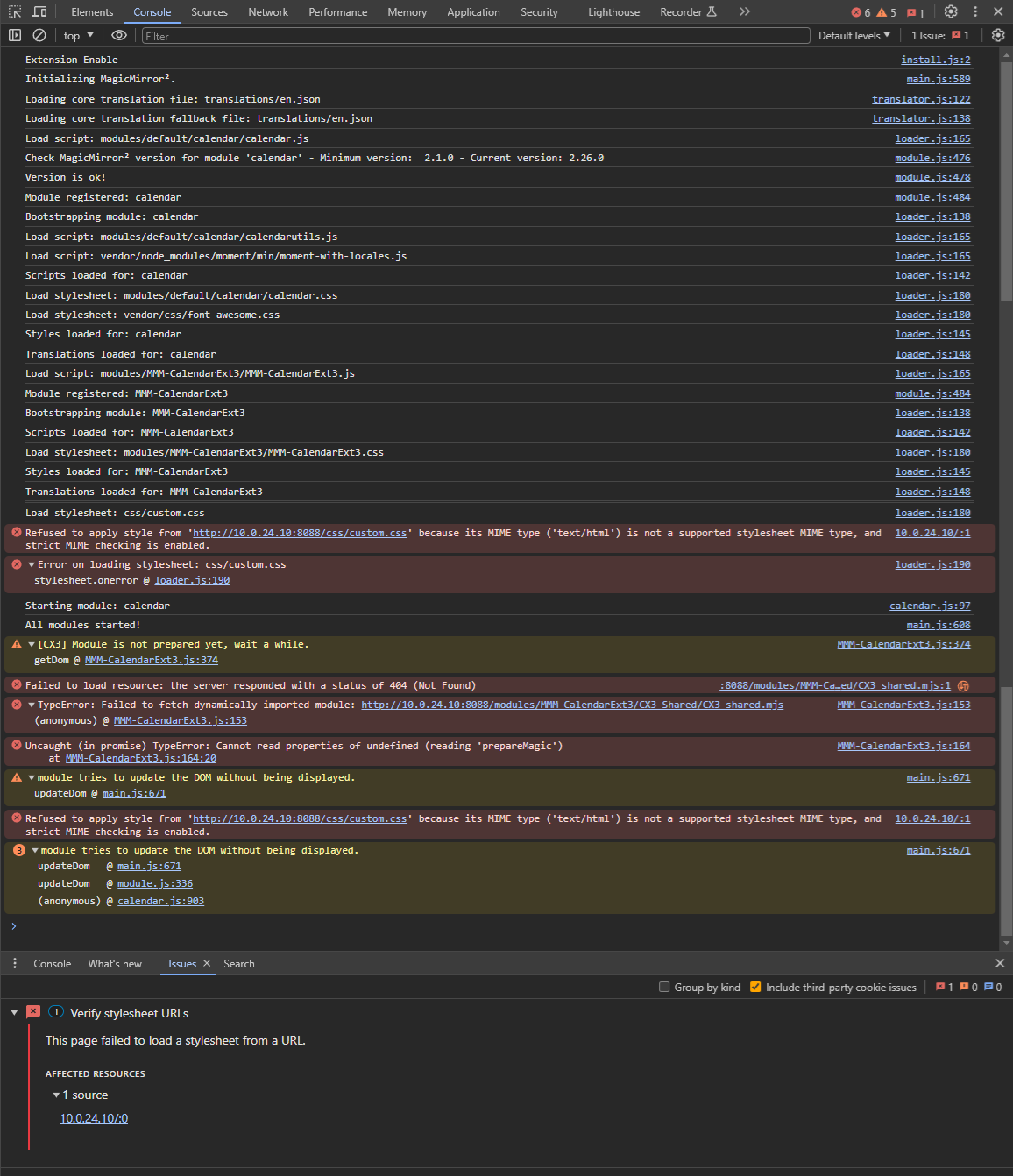
- Open the front-end dev-console in the browser (Ctrl+Shift+i) and see the console tab, find any suspicious issue.
- Or install
MMM-LogExtto record the front-end logs into the backend log.
-
-
@flemmingss
You may still need to complete the installation of the module. You may have missed these instructions on installation;npm install git submodule update --init --recursiveOr, you are using Docker, and for some reason,
css/custom.cssandmodules/MMM-CalendarExt3/CX3_Shared/CX3_Shared.mjsseems not being loaded. I’m not familiar with Docker so not sure. -
@MMRIZE
Hmm, these commands di not solve anyhing.
To be more accurate, I am running this on UnRAID with this image: https://hub.docker.com/r/ich777/magic-mirror2
The modules are installed by entering the URL in a text-file “magicmirror2\modules\modules.txt”.# Paste the links from the git repository wich you want to install here. # The Y or N is the indication if the module needs 'npm install' to work. # Also you can delete the # in front of any line below to install a module # from the corresponding github repository (please don't delete the last line). N https://github.com/MMRIZE/MMM-LogExt Y https://github.com/MMRIZE/MMM-CalendarExt3.git #Y https://github.com/ItayXD/MMM-Admin-Interface.git #N https://github.com/werthdavid/MMM-BurnIn.git #N https://github.com/barnabycolby/MMM-Carousel #N https://github.com/Toreke/MMM-Dynamic-Modules.git #N https://github.com/Kreshnik/MMM-JokeAPI.git #Y https://github.com/slametps/MMM-NetworkConnection.git #Y https://github.com/PoOwAa/MMM-network-signal.git #N https://github.com/glitch452/MMM-ViewNotifications.git #N https://github.com/ulrichwisser/MMM-HTMLSnippet #Y https://github.com/eouia/MMM-AVStock #N https://github.com/jeroenpeters1986/MMM-bitcoin-portfolio.git #Y https://github.com/Elaniobro/MMM-stocks.git #N https://github.com/rehne/MMM-Ecosia-Tree-Counter.git #N https://github.com/amcolash/MMM-GoogleFit.git #Y https://github.com/eouia/MMM-News #Y https://github.com/pinsdorf/MMM-WeeklySchedule.git #N https://github.com/mihairinzis/MMM-wiki #Y https://github.com/Jopyth/MMM-Remote-Control.git #Y https://github.com/ronny3050/phone-notification-mirror.git #Y https://github.com/ianperrin/MMM-Strava.git #N https://github.com/PtrBld/MMM-Scrobbler.git #N https://github.com/MitchSS/MMM-Hue.git # Don't delete this line!It it is for any helt, this is the content of my MMM-CalendarExt3 module folder
https://fastupload.io/0UNy4rcEJ3b4nrI/file -
@flemmingss
Your RAR is not downloadable by security issue. Anyway, is thereCX3_Shared/CX3_Shared.mjsin position? Your error log says it is not accessible on your system.
Hello! It looks like you're interested in this conversation, but you don't have an account yet.
Getting fed up of having to scroll through the same posts each visit? When you register for an account, you'll always come back to exactly where you were before, and choose to be notified of new replies (either via email, or push notification). You'll also be able to save bookmarks and upvote posts to show your appreciation to other community members.
With your input, this post could be even better 💗
Register Login