MagicMirror Forum
    • Recent
    • Tags
    • Unsolved
    • Solved
    • MagicMirror² Repository
    • Documentation
    • 3rd-Party-Modules
    • Donate
    • Discord
    • Register
    • Login
    A New Chapter for MagicMirror: The Community Takes the Lead
    Read the statement by Michael Teeuw here.

    MMM-CalendarExt3

    Scheduled Pinned Locked Moved Utilities
    689 Posts 82 Posters 2.8m Views 86 Watching
    Loading More Posts
    • Oldest to Newest
    • Newest to Oldest
    • Most Votes
    Reply
    • Reply as topic
    Log in to reply
    This topic has been deleted. Only users with topic management privileges can see it.
    • D Offline
      Decimeter9667 @MMRIZE
      last edited by Decimeter9667

      @MMRIZE

      I’m working in the same situation: using an old iPad and trying to conserve space. I used this transform you posted way back in this thread:

      /* In your config */
      eventTransformer: (ev) => {
        if (!ev.isFullday) {
          let t = new Date(ev.startDate)
          let time = (t.getMinutes() === 0) ? String(t.getHours()) : String(t.getHours() + ':' + t.getMinutes())
          ev.title = `<span class="myTime">${time}</span> ${ev.title}`	
        }
        return ev 
      }
      

      That works great, but how can I get it to display the hour in 12h, not 24h?

      S 1 Reply Last reply Reply Quote 0
      • S Do not disturb
        sdetweil @Decimeter9667
        last edited by

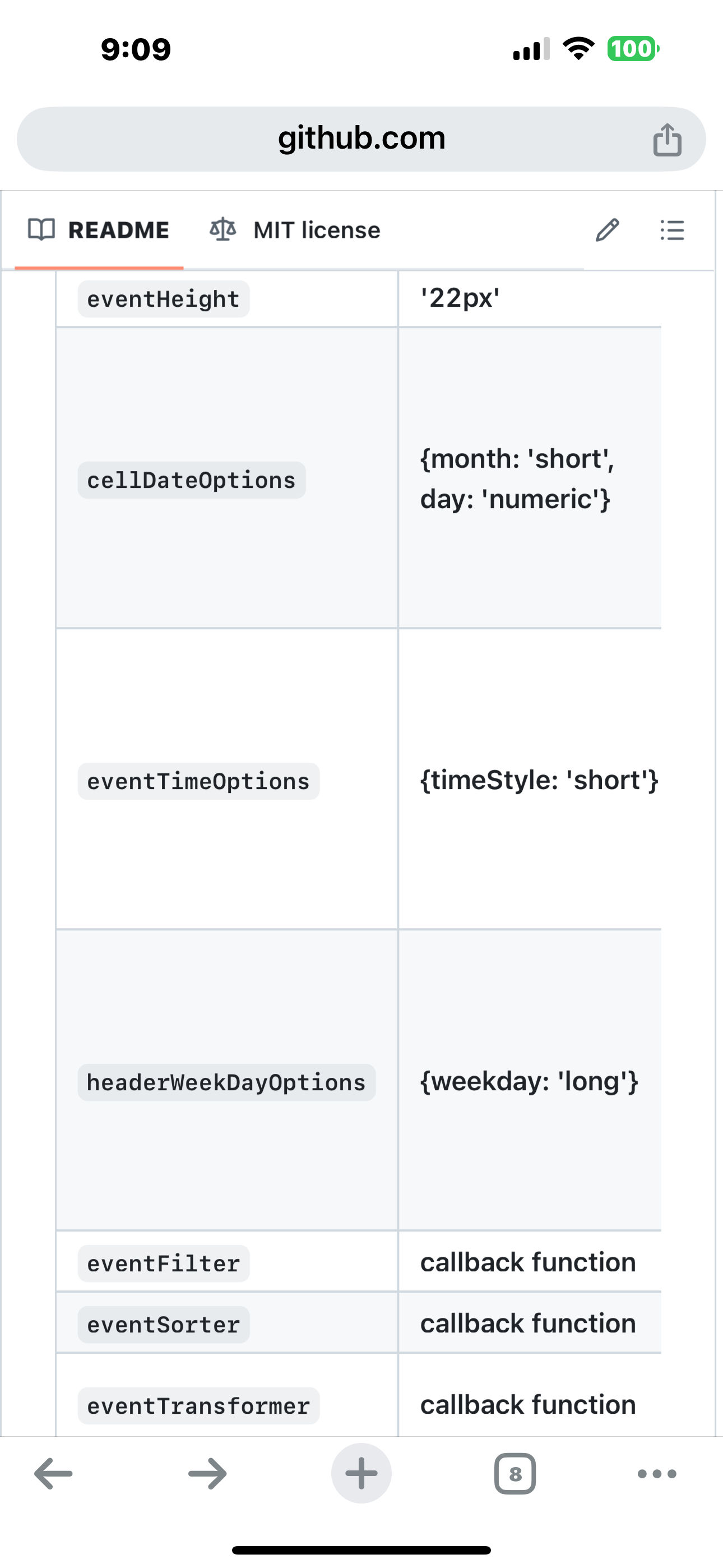
        @Decimeter9667 time see theIMG_0598.png eventTimeOptions

        Sam

        How to add modules

        learning how to use browser developers window for css changes

        D 1 Reply Last reply Reply Quote 0
        • D Offline
          Decimeter9667 @sdetweil
          last edited by

          @sdetweil Hmm… are you sure that works in the context of the transform I showed? eventTimeOptions doesn’t seem to change it.

          S 1 Reply Last reply Reply Quote 0
          • S Do not disturb
            sdetweil @Decimeter9667
            last edited by

            @Decimeter9667

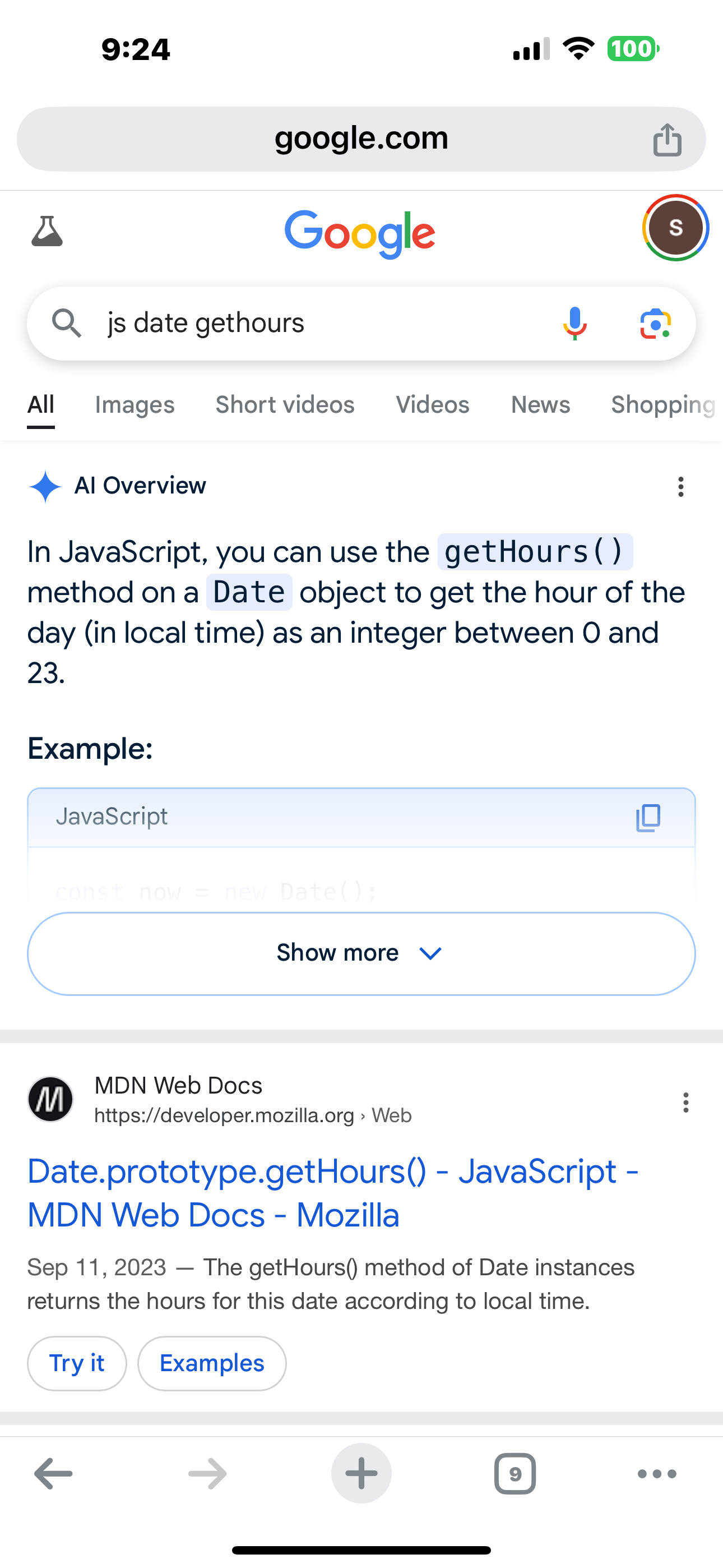
            you are doing it raw. Date.getHours() returns 0-23
            so YOU have to check , and substract 12 if over 12
            IMG_0599.png

            Sam

            How to add modules

            learning how to use browser developers window for css changes

            D 1 Reply Last reply Reply Quote 0
            • D Offline
              Decimeter9667 @sdetweil
              last edited by

              @sdetweil Thanks. For anyone else looking to do this, here’s how I modified the code:

                      eventTransformer: (ev) => {
                                  if (!ev.isFullday) {
                                  let t = new Date(ev.startDate)
                                  const amPm = t.getHours() >= 12 ? 'p' : 'a';
                                  let time = (t.getMinutes() === 0) ? String(t.getHours() % 12 || 12) : String( (t.getHours() % 12 || 12)  + ':' + t.getMinutes())
                                  ev.title = `<span class="myTime">${time}${amPm}</span> ${ev.title}`
                                  }
                              return ev
                              }
              
              S 1 Reply Last reply Reply Quote 0
              • S Do not disturb
                sdetweil @Decimeter9667
                last edited by sdetweil

                @Decimeter9667 you could have set the hour in a local variable when you did the am/pm test

                // assume am. 
                // of course you could reverse this if most of the events are in the afternoon
                let amPm='a'
                let hour=t.getHours()
                     if(hour >= 12) {
                             amPm= 'p';
                             hour-= 12
                    }
                

                then not have 2 more calls to getHour()

                performance things creep in all the time… (as you might be doing this for all events…)

                Sam

                How to add modules

                learning how to use browser developers window for css changes

                1 Reply Last reply Reply Quote 1
                • A Offline
                  anonymous321
                  last edited by

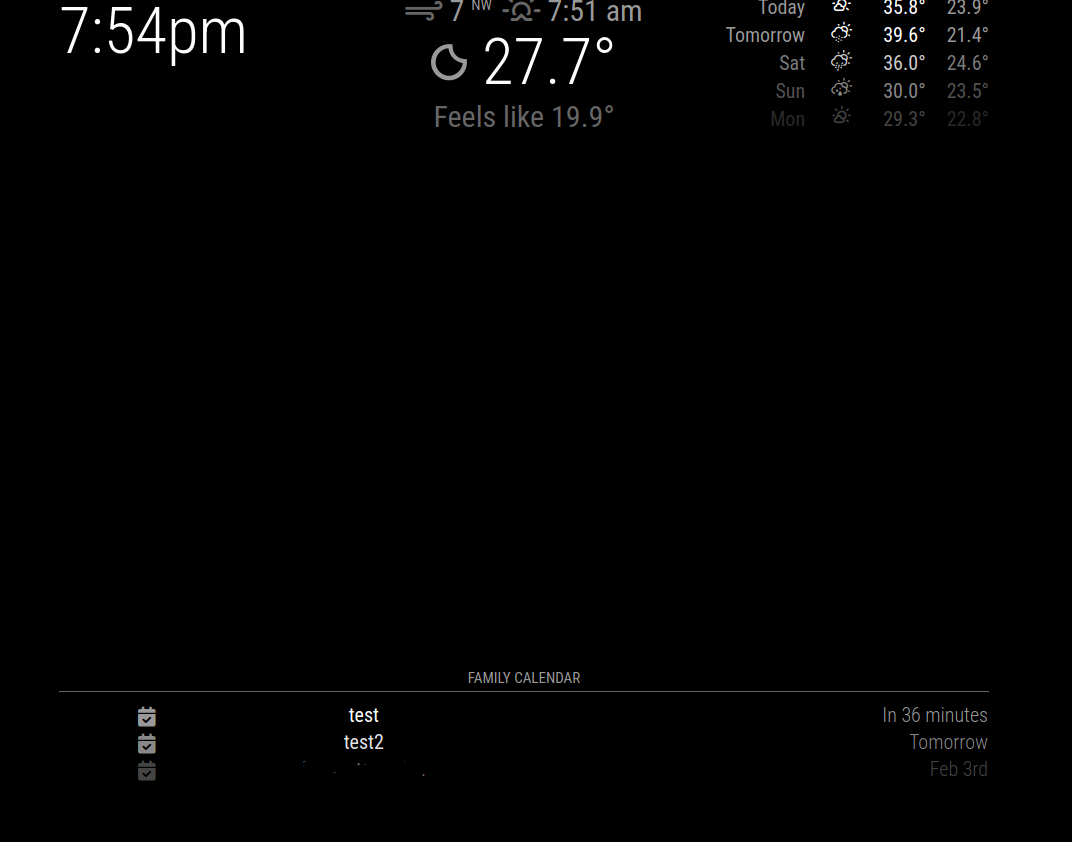
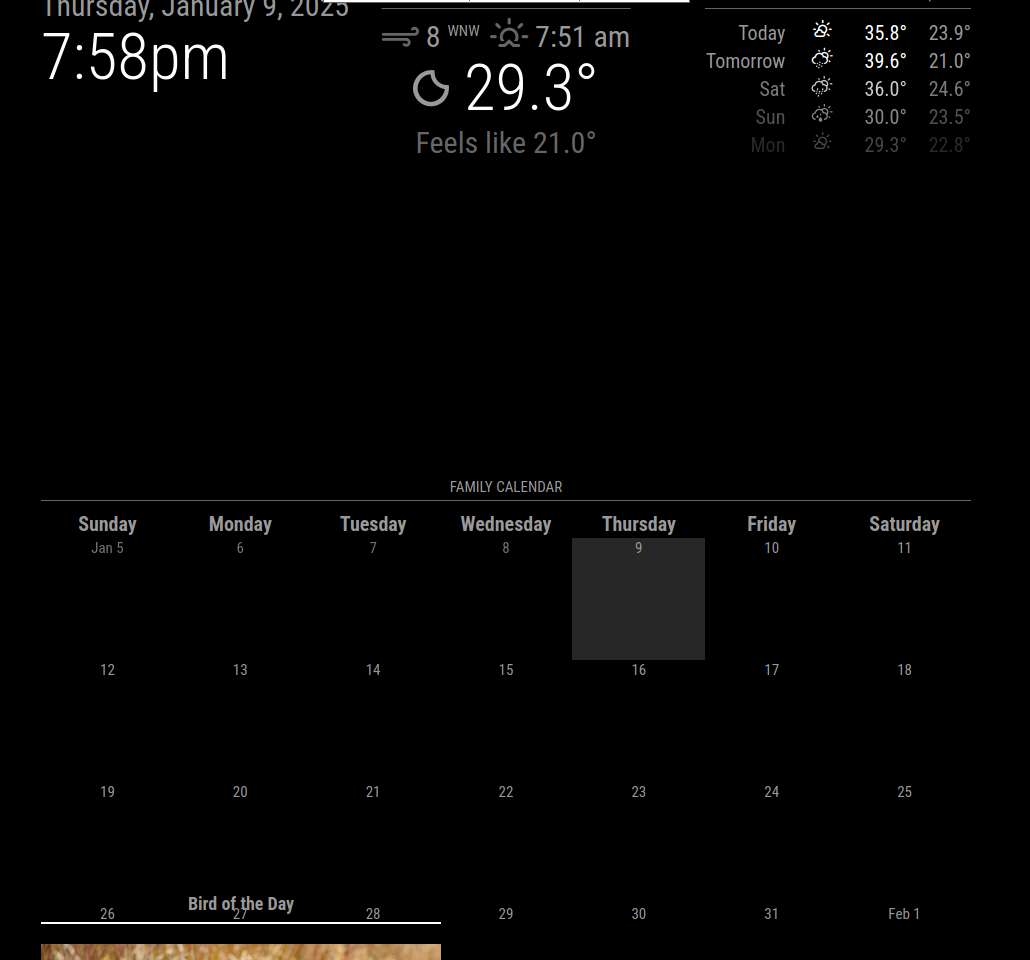
                  Hello, I’m new to MagicMirror trying to build my first. I’m having an issue with any events showing up. When I run the attached code I get a blank calendar. However when I run the regular calendar I see all the events. Am I doing something wrong?

                  {
                  			module: "MMM-MonthlyCalendar",
                  			header: "Family Calendar",
                  			position: "bottom_bar",
                  			config: {
                  				updatesEvery: 30,
                  				weeksInFuture: 5, 
                  				mode: "fourWeeks",
                  				firstDayofWeek: "sunday",
                                                 //maximumEntries: "10000", <--- " I saw in one of the forums that this could help but it did not."
                  				calendars: [
                  				  {
                  					url: "https://calendar.google.com/calendar/ical/******basic.ics",
                  					priority: 1,
                  				  },
                  				]
                  			  }
                  			}
                  

                  Here is a screenshot of the regular calendar.
                  dbc9774a-00fd-4f0b-a479-ed4ab716013a-image.png

                  This is what it looks like with MMM-CalendarExt3
                  0f0c31a7-889a-4c97-8072-e1e0ba74e60b-image.png

                  S 1 Reply Last reply Reply Quote 0
                  • S Do not disturb
                    sdetweil @anonymous321
                    last edited by sdetweil

                    @anonymous321 2 things

                    what MagicMirror version is this? latest?

                    see this https://forum.magicmirror.builders/topic/19282/version-2-30-0-calendar-fix-for-clipping-broadcast-events

                    Sam

                    How to add modules

                    learning how to use browser developers window for css changes

                    1 Reply Last reply Reply Quote 0
                    • A Offline
                      anonymous321
                      last edited by

                      I think its the latest. I just installed it two nights ago. How would I check the version number?

                      S 1 Reply Last reply Reply Quote 0
                      • S Do not disturb
                        sdetweil @anonymous321
                        last edited by

                        @anonymous321 look at the messages at startu
                        if using pm2 then

                        pm2 logs --lines=xxx
                        xxx is number of most recent lines, default 15

                        or look inside the package.json file

                        Sam

                        How to add modules

                        learning how to use browser developers window for css changes

                        1 Reply Last reply Reply Quote 0
                        • A Offline
                          anonymous321
                          last edited by

                          Version 1.9.4

                          S 1 Reply Last reply Reply Quote 0
                          • S Do not disturb
                            sdetweil @anonymous321
                            last edited by

                            @anonymous321

                            MagicMirror version

                            the fix is in the MagicMirror calendar module

                            Sam

                            How to add modules

                            learning how to use browser developers window for css changes

                            1 Reply Last reply Reply Quote 0
                            • P Offline
                              p1lspeda
                              last edited by

                              Hi,
                              I’ve just come across this great module, but I cannot quite get it to work.
                              My default calendar module shows multiple google-calendar based calendars/entries.
                              This works fine.
                              However: CX3 only shows the ‘work’ calendar and I do not know why.

                              Can anybody point me in the right direction ?

                              Edit: so I got it working (somehow) but the calendar entries take forever to show up in CX3.
                              Why is that ?

                              [2025-02-07 12:31:47.169] [INFO]  Calendar-Fetcher: Broadcasting 12 events from https://calendar.google.com/calendar/ical...
                              [2025-02-07 12:31:47.701] [INFO]  Calendar-Fetcher: Broadcasting 27 events from https://calendar.google.com/calendar/ical...
                              [2025-02-07 12:31:48.719] [INFO]  Calendar-Fetcher: Broadcasting 70 events from https://calendar.google.com/calendar/ical...
                              [2025-02-07 12:31:49.691] [INFO]  Calendar-Fetcher: Broadcasting 42 events from https://calendar.google.com/calendar/ical...
                              [2025-02-07 12:31:50.976] [INFO]  Calendar-Fetcher: Broadcasting 36 events from https://calendar.google.com/calendar/ical...
                              [2025-02-07 12:31:56.453] [INFO]  Calendar-Fetcher: Broadcasting 93 events from https://calendar.google.com/calendar/ical...
                              

                              Thanks

                              my CX3 config:

                              {
                                                      module: "MMM-CalendarExt3",
                                                      position: "bottom_bar",
                                                      title: "",
                                                      config: {
                                                              mode: "week",
                                                              weekIndex: "0",
                                                              weeksInView: "2",
                                                              instanceId: "basicCalendar",
                                                              //locale: 'de-DE',
                                                              maxEventLines: 8,
                                                              firstDayOfWeek: 1,
                                                              calendarSet: null,
                                                              }
                                              },
                              

                              my default calendar module config:

                                                            {
                                                                      module: "calendar",
                                                                      position: "bottom_right",
                                                                      header: "Calendar",
                                                                      config: {
                                                                              broadcastPastEvents: true,
                                                                              colored: false,
                                                                              coloredSymbolOnly: false,
                                                                              maximumEntries: 8,
                                                                              maxTitleLength: 50,
                                                                              maximumNumberOfDays: 180,
                                                                              timeFormat: "relative",
                                                                              getRelative: 60 * 24,
                                                                              urgency: 60,
                                                                              calendars: [
                                                                                      {
                                                                                              url: 'https://calendar.google.com/calendar...',
                                                                                              symbol: 'calendar', // MAINZ 05 CALENDAR
                                                                                              name: 'mainz05',
                                                                                              colour: 'white',
                                                                                      },
                                              
                                                                                      {
                                                                                              url: 'https://calendar.google.com/calendar...',
                                                                                              symbol: 'calendar', // MAIN GOOGLE CALENDAR
                                                                                              name: 'personal',
                                                                                              colour: 'white',
                                                                                      },
                                              
                                                                                      {
                                                                                              url: 'https://calendar.google.com/calendar...',
                                                                                              symbol: 'calendar', // FORMULA 1 CALENDAR
                                                                                              name: 'f1',
                                                                                              colour: 'white',
                                                                                      },
                                              
                                                                                      {
                                                                                              url: 'https://calendar.google.com/calendar...',
                                                                                              symbol: 'calendar', // EB MAINZ
                                                                                              name: 'eb_mainz',
                                                                                              colour: 'white',
                                                                                      },
                                              
                                                                                      {
                                                                                              url: 'https://calendar.google.com/calendar...',
                                                                                              symbol: 'calendar', // PRO RUNDE
                                                                                              name: 'pro_runde',
                                                                                              colour: 'white',
                                                                                      },
                                              
                                                                                      {
                                                                                              url: 'https://calendar.google.com/calendar...',
                                                                                              symbol: 'calendar', // BUSINESS TRIPS
                                                                                              name: 'work',
                                                                                              colour: 'white',
                                                                                      },
                                                                              ],
                                                                      },
                                                              },


                              S 1 Reply Last reply Reply Quote 0
                              • S Do not disturb
                                sdetweil @p1lspeda
                                last edited by

                                @p1lspeda i would start with commenting out the calendarSet:null

                                Sam

                                How to add modules

                                learning how to use browser developers window for css changes

                                P 1 Reply Last reply Reply Quote 0
                                • P Offline
                                  p1lspeda @sdetweil
                                  last edited by

                                  @sdetweil
                                  thanks for the help.
                                  Did that - no change.
                                  Same problem and I have no idea where to start an look

                                  Edit: HA ! I decreased the refreshIntervall and it seems as that did the trick - I could have probably just waited 30min (but I’m impatient)

                                  S 1 Reply Last reply Reply Quote 0
                                  • S Do not disturb
                                    sdetweil @p1lspeda
                                    last edited by sdetweil

                                    @p1lspeda ok. nice work.
                                    Ext3 attempts to not flash the screen on every update. the individual calendar data arrive at different times

                                    so the waitFetch value is used to decide when to display initially, and refreshInterval after that

                                    waitFetch defaults to 5 seconds

                                    so this means some data arrived after 5 seconds (waitFetch)

                                    Sam

                                    How to add modules

                                    learning how to use browser developers window for css changes

                                    1 Reply Last reply Reply Quote 0
                                    • P Offline
                                      p1lspeda
                                      last edited by

                                      Re: MMM-CalendarExt3

                                      Next (easy) question:
                                      My CX3 module doesn’t have symmetrical borders (left & right), i.e. the left border is smaller than the right border.
                                      I want to maximize the width or at least have symmetrical borders.
                                      Border = distance between module edge and display edge
                                      See the screenshot:

                                      649675de-98ba-4471-87b8-e8ae36718248-image.png

                                      How can I adjust these in my custom.css ?
                                      My custom.css includes

                                      body {
                                              margin: 10px;
                                              position: absolute;
                                              height: calc(100% - 30px);
                                              width: calc(100% - 30px);
                                      }
                                      

                                      A hint/clue/idea would be very much appreciated.
                                      Thanks !

                                      S 1 Reply Last reply Reply Quote 0
                                      • S Do not disturb
                                        sdetweil @p1lspeda
                                        last edited by

                                        @p1lspeda we already set margins and borders
                                        see css/main.css

                                        sounds like your 7 day width is not symmetrical to the position the module is in

                                        CX3 has extensive classes that should allow you to position it properly

                                        also your css entry whacks the entire page, not just your module config.

                                        see the position layout in the doc here

                                        html is typically reading anchored left for ltr langusgrd abd right for rtl langusges, so you should br able to increase the left edge number to shift the whole image right

                                        .CX3 {
                                           left:20px;
                                        }
                                        

                                        this left is relative to its configured position

                                        Sam

                                        How to add modules

                                        learning how to use browser developers window for css changes

                                        P 1 Reply Last reply Reply Quote 0
                                        • P Offline
                                          p1lspeda @sdetweil
                                          last edited by

                                          @sdetweil Thanks for pointing me in the right direction.
                                          Seems I need to play around with css.

                                          S 1 Reply Last reply Reply Quote 0
                                          • S Do not disturb
                                            sdetweil @p1lspeda
                                            last edited by

                                            @p1lspeda see the second link below in my signature for using the developers window elements tan

                                            Sam

                                            How to add modules

                                            learning how to use browser developers window for css changes

                                            1 Reply Last reply Reply Quote 0

                                            Hello! It looks like you're interested in this conversation, but you don't have an account yet.

                                            Getting fed up of having to scroll through the same posts each visit? When you register for an account, you'll always come back to exactly where you were before, and choose to be notified of new replies (either via email, or push notification). You'll also be able to save bookmarks and upvote posts to show your appreciation to other community members.

                                            With your input, this post could be even better 💗

                                            Register Login

                                            • 1
                                            • 2
                                            • 29
                                            • 30
                                            • 31
                                            • 32
                                            • 33
                                            • 34
                                            • 35
                                            • 31 / 35
                                            • First post
                                              Last post
                                            Enjoying MagicMirror? Please consider a donation!
                                            MagicMirror created by Michael Teeuw.
                                            Forum managed by Sam, technical setup by Karsten.
                                            This forum is using NodeBB as its core | Contributors
                                            Contact | Privacy Policy