MagicMirror Forum
    • Recent
    • Tags
    • Unsolved
    • Solved
    • MagicMirror² Repository
    • Documentation
    • 3rd-Party-Modules
    • Donate
    • Discord
    • Register
    • Login
    A New Chapter for MagicMirror: The Community Takes the Lead
    Read the statement by Michael Teeuw here.

    MMM-CalendarExt3

    Scheduled Pinned Locked Moved Utilities
    689 Posts 82 Posters 2.8m Views 86 Watching
    Loading More Posts
    • Oldest to Newest
    • Newest to Oldest
    • Most Votes
    Reply
    • Reply as topic
    Log in to reply
    This topic has been deleted. Only users with topic management privileges can see it.
    • M Offline
      MMRIZE @Selph
      last edited by

      @Selph
      It is not the translation’s problem.
      This module (and agenda) depends on its internationalization to Intl internal Javascript object. (https://developer.mozilla.org/en-US/docs/Web/JavaScript/Reference/Global_Objects/Intl). That is supposed to be a standard method for I18N/L10N in JavaScript world.
      But unfortunately, Chromium(Electron of MagicMirror is using it) is known to have a bug in handling Icelandic locale ‘is’ or ‘is-IS’, and not been fixed yet.
      https://support.google.com/chrome/thread/26467925/icelandic-locale-formating-wrong?hl=en

      Sorry. At this moment, I cannot help about it.

      S 1 Reply Last reply Reply Quote 0
      • S Do not disturb
        sdetweil @MMRIZE
        last edited by sdetweil

        @MMRIZE can he use chromium browser instead of electron to work around this issue?

        Sam

        How to add modules

        learning how to use browser developers window for css changes

        M 1 Reply Last reply Reply Quote 0
        • M Offline
          MMRIZE @sdetweil
          last edited by

          @sdetweil
          It’s all Chromium based browser’s issue; chrome, chromium, and even MS edge.

          S 1 Reply Last reply Reply Quote 0
          • S Do not disturb
            sdetweil @MMRIZE
            last edited by

            @MMRIZE ok, no workaround…

            Sam

            How to add modules

            learning how to use browser developers window for css changes

            1 Reply Last reply Reply Quote 0
            • S Offline
              Selph
              last edited by

              Well that is indeed unfortunate. Thanks for the info, I appreciate it. I guess I’ll try to hardcode the translation values into CalendarExt3.js for now.

              1 Reply Last reply Reply Quote 0
              • A Offline
                almightyyoshi @MMRIZE
                last edited by

                @MMRIZE
                Thanks for the help. I actually just had to specify singleday and fullday along with the calendar name, which I’m ashamed I didn’t think of before.

                1 Reply Last reply Reply Quote 0
                • S Offline
                  sfb
                  last edited by

                  @MMRIZE Sorry if this has already been reported: I just installed MMM-CalendarExt3 and it appears to be listing my calendar events (Google Calendar .ics) in reverse order (events on each day are listed from latest to earliest). Not sure what additional information is helpful, but I’m using month view, locale is en-US, using timeFormat: 12, and this is all that’s in my module config:

                                {
                  			module: "MMM-CalendarExt3",
                  			position: "bottom_center",
                  			title: "",
                  			config: {
                  				mode: "month",
                  				instanceId: "basicCalendar",
                  				locale: 'en-US',
                  				maxEventLines: 5,
                  				firstDayOfWeek: 1,
                  				calendarSet: ['work', 'home', 'us-holidays', "leisure"],
                  			}
                  		},
                  

                  Any idea what might be happening? Thank you!

                  S 1 Reply Last reply Reply Quote 0
                  • S sfb referenced this topic on
                  • S Offline
                    sfb @sfb
                    last edited by

                    @MMRIZE I found the discrepancy! It show up in the correct order on Chromium based browsers, however is in the reverse order when viewed on Firefox.

                    @sfb said in MMM-CalendarExt3:

                    @MMRIZE Sorry if this has already been reported: I just installed MMM-CalendarExt3 and it appears to be listing my calendar events (Google Calendar .ics) in reverse order (events on each day are listed from latest to earliest). Not sure what additional information is helpful, but I’m using month view, locale is en-US, using timeFormat: 12, and this is all that’s in my module config:

                                  {
                    			module: "MMM-CalendarExt3",
                    			position: "bottom_center",
                    			title: "",
                    			config: {
                    				mode: "month",
                    				instanceId: "basicCalendar",
                    				locale: 'en-US',
                    				maxEventLines: 5,
                    				firstDayOfWeek: 1,
                    				calendarSet: ['work', 'home', 'us-holidays', "leisure"],
                    			}
                    		},
                    

                    Any idea what might be happening? Thank you!

                    M 1 Reply Last reply Reply Quote 0
                    • M Offline
                      MMRIZE @sfb
                      last edited by

                      @sfb
                      interesting symptom.
                      I suspect some CSS property compatibility issues.(maybe -webkit and -moz diffrence) I’ll look inside at what happens in Firefox. Anyway, MM is supposed to work on Electron in standalone mode, So I regard Chromium as a de facto standard environment of MM.

                      S 1 Reply Last reply Reply Quote 0
                      • S Offline
                        sfb @MMRIZE
                        last edited by

                        @MMRIZE Thanks for looking into it! Totally understandable. I’ve been testing MM serving from a docker container and viewed in various environments, so it’s not a typical setup.

                        1 Reply Last reply Reply Quote 0
                        • N Offline
                          nmacd
                          last edited by

                          I am very new to this so I apologize if this is a dumb question. I love the layout here, but I am having an issue getting the weekly calendar to populate. I have the default calendar and its working, but what I am trying to do is to have my google account show up in the weekly.
                          Thanks, and again I am sorry if this is simple. Any help would be appreciated.

                          M 1 Reply Last reply Reply Quote 0
                          • M Offline
                            MMRIZE @nmacd
                            last edited by

                            @nmacd

                            mode: 'week',
                            

                            in the config section of the module would be that.
                            Could you upload your config here to let me see what you were trying?

                            N 1 Reply Last reply Reply Quote 0
                            • N Offline
                              nmacd @MMRIZE
                              last edited by

                              @MMRIZE
                              {
                              module: “calendar”,
                              position: “top_center”,
                              config: {
                              broadcastPastEvents: true, // <= IMPORTANT to see past events
                              calendars: [
                              {
                              url: “https://calendar.google.com/calendar/”,
                              name: “Calendar”, // <= RECOMMENDED to assign name
                              color: “red” // <= RECOMMENDED to assign color
                              },

                              						]
                              		}
                              	},
                              	{
                              		module: "MMM-CalendarExt3",
                              		position: "bottom_center",
                              		title: "",
                              		config: {
                              			mode: "month",
                              			instanceId: "basicCalendar",
                              			locale: 'en-US',
                              			maxEventLines: 5,
                              			firstDayOfWeek: 1,
                              			calendars: ['https://calendar.google.com/'] - 
                              	}
                              	},
                              	{
                              

                              I have my calendar string in there from google I just deleted the identifier.
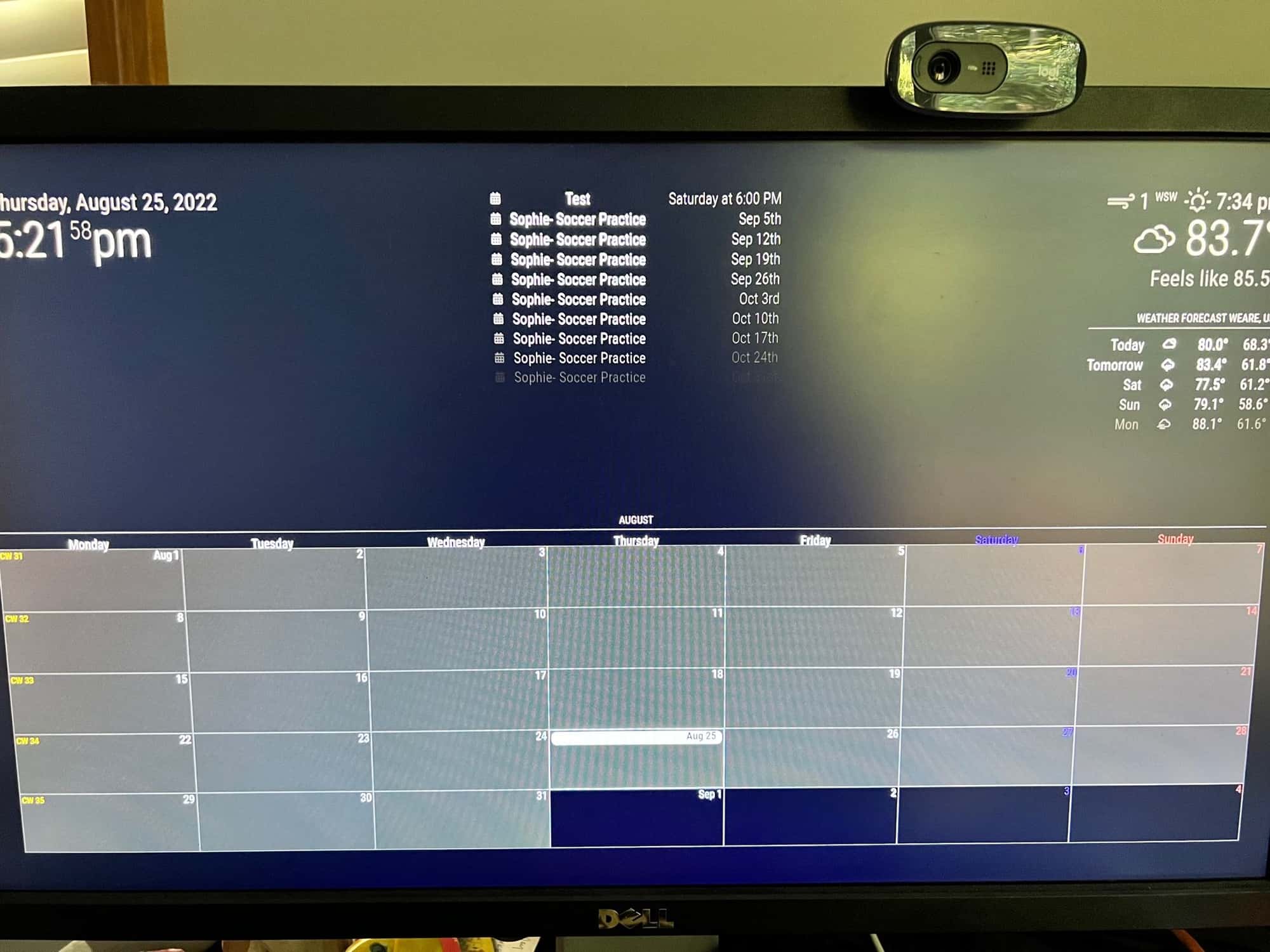
                              IMG_7385 (1).jpg

                              As you can see the calendar event test is showing top center, but is not on the calendar.
                              I like the current view just would like the calendar to populate.

                              Also in my config file everything is lined up just didn’t transfer well.

                              Thanks again for your patience

                              M 2 Replies Last reply Reply Quote 0
                              • M Offline
                                MMRIZE @nmacd
                                last edited by

                                @nmacd
                                I think your google calendar has so many events, so the past old events(years or months ago events) would be also huge numbers. They might consume all the quota of ‘maximumEntries’. Probably that is not the bug of the default calendar module, but also not expected behaviors.
                                Anyway someone said it would be fixed in 2.21. I wish that upgrade could fix this kind of issue.

                                Until then, adjust your maximumEvents and maximumNumberOfDays to include recent events to the broadcasted notification.

                                N S 2 Replies Last reply Reply Quote 0
                                • emloweE Offline
                                  emlowe Module Developer
                                  last edited by

                                  CX3? I’m still using OG CX …

                                  I couldn’t get CX2 to do what I was doing with CX so I never upgraded at all - it still runs, but it does have trouble parsing some kinds of calendar items.

                                  I use OG CX to do

                                  1. A single Day scrolling view for my 7" “Desktop MM” - not much screen space on the 7" screen so can only show a single day on one half in a scrolling loop

                                  2. A 3-day view for the Kitchen Family Screen - an entire week makes things too small so you cannot see easily - a 3 day view fits nicely though and can use a nice large font

                                  I’ll agree that CX2 was crazy complicated to configure though - and I gave up trying to get it look like I wanted.

                                  1 Reply Last reply Reply Quote 1
                                  • N Offline
                                    nmacd @MMRIZE
                                    last edited by

                                    @MMRIZE
                                    So i got rid of all the events and only left the one for the “test” on 8/28 and the results are the same. Nothing is showing up in the actual calendar.
                                    I will keep working on it, my guess is I am missing something simple.

                                    1 Reply Last reply Reply Quote 0
                                    • S Do not disturb
                                      sdetweil @MMRIZE
                                      last edited by sdetweil

                                      @MMRIZE I am the one that caused the bug in 2.20, fixed in 2.21 oct 1

                                      if u want to test the develop branch
                                      see
                                      https://forum.magicmirror.builders/topic/14327/testing-new-fixes-or-solving-current-problems-with-next-release-code

                                      Sam

                                      How to add modules

                                      learning how to use browser developers window for css changes

                                      1 Reply Last reply Reply Quote 0
                                      • M Offline
                                        MMRIZE @nmacd
                                        last edited by MMRIZE

                                        @nmacd
                                        I found what’s wrong.

                                        calendars: ['https://calendar.google.com/'],
                                        

                                        You need to set the names of calendar, in this case you assigned “Calendar” as the name of your google calendar.
                                        So it should be calendarSet:[‘Calendar’], . Or just leave as blank([]) to get all the calendars.

                                        S 1 Reply Last reply Reply Quote 0
                                        • S Do not disturb
                                          sdetweil @MMRIZE
                                          last edited by sdetweil

                                          @MMRIZE as this is the 3rd or 4th time users have had trouble with this
                                          you should put out a debugging message

                                          unable to locate calendar with name property equal to “???”

                                          maybe list the names you found…

                                          Sam

                                          How to add modules

                                          learning how to use browser developers window for css changes

                                          luisestradaL 1 Reply Last reply Reply Quote 0
                                          • luisestradaL Offline
                                            luisestrada @sdetweil
                                            last edited by

                                            Hi @sdetweil @MMRIZE

                                            This used to be possible before, but after implementing the weather icons, it stopped working. It’s not a big deal but it’s a nice to have feature.

                                            As you know, MagicMirror uses a very old version of Font Awesome. I updated mine to the most recent version and it now includes the Canadian flag and many other brand icons. Unfortunately, for brands, you have to use “fas” or “fa-solid”, and for brands you have to use “fab” or “fa-brands”. I solved this by tweaking the code in calendar.js and config.js. I also tried to do the same in MMM-CalendarEXT3.js, line 242, but when I try to update config.js calendar module, the calendar shows no data. The reason, because MMM-CalendarEXT3 module does not accept spaces in symbol.

                                            CalendarEXT3.js, line 242:

                                            symbol.className = "fa fa-fw fa" + s;
                                            

                                            config.js, for birthday calendar

                                            symbol: "s fa-cake-candles",
                                            

                                            config.js, for Canadian holidays

                                            symbol: "b fa-canadian-maple-leaf",
                                            

                                            The space breaks my code, I wanted to choose either “b” or “s” in the symbol field

                                            How the icons look in the native calendar

                                            Screen Shot 2022-08-26 at 3.10.57 PM.png

                                            Unfortunately, not allowing spaces, forces me to decide which one to use or “fas” or “fab”

                                            Screen Shot 2022-08-26 at 3.11.35 PM.png

                                            M 2 Replies Last reply Reply Quote 0

                                            Hello! It looks like you're interested in this conversation, but you don't have an account yet.

                                            Getting fed up of having to scroll through the same posts each visit? When you register for an account, you'll always come back to exactly where you were before, and choose to be notified of new replies (either via email, or push notification). You'll also be able to save bookmarks and upvote posts to show your appreciation to other community members.

                                            With your input, this post could be even better 💗

                                            Register Login

                                            • 1
                                            • 2
                                            • 8
                                            • 9
                                            • 10
                                            • 11
                                            • 12
                                            • 34
                                            • 35
                                            • 10 / 35
                                            • First post
                                              Last post
                                            Enjoying MagicMirror? Please consider a donation!
                                            MagicMirror created by Michael Teeuw.
                                            Forum managed by Sam, technical setup by Karsten.
                                            This forum is using NodeBB as its core | Contributors
                                            Contact | Privacy Policy