Read the statement by Michael Teeuw here.
calendar: different spaces between symbol and text when different sources used
-
Hi all!
First of all thanks to Michael and his helping hands for the great magicmirror project. I really love it and I think it’s all together a technical and optical highlight!
I have some little troubles with the calendar module. It’s not a real bug - it’s more an optical and design problem:
The first calender I added is a public Apple iCloud calendar from my account (webcal://p13-calendars.icloud.com/published/…) named “Familie”
The second one is an iCalendar feed from the university I attend (http://portal.fh-campuswien.ac.at/calendar/feed/…) named “FH Campus Wien”Everything is working fine and I get the correct appointments. But the iCloud calender has beginning blanks. Please take a look at the attached screenshots.
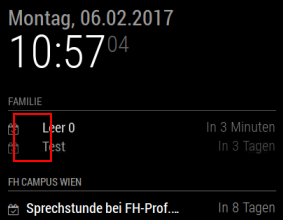
The interessting thing is, with every refresh or browser restart there are sometimes more, sometimes less blanks. I don’t know where they are comming from. They are not in the appointment created in iCloud or iPhone. I also created a second calender on iCloud, but the result is the same.
Does anyone have any ideas? What can I look for?
Please take a look at my config:
Platform: Pi Zero
Node Version [ 0.12.13 or later ]: 4.2.1
MagicMirror Version [ V1 / V2-Beta ]: v2
Browser: Chromium Version 51.0.2704.91 Built on Ubuntu 14.04, running on Raspbian 8.0Thanks a lot!!
Kind regards,
Dominik -
I’m wondering, since the lower calender has a “full” title, is it a spacing issue?
I.e when there is a long title it is force to take up all space and when it’s a short title it gets more space?
-
Hi broberg!
100 points!! - great work - you’re absolutly right!
Thank you!!I added an appointment with the same text - pls take a look:
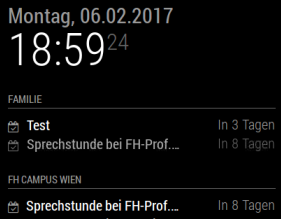
Any idea how I can fix this? Maybe editing a css-File with “alignment-left”?
Thanks a lot!
Kind regards,
Dominik -
Try adding
.calendar .symbol {width: 20px;}
.calender .time {width: 50px;}
To the custom.css
-
Do you mean this way?
 body {
 	.calendar .symbol {width: 20px;}
	.calender .time {width: 50px;}
 }
Sadly it’s not working this way…
Any other idea?Thanks a lot for your time, broberg!!
Kind regards,
Dominik -
@strizl no, not inside the body {}
you could try increasing the size to see a more clear effect
-
Hi broberg!
Thanks again for your help!
It’s working now. It was only due to the vnc viewer connection - this caused a space or resolution error. On the TFT screen everything’s fine!
But good to know where I can play with the CSS options…Thanks again and kind regards,
Dominik
Hello! It looks like you're interested in this conversation, but you don't have an account yet.
Getting fed up of having to scroll through the same posts each visit? When you register for an account, you'll always come back to exactly where you were before, and choose to be notified of new replies (either via email, or push notification). You'll also be able to save bookmarks and upvote posts to show your appreciation to other community members.
With your input, this post could be even better 💗
Register Login