MagicMirror Forum
    • Recent
    • Tags
    • Unsolved
    • Solved
    • MagicMirror² Repository
    • Documentation
    • 3rd-Party-Modules
    • Donate
    • Discord
    • Register
    • Login
    A New Chapter for MagicMirror: The Community Takes the Lead
    Read the statement by Michael Teeuw here.

    Struggling with Weather... module

    Scheduled Pinned Locked Moved Solved Troubleshooting
    34 Posts 5 Posters 13.7k Views 6 Watching
    Loading More Posts
    • Oldest to Newest
    • Newest to Oldest
    • Most Votes
    Reply
    • Reply as topic
    Log in to reply
    This topic has been deleted. Only users with topic management privileges can see it.
    • D Offline
      D3dl3g @sdetweil
      last edited by D3dl3g

      @sdetweil

      could it be *js file setup.

      been poking around on the Met Office website

      is this “request” something that could be used

      GET https://api-metoffice.apiconnect.ibmcloud.com/v0/forecasts/point/hourly?latitude=52.################&longitude=-1.################
      Headers:
      Accept: application/json
      X-IBM-Client-Id: e52######################
      X-IBM-Client-Secret: *********
      

      a “Header”

      cache-control: no-cache, no-store, max-age=0, must-revalidate
      content-length: 3634
      content-type: application/json
      expires: 0
      pragma: no-cache
      x-global-transaction-id: 9####################
      x-ratelimit-limit: name=rate-limit-1,360;
      x-ratelimit-remaining: name=rate-limit-1,358;
      

      theres also a “Body” that starts

      {
          "type": "FeatureCollection",
          "features": [
              {
                  "type": "Feature",
                  "geometry": {
                      "type": "Point",
                      "coordinates": [
                          -1.###,
                          52.###,
                          ###
                      ]
                  },
                  "properties": {
                      "requestPointDistance": 736.6499,
                      "modelRunDate": "2022-06-28T13:00Z",
                      "timeSeries": [
                          {
                              "time": "2022-06-28T13:00Z",
                              "screenTemperature": 19.6,
                              "maxScreenAirTemp": 19.6,
                              "minScreenAirTemp": 19.1,
                              "screenDewPointTemperature": 7.7,
                              "feelsLikeTemperature": 16.83,
                              "windSpeed10m": 5.1,
                              "windDirectionFrom10m": 200,
                              "windGustSpeed10m": 11.3,
                              "max10mWindGust": 13.42,
                              "visibility": 24714,
                              "screenRelativeHumidity": 46.06,
                              "mslp": 101420,
                              "uvIndex": 4,
                              "significantWeatherCode": 3,
                              "precipitationRate": 0,
                              "totalPrecipAmount": 0,
                              "totalSnowAmount": 0,
                              "probOfPrecipitation": 1
      

      i hashed out sensitive info BTW, the Long/lat and API Keys

      1 Reply Last reply Reply Quote 0
      • D Offline
        D3dl3g
        last edited by

        in addition… looking at “ukmetofficedatahub.js”
        API Base URL looks like this…
        apiBase: “https://api-metoffice.apiconnect.ibmcloud.com/v0/forecasts/point/<hourly/3hourly/daily>”,

        where as the next section down API URL is stated to be
        “https://metoffice.apiconnect.ibmcloud.com/metoffice/production/api”

        seems to be a mismatch although im still looking at where to test that theory…
        i would have hoped which ever way the URL is structured its the JS info thats the important bit, not the structure of the URL

        1 Reply Last reply Reply Quote 0
        • D Offline
          D3dl3g
          last edited by D3dl3g

          I’m stumped!

          As outlined here

          ukmetofficedatahub.js is set to

                  // Set the default config properties that is specific to this provider
                  defaults: {
                          apiBase: "https://api-metoffice.apiconnect.ibmcloud.com/v0/forecasts/point/daily/",
                          apiKey: "<myID>",
                          apiSecret: " <my secret>",
                          lat: <my lat>,
                          lon: <mylong>,
                          windUnits: "mph"
          

          (lines 50-55)

          ////////////////////////////////////////////////////////////////////////////////////////////////////////////////////////

          config.js set to

            		weatherProvider: "ukmetofficedatahub",
            		apiBase: "https://api-metoffice.apiconnect.ibmcloud.com/v0/forecasts/point/daily/",
            		apiKey: "<myID>",
            		apiSecret: " <my secret>",
            		lat: <my lat>,
            		lon: <my long>,
           		windUnits: "mph",
           		tempUnits: "metric",
          

          (lines 20-27)

          ///////////////////////////////////////////////////////////////////////////////////////////////////////////////////////
          bff556ff-fe1a-46f0-8532-2d07dfce1a35-image.png
          ///////////////////////////////////////////////////////////////////////////////////////////////////////////////////////

          logs are clear… many server restarts…

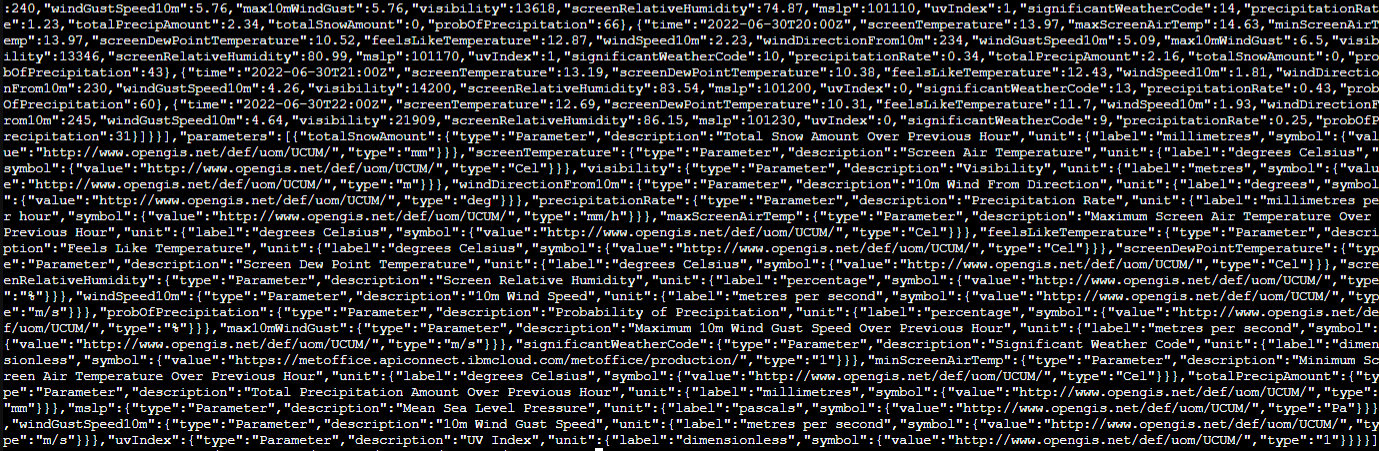
          i can curl required info and get something vaguely intelligent from the Met office Servers

          curl --request GET \
            --url 'https://api-metoffice.apiconnect.ibmcloud.com/v0/forecasts/point/hourly?excludeParameterMetadata=false&includeLocationName=true&latitude=<my lat>&longitude=<my long>' \
            --header 'X-IBM-Client-Id:  <myID>' \
            --header 'X-IBM-Client-Secret: <my secret>' \
            --header 'accept: application/json'
          

          44b19423-474c-4042-a8ff-69c32a3079a8-image.png

          1 Reply Last reply Reply Quote 0
          • D Offline
            D3dl3g
            last edited by

            any ideas?? @sdetweil

            Is this portion of the module broke for me, do i need to use a different service?

            S 1 Reply Last reply Reply Quote 0
            • S Do not disturb
              sdetweil @D3dl3g
              last edited by sdetweil

              @D3dl3g I don’t KNOW for sure… the provider has its own apiBase set…

              * 		apiBase: "https://api-metoffice.apiconnect.ibmcloud.com/metoffice/production/v0/forecasts/point/",
              

              so comment that out in your config
              add // to the start of the line with apiBase:

              also, as this doesn’t have a node helper, we should be looking in the browser logs

              ctrl-shift-i, select the console tab and put

              weath
              

              in the filter field

              Sam

              How to add modules

              learning how to use browser developers window for css changes

              D 1 Reply Last reply Reply Quote 0
              • D Offline
                D3dl3g @kayakbabe
                last edited by D3dl3g

                @kayakbabe
                For some reason i glossed over your reply, apologies.

                Trying with a different provider will be my plan of attack today. After running some diag, as sam has suggested.

                I find the met office to be insanely accurate for my area when compared to other online weather services. Hence my desire to use it.

                One of the reasons my posts are peppered with pictures and code is to help ensure i am setting it up correctly. I didnt realise about the .js in the weather folder for 2 days i thought it was all set up from config.js…

                As it stands im convinced i have it set right, now, but its totally possible i have a comma in the wrong place. As im a total n00b with JS. i know sometimes it is difficult to see the forest through the trees and a fresh set of eyes can help.

                Thank-you for your reply, looks like im experiencing option 4 😄

                S 1 Reply Last reply Reply Quote 0
                • D Offline
                  D3dl3g @sdetweil
                  last edited by D3dl3g

                  @sdetweil,

                  apiBase commented out in config.
                  c0056a38-65e2-49ff-a3d4-5324c5cca865-image.png

                  server restart, and browser log request, showing loaded weather modules
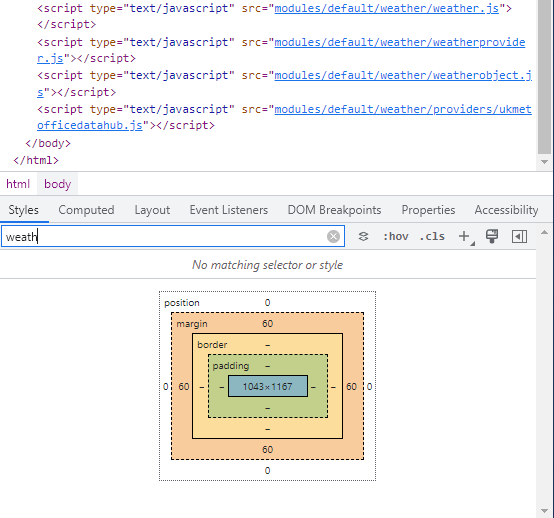
                  b10c9006-1351-4cfe-865b-26def301bf3b-image.png
                  i still have “loading” in module location

                  looking at source gives me the impression that i need to go and look at 2 more .js files. Previously i have been working with /default/weather/ukmetofficedatahub.js and /MagicMirror/config/config.js

                  ill see if thes hold any info:
                  /root/MagicMirror/modules/default/weather/weatherproviders.js
                  (Edit: //weather provider properties: null, modified to:
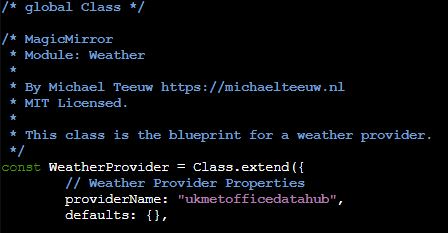
                  8bca5c6c-09d9-4987-8940-0233b5e827c7-image.png )

                  /root/MagicMirror/modules/default/weather/weather.js
                  (Edit: this file is set to “openweathermap”, changing to “ukmetofficedatahub”
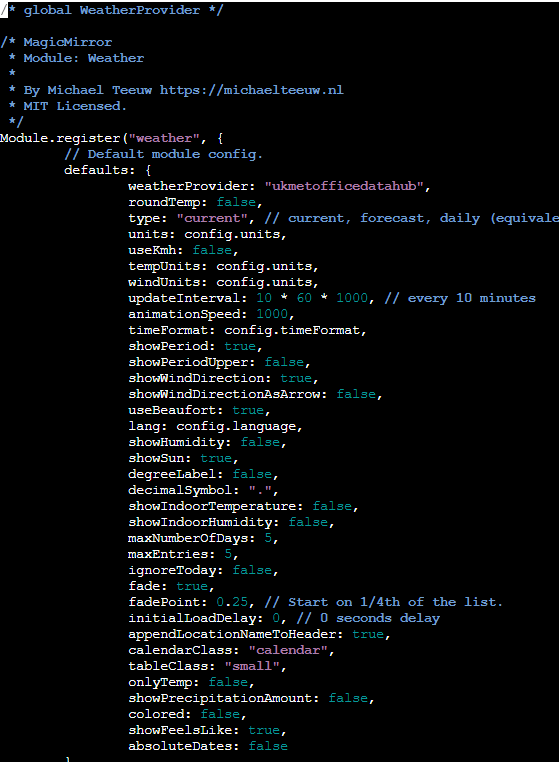
                  a2763dbe-9a57-47bc-b036-505bd38e8e4e-image.png )

                  server restart, no effect noted :(

                  1 Reply Last reply Reply Quote 0
                  • D Offline
                    D3dl3g
                    last edited by D3dl3g

                    @Kayababe @sdetweil

                    openweathermap works… albiet the location its suggested is 3 miles down the road. (ukmetoffice has data for 2 streets away)

                    1625ac6e-c4f6-43ec-a86a-9c6cb7a05d31-image.png

                    1 Reply Last reply Reply Quote 0
                    • S Do not disturb
                      sdetweil @D3dl3g
                      last edited by

                      @D3dl3g you ONLY setup from config.js

                      please try with NO apibase set

                      Sam

                      How to add modules

                      learning how to use browser developers window for css changes

                      D 1 Reply Last reply Reply Quote 0
                      • D Offline
                        D3dl3g @sdetweil
                        last edited by D3dl3g

                        @sdetweil

                        weather.js and weatherprovider.js i have set back to defaults.

                        i have set config.js as requested

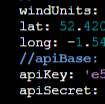
                          weatherProvider: 'ukmetofficedatahub',
                          lat: "52.###############",
                          long: "-1.###############",
                        //apiBase: 'https://api-metoffice.apiconnect.ibmcloud.com/v0/forecasts/point/daily/',
                          apiKey: 'e52#############################',
                          apiSecret: 'd3a#############################',
                        

                        the result:-

                        7eba740f-a745-4800-a364-6d8a94be739a-image.png

                        S 1 Reply Last reply Reply Quote 0
                        • S Do not disturb
                          sdetweil @D3dl3g
                          last edited by

                          @D3dl3g send me your API key… config from config.js via email or direct message so I can debug

                          did u look in the browser messages?

                          my email is my same userid at gmail

                          Sam

                          How to add modules

                          learning how to use browser developers window for css changes

                          1 Reply Last reply Reply Quote 0
                          • D Offline
                            D3dl3g
                            last edited by D3dl3g

                            Just to update the forum, as to what happened behind closed doors

                            Sam kindly tested my code, and it worked for him.

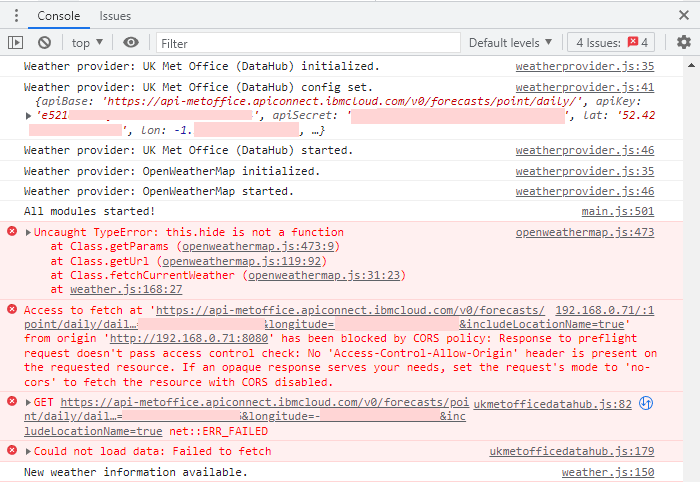
                            I am recieving browser errors (previously requested but i wasnt looking in the right bit of the browser window)… he is not

                            Issues Tab

                            a6d930c5-9a8d-4954-b85f-0a690ebf979a-image.png

                            Console Tab
                            28bb215d-8d84-42ca-90bd-f32d898fa203-image.png
                            the last 5 entries here will reoccur, im guessing at every “retry” for weather info

                            attempted to use useCorsProxy: true to no avail

                            Sam kindly posted into git hub issues.
                            https://github.com/MichMich/MagicMirror/issues/271

                            karsten13K 1 Reply Last reply Reply Quote 0
                            • karsten13K Offline
                              karsten13 @D3dl3g
                              last edited by

                              tested ukmetofficehub and it works out of the box (without setting the useCorsProxy flag).

                              Looking into the provided config

                                weatherProvider: 'ukmetofficedatahub',
                                lat: "52.###############",
                                long: "-1.###############",
                              

                              which is messed up. It has to be:

                                weatherProvider: 'ukmetofficedatahub',
                                lat: 52.###############,
                                lon: -1.###############,
                              
                              S 1 Reply Last reply Reply Quote 0
                              • S Do not disturb
                                sdetweil @karsten13
                                last edited by

                                @karsten13 I tested w those in quotes, and it worked ok

                                Sam

                                How to add modules

                                learning how to use browser developers window for css changes

                                karsten13K 1 Reply Last reply Reply Quote 0
                                • karsten13K Offline
                                  karsten13 @sdetweil
                                  last edited by

                                  @sdetweil

                                  did only test without, but there is another error lon vs. long …

                                  S D 3 Replies Last reply Reply Quote 0
                                  • S Do not disturb
                                    sdetweil @karsten13
                                    last edited by

                                    @karsten13 I just copy pasted and it worked.

                                    weird

                                    Sam

                                    How to add modules

                                    learning how to use browser developers window for css changes

                                    1 Reply Last reply Reply Quote 0
                                    • D Offline
                                      D3dl3g @karsten13
                                      last edited by

                                      @karsten13

                                      i too am getting this… showing me some 80+miles SEE of my actual location

                                      1 Reply Last reply Reply Quote 0
                                      • D Offline
                                        D3dl3g @karsten13
                                        last edited by D3dl3g

                                        @karsten13
                                        also… replace the hash symbols with various numbers… im not posting my exact Lat/Long for obvious reasons…

                                        make sure ur doing

                                        lat:
                                        

                                        and

                                        lon:
                                        

                                        i had it set to lat & lon(G) which is incorrect. hence why it was 80+miles, way tf over there!

                                        quote marks or none surronding the numbers doesnt appear to matter, for me at least

                                        1 Reply Last reply Reply Quote 0
                                        • D Offline
                                          D3dl3g
                                          last edited by D3dl3g

                                          This “issue” is fixed.

                                          Advised by Sam, I ran these 2 commands to find modified files that differ from a “clean install/default” of MM.

                                          git status
                                          git diff
                                          

                                          Any that varied… I ran:

                                          git checkout <dir-tree>/file.extension
                                          

                                          Rebuilt my config.js and found that apiBase HAS to be commented out.

                                          On reflection DO NOT CHANGE ANY FILE aside from “config.js”
                                          I had 3 causes for this issue.

                                          • (edit) i had longitude set in config.js to “long:”… it should be “lon:” and the lat/lon do not have to be surrounded by any quote marks.
                                          • I’d modified other *.js files, that didn’t need to be modified.
                                          • the “apiBase” argument listed in (MagicMirror Documentation > Modules > Weather Module > Configuration Options) was, in my case, not “REQUIRED”.
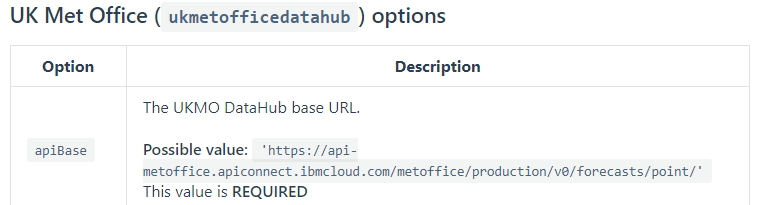
                                            c82b60b1-1dd9-43bb-a09a-94a3009810bb-image.png

                                          @sdetweil … Sam, publically, I cant thank you enough for your help with this. Sorry for being a n00b, your insight and help was invaluable, and you taught me some stuff, which is great!!

                                          S 1 Reply Last reply Reply Quote 2
                                          • S Do not disturb
                                            sdetweil @D3dl3g
                                            last edited by

                                            @D3dl3g glad u got it working. we are all noobs at some of this stuff…
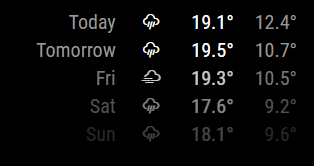
                                            Sam

                                            How to add modules

                                            learning how to use browser developers window for css changes

                                            1 Reply Last reply Reply Quote 0

                                            Hello! It looks like you're interested in this conversation, but you don't have an account yet.

                                            Getting fed up of having to scroll through the same posts each visit? When you register for an account, you'll always come back to exactly where you were before, and choose to be notified of new replies (either via email, or push notification). You'll also be able to save bookmarks and upvote posts to show your appreciation to other community members.

                                            With your input, this post could be even better 💗

                                            Register Login

                                            • 1
                                            • 2
                                            • 2 / 2
                                            • First post
                                              Last post
                                            Enjoying MagicMirror? Please consider a donation!
                                            MagicMirror created by Michael Teeuw.
                                            Forum managed by Sam, technical setup by Karsten.
                                            This forum is using NodeBB as its core | Contributors
                                            Contact | Privacy Policy