MagicMirror Forum
    • Recent
    • Tags
    • Unsolved
    • Solved
    • MagicMirror² Repository
    • Documentation
    • 3rd-Party-Modules
    • Donate
    • Discord
    • Register
    • Login
    A New Chapter for MagicMirror: The Community Takes the Lead
    Read the statement by Michael Teeuw here.

    MMM-CalendarExt3Agenda

    Scheduled Pinned Locked Moved Utilities
    224 Posts 30 Posters 362.3k Views 32 Watching
    Loading More Posts
    • Oldest to Newest
    • Newest to Oldest
    • Most Votes
    Reply
    • Reply as topic
    Log in to reply
    This topic has been deleted. Only users with topic management privileges can see it.
    • BKeyportB Offline
      BKeyport Module Developer @MMRIZE
      last edited by

      @MMRIZE I did, when I was on a dark background. Then I decided I wanted to go with color to tell events apart, so css work it was.

      The "E" in "Javascript" stands for "Easy"

      1 Reply Last reply Reply Quote 0
      • W Offline
        Wenike @MMRIZE
        last edited by

        @MMRIZE I did! Except I have like 6 calendars defined and I’ve long been used to telling them apart by color on my Google calendar.

        1 Reply Last reply Reply Quote 0
        • luisestradaL Offline
          luisestrada @hogedir
          last edited by

          @hogedir

          I edited the max-width value (50% to 100%) in .CX3A .cellBody .fullday .event and solved the issue

          1 Reply Last reply Reply Quote 0
          • H Offline
            hogedir @MMRIZE
            last edited by

            @MMRIZE how do you change the baseball icon please? which one are available to put?

            BKeyportB 1 Reply Last reply Reply Quote 0
            • BKeyportB Offline
              BKeyport Module Developer @hogedir
              last edited by BKeyport

              @hogedir icons are changed at the calendar level by adding symbol: <some symbol> to each calendar in the calendar module.

              https://fontawesome.com/v5/search is where you can look up icons to use. The system can’t use pro icons.

              {
              	url: "http://cal.events/VReW45.ics",
              	name: "Seahawks",
              	symbol: "football-ball",						
              },
              

              is https://fontawesome.com/v5/icons/football-ball?s=solid&f=classic

              The "E" in "Javascript" stands for "Easy"

              H 1 Reply Last reply Reply Quote 0
              • BKeyportB BKeyport referenced this topic on
              • H Offline
                hogedir @BKeyport
                last edited by hogedir

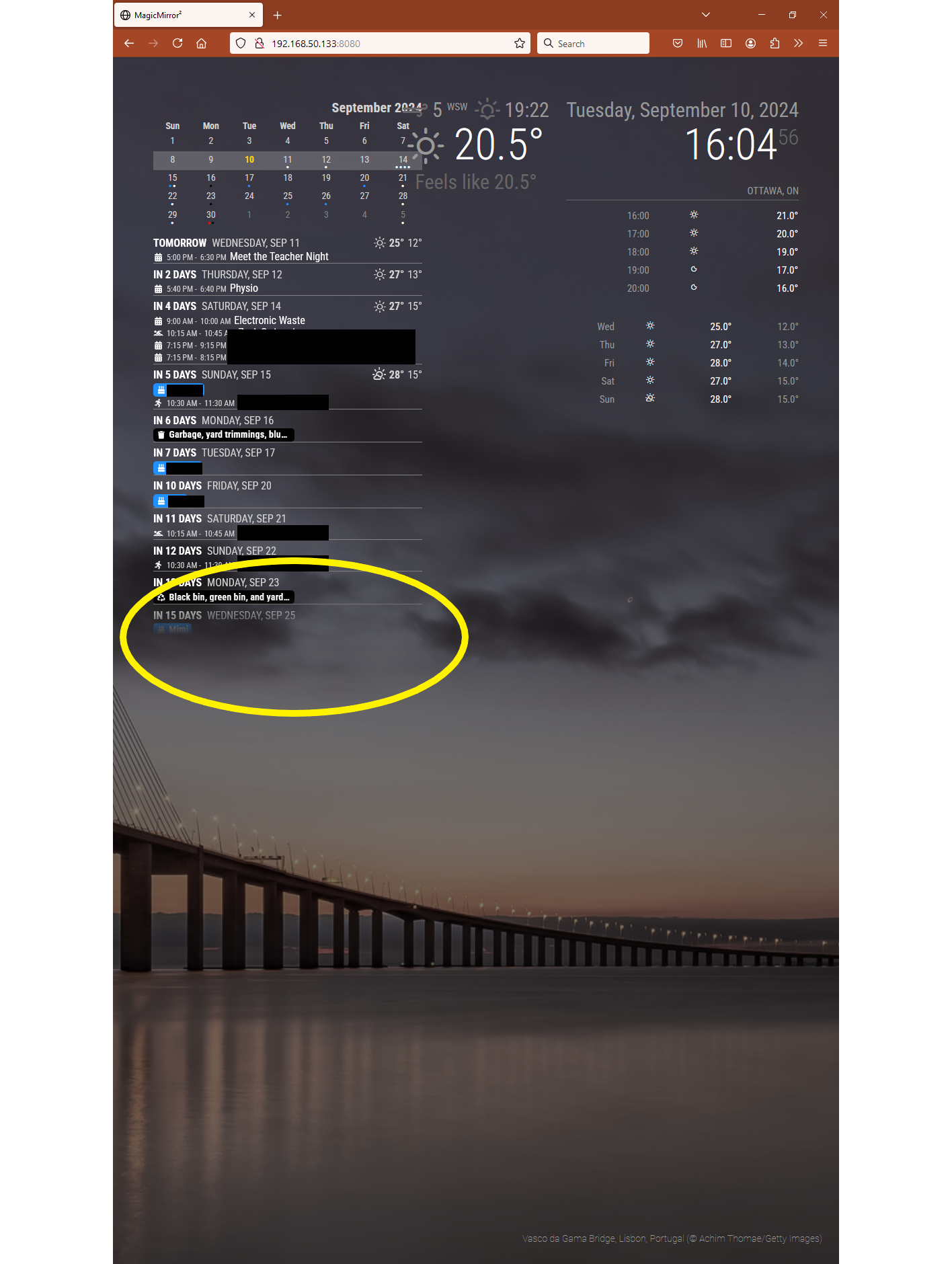
                @BKeyport I searched how to Hide the list of events diary and the AGENDA calendar with all the month with days because I just want to show the 3rd part of the module with all the events.

                like this : hiding the cross part and the other part with events :
                4798d7d9-f035-4b8c-9a46-761c328e4d46-image.png

                S BKeyportB 2 Replies Last reply Reply Quote 0
                • S Offline
                  sdetweil @hogedir
                  last edited by

                  @hogedir please see this post

                  https://forum.magicmirror.builders/topic/14862/help-with-a-couple-css-issues?_=1664733698317

                  about using the developers window (ctrl-shift-i) to examine the web page and find the element u want to address

                  this content goes into ~.MagicMirror/css/custom.css

                  .MMM-CalendarExt3Agenda  .?????? {
                        display:none;
                  }
                  

                  where ??? is the classname of the month view

                  Sam

                  How to add modules

                  learning how to use browser developers window for css changes

                  1 Reply Last reply Reply Quote 0
                  • BKeyportB Offline
                    BKeyport Module Developer @hogedir
                    last edited by BKeyport

                    @hogedir hiding the minical is simple: showMiniMonthCalendar: false, in your config. I suggest you read the README.md - it’s all documented.

                    Everything other than config options is CSS - Feel free to give ideas, and @mmrize and I can help you work it out.

                    The "E" in "Javascript" stands for "Easy"

                    BKeyportB 1 Reply Last reply Reply Quote 0
                    • BKeyportB Offline
                      BKeyport Module Developer @BKeyport
                      last edited by

                      hey, @MMRIZE - I can’t figure out how to do something.

                      One of my remotely generated events has taken to advertising in it’s title.
                      (Washington Football vs Arizona - blah blah special event, Presented by Idiot Company)

                      I want to get rid of everything after the dash. Not sure how to word the transform to do it - can you explain?

                      Thanks.

                      The "E" in "Javascript" stands for "Easy"

                      1 Reply Last reply Reply Quote 1
                      • D Offline
                        DDE12
                        last edited by

                        How do I change the order of information events from
                        ___________________________________________________________
                        1:30 PM - 2:30 PM Event Name ________________________

                        to

                        ___________________________________________________________
                        Event Name ________________________1:30 PM - 2:30 PM

                        BKeyportB 1 Reply Last reply Reply Quote 0
                        • BKeyportB Offline
                          BKeyport Module Developer @DDE12
                          last edited by BKeyport

                          @DDE12 refer back to https://forum.magicmirror.builders/topic/16976/mmm-calendarext3agenda/24?_=1668752794543

                          The combo of my work and @MMRIZE 's work results in that. Right around there is where I got all of my settings for my install. Feel free to experiment.

                          The "E" in "Javascript" stands for "Easy"

                          D 1 Reply Last reply Reply Quote 1
                          • BKeyportB BKeyport referenced this topic on
                          • C Offline
                            cyberphox
                            last edited by

                            Running MagicMirror in Docker on Synology.
                            Installed this module and it looks great on my MacBook, but when I try to visit on my mirror with Raspberry Pi 3, the module doesn’t show (just default calendar module). Get a Syntax error, unexpected token.
                            So weird.

                            Full time Dad, DJ and entertainer and lover of technology.

                            S 1 Reply Last reply Reply Quote 0
                            • S Offline
                              sdetweil @cyberphox
                              last edited by

                              @cyberphox what version of MM are you running, and on pi, what version of OS and what browser?

                              these modules, like many newer ones, are converting to javascript ES6 idioms that don’t work on older node versions (built into browsers as well)

                              Sam

                              How to add modules

                              learning how to use browser developers window for css changes

                              C 1 Reply Last reply Reply Quote 0
                              • C Offline
                                cyberphox @sdetweil
                                last edited by

                                @sdetweil
                                Chromium 72.0.3626.121
                                Raspbian Stretch
                                MagicMirror: v2.21.0

                                Full time Dad, DJ and entertainer and lover of technology.

                                S 2 Replies Last reply Reply Quote 0
                                • S Offline
                                  sdetweil @cyberphox
                                  last edited by

                                  @cyberphox how about node -v

                                  stretch is really old… so probably a downlevel version of javascript…

                                  Sam

                                  How to add modules

                                  learning how to use browser developers window for css changes

                                  C 1 Reply Last reply Reply Quote 0
                                  • C Offline
                                    cyberphox @sdetweil
                                    last edited by

                                    @sdetweil
                                    No doubt…not a huge issue as it was test install…Thanks for the help!

                                    Full time Dad, DJ and entertainer and lover of technology.

                                    1 Reply Last reply Reply Quote 0
                                    • S Offline
                                      sdetweil @cyberphox
                                      last edited by

                                      @cyberphox said in MMM-CalendarExt3Agenda:

                                      72.0.3626.121

                                      chrome 72 is march 2019… so 3.5 years old

                                      Sam

                                      How to add modules

                                      learning how to use browser developers window for css changes

                                      C 1 Reply Last reply Reply Quote 0
                                      • C Offline
                                        cyberphox @sdetweil
                                        last edited by

                                        @sdetweil Looks like I can upgrade through terminal so might give it a go over the weekend

                                        Full time Dad, DJ and entertainer and lover of technology.

                                        1 Reply Last reply Reply Quote 0
                                        • D Offline
                                          DDE12 @BKeyport
                                          last edited by

                                          @BKeyport Thank you!
                                          I’m using both startTime and endTime and can’t get it lined up right.

                                          .CX3A .event .title {
                                            color: var(--calendarColor);
                                            order: 1;
                                            width: 120px; /* Adjust for your region width. Here I am using fixed value to make things simple */
                                            flex-grow: 1;
                                          }
                                          
                                          .CX3A .event .time.startTime {
                                            order: 2;
                                            width: 52px;  
                                            text-align: right;
                                          }
                                          
                                          .CX3A .event .startTime::after {
                                            content: ' -';
                                          }
                                          
                                          .CX3A .event .time.endTime {
                                            order: 2;
                                            width: 65px;  
                                            text-align: right;
                                          }
                                          
                                          .CX3A .event .symbol {
                                            order: 4;
                                          }
                                          
                                          .CX3A .event .headline {
                                            justify-content: space-between;
                                          }
                                          
                                          .CX3A .event .description {
                                            overflow: hidden;
                                            white-space: nowrap;
                                            text-overflow: ellipsis;
                                            max-width: 100%;
                                            font-size: 90%;
                                            color: orange;
                                            padding-left: 20px;
                                          }
                                          
                                          BKeyportB D 2 Replies Last reply Reply Quote 0
                                          • BKeyportB Offline
                                            BKeyport Module Developer @DDE12
                                            last edited by

                                            @DDE12 I still don’t get them all lined up right - thanks to advertising in one of my schedules (Washington State Cougars @ Washington Huskies - presented by blah blah blah blah)

                                            But I’ve tweaked it enough to get it right most of the time. Just keep tweaking it.

                                            The "E" in "Javascript" stands for "Easy"

                                            1 Reply Last reply Reply Quote 0

                                            Hello! It looks like you're interested in this conversation, but you don't have an account yet.

                                            Getting fed up of having to scroll through the same posts each visit? When you register for an account, you'll always come back to exactly where you were before, and choose to be notified of new replies (either via email, or push notification). You'll also be able to save bookmarks and upvote posts to show your appreciation to other community members.

                                            With your input, this post could be even better 💗

                                            Register Login

                                            • 1
                                            • 2
                                            • 7
                                            • 8
                                            • 9
                                            • 10
                                            • 11
                                            • 12
                                            • 9 / 12
                                            • First post
                                              Last post
                                            Enjoying MagicMirror? Please consider a donation!
                                            MagicMirror created by Michael Teeuw.
                                            Forum managed by Sam, technical setup by Karsten.
                                            This forum is using NodeBB as its core | Contributors
                                            Contact | Privacy Policy