Read the statement by Michael Teeuw here.
MMM-Modulebar - A module that adds touch buttons for showing/hiding other modules.
-
Description:
This Module adds a touch menu to hide / show other the defined (in the config.js) modules.
Screenshots:
Module with symbols only in row mode:

Module with symbols only in column mode:

Module with symbols and text in column mode:

Module with symbols and text in row mode:

This is my own mirrors view (Bottom Bar) using some addition in the custom.css see below.

Download:
[card:Snille/MMM-Modulebar]
Custom-CSS
Here is my CSS settings for the module that I have added to my custom.css to give it the extra special look. :)
/* MMM-Modulebar ------------------------------------*/
.modulebar-button {
  margin: 1px;
  padding: 1px 1px;
  border: 2px solid #fff;
  background-color: #fff;
  color: #000;
  border-radius: 0px;
  border-radius: 50%;
  width: 60px;
  height: 60px;
}
.modulebar-picture {
  margin: 0px 0px;
  border-radius: 50%;
}
.modulebar-menu {
  align-items: flex-start;
}
/*****************************************************/
Version 0.2
- Had to change the button array format a bit. Make sure to update your config to the new “standard”.
The reason for the change where to be able control each module separately even if it is the same module multiple times. :)
Version 0.1
- Initial release.
- Had to change the button array format a bit. Make sure to update your config to the new “standard”.
-
Very nice!
-
Nice! Now I just need to get an touch mirror… 😊
-
Nice to see people making different versions of my code :)
This indeed was one thing that my module can’t do! Now people can choose to use this module if they want buttons for single modules :DIf there is anything don’t hesitate to contact me!
ProfileSwitcher, TouchNotifications -
@tosti007 Yes! That’s exactly what I wanted. :) I’m using your modules for accessing the “profiles” and my module as a “quick” option to just view one thing.
Thank YOU, for making the first module. :)
If you cant find it, make it and share it
MMM-homeassistant-sensors,MMM-Modulebar,MMM-Profilepicture,MMM-Videoplayer,MMM-TautulliLatest -
@Snille yes that’s a a great way to use the modules :) you’re welcome for my version but thank you for yours :D
-
Is it possible to make the module bar itself toggle-able? It covers a large amount of screen real-estate; I was just wondering if its possible, how I could do that.
-
@chaseb1357 Well, you could “hide” it with a button, but the problem is to get it back again. :)
If you cant find it, make it and share it
MMM-homeassistant-sensors,MMM-Modulebar,MMM-Profilepicture,MMM-Videoplayer,MMM-TautulliLatest -
@Snille Haha, I tried that yes. only to realize my mistake.
-
@chaseb1357 Personally I’m using the “Hide all” module for removing everything. :)
If you cant find it, make it and share it
MMM-homeassistant-sensors,MMM-Modulebar,MMM-Profilepicture,MMM-Videoplayer,MMM-TautulliLatest -
@Snille I have that module installed also, I was just wanting a quick way to hide certain modules like for example email. For whenever I don’t want any friends snooping, while i still get to show off the mirror. :)
-
@chaseb1357 Hmm… I have not tried it… But what if you have two instances of the modulebar one with only one button hiding the “other” module bar. :)
If you cant find it, make it and share it
MMM-homeassistant-sensors,MMM-Modulebar,MMM-Profilepicture,MMM-Videoplayer,MMM-TautulliLatest -
@Snille That was a brilliant idea! I got it to work just as I wanted.
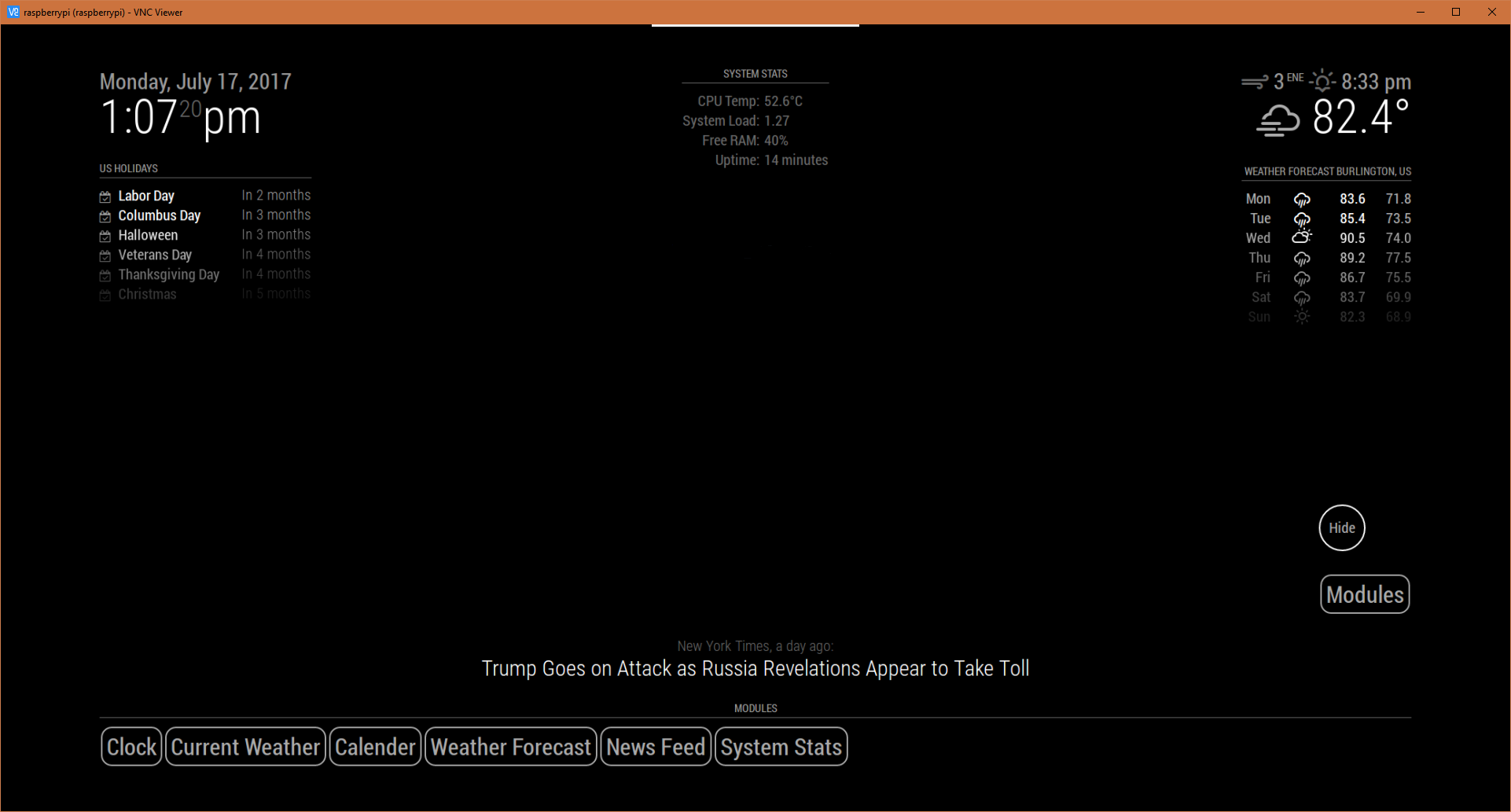
The Modules button is a separate module bar that I set up to toggle the one that I will fill with all my modules. I achieved this by going to my modules folder and duplicating the “MMM-Modulebar” folder and renaming it “MMM-ModulebarHide”. I then renamed everything referencing “MMM-Modulebar” to “MMM-ModulebarHide” for consistency.My config file is set up like this:
		{
        		module: "MMM-ModulebarHide",
       			position: "bottom_right",
			//header: "Modules",
        		classes: "default everyone",
        		config: {
        			buttons: {
   				 	"1": {
	  					module: "MMM-Modulebar",
      						text: "Modules",
    					},
       				}
       			}
    		},
		{
        		module: "MMM-Modulebar",
       			position: "bottom_bar", // This can be any of the regions.
			header: "Modules", // Optional
        		classes: "default everyone", // Optional
        		config: {
        			buttons: {
   				 	"1": {
	  					module: "clock",
      						text: "Clock",
    					},
   					"2": {
						module: "currentweather",
      						text: "Current Weather",
      					},
      					"3": {
      						module: "calendar",
      						text: "Calender",
      					},
      					"4": {
      						module: "weatherforecast",
      						text: "Weather Forecast",
      					},
      					"5": {
      						module: "newsfeed",
      						text: "News Feed",
      					},
      					"6": {
      						module: "MMM-SystemStats",
      						text: "System Stats",
      					},

      				}
           			// See 'Configuration options' for more information.
       			}
    		},
I can now toggle the module bar! Thanks so much!
-
@chaseb1357 Hehe! Great! :) Nicely done!
-
Hello, is it possible to use one button for display multiple module ?
Example :
Button 1 : Clock and weather
Button 2 : Mail and calendar
Button 3 : Clock and CameraThanks for advance
-
@gaudouy Hi, no, it can only show and hide one/ or multiple instances of the same type of module on one button, but not two different types of modules on one button.





Hello! It looks like you're interested in this conversation, but you don't have an account yet.
Getting fed up of having to scroll through the same posts each visit? When you register for an account, you'll always come back to exactly where you were before, and choose to be notified of new replies (either via email, or push notification). You'll also be able to save bookmarks and upvote posts to show your appreciation to other community members.
With your input, this post could be even better 💗
Register Login