Read the statement by Michael Teeuw here.
MMM-PIR-Sensor-Lite does not switch HDMI off
-
@grena
Oh, now another problem:
After switching off HDMI by MMM-PIR-Sensor-Lite the livestream-picture from MMM-RTSPStream is not in the frame when HDMI is switched on again by PIR . -
@Volkae, have you updated the module from the testing branch since your last message that it worked?
-
@grena
yes, I did but I did not run RTSPStream while running the testing branch, sorry. -
@Volkae said in MMM-PIR-Sensor-Lite does not switch HDMI off:
yes, I did but I did not run RTSPStream while running the testing branch, sorry.
No problem, I’ll try to reproduce this issue!MMM-RTSPStream is no longer being actively developed :neutral_face:
So, I refer you to the advice of the author of MMM-RTSPStream to find another solution::warning: This module is no longer being actively developed. I will accept PRs and leave the repo active, but will not be directly supporting any issues. If anyone is interested in assuming ownership of the module, please contact @shbatm. :warning:
Why?
I am no longer using this module on my own mirror. After several years, I found that I use the snapshots much more frequently than I streamed the actual cameras, which can be performed by much simpler modules and methods. To enable streaming, WebRTC (like MMM-HomeAssistant-WebRTC) is a newer and better standard with much lower server overhead and latency for delivering RTSP Streams to the frontend than any of the options used here, in the future, this will be the method I focus on and I will not try to shoehorn another technology into this module.
-
:fire: MMM-PIR-Sensor-Lite 1.2 has just been released! It’s allows you to manage monitor on Debian 11 Bullseye :sign_of_the_horns_medium-light_skin_tone:
Learn more in ReadMe
-
@grena
Hello Grena… Hoping you or someone maybe able to help. I had to rebuild my MM (using Pi4b). With regards to using a PIR sensor, I’m using a doppler sensor vs. a PIR sensor using the following build thread:Everything prior to rebuild worked great… The screen would go into stand-by after 2 mins and flip back on when the sensor picked up presence. The repo I had, originally, used:
https://github.com/paviro/MMM-PIR-Sensor
is no longer supported so I didn’t clone it. Instead, I used yours but having issues getting it to work. I can see the countdown on the screen but nothing happens. I unplugged the doppler sensor but no change. Any ideas? I’m running
Debian v11
MM v2.21on pi4b. Any help is greatly appreciated
-
@dkhorse74 another user noticed this only worked for the 1st HDMI port on the pi4.
had to change the code in the node_helper.js for the second port
-
@sdetweil
Thank you I will try… I ran:xrandr -q
which show HDMI-2 is what is currently plugged in… Will report back
-
@sdetweil
that did it! Screen goes to sleep… now need to figure out how to get the doppler sensor to “wake-up” the monitor -
@dkhorse74 the module turns it back on… another place for the hdmi port…
the sensor just signals movement, usually a high signal…
the module then signals wake up and starts a time…
no more high signals, then sleep…
-
@sdetweil
yep, understood… Still not able to wake up the screen… I tested the sensor with a meter and getting correct input voltage… is there anything I could be missing? -
@sdetweil
Found another post where you shared a link on how to run a PY script to test the sensor:https://projects.raspberrypi.org/en/projects/parent-detector/3
Going to try this later tonight.
-
Got everything to work perfectly…
For anyone else who maybe considering using the doppler sensor with a potentiometer, you can follow the “how-to” thread in my initial post BUT use the MMM-PIR-Sensor-Lite module only as it keeps things simple. The other PIR modules may not work with Debian 11 (Bullseye)
As for the resolution, the mistake was on my end:
-
I had “GND” and “Vout” swapped on the board pins
-
I had to join my raspberry login id to group “gpio”
The following page is very useful to test the functionality of the sensor before you implement the change to mirror config file (thanks to @sdetweil for posting the link in a different thread):
https://projects.raspberrypi.org/en/projects/parent-detector/3
Again thanks to all for the help…
-
-
Got everything to work perfectly…
:thumbs_up:
The following page is very useful to test the functionality of the sensor before you implement the change to mirror config file (thanks to @sdetweil for posting the link in a different thread): https://projects.raspberrypi.org/en/projects/parent-detector/3
Yes, You can also run the python script of the module:
python3 -u ~/MagicMirror/modules/MMM-PIR-Sensor-Lite/pir.py SENSOR_PINanother user noticed this only worked for the 1st HDMI port on the pi4.
Yes, I add this point of vigilance at the beginning of the readme :white_heavy_check_mark:
-
@grena a more better thing would be to make a parameter for config so the user can change it without editing your code.
-
@grena said in MMM-PIR-Sensor-Lite does not switch HDMI off:
:thumbs_up: Yes, You can also run the python script of the module:
python3 -u ~/MagicMirror/modules/MMM-PIR-Sensor-Lite/pir.py SENSOR_PIN -
I also have a problem displaying the flow from the MMM-RTSPStream module after turning on the screen on the motion sensor. The stream image does not return to the frame of the desired location. Was it possible to somehow defeat the image shift? I know that the module is no longer supported, but maybe who was able to find a solution? ((
This is the kind of screen I have after the motion sensor is triggered… (((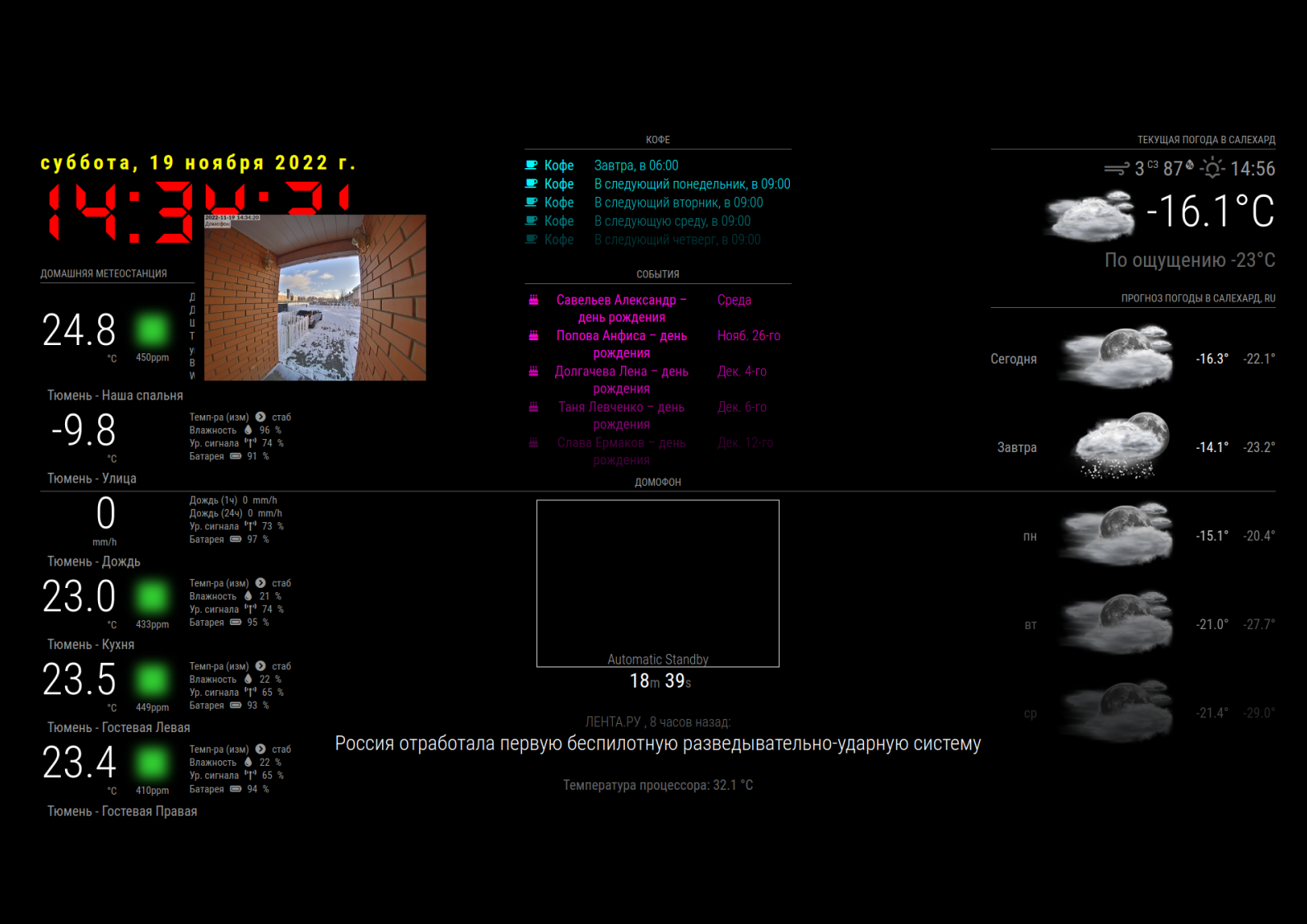
-
@Laz
I have exactly the same Problem using MMM-PIR-Sensor-Lite in combination with MMM-RTSPStream and even by using MMM-PIR-Sensor-Lite in combination with MMM-iFrame.I have no idea…
-
Tell me which command to restart MagicMirror? I want to try after turning on the screen to reboot the program itself.
Not raspberries, but mirror programs. Maybe it will help return the stream picture to the right place…? -
pm2 restart /home/vova/MagicMirror/installers/mm.sh
This command overloaded the program MM2 and returned the video stream to the right place in the RTSP frame…)
Hello! It looks like you're interested in this conversation, but you don't have an account yet.
Getting fed up of having to scroll through the same posts each visit? When you register for an account, you'll always come back to exactly where you were before, and choose to be notified of new replies (either via email, or push notification). You'll also be able to save bookmarks and upvote posts to show your appreciation to other community members.
With your input, this post could be even better 💗
Register Login