Read the statement by Michael Teeuw here.
MMM-NetworkScanner help needed
-
Hi, and please help. Thank you.
I’ve got this module running but the only devices that will show as active are the Github from the sample config and the showUnknown devices which I have turned off. All others that I have added appear as offline. I’m using the MAC addresses that I got from my router (and confirmed them with what MMM-NetworkScanner shows when I have showUnknown enabled) They are correct and all in lower case. I read where that might be an issue. I did git pull and npm install in the MMM-NetworkScanner folder. Also, if I change the 2nd device entry (below) to macAddress and enter the MykleDesktop macAddress, then the macAddress that was showing in showUnknown no longer appears, and still the device shows as offline. In other words, all my devices show their mac addresses as online if I don’t list them in devices. If I list them in devices, they show as offline and the showUnknown mac addresses disappear
{
module: ‘MMM-NetworkScanner’,
position: ‘top_left’,
config: {
devices: [
{ ipAddress: “github.com”, name: “Github”, icon: “globe”},
{ ipAddress: “192.168.1.4”, name: “MykleDesktop”, icon: “desktop”},
{ macAddress: “mac.address.all.lower.case”, name: “DoveMBP”, icon: “laptop”},
{ macAddress: “mac.address.all.lower.case”, name: “MyklesiPhone”, icon: “mobile”},
{ macAddress: “mac.address.all.lower.case”, name: “JayAndroid”, icon: “mobile”},
{ macAddress: “mac.address.all.lower.case”, name: “DonnaMBP”, icon: “laptop”},
{ macAddress: “mac.address.all.lower.case”, name: “DonnaiPhone”, icon: “mobile”},
{ macAddress: “mac.address.all.lower.case”, name: “NikkiiPhone”, icon: “mobile”},
],
showUnknown: false,
showOffline: true,
showLastSeen: true,
keepAlive: 180,
updateInterval: 10,
residents: “Mobile”, // I tried this with each name of the devices above and each icon name and the default of []
occupiedCMD: {notification: ‘TEST’, payload: {action: ‘occupiedCMD’}},
vacantCMD: {notification: ‘TEST’, payload: {action: ‘vacantCMD’}},
} -
@Mykle1 try to execute the following in shell:
arp-scan -l -qCompare all the scanned MAC with your MAC device entries in MMM-NetworkScanner.
regards,
Slamet PS
-
@slametps said in MMM-NetworkScanner help needed:
arp-scan -l -q
pi@Pi3:~ $ arp-scan -l -q
You need to be root, or arp-scan must be SUID root, to open a link-layer socket.
link_open: Operation not permitted
pi@Pi3:~ $please advise
-
@Mykle1 sorry, my bad. The correct one:
sudo arp-scan -l -q -
@slametps said in MMM-NetworkScanner help needed:
sudo arp-scan -l -q
I just checked all reported mac addresses against my device entries. They are all correct. Not one of them shows as online
-
I can verify mac addresses not working for me either… I installed it to play with and the only way I can show anything online is using ip addresses…
-
@cowboysdude said in MMM-NetworkScanner help needed:
I can verify mac addresses not working for me either… I installed it to play with and the only way I can show anything online is using ip addresses…
A quick fix, so far:
I went into my FIOS router and assigned a “static lease” on the IP addresses of the devices that would not show in NetworkScanner with their MAC addresses. Went back into my config.js and changed the macAddress to ipAddress for each device and put in the static IP addresses I just assigned in the router.
It’s working now, all except for the machine I am working on now (my desktop). It doesn’t show as active, even with a static lease on the IP address. That’s sort of alright, as I really just wanted the cell phones to appear, which they do, but odd, nonetheless. :-/
Now two things that remain:
-
I want to move the entire cell that contains NetworkScanner on the screen to the left. Could someone tell me where to find that?
-
The phrase “was last seen 5 minutes ago” in NetworkScanner. Where do I go to edit that?
-
-
The mac address scanner was working up until yesterday when a new version came out. If you look at your logs you can see it is doing MAC scanning. Mine keeps throwing an error saying the module ‘ping’ is missing.
I don’t want to scan by IP address because I have some machines that I don’t have ping enabled.
-
After I assigned static IP addresses via my FIOS router the scanner started working, somewhat. Then I rearranged my mirror, somewhat.
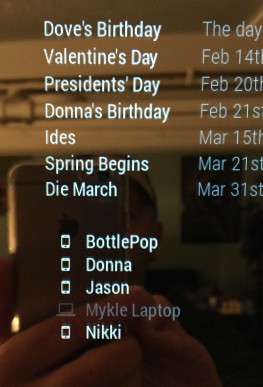
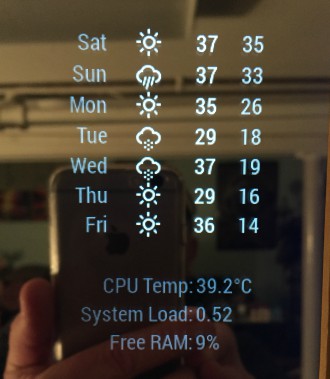
-
@Mykle1 yap, mine is no longer working after updating the module :'( I think there is something wrong with the new module for MAC comparison. Hope the author fix this soon.
-
@slametps I think so too. I could not get it to work with MAC addresses. Assigning static IP addresses is the only way I could get it to work, and even that was not perfect, as it would not show my desktop as active , even with a static ip address
-
Im sure because you have the firewall on, it won’t ping if thats the case. This is one of the reasons I want to do it by MAC address.
-
@Mykle1 said in MMM-NetworkScanner help needed:
@slametps I think so too. I could not get it to work with MAC addresses. Assigning static IP addresses is the only way I could get it to work, and even that was not perfect, as it would not show my desktop as active , even with a static ip address
Unfortunately, mine was not working, neither MAC nor IP. :sob:
While I tracing the execution through console log, the problem is in here:... payload.forEach(function (item) { var device = self.getDeviceByMacAddress(item); // device is null, although self.getDeviceByMacAddress() return not null. still no idea. console.log("devices: " + device); if (device) { device.online = true; device.lastSeen = moment(); self.networkDevices.push(device); } }); ... -
in this context self has no meaning - add
var self = this;to the top of the function or replaceselfwiththis -
@izanbard said in MMM-NetworkScanner help needed:
in this context self has no meaning - add
var self = this;to the top of the function or replaceselfwiththisself is already defined in the original complete code. the original author @ianperrin will take a look into the latest code (v0.0.2, I presume).
@Mykle1 : For now, I downloaded the previous version (tags v0.0.1 before the official bugs free the new version v0.0.2 fixed/released), and work like a charm.git clone --tags v0.0.1 https://github.com/ianperrin/MMM-NetworkScanner.git -
@slametps said in MMM-NetworkScanner help needed:
@Mykle1 : For now, I downloaded the previous version (tags v0.0.1 before the official bugs free the new version v0.0.2 fixed/released), and work like a charm.
Very good. :thumbsup:
-
@Mykle1 said in MMM-NetworkScanner help needed:
@slametps said in MMM-NetworkScanner help needed:
@Mykle1 : For now, I downloaded the previous version (tags v0.0.1 before the official bugs free the new version v0.0.2 fixed/released), and work like a charm.
Very good. :thumbsup:
I just fresh cloned the (new) latest version (rather than update/git pull), it is working flawlessly now. Thx to @ianperrin.
-
And easy question I hope you guys can help with – is this module active or passive?
For example, if I take my magic mirror to work to show it off, will this module activly send out network traffic to the network and trigger security alerts (getting me in big trouble)?
I’m hoping the answer is that it only looks for IP and Mac addresses listed in the configuration.
-
@FlatPepsi it is active since arp-scan will executed every updateInterval setting. Of course, it will trigger such a security alert if violate the security policy of your office. No, arp-scan will scan all available devices in the network.
-
@slametps said in MMM-NetworkScanner help needed:
@Mykle1 try to execute the following in shell:
arp-scan -l -qCompare all the scanned MAC with your MAC device entries in MMM-NetworkScanner.
I have run the command sudo arp-scan -l -q and somehow find only devices that are in the LAN, but no device what is in the WIFI - so unfortunately no mobile. My MM always shows me only “NO DEVICE ONLINE”.
I proceeded as follows:
cd ~ /
sudo apt-get install arp-scancd ~ / MagicMirror / modules
git clone https://github.com/ianperrin/MMM-NetworkScanner.git
cd ~ / MagicMirror / modules / MMM-NetworkScanner
npm installcd ~ / MagicMirror / config
nano config.js{ module: "MMM-NetworkScanner", position: "bottom_right", config: { device: [ { macAddress: "XX:XX:XX:XX:XX:XX", name: "I", icon: "mobile"}, ], showUnknown: true, } },





Hello! It looks like you're interested in this conversation, but you don't have an account yet.
Getting fed up of having to scroll through the same posts each visit? When you register for an account, you'll always come back to exactly where you were before, and choose to be notified of new replies (either via email, or push notification). You'll also be able to save bookmarks and upvote posts to show your appreciation to other community members.
With your input, this post could be even better 💗
Register Login