MagicMirror Forum
    • Recent
    • Tags
    • Unsolved
    • Solved
    • MagicMirror² Repository
    • Documentation
    • 3rd-Party-Modules
    • Donate
    • Discord
    • Register
    • Login
    A New Chapter for MagicMirror: The Community Takes the Lead
    Read the statement by Michael Teeuw here.

    Online Radio

    Scheduled Pinned Locked Moved Entertainment
    52 Posts 4 Posters 25.4k Views 4 Watching
    Loading More Posts
    • Oldest to Newest
    • Newest to Oldest
    • Most Votes
    Reply
    • Reply as topic
    Log in to reply
    This topic has been deleted. Only users with topic management privileges can see it.
    • T Offline
      tanvir586
      last edited by

      Is there any working online Radio module available? Tried couple of modules but no luck

      wishmaster270W 1 Reply Last reply Reply Quote 0
      • wishmaster270W Offline
        wishmaster270 Module Developer @tanvir586
        last edited by

        @tanvir586 Hi,
        i developed MMM-MplayerRadio a couple of years ago. It still should be functional.

        T 1 Reply Last reply Reply Quote 1
        • T Offline
          tanvir586 @wishmaster270
          last edited by

          @wishmaster270 Hi, tried your one. But no sound. Installed vlc still no sound. Will share my config once I go home. Thanks for replying mate

          wishmaster270W 1 Reply Last reply Reply Quote -1
          • wishmaster270W Offline
            wishmaster270 Module Developer @tanvir586
            last edited by wishmaster270

            @tanvir586 Had a lot of problems with the sound of Raspberry as well. It do not think that it is a problem with the modules it might be a problem with the asound or pulseaudio configuration of the operating system.

            If you use Buster release sound is configured by asound, if you use Bullseye it is PulseAudio.

            Do you use the build in sound of the board or a external sound card?

            bugsounetB T 3 Replies Last reply Reply Quote 0
            • bugsounetB Offline
              bugsounet Banned @wishmaster270
              last edited by

              @wishmaster270

              If you use Buster release sound is configured by asound, if you use Bullseye it is PulseAudio

              Nop… It’s pulseaudio too…

              1 Reply Last reply Reply Quote 0
              • T Offline
                tanvir586 @wishmaster270
                last edited by

                @wishmaster270 Hi , Im using my monitors build in speaker. I don’t know which operating system I’m using. I downloaded yesterday. Will let you know once I go home

                1 Reply Last reply Reply Quote 0
                • T Offline
                  tanvir586 @wishmaster270
                  last edited by

                  @wishmaster270 Hi just checked. its bullseye. and my config is

                  {
                  		module: "MMM-MplayerRadio",
                  		header: "Radio",
                  		position: "top_center",
                  		config: {
                  			//autoplay: 0,
                  			stations: [
                  				{
                  					title: "Al Mubarak",
                  					url: "https://emasjidlive.co.uk/listen/almubarakradio",
                  					logo: "https://upload.wikimedia.org/wikipedia/commons/a/ac/Antenne-bayern-logo.png",
                  				},
                  			],
                  		},
                  	},
                  
                  wishmaster270W 1 Reply Last reply Reply Quote 0
                  • wishmaster270W Offline
                    wishmaster270 Module Developer @tanvir586
                    last edited by

                    @bugsounet Oh, good to know. I use Bullseye for a while but currently only have a mirror running without audio.

                    @tanvir586
                    In default mode (which you use) mplayer is used. As i wrote in the documentation mplayer has caused a lot of problems with many streams. You could try to switch to vlc instead which is working much better but does not provide the current stream information.

                    	{
                    		module: "MMM-MplayerRadio",
                    		header: "Radio",
                    		position: "top_center",
                    		config: {
                    			//autoplay: 0,
                                            customCommand: "/usr/bin/vlc",
                                            customCommandArgs: ["-I","dummy","###URL###"],
                    			stations: [
                    				{
                    					title: "Al Mubarak",
                    					url: "https://emasjidlive.co.uk/listen/almubarakradio",
                    					logo: "https://upload.wikimedia.org/wikipedia/commons/a/ac/Antenne-bayern-logo.png",
                    				},
                    			],
                    		},
                    	},
                    

                    Make sure to install vlc first:

                    sudo apt update && sudo apt install -y vlc
                    
                    T 2 Replies Last reply Reply Quote 0
                    • T Offline
                      tanvir586 @wishmaster270
                      last edited by

                      @wishmaster270 Hi I’ve tried this aswell. And I installed the vlc. But still not working. I’ll try it again now.

                      1 Reply Last reply Reply Quote 0
                      • T Offline
                        tanvir586 @wishmaster270
                        last edited by

                        @wishmaster270 ok. Didn’t work. I have another mirror with no speaker. And that’s os 11.2. I can copy that sd card and try on my new mirror. Do you think it will work or I should do something on this one?

                        wishmaster270W 1 Reply Last reply Reply Quote 0
                        • wishmaster270W Offline
                          wishmaster270 Module Developer @tanvir586
                          last edited by

                          @tanvir586 If you do have graphical access directly or via vnc you can check the audio settings first.
                          Maybe the sound is send to analog out instead of hdmi.

                          wishmaster270W 1 Reply Last reply Reply Quote 0
                          • wishmaster270W Offline
                            wishmaster270 Module Developer @wishmaster270
                            last edited by

                            @wishmaster270 If you do a right click on the speaker symbol you can decide where to output the sound:
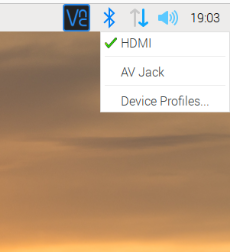
                            speaker.png

                            T 1 Reply Last reply Reply Quote 1
                            • T Offline
                              tanvir586 @wishmaster270
                              last edited by

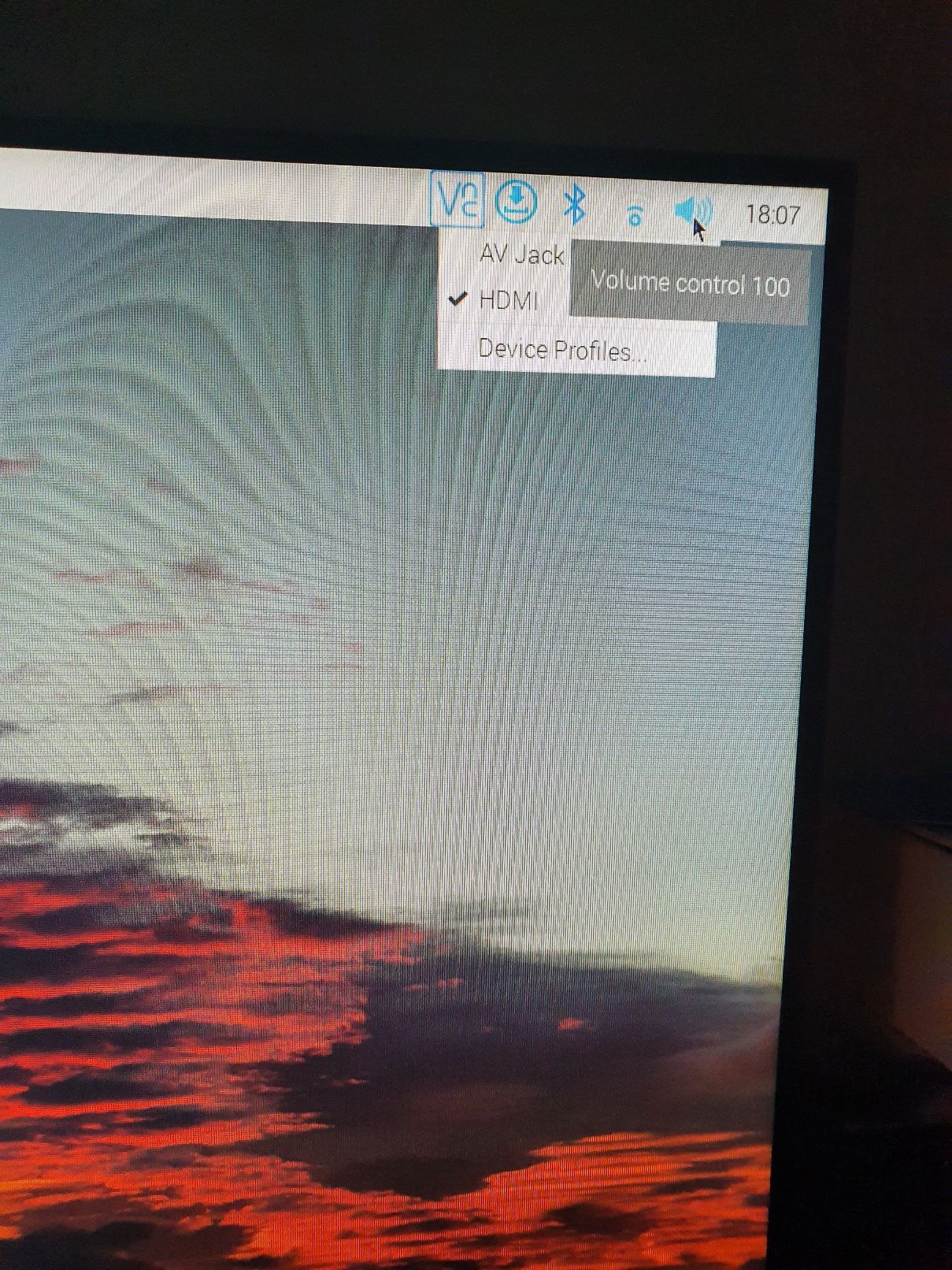
                              @wishmaster270 ![alt text]20221020_180721.jpg
                              It’s on Hdmi. And I can play YouTube, sound OK on YouTube

                              wishmaster270W 1 Reply Last reply Reply Quote 1
                              • wishmaster270W Offline
                                wishmaster270 Module Developer @tanvir586
                                last edited by wishmaster270

                                @tanvir586 Ok. Maybe the vlc on the shell ignores it.

                                Found an interesting thread which suggests running vlc with a additional option:

                                       {
                                		module: "MMM-MplayerRadio",
                                		header: "Radio",
                                		position: "top_center",
                                		config: {
                                			//autoplay: 0,
                                                        customCommand: "/usr/bin/vlc",
                                                        customCommandArgs: ["-I","dummy", "--alsa-audio-device", "hw:0,0", "###URL###"],
                                			stations: [
                                				{
                                					title: "Al Mubarak",
                                					url: "https://emasjidlive.co.uk/listen/almubarakradio",
                                					logo: "https://upload.wikimedia.org/wikipedia/commons/a/ac/Antenne-bayern-logo.png",
                                				},
                                			],
                                		},
                                	},
                                

                                If you use a Raspberry Pi 4 with two hdmi you may need to change “hw:0,0” to “hw:1,0” depending of the port your monitor is connected to.

                                Maybe this helps. I can not test it at the moment.

                                Edit:

                                Some people suggest to add

                                dtoverlay=vc4-fkms-v3d
                                

                                to “/boot/config.txt” additionally.

                                T 1 Reply Last reply Reply Quote 0
                                • T Offline
                                  tanvir586 @wishmaster270
                                  last edited by

                                  @wishmaster270 found the problem…
                                  its my url. its play http://play.antenne.de/antenne.m3u. but it doesnt play https://emasjidlive.co.uk/listen/almubarakradio.

                                  T 1 Reply Last reply Reply Quote 0
                                  • T Offline
                                    tanvir586 @tanvir586
                                    last edited by tanvir586

                                    @tanvir586 is there anything I can do here?

                                    wishmaster270W 1 Reply Last reply Reply Quote 0
                                    • wishmaster270W Offline
                                      wishmaster270 Module Developer @tanvir586
                                      last edited by wishmaster270

                                      @tanvir586 Hi, just checked the website and found the “real” url of the radio.
                                      The url “http://95.154.250.9:9980” works fine with my vlc. As long as they do not change their ip it will be functional.

                                      If it stops working you can go to https://almubarakradio.com/ hit the “Tune in live” button and copy the url of the browser window.

                                      Edit:
                                      Found a better way. You can use the url “https://relay.emasjidlive.uk/almubarakradio” which is the url used by the player on page “https://emasjidlive.co.uk/listen/almubarakradio”

                                      T 1 Reply Last reply Reply Quote 1
                                      • T Offline
                                        tanvir586 @wishmaster270
                                        last edited by

                                        @wishmaster270 Mate you’re a genius. Worked perfectly. Seriously can’t thank you enough. Just one question, it’s not 24 hours radio, when it’s come back online will it start automatically? On my computer browser on the radio page when it’s come back online it doesn’t go live automatically, I need to press refresh button to go live.

                                        wishmaster270W 1 Reply Last reply Reply Quote 0
                                        • wishmaster270W Offline
                                          wishmaster270 Module Developer @tanvir586
                                          last edited by

                                          @tanvir586 Great if I could help.
                                          I am not sure how vlc will handle a connection loss. Normally it will try to reconnect but I do not know how long and often it tries.
                                          Maybe there is a command line option but I think the best option is to try it

                                          T 3 Replies Last reply Reply Quote 0
                                          • T Offline
                                            tanvir586 @wishmaster270
                                            last edited by

                                            @wishmaster270 ok. Will try and let you know. Really appreciated. Thanks 😊

                                            1 Reply Last reply Reply Quote 0

                                            Hello! It looks like you're interested in this conversation, but you don't have an account yet.

                                            Getting fed up of having to scroll through the same posts each visit? When you register for an account, you'll always come back to exactly where you were before, and choose to be notified of new replies (either via email, or push notification). You'll also be able to save bookmarks and upvote posts to show your appreciation to other community members.

                                            With your input, this post could be even better 💗

                                            Register Login

                                            • 1
                                            • 2
                                            • 3
                                            • 2 / 3
                                            • First post
                                              Last post
                                            Enjoying MagicMirror? Please consider a donation!
                                            MagicMirror created by Michael Teeuw.
                                            Forum managed by Sam, technical setup by Karsten.
                                            This forum is using NodeBB as its core | Contributors
                                            Contact | Privacy Policy