MagicMirror Forum
    • Recent
    • Tags
    • Unsolved
    • Solved
    • MagicMirror² Repository
    • Documentation
    • 3rd-Party-Modules
    • Donate
    • Discord
    • Register
    • Login
    A New Chapter for MagicMirror: The Community Takes the Lead
    Read the statement by Michael Teeuw here.

    Weather not working

    Scheduled Pinned Locked Moved Unsolved Troubleshooting
    26 Posts 2 Posters 8.4k Views 2 Watching
    Loading More Posts
    • Oldest to Newest
    • Newest to Oldest
    • Most Votes
    Reply
    • Reply as topic
    Log in to reply
    This topic has been deleted. Only users with topic management privileges can see it.
    • S Do not disturb
      sdetweil @KI6UVE
      last edited by

      @KI6UVE don’t change the endpoint, missing a comma on the line before?

      Sam

      How to add modules

      learning how to use browser developers window for css changes

      K 1 Reply Last reply Reply Quote 0
      • K Offline
        KI6UVE @sdetweil
        last edited by

        @sdetweil
        I took out the endpoint line and that fixed the parsing error, but still no weather. I rechecked my api key and it is correct. Any other ideas? Thanks!!

        S 1 Reply Last reply Reply Quote 0
        • S Do not disturb
          sdetweil @KI6UVE
          last edited by sdetweil

          @KI6UVE open the developers window, ctrl-shift-i, then select the console tab and put weath in the filter field

          is this an openweather v 3 apikey, that u had to provide a credit card to get?

          if so, add

          apiVersion:'3.0',
          

          to the weather config section

          Sam

          How to add modules

          learning how to use browser developers window for css changes

          K 1 Reply Last reply Reply Quote 0
          • K Offline
            KI6UVE @sdetweil
            last edited by

            @sdetweil
            No luck. I noticed you used ‘ ‘ instead of “ “ for the ‘3.0’. I used “ “ for all my other variables, such as type: “forecast”. Is that correct?

            The doc file doesn’t have any notation for how the lat/Lon is presented. Should that read…lat: ‘33.3025’ or nothing as it would imply in the doc file, I.e., lat: 33.3025

            S 1 Reply Last reply Reply Quote 0
            • S Do not disturb
              sdetweil @KI6UVE
              last edited by

              @KI6UVE lat and lng are numbers, so no quotes. either type is ok as long as they match

              Sam

              How to add modules

              learning how to use browser developers window for css changes

              K 1 Reply Last reply Reply Quote 0
              • K Offline
                KI6UVE @sdetweil
                last edited by KI6UVE

                @sdetweil
                No luck with that. Should the apiVersion be in ‘ ‘ or raw? Is there a different weather app api that is easier to configure?

                S 1 Reply Last reply Reply Quote 0
                • S Do not disturb
                  sdetweil @KI6UVE
                  last edited by

                  @KI6UVE I just did this

                  		{
                  			module: "weather",
                  			position: "top_right",
                  			config: {
                  				weatherProvider: "openweathermap",
                  				type: "current",
                  			//	location: "New York",
                  			//	locationID: "5128581", //ID from http://bulk.openweathermap.org/sample/city.list.json.gz; unzip the gz file and find your city
                  				apiKey: ".....",
                  				lat:30.xxxxxx,
                  				lon:-97.xxxxxx
                  			}
                  		},
                  

                  and it worked (top right)
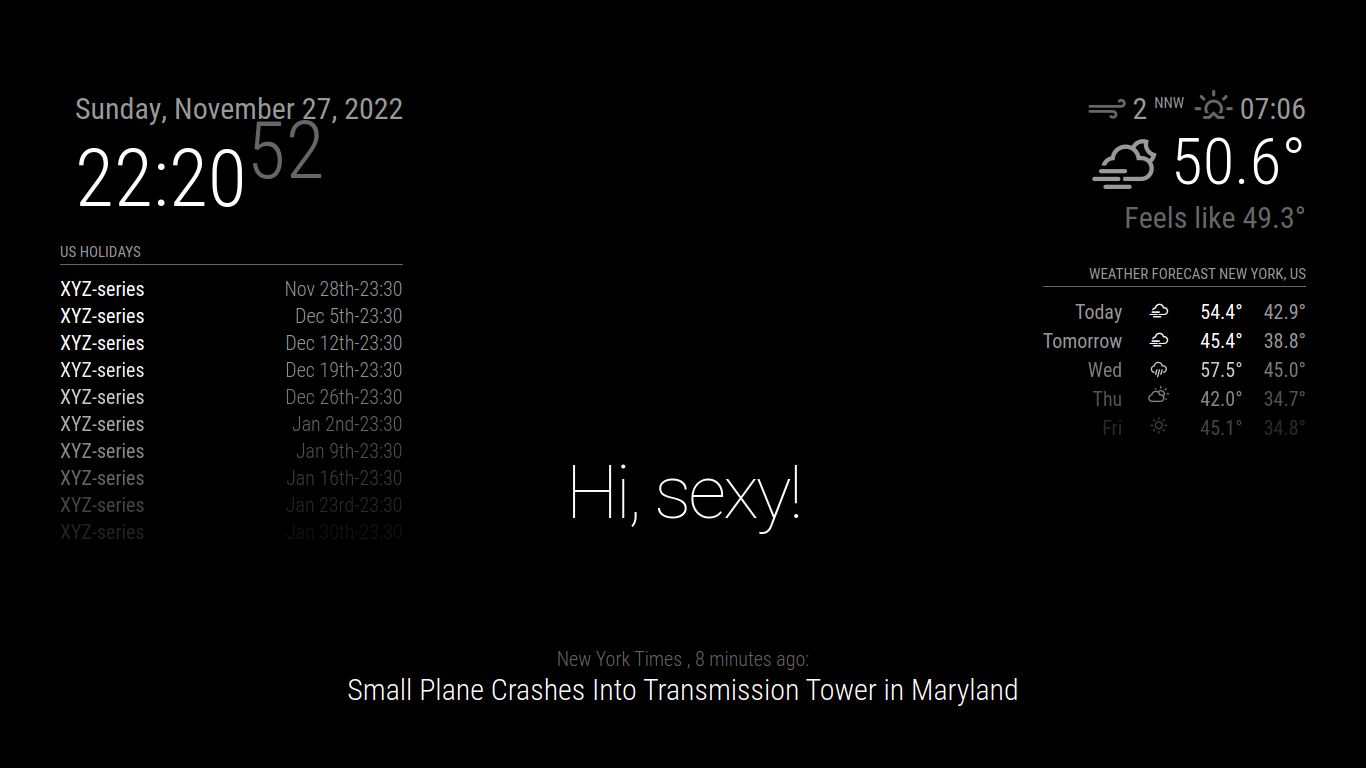
                  Screenshot_2022-11-27_22-20-54.png

                  and the other used locationID… with my apiKey

                  Sam

                  How to add modules

                  learning how to use browser developers window for css changes

                  S 1 Reply Last reply Reply Quote 0
                  • S Do not disturb
                    sdetweil @sdetweil
                    last edited by

                    @KI6UVE

                    if you open the developers window using the instructions i gave before, do you see any errors?

                    Sam

                    How to add modules

                    learning how to use browser developers window for css changes

                    K 1 Reply Last reply Reply Quote 0
                    • K Offline
                      KI6UVE @sdetweil
                      last edited by

                      @sdetweil
                      Something must be wrong with my api key. I did not see the instructions for opening a developers window. Could you send again?

                      S 1 Reply Last reply Reply Quote 0
                      • S Do not disturb
                        sdetweil @KI6UVE
                        last edited by

                        @KI6UVE https://forum.magicmirror.builders/topic/17411/weather-not-working/9?_=1668880346563

                        Sam

                        How to add modules

                        learning how to use browser developers window for css changes

                        K 1 Reply Last reply Reply Quote 0
                        • S sdetweil referenced this topic on
                        • K Offline
                          KI6UVE @sdetweil
                          last edited by

                          @sdetweil

                          That brought up module weather.js, Uncaught SyntaxError: unexpected token .

                          S 1 Reply Last reply Reply Quote 0
                          • S Do not disturb
                            sdetweil @KI6UVE
                            last edited by

                            @KI6UVE what line number?

                            Sam

                            How to add modules

                            learning how to use browser developers window for css changes

                            K 1 Reply Last reply Reply Quote 0
                            • K Offline
                              KI6UVE @sdetweil
                              last edited by

                              @sdetweil

                              159

                              S 1 Reply Last reply Reply Quote 0
                              • S Do not disturb
                                sdetweil @KI6UVE
                                last edited by

                                @KI6UVE how did you install MM? my script or manually?

                                what version of nodejs is installed?

                                node -v

                                Sam

                                How to add modules

                                learning how to use browser developers window for css changes

                                K 1 Reply Last reply Reply Quote 0
                                • K Offline
                                  KI6UVE @sdetweil
                                  last edited by

                                  @sdetweil

                                  Used in the install script npm install-mm from the website instructions. nodejs version is 16.18.1

                                  S 1 Reply Last reply Reply Quote 0
                                  • S Do not disturb
                                    sdetweil @KI6UVE
                                    last edited by

                                    @KI6UVE hm… I think that is manual install …

                                    my scripts (listed in alternative install section)
                                    are here
                                    https://github.com/sdetweil/MagicMirror_scripts

                                    did u ever edit the weather.js file?
                                    if so, you can restore it

                                    cd ~/MagicMirror
                                    git checkout modules/default/weather/weather.js

                                    what MM version are u running? 2.21 is current

                                    cd ~/MagicMirror
                                    grep version package.json

                                    Sam

                                    How to add modules

                                    learning how to use browser developers window for css changes

                                    K 1 Reply Last reply Reply Quote 0
                                    • K Offline
                                      KI6UVE @sdetweil
                                      last edited by KI6UVE

                                      @sdetweil

                                      Never edited the weather.js file. Ran the git checkout line and it said Updated 0 paths from index. Version is 2.21.0

                                      I’ll do a complete redo tomorrow with your GitHub scripts on a fresh RPi OS install. I’ll post the result here.

                                      S 1 Reply Last reply Reply Quote 1
                                      • S Do not disturb
                                        sdetweil @KI6UVE
                                        last edited by sdetweil

                                        @KI6UVE thx, really just need to rename the MM folder to some other name… then my script will run

                                        I don’t think this is an OS problem

                                        Sam

                                        How to add modules

                                        learning how to use browser developers window for css changes

                                        K 2 Replies Last reply Reply Quote 0
                                        • K Offline
                                          KI6UVE @sdetweil
                                          last edited by

                                          @sdetweil

                                          Thank you, I really appreciate all your help!!

                                          1 Reply Last reply Reply Quote 0
                                          • K Offline
                                            KI6UVE @sdetweil
                                            last edited by

                                            @sdetweil

                                            Did fresh OS install anyway, and then ran your MM install script. Pasted my updated config file that we worked over into the new install and weather is working great. Now back to MMM-Flights.

                                            So, the final analysis for anyone reading this is to use the @sdetweil Magic Mirror install script, then edit the config.js

                                            The only config options for openweathermap that I used were:

                                            1. Location
                                            2. LocationID
                                            3. apiKey (used a free one from openweathermap.org)

                                            I did not have to use lat/lon or any other config options for it to work.

                                            1 Reply Last reply Reply Quote 1

                                            Hello! It looks like you're interested in this conversation, but you don't have an account yet.

                                            Getting fed up of having to scroll through the same posts each visit? When you register for an account, you'll always come back to exactly where you were before, and choose to be notified of new replies (either via email, or push notification). You'll also be able to save bookmarks and upvote posts to show your appreciation to other community members.

                                            With your input, this post could be even better 💗

                                            Register Login

                                            • 1
                                            • 2
                                            • 1 / 2
                                            • First post
                                              Last post
                                            Enjoying MagicMirror? Please consider a donation!
                                            MagicMirror created by Michael Teeuw.
                                            Forum managed by Sam, technical setup by Karsten.
                                            This forum is using NodeBB as its core | Contributors
                                            Contact | Privacy Policy