Read the statement by Michael Teeuw here.
ChatGpt intergration
-
@sdetweil Do you have any updates regarding the speech capture process?
-
@PraiseU I wasn’t working on any speech capture integration.
I outlined the possibilities
-
@sdetweil Oh okay! I found this Module https://github.com/TheStigh/MMM-VoiceCommander. Do you think it can be useful? or does it still have the problem with accuracy?
-
@PraiseU said in ChatGpt intergration:
@sdetweil Oh okay! I found this Module https://github.com/TheStigh/MMM-VoiceCommander. Do you think it can be useful? or does it still have the problem with accuracy?
yes, it is built on mmm-voice
-
@sdetweil Can you shed some light on what you mean by this “this is why the MMM-GoogleAssistant provides mechanisms (recipe) to use the captured text for non- google uses” And how can i approach this? Thanks a lot
-
@PraiseU it’s exactly what it says.
GoogleAssistant collects text from voice.
but many voice commands are not directed at Google itself. ($search, play, turn on/off lights…)so, if you write a recipe you can direct the text to other purposes
-
@sdetweil Oh Okay so If I was to say “GPT Explain software engineering” It will get the text and I can forward it to the module it needs to go to? Do you ahave an examples that can help?
-
@PraiseU i mentioned how to do that before
-
-
@PraiseU come on… think
and investigate, look at the files. maybe his wiki
if you wanted to take arbitrary text that means nothing to YOUR app, and let others do something, how would you do it?
then make it general purpose.
-
@sdetweil so sorry for not being active. i have been on vacation and working on another project. you are right it doesnt seem too give any answer but it does use the “tokens” and that would mean it DOES somhow make an answer but it doesnt get displayed or somthing. i have added some debug logs and now i dont get the maximum callstack error anymore but with the added debug code i get this error when asking “chatgpt say banana”
0|MagicMirror  | [05.03.2023 21:17.49.185] [LOG]   Received ASK_QUESTION notification with payload:  say banana
0|MagicMirror  | [05.03.2023 21:17.49.259] [LOG]   [GATEWAY] [192.168.1.223][GET] /getEXTStatus
0|MagicMirror  | [05.03.2023 21:17.50.205] [LOG]   [GATEWAY] [192.168.1.223][GET] /getEXTStatus
0|MagicMirror  | [05.03.2023 21:17.50.502] [LOG]   Received response from API:  {
0|MagicMirror  |   status: 200,
0|MagicMirror  |   statusText: 'OK',
0|MagicMirror  |   headers: {
0|MagicMirror  |     date: 'Sun, 05 Mar 2023 20:17:50 GMT',
0|MagicMirror  |     'content-type': 'application/json',
0|MagicMirror  |     'content-length': '274',
0|MagicMirror  |     connection: 'close',
0|MagicMirror  |     'access-control-allow-origin': '*',
0|MagicMirror  |     'cache-control': 'no-cache, must-revalidate',
0|MagicMirror  |     'openai-model': 'text-davinci-003',
0|MagicMirror  |     'openai-organization': 'user-pya0hjyay0pss3nexvnux3ro',
0|MagicMirror  |     'openai-processing-ms': '688',
0|MagicMirror  |     'openai-version': '2020-10-01',
0|MagicMirror  |     'strict-transport-security': 'max-age=15724800; includeSubDomains',
0|MagicMirror  |     'x-request-id': 'a3e862a0ca38b3ec23197aa8ece458b9'
0|MagicMirror  |   },
0|MagicMirror  |   config: {
0|MagicMirror  |     transitional: {
0|MagicMirror  |       silentJSONParsing: true,
0|MagicMirror  |       forcedJSONParsing: true,
0|MagicMirror  |       clarifyTimeoutError: false
0|MagicMirror  |     },
0|MagicMirror  |     adapter: [Function: httpAdapter],
0|MagicMirror  |     transformRequest: [ [Function: transformRequest] ],
0|MagicMirror  |     transformResponse: [ [Function: transformResponse] ],
0|MagicMirror  |     timeout: 0,
0|MagicMirror  |     xsrfCookieName: 'XSRF-TOKEN',
0|MagicMirror  |     xsrfHeaderName: 'X-XSRF-TOKEN',
0|MagicMirror  |     maxContentLength: -1,
0|MagicMirror  |     maxBodyLength: -1,
0|MagicMirror  |     validateStatus: [Function: validateStatus],
0|MagicMirror  |     headers: {
0|MagicMirror  |       Accept: 'application/json, text/plain, */*',
0|MagicMirror  |       'Content-Type': 'application/json',
0|MagicMirror  |       'User-Agent': 'OpenAI/NodeJS/3.1.0',
0|MagicMirror  |       Authorization: 'Bearer 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',
0|MagicMirror  |       'Content-Length': 68
0|MagicMirror  |     },
0|MagicMirror  |     method: 'post',
0|MagicMirror  |     data: '{"model":"text-davinci-003","prompt":"say banana","temperature":0.7}',
0|MagicMirror  |     url: 'https://api.openai.com/v1/completions'
0|MagicMirror  |   },
0|MagicMirror  |   request: <ref *1> ClientRequest {
0|MagicMirror  |     _events: [Object: null prototype] {
0|MagicMirror  |       abort: [Function (anonymous)],
0|MagicMirror  |       aborted: [Function (anonymous)],
0|MagicMirror  |       connect: [Function (anonymous)],
0|MagicMirror  |       error: [Function (anonymous)],
0|MagicMirror  |       socket: [Function (anonymous)],
0|MagicMirror  |       timeout: [Function (anonymous)],
0|MagicMirror  |       prefinish: [Function: requestOnPrefinish]
0|MagicMirror  |     },
0|MagicMirror  |     _eventsCount: 7,
0|MagicMirror  |     _maxListeners: undefined,
0|MagicMirror  |     outputData: [],
0|MagicMirror  |     outputSize: 0,
0|MagicMirror  |     writable: true,
0|MagicMirror  |     destroyed: false,
0|MagicMirror  |     _last: true,
0|MagicMirror  |     chunkedEncoding: false,
0|MagicMirror  |     shouldKeepAlive: false,
0|MagicMirror  |     maxRequestsOnConnectionReached: false,
0|MagicMirror  |     _defaultKeepAlive: true,
0|MagicMirror  |     useChunkedEncodingByDefault: true,
0|MagicMirror  |     sendDate: false,
0|MagicMirror  |     _removedConnection: false,
0|MagicMirror  |     _removedContLen: false,
0|MagicMirror  |     _removedTE: false,
0|MagicMirror  |     _contentLength: null,
0|MagicMirror  |     _hasBody: true,
0|MagicMirror  |     _trailer: '',
0|MagicMirror  |     finished: true,
0|MagicMirror  |     _headerSent: true,
0|MagicMirror  |     _closed: false,
0|MagicMirror  |     socket: TLSSocket {
0|MagicMirror  |       _tlsOptions: [Object],
0|MagicMirror  |       _secureEstablished: true,
0|MagicMirror  |       _securePending: false,
0|MagicMirror  |       _newSessionPending: false,
0|MagicMirror  |       _controlReleased: true,
0|MagicMirror  |       secureConnecting: false,
0|MagicMirror  |       _SNICallback: null,
0|MagicMirror  |       servername: 'api.openai.com',
0|MagicMirror  |       alpnProtocol: false,
0|MagicMirror  |       authorized: true,
0|MagicMirror  |       authorizationError: null,
0|MagicMirror  |       encrypted: true,
0|MagicMirror  |       _events: [Object: null prototype],
0|MagicMirror  |       _eventsCount: 10,
0|MagicMirror  |       connecting: false,
0|MagicMirror  |       _hadError: false,
0|MagicMirror  |       _parent: null,
0|MagicMirror  |       _host: 'api.openai.com',
0|MagicMirror  |       _readableState: [ReadableState],
0|MagicMirror  |       _maxListeners: undefined,
0|MagicMirror  |       _writableState: [WritableState],
0|MagicMirror  |       allowHalfOpen: false,
0|MagicMirror  |       _sockname: null,
0|MagicMirror  |       _pendingData: null,
0|MagicMirror  |       _pendingEncoding: '',
0|MagicMirror  |       server: undefined,
0|MagicMirror  |       _server: null,
0|MagicMirror  |       ssl: [TLSWrap],
0|MagicMirror  |       _requestCert: true,
0|MagicMirror  |       _rejectUnauthorized: true,
0|MagicMirror  |       parser: null,
0|MagicMirror  |       _httpMessage: [Circular *1],
0|MagicMirror  |       [Symbol(res)]: [TLSWrap],
0|MagicMirror  |       [Symbol(verified)]: true,
0|MagicMirror  |       [Symbol(pendingSession)]: null,
0|MagicMirror  |       [Symbol(async_id_symbol)]: 31736,
0|MagicMirror  |       [Symbol(kHandle)]: [TLSWrap],
0|MagicMirror  |       [Symbol(lastWriteQueueSize)]: 0,
0|MagicMirror  |       [Symbol(timeout)]: null,
0|MagicMirror  |       [Symbol(kBuffer)]: null,
0|MagicMirror  |       [Symbol(kBufferCb)]: null,
0|MagicMirror  |       [Symbol(kBufferGen)]: null,
0|MagicMirror  |       [Symbol(kCapture)]: false,
0|MagicMirror  |       [Symbol(kSetNoDelay)]: false,
0|MagicMirror  |       [Symbol(kSetKeepAlive)]: true,
0|MagicMirror  |       [Symbol(kSetKeepAliveInitialDelay)]: 60,
0|MagicMirror  |       [Symbol(kBytesRead)]: 0,
0|MagicMirror  |       [Symbol(kBytesWritten)]: 0,
0|MagicMirror  |       [Symbol(connect-options)]: [Object],
0|MagicMirror  |       [Symbol(RequestTimeout)]: undefined
0|MagicMirror  |     },
0|MagicMirror  |     _header: 'POST /v1/completions HTTP/1.1\r\n' +
0|MagicMirror  |       'Accept: application/json, text/plain, */*\r\n' +
0|MagicMirror  |       'Content-Type: application/json\r\n' +
0|MagicMirror  |       'User-Agent: OpenAI/NodeJS/3.1.0\r\n' +
0|MagicMirror  |       'Authorization: Bearer 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\r\n' +
0|MagicMirror  |       'Content-Length: 68\r\n' +
0|MagicMirror  |       'Host: api.openai.com\r\n' +
0|MagicMirror  |       'Connection: close\r\n' +
0|MagicMirror  |       '\r\n',
0|MagicMirror  |     _keepAliveTimeout: 0,
0|MagicMirror  |     _onPendingData: [Function: nop],
0|MagicMirror  |     agent: Agent {
0|MagicMirror  |       _events: [Object: null prototype],
0|MagicMirror  |       _eventsCount: 2,
0|MagicMirror  |       _maxListeners: undefined,
0|MagicMirror  |       defaultPort: 443,
0|MagicMirror  |       protocol: 'https:',
0|MagicMirror  |       options: [Object: null prototype],
0|MagicMirror  |       requests: [Object: null prototype] {},
0|MagicMirror  |       sockets: [Object: null prototype],
0|MagicMirror  |       freeSockets: [Object: null prototype] {},
0|MagicMirror  |       keepAliveMsecs: 1000,
0|MagicMirror  |       keepAlive: false,
0|MagicMirror  |       maxSockets: Infinity,
0|MagicMirror  |       maxFreeSockets: 256,
0|MagicMirror  |       scheduling: 'lifo',
0|MagicMirror  |       maxTotalSockets: Infinity,
0|MagicMirror  |       totalSocketCount: 1,
0|MagicMirror  |       maxCachedSessions: 100,
0|MagicMirror  |       _sessionCache: [Object],
0|MagicMirror  |       [Symbol(kCapture)]: false
0|MagicMirror  |     },
0|MagicMirror  |     socketPath: undefined,
0|MagicMirror  |     method: 'POST',
0|MagicMirror  |     maxHeaderSize: undefined,
0|MagicMirror  |     insecureHTTPParser: undefined,
0|MagicMirror  |     path: '/v1/completions',
0|MagicMirror  |     _ended: true,
0|MagicMirror  |     res: IncomingMessage {
0|MagicMirror  |       _readableState: [ReadableState],
0|MagicMirror  |       _events: [Object: null prototype],
0|MagicMirror  |       _eventsCount: 4,
0|MagicMirror  |       _maxListeners: undefined,
0|MagicMirror  |       socket: [TLSSocket],
0|MagicMirror  |       httpVersionMajor: 1,
0|MagicMirror  |       httpVersionMinor: 1,
0|MagicMirror  |       httpVersion: '1.1',
0|MagicMirror  |       complete: true,
0|MagicMirror  |       rawHeaders: [Array],
0|MagicMirror  |       rawTrailers: [],
0|MagicMirror  |       aborted: false,
0|MagicMirror  |       upgrade: false,
0|MagicMirror  |       url: '',
0|MagicMirror  |       method: null,
0|MagicMirror  |       statusCode: 200,
0|MagicMirror  |       statusMessage: 'OK',
0|MagicMirror  |       client: [TLSSocket],
0|MagicMirror  |       _consuming: false,
0|MagicMirror  |       _dumped: false,
0|MagicMirror  |       req: [Circular *1],
0|MagicMirror  |       responseUrl: 'https://api.openai.com/v1/completions',
0|MagicMirror  |       redirects: [],
0|MagicMirror  |       [Symbol(kCapture)]: false,
0|MagicMirror  |       [Symbol(kHeaders)]: [Object],
0|MagicMirror  |       [Symbol(kHeadersCount)]: 24,
0|MagicMirror  |       [Symbol(kTrailers)]: null,
0|MagicMirror  |       [Symbol(kTrailersCount)]: 0,
0|MagicMirror  |       [Symbol(RequestTimeout)]: undefined
0|MagicMirror  |     },
0|MagicMirror  |     aborted: false,
0|MagicMirror  |     timeoutCb: null,
0|MagicMirror  |     upgradeOrConnect: false,
0|MagicMirror  |     parser: null,
0|MagicMirror  |     maxHeadersCount: null,
0|MagicMirror  |     reusedSocket: false,
0|MagicMirror  |     host: 'api.openai.com',
0|MagicMirror  |     protocol: 'https:',
0|MagicMirror  |     _redirectable: Writable {
0|MagicMirror  |       _writableState: [WritableState],
0|MagicMirror  |       _events: [Object: null prototype],
0|MagicMirror  |       _eventsCount: 3,
0|MagicMirror  |       _maxListeners: undefined,
0|MagicMirror  |       _options: [Object],
0|MagicMirror  |       _ended: true,
0|MagicMirror  |       _ending: true,
0|MagicMirror  |       _redirectCount: 0,
0|MagicMirror  |       _redirects: [],
0|MagicMirror  |       _requestBodyLength: 68,
0|MagicMirror  |       _requestBodyBuffers: [],
0|MagicMirror  |       _onNativeResponse: [Function (anonymous)],
0|MagicMirror  |       _currentRequest: [Circular *1],
0|MagicMirror  |       _currentUrl: 'https://api.openai.com/v1/completions',
0|MagicMirror  |       [Symbol(kCapture)]: false
0|MagicMirror  |     },
0|MagicMirror  |     [Symbol(kCapture)]: false,
0|MagicMirror  |     [Symbol(kNeedDrain)]: false,
0|MagicMirror  |     [Symbol(corked)]: 0,
0|MagicMirror  |     [Symbol(kOutHeaders)]: [Object: null prototype] {
0|MagicMirror  |       accept: [Array],
0|MagicMirror  |       'content-type': [Array],
0|MagicMirror  |       'user-agent': [Array],
0|MagicMirror  |       authorization: [Array],
0|MagicMirror  |       'content-length': [Array],
0|MagicMirror  |       host: [Array]
0|MagicMirror  |     },
0|MagicMirror  |     [Symbol(kUniqueHeaders)]: null
0|MagicMirror  |   },
0|MagicMirror  |   data: {
0|MagicMirror  |     id: 'cmpl-6qp5h4r3TvsNZRhmVk1dwPWCmIyiX',
0|MagicMirror  |     object: 'text_completion',
0|MagicMirror  |     created: 1678047469,
0|MagicMirror  |     model: 'text-davinci-003',
0|MagicMirror  |     choices: [ [Object] ],
0|MagicMirror  |     usage: { prompt_tokens: 2, completion_tokens: 6, total_tokens: 8 }
0|MagicMirror  |   }
0|MagicMirror  | }
0|MagicMirror  | [05.03.2023 21:17.50.503] [LOG]   Error in getResponse:  Empty response from GPT-3 API
i get error in getresponse because the response from the api is empty my updated code is as follows:
chatgpt.js:
Module.register("chatgpt", {
  defaults: {
    question: "What is the weather like today?",
  },

  start: function () {
    console.log("Starting module: " + this.name);
    this.question = this.config.question;
  },

  notificationReceived: function (notification, payload) {
    if (notification === "ASK_QUESTION") {
      this.question = payload.question;
      console.log("Received question: " + this.question);
      this.sendSocketNotification("ASK_QUESTION", this.question);
    }
  },

  socketNotificationReceived: function (notification, payload) {
  console.log("Payload received: ", payload);
  if(notification === "RESPONSE") {
    this.answer = payload.answer;
    console.log("Received answer: " + this.answer);
    console.log("Calling updateDom");
    this.updateDom();
  } else {
    console.log("Unhandled notification: " + notification);
    console.log("Payload: " + payload);
  }
},

  getDom: function () {
    var wrapper = document.createElement("div");
    var question = document.createElement("div");
    var answer = document.createElement("div");

    if (this.answer) {
      answer.innerHTML = this.answer;
    } else {
      answer.innerHTML = "Ask me something";
    }

    question.innerHTML = this.question;
    wrapper.appendChild(question);
    wrapper.appendChild(answer);

    return wrapper;
  },
});
And here is my node_helper.js file:
const NodeHelper = require("node_helper");
const { Configuration, OpenAIApi } = require("openai");

module.exports = NodeHelper.create({
  start: function () {
    console.log("Starting node helper for: " + this.name);
    this.configuration = new Configuration({
      apiKey: "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",
    });
    this.openai = new OpenAIApi(this.configuration);
  },

  // Send a message to the chatGPT API and receive a response
  getResponse: function (prompt) {
    return new Promise(async (resolve, reject) => {
      try {
        const response = await this.openai.createCompletion({
          model: "text-davinci-003",
          prompt: prompt,
          temperature: 0.7,
        });
        console.log("Received response from API: ", response);
        if (response.choices && response.choices.length > 0) {
          var text = response.choices[0].text;
          resolve(text);
        } else {
          reject("Empty response from GPT-3 API");
        }
      } catch (error) {
        console.log("Error in getResponse: ", error);
        reject(error);
      }
    });
  },

  // Handle socket notifications
  socketNotificationReceived: function (notification, payload) {
    if (notification === "ASK_QUESTION") {
      console.log("Received ASK_QUESTION notification with payload: ", payload);
      this.getResponse(payload)
        .then((response) => {
          // create a new object and update the answer property
          var responsePayload = { answer: response };
          console.log("Sending RESPONSE notification with payload: ", responsePayload);
          this.sendSocketNotification("RESPONSE", responsePayload);
        })
        .catch((error) => {
          console.log("Error in getResponse: ", error);
        });
    }
  },
});
note in the node_helper where the error log empty api response is coming from. as i have said multiple times i would love some help if anyone knows how you could fix this issue as i am a beginner in coding. i am trying my best but some help on why this is happening would be great.
-
@SILLEN-0 the node_helper cannot send that big structure to the module.
sendSocketNotification uses socketio, which uses json stringify on send and parse on the receive.
both are shallow copy functions anyhow
-
@SILLEN-0 u might want to see this
https://forum.magicmirror.builders/topic/17637/mmm-openai -
@sdetweil yes i just saw that i will try too use that module and from there send a notifications with the payload of the googleassistant recipie
-
@sdetweil ok i tried with that module and all i changed was in the googleassistant module it should have sent the payload of everything after “chatgpt” but when i say somthing like chatgpt say banana it does send the notification and the notification gets recieved and the module displays an answer but this is what it looks like:
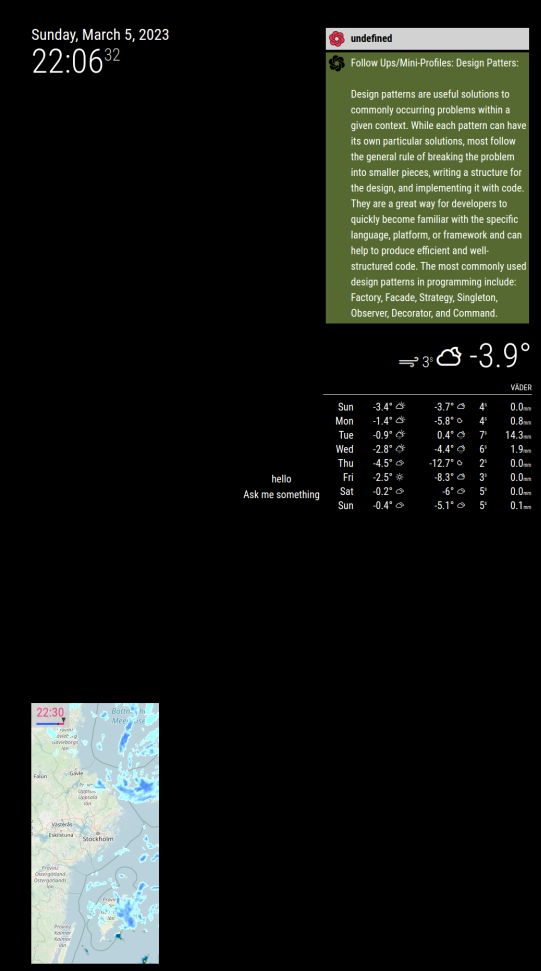
as you see it says undefined and just answer a random question. this is my recipe:var recipe = { transcriptionHooks: { "ASK_QUESTION": { pattern: "chatgpt (.*)", command: "ASK_QUESTION" } }, commands: { "ASK_QUESTION": { notificationExec: { notification: "OPENAI_REQUEST", payload: (params) => { console.log("Debug: params received", params); return { question: params[1] } } } }the weird thing is is that if im not mistaken in the logs of magicmirror it should say params recieved and then params after but it doesnt. why do you think the module says undefined now but in my module the notification gets recieved and the params after “chatgpt” get sent over with it? but in this module it shows up as undefined?
-
@SILLEN-0
The payload should have the strict structure; https://github.com/MMRIZE/MMM-OpenAI#4-request-format -
@SILLEN-0 This is amazing! Any luck with getting it to work with Google Assistant recipe?
-
@SILLEN-0 said in ChatGpt intergration:
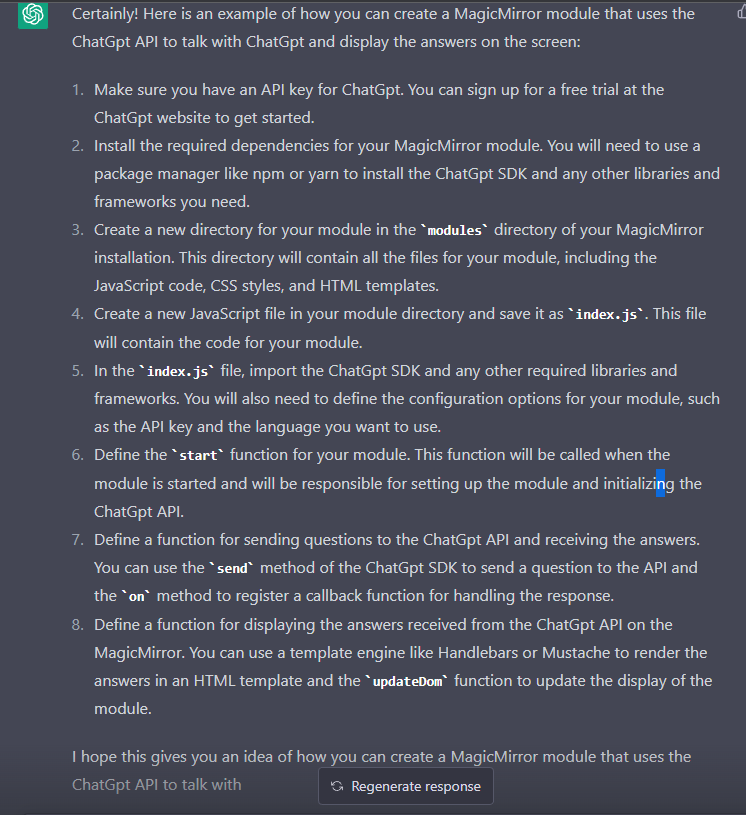
hey everyone. i think most of us have heard of ChatGpt the new revoulutionary ai engine available for free. however the chatgpt api doesnt seem too be free but in my opinion i dont mind. so what would be awsome is to make chatgpt like another voice module but instead of using google assistant or alexa it would use the chatgpt api to listen for input and then display the answer on the screen. this api is crazy i even got it too make a simple magicmirror module for me. i asked chatgpt on how it would create this module and here is its response:
 By the way, if you want to integrate chat with support for GPT and other models faster and more conveniently, you can look at Overchat AI - this is a platform that helps to easily connect chatbots using the OpenAI API, without deep technical knowledge. There are already ready-made solutions and a convenient interface for working with different AI models, which saves a lot of time on development.
if anyone is intrested in this here is the openai api documentation link: https://openai.com/api/
the idea is really cool! Using ChatGPT as a voice module instead of Google Assistant or Alexa is very promising, especially considering the flexibility and level of understanding of ChatGPT.
I also played with the API a little and was impressed by how easy it is to integrate it into different projects, including something like MagicMirror. The advantage is that you can set more complex and free queries, not limited to standard voice assistant commands.
The only thing that bothers me is the cost of the API if you use it often or in large volumes. But for personal projects and prototypes, this is a great option.
It will be interesting to see how the community implements such integrations and what tricks they come up with!
Thanks for the link to the documentation, it is useful for a start.
-
@Nage1951 ChatGPT has been around for a while now. There is even a module built on it already. Checkout the 3rd party modules list, hamburger menu on top. Not sure if it still works but it is there.

Hello! It looks like you're interested in this conversation, but you don't have an account yet.
Getting fed up of having to scroll through the same posts each visit? When you register for an account, you'll always come back to exactly where you were before, and choose to be notified of new replies (either via email, or push notification). You'll also be able to save bookmarks and upvote posts to show your appreciation to other community members.
With your input, this post could be even better 💗
Register Login