MagicMirror Forum
    • Recent
    • Tags
    • Unsolved
    • Solved
    • MagicMirror² Repository
    • Documentation
    • 3rd-Party-Modules
    • Donate
    • Discord
    • Register
    • Login
    A New Chapter for MagicMirror: The Community Takes the Lead
    Read the statement by Michael Teeuw here.

    Weather based on another provider..

    Scheduled Pinned Locked Moved Requests
    18 Posts 3 Posters 17.3k Views 3 Watching
    Loading More Posts
    • Oldest to Newest
    • Newest to Oldest
    • Most Votes
    Reply
    • Reply as topic
    Log in to reply
    This topic has been deleted. Only users with topic management privileges can see it.
    • mochmanM Offline
      mochman Module Developer
      last edited by

      @cowboysdude Take at look at this post. I added a locationID which gives you the ability to put the exact city in you want weather for. It helps get rid of the ambiguity of having multiple cities with the same name.

      1 Reply Last reply Reply Quote 0
      • cowboysdudeC Offline
        cowboysdude Module Developer
        last edited by

        Thank you!! I did use it but it’s still returning that it’s 5:32am and it’s actually 12:03 AM right now… so not sure what that’s all about… The temp is right but the time isn’t…

        OH SHOOT never mind LOL that’s the time of the sunrise… opps…

        I still am getting incorrect weather forecast info… BUT the current weather is working great! :)

        1 Reply Last reply Reply Quote 0
        • RedNaxR Offline
          RedNax Module Developer
          last edited by RedNax

          If this WeatherUnderground location works for you you could use MMM-WunderGround:
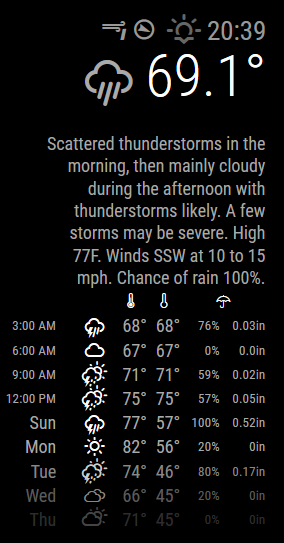
          0_1465109941312_elmira.png

          Your config section will look like this:

          {
          			module : 'MMM-WunderGround',
          			position : 'top_right',
          			config : {
          				apikey : 'xxxxxxxxxxxxx', // private; don't share!
          				pws: 'NY/Elmira',
          				lang : 'EN',
          				hourly : '1',
          				fctext : '1',
          				fcdaycount : "5",
          				fcdaystart : "0",
          				hourlyinterval : "3",
          				hourlycount : "2",
          				alerttime : 10000,
          				alerttruncatestring : ""
          			}
          		}
          
          cowboysdudeC 1 Reply Last reply Reply Quote 0
          • cowboysdudeC Offline
            cowboysdude Module Developer
            last edited by

            I would also need the module for this and that I don’t have… I have found one but it’s not working so I’ll have to figure it out…

            Thank you!

            mochmanM 1 Reply Last reply Reply Quote 0
            • mochmanM Offline
              mochman Module Developer @cowboysdude
              last edited by mochman

              @cowboysdude Since the default weather forecast and current weather pull from the same place, you can make the same changes as you did on the currentweather module to the forecastweather module and config.js.

              Replace your current weatherforecast.js with the one here.
              Your currentweather.js should look like the one here.

              Don’t forget to edit your config.js to put the locationID in both.

              1 Reply Last reply Reply Quote 0
              • mochmanM Offline
                mochman Module Developer
                last edited by

                Or just get the new MagicMirror 2.0.2 that was released today. It has those changes incorporated.

                cowboysdudeC 1 Reply Last reply Reply Quote 1
                • cowboysdudeC Offline
                  cowboysdude Module Developer @mochman
                  last edited by

                  @mochman said in Weather based on another provider..:

                  Or just get the new MagicMirror 2.0.2 that was released today. It has those changes incorporated.

                  That’s awesome! Thank you but I just got weather underground working and I like it :)

                  @cowboysdude said in Weather based on another provider..:

                  I would also need the module for this and that I don’t have… I have found one but it’s not working so I’ll have to figure it out…

                  Thank you!

                  Found it… it’s working great!! Great job and Thank you!

                  mochmanM 1 Reply Last reply Reply Quote 0
                  • mochmanM Offline
                    mochman Module Developer @cowboysdude
                    last edited by

                    @cowboysdude said in Weather based on another provider..:

                    @mochman said in Weather based on another provider..:

                    Or just get the new MagicMirror 2.0.2 that was released today. It has those changes incorporated.

                    That’s awesome! Thank you but I just got weather underground working and I like it :)

                    Yeah it does, that’s the one I use too.

                    cowboysdudeC 1 Reply Last reply Reply Quote 1
                    • cowboysdudeC Offline
                      cowboysdude Module Developer @mochman
                      last edited by

                      @mochman but I did do my git pull to update as well!! Thank you!!!

                      1 Reply Last reply Reply Quote 0
                      • cowboysdudeC Offline
                        cowboysdude Module Developer @RedNax
                        last edited by paviro

                        @RedNax said in Weather based on another provider..:

                        0_1465109941312_elmira.png

                        I would like to know one more thing… how you get the text forecast on there too

                        RedNaxR 1 Reply Last reply Reply Quote 0
                        • RedNaxR Offline
                          RedNax Module Developer @cowboysdude
                          last edited by

                          @cowboysdude If/when the chosen location provides any they should be displayed as per the pic…

                          What’s your config?

                          cowboysdudeC 1 Reply Last reply Reply Quote 0
                          • cowboysdudeC Offline
                            cowboysdude Module Developer @RedNax
                            last edited by KirAsh4

                            @RedNax this is what’s in the config.js [of course I didn’t list my key here]

                            config: {
                                        // See 'Configuration options' for more information.
                                        location: 'NY/Elmira',
                                        appid: 'xxxxxxxxxxxx' //wunderground.com API key.
                                    }
                            

                            I’m thinking this is what you were asking for…

                            Thank you!

                            Note from Moderator: Please use Markdown on code snippets for easier reading.

                            RedNaxR 1 Reply Last reply Reply Quote 0
                            • RedNaxR Offline
                              RedNax Module Developer @cowboysdude
                              last edited by

                              @cowboysdude That config isn’t for the MMM-WunderGround module… You’re using another module that’s using Weather Underground for weather info. The forecast text functionality needs to be implemented in the module itself. Or you could of course switch to using MMM-WunderGround Which is what the above screenshot is off…

                              cowboysdudeC 3 Replies Last reply Reply Quote 0
                              • cowboysdudeC Offline
                                cowboysdude Module Developer @RedNax
                                last edited by

                                @RedNax Thank you that explains it!!! As soon as I get the frame around it and get it set back up to work on I will be switching because I just like it!

                                HUGE Thanks

                                1 Reply Last reply Reply Quote 0
                                • cowboysdudeC Offline
                                  cowboysdude Module Developer @RedNax
                                  last edited by

                                  This post is deleted!
                                  1 Reply Last reply Reply Quote 0
                                  • cowboysdudeC Offline
                                    cowboysdude Module Developer @RedNax
                                    last edited by

                                    @RedNax Thank you for the module. I did finally get a chance to install it and it works perfectly!!!

                                    Huge Thanks!! Great job!

                                    RedNaxR 1 Reply Last reply Reply Quote 0
                                    • RedNaxR Offline
                                      RedNax Module Developer @cowboysdude
                                      last edited by

                                      @cowboysdude :D Glad it’s working, enjoy!

                                      1 Reply Last reply Reply Quote 1

                                      Hello! It looks like you're interested in this conversation, but you don't have an account yet.

                                      Getting fed up of having to scroll through the same posts each visit? When you register for an account, you'll always come back to exactly where you were before, and choose to be notified of new replies (either via email, or push notification). You'll also be able to save bookmarks and upvote posts to show your appreciation to other community members.

                                      With your input, this post could be even better 💗

                                      Register Login

                                      • 1 / 1
                                      • First post
                                        Last post
                                      Enjoying MagicMirror? Please consider a donation!
                                      MagicMirror created by Michael Teeuw.
                                      Forum managed by Sam, technical setup by Karsten.
                                      This forum is using NodeBB as its core | Contributors
                                      Contact | Privacy Policy