MagicMirror Forum
    • Recent
    • Tags
    • Unsolved
    • Solved
    • MagicMirror² Repository
    • Documentation
    • 3rd-Party-Modules
    • Donate
    • Discord
    • Register
    • Login
    A New Chapter for MagicMirror: The Community Takes the Lead
    Read the statement by Michael Teeuw here.

    Config option with array of multiple values?

    Scheduled Pinned Locked Moved Development
    25 Posts 3 Posters 8.0k Views 3 Watching
    Loading More Posts
    • Oldest to Newest
    • Newest to Oldest
    • Most Votes
    Reply
    • Reply as topic
    Log in to reply
    This topic has been deleted. Only users with topic management privileges can see it.
    • UncleRogerU Offline
      UncleRoger @sdetweil
      last edited by

      @sdetweil
      I got it working with the .filter function:

      let selSender = that.config.validSenders.filter(mySender => {
      	if (mySender.addr.toLowerCase() == mailObj.sender[0].address.toLowerCase()) 
      		return true
      	 else 
      		return false
      });
      

      but now I’m having a problem trying to use the returned array. In this code the adding the color element to the subject works fine (that’s there for testing), as does the setting the style.color, but if I uncomment the if statement, it crashes:

      subject = subject + selSender[0].color;
      //		if (selSender[0].color != undefined) {
      			subjectWrapper.style.color = selSender[0].color;
      //		} else {
      

      Is there a reason it doesn’t like that in the IF statement? Note: I also tried it as just “if (selSender[0].color) {” and assigning the value of selSender[0].color to another variable and using that other variable in the IF statement. In at least one test case there is a value in color.

      UncleRogerU 1 Reply Last reply Reply Quote 0
      • UncleRogerU Offline
        UncleRoger @UncleRoger
        last edited by

        @UncleRoger said in Config option with array of multiple values?:

        subject = subject + selSender[0].color;
        // if (selSender[0].color != undefined) {
        subjectWrapper.style.color = selSender[0].color;
        // } else {

        Is there a reason it doesn’t like that in the IF statement? Note: I also tried it as just “if (selSender[0].color) {” and assigning the value of selSender[0].color to another variable and using that other variable in the IF statement. In at least one test case there is a value in color.

        Okay, so it looks like Javascript wants “!==”, not “!=”. Ugh.

        Anyway, I got it working using a “switch (true)” block.

        Thanks for all the help!

        S 1 Reply Last reply Reply Quote 0
        • S Offline
          sdetweil @UncleRoger
          last edited by sdetweil

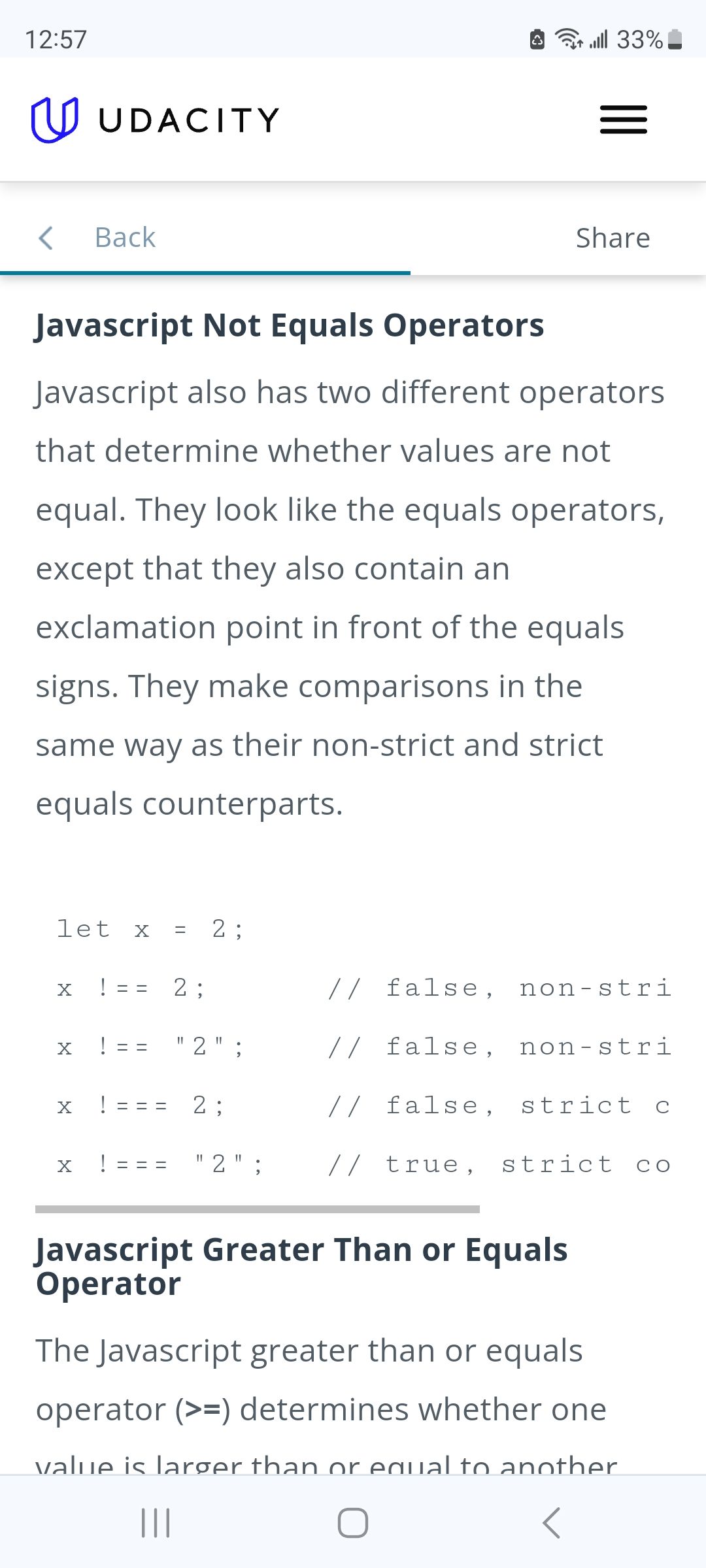
          @UncleRoger yes the compares

          !=
          !==
          !===
          

          are different
          Screenshot_20231027_125711_Chrome.jpg

          one compare s the data type too
          2 is a number
          “2” is a string

          Sam

          How to add modules

          learning how to use browser developers window for css changes

          UncleRogerU 1 Reply Last reply Reply Quote 1
          • MZ-BERM Offline
            MZ-BER
            last edited by

            Hello @UncleRoger - are you planning to publish your module? And can I may ask you what this module will do?

            UncleRogerU 2 Replies Last reply Reply Quote 1
            • UncleRogerU Offline
              UncleRoger @MZ-BER
              last edited by

              @MZ-BER said in Config option with array of multiple values?:

              Hello @UncleRoger - are you planning to publish your module? And can I may ask you what this module will do?

              Yes, I am planning to publish it, once I’ve tested it reasonably well. Mostly, it seems to work thus far. I’m doing more testing and working on documentation.

              The module checks an e-mail address and then shows the subject of any e-mails on the MM. Basically, I wanted a way for my wife and I to post messages for the whole family to see. This is an idea I’ve had for a long time (going back to the days of pagers) and is kinda obsolete – we use text messages and instagram messages a lot these days – but I still wanted to make this happen.

              Probably next week I’ll be posting a message “how do I put a module in github for everyone to use?” as I’m totally new to all of this. 8^)

              S 1 Reply Last reply Reply Quote 0
              • UncleRogerU Offline
                UncleRoger @sdetweil
                last edited by

                @sdetweil said in Config option with array of multiple values?:

                yes the compares
                !=
                !==
                !===

                are different

                Heh. Back in my day, we got one equality operator and one inequality operator and we were dang thankful for that. Now git off my lawn! 8^)

                Seriously, though, thanks for all your help!

                S 1 Reply Last reply Reply Quote 0
                • S Offline
                  sdetweil @UncleRoger
                  last edited by

                  @UncleRoger I agree. I came in before these fancy new languages. before web.

                  Sam

                  How to add modules

                  learning how to use browser developers window for css changes

                  1 Reply Last reply Reply Quote 1
                  • S Offline
                    sdetweil @UncleRoger
                    last edited by sdetweil

                    @UncleRoger logon to GitHub, click repositories , new, make the name match your module name, create.

                    it will give you a set of commands to execute in your module folder to upload it to that repo…

                    easy peasy

                    note that you need to create an access key thru the GitHub profile menu to be able to upload.(aka push)
                    this replaces the requested password now

                    Sam

                    How to add modules

                    learning how to use browser developers window for css changes

                    UncleRogerU S 2 Replies Last reply Reply Quote 1
                    • UncleRogerU Offline
                      UncleRoger @sdetweil
                      last edited by

                      @sdetweil said in Config option with array of multiple values?:

                      it will give you a set of commands to execute in your module folder to.upload it to that repo…
                      easy peasy

                      I’ve got a repository set up with a README.md file but I don’t see anything about how to upload the module.

                      Also, is there anywhere with a list of what files I need to upload? These are the files in my directory:

                       ll
                      total 32
                      -rw-r--r--  1 roger roger   59 Oct 25 07:43 email.css.orig
                      -rw-r--r--  1 roger roger 6420 Oct 27 11:26 MMM-MailMessage.js
                      -rw-r--r--  1 roger roger 3566 Oct 25 12:44 MMM-MailMessage.js.save
                      -rw-r--r--  1 roger roger 3117 Oct 25 07:58 node_helper.js
                      drwxr-xr-x 12 roger roger 4096 Oct 25 12:44 node_modules
                      -rw-r--r--  1 roger roger  355 Oct 27 12:37 package.json
                      -rw-r--r--  1 roger roger 3755 Oct 25 12:44 package-lock.json
                      

                      I’m pretty sure the node_modules directory comes from the emailjs-imap-client that it needs (which came from an npm install) so I don’t think that should be in the repository for this module. I’m not sure about package-lock.json. I think package.json is needed – it basically just has the name & description and says it needs the emailjs thing.

                      Other than that, it’s MMM-MailMessage.js and node_helper.js so I think the files needed are:

                      • MMM-MailMessage.js
                      • node_helper.js
                      • package.json

                      Is that right?

                      S 1 Reply Last reply Reply Quote 0
                      • S Offline
                        sdetweil @sdetweil
                        last edited by sdetweil

                        @UncleRoger then to update your repo

                        on the pi in your module folder

                        git status
                        will tell you the files that changed

                        git add . 
                        

                        will add them all

                        git add filename filename2 
                        

                        will add only those to the pending commit

                        git commit -m "some message why you made these changes"
                        

                        then

                        git push 
                        

                        to upload

                        Sam

                        How to add modules

                        learning how to use browser developers window for css changes

                        1 Reply Last reply Reply Quote 1
                        • S Offline
                          sdetweil @UncleRoger
                          last edited by

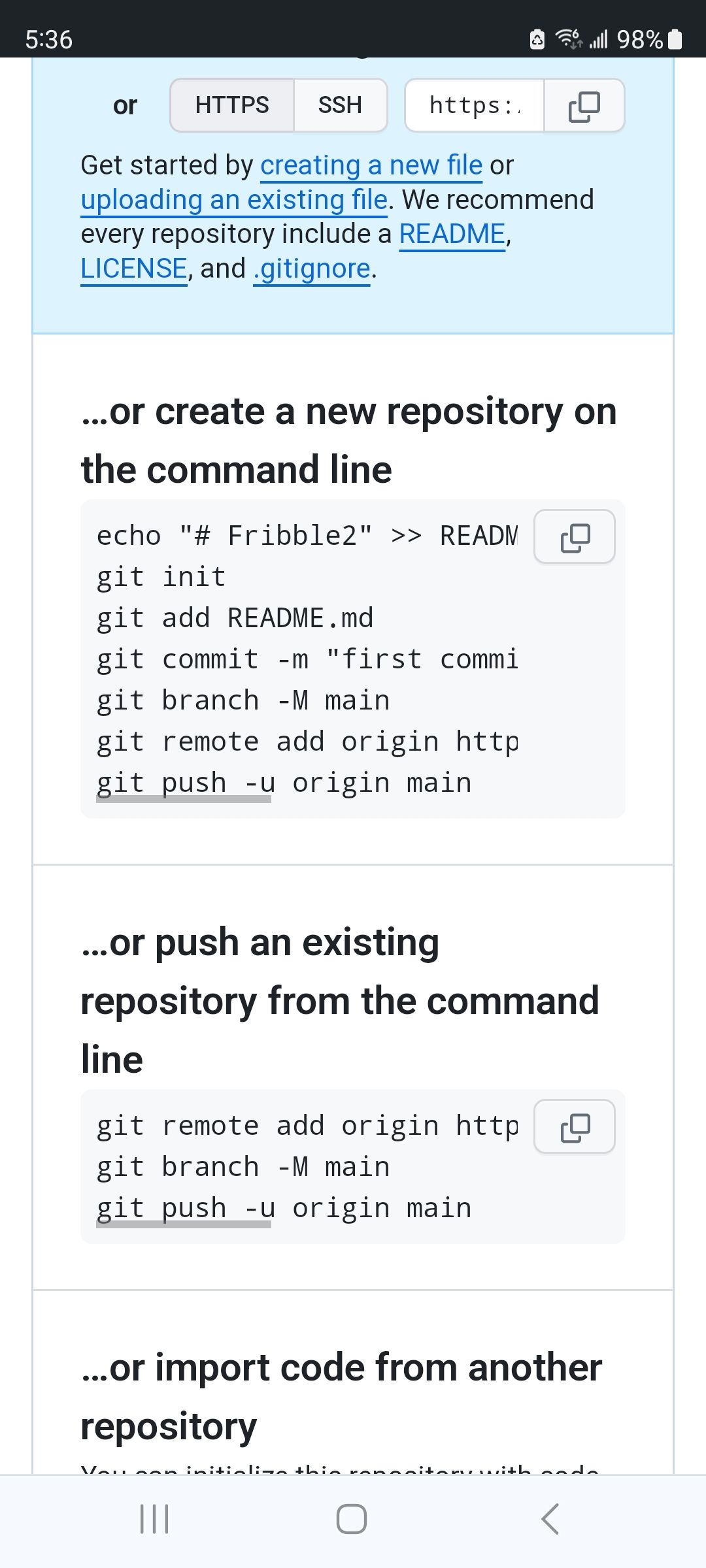
                          @UncleRoger when you created the repo on GitHub you should have seen this output

                          I named my repo fribble2 for this test
                          Screenshot_20231028_053654_Chrome.jpg

                          in the section on create new from commandline

                          I would not do the git add for the readme as I have that already on the GitHub side

                          Sam

                          How to add modules

                          learning how to use browser developers window for css changes

                          UncleRogerU 1 Reply Last reply Reply Quote 1
                          • UncleRogerU Offline
                            UncleRoger @sdetweil
                            last edited by

                            @sdetweil

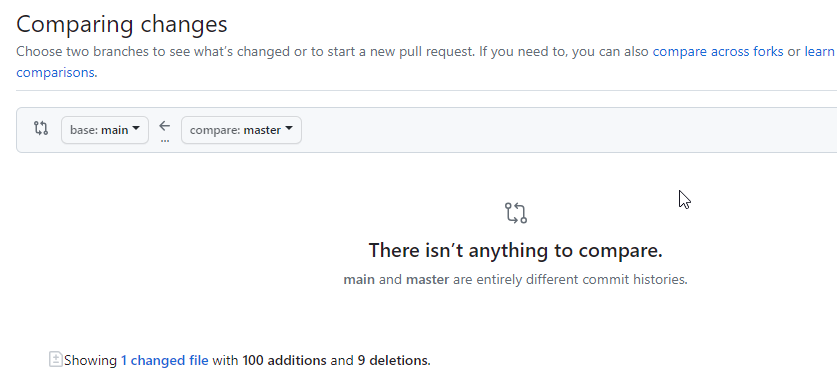
                            I think I’ve managed to thoroughly muck things up. Apparently my changes are in a branch called “master” and the repository has a “main” and never the twain shall meet.

                            If I go to the “pull requests” tab in github, it shows me the differences between the file there and my changed file but there’s no way to merge them. This is what I’m seeing:
                            60809309-baf5-41c9-a45d-1f279659f590-image.png

                            I have the module working for me on my system but I don’t seem to be able to get it to a state where I can publish it.

                            I’ve never used git/github before (other than to download modules) and, frankly, there’s a lot of base knowledge I don’t have that seems to be required to understand it and get it working.

                            S 2 Replies Last reply Reply Quote 0
                            • S Offline
                              sdetweil @UncleRoger
                              last edited by sdetweil

                              @UncleRoger ok

                              ok, the easiest way to handle this

                              rename your module folder to some other name

                              then git clone your github repo

                              then copy the files from your renamed folder to the clone

                              then in the clone folder do

                               git add . 
                              git commit -m "adding 1st commit"
                              git push
                              

                              then the local branch will be the same as the remote(github) branch
                              and all will be well from then on, and u can delete the renamed folder

                              Sam

                              How to add modules

                              learning how to use browser developers window for css changes

                              1 Reply Last reply Reply Quote 1
                              • S Offline
                                sdetweil @UncleRoger
                                last edited by sdetweil

                                @UncleRoger well, maybe its even easier

                                on the github page
                                the link next to the branches

                                Screenshot at 2023-10-30 11-45-51.png
                                you can rename main to xyz
                                then rename master to main

                                Screenshot at 2023-10-30 11-46-43.png
                                then delete xyz branch

                                then on your pc
                                rename the existing folder out of the way
                                git clone your repo again
                                then you will be in sync

                                Sam

                                How to add modules

                                learning how to use browser developers window for css changes

                                UncleRogerU 1 Reply Last reply Reply Quote 1
                                • UncleRogerU Offline
                                  UncleRoger @sdetweil
                                  last edited by

                                  @sdetweil
                                  I went with your first suggestion and it seems to be all better now.

                                  I’m going to play with it some more but once I’m satisfied it won’t break anyone’s set up too badly, do I just change the visibility from private to public?

                                  There was a notice about the repository not being protected but it seems to have gone away; is that something I should worry about?

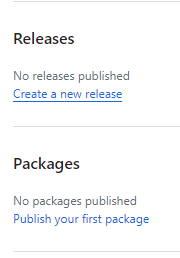
                                  Lastly, I see this on the repository page:
                                  97f4a3a4-a101-4846-be4c-4a9a323fc14f-image.png
                                  Do I need to do anything about those?

                                  Thanks again for all your help and your patience!

                                  S 1 Reply Last reply Reply Quote 0
                                  • S Offline
                                    sdetweil @UncleRoger
                                    last edited by

                                    @UncleRoger just change it to public. the others are for bigger projects

                                    Sam

                                    How to add modules

                                    learning how to use browser developers window for css changes

                                    UncleRogerU 1 Reply Last reply Reply Quote 1
                                    • UncleRogerU Offline
                                      UncleRoger @sdetweil
                                      last edited by

                                      @sdetweil Thanks!

                                      1 Reply Last reply Reply Quote 0
                                      • UncleRogerU Offline
                                        UncleRoger @MZ-BER
                                        last edited by

                                        @MZ-BER
                                        FYI, I’ve published and posted in the modules/showcase forum.

                                        https://forum.magicmirror.builders/topic/18139/mmm-mailmessage-send-messages-to-your-magicmirror-via-e-mail?_=1698853756973

                                        1 Reply Last reply Reply Quote 1

                                        Hello! It looks like you're interested in this conversation, but you don't have an account yet.

                                        Getting fed up of having to scroll through the same posts each visit? When you register for an account, you'll always come back to exactly where you were before, and choose to be notified of new replies (either via email, or push notification). You'll also be able to save bookmarks and upvote posts to show your appreciation to other community members.

                                        With your input, this post could be even better 💗

                                        Register Login

                                        • 1
                                        • 2
                                        • 2 / 2
                                        • First post
                                          Last post
                                        Enjoying MagicMirror? Please consider a donation!
                                        MagicMirror created by Michael Teeuw.
                                        Forum managed by Sam, technical setup by Karsten.
                                        This forum is using NodeBB as its core | Contributors
                                        Contact | Privacy Policy