MagicMirror Forum
    • Recent
    • Tags
    • Unsolved
    • Solved
    • MagicMirror² Repository
    • Documentation
    • 3rd-Party-Modules
    • Donate
    • Discord
    • Register
    • Login
    A New Chapter for MagicMirror: The Community Takes the Lead
    Read the statement by Michael Teeuw here.

    Modifying the Config File

    Scheduled Pinned Locked Moved Unsolved Troubleshooting
    101 Posts 7 Posters 170.8k Views 7 Watching
    Loading More Posts
    • Oldest to Newest
    • Newest to Oldest
    • Most Votes
    Reply
    • Reply as topic
    Log in to reply
    This topic has been deleted. Only users with topic management privileges can see it.
    • BKeyportB Offline
      BKeyport Module Developer @sdetweil
      last edited by

      @sdetweil Fair enough, I was applying a bit of KISS (Keep It Simple, Stupid) suggesting at least initial edits can be done locally - don’t want to overwhelm.

      The "E" in "Javascript" stands for "Easy"

      S 1 Reply Last reply Reply Quote 0
      • S Do not disturb
        sdetweil @BKeyport
        last edited by

        @BKeyport I know, but learning all the commands, keyboard, gui tools, menus, settings, etc, is overwhelming for many people.

        Sam

        How to add modules

        learning how to use browser developers window for css changes

        1 Reply Last reply Reply Quote 0
        • J Offline
          jimb
          last edited by

          Sam, I’m trying to get to the point where I can copy/paste the config where you can take a look at it. It’s been 45 years since I looked at Unix, never Linux.

          IP Config from the OS prompt on the Pi yields -
          “Link/loopback 'all zeros…”
          “inet 127.0.0.0/8 scope host lo”
          NOT a valid IP address, it should be in the range of 192.168. x.x

          hostname command from the Pi gives “rutspi” which is the hostname I assigned as it was building.

          S bheplerB 2 Replies Last reply Reply Quote 0
          • S Do not disturb
            sdetweil @jimb
            last edited by

            @jimb if that is the only ip address, then it is not on your wifi or Ethernet networks.

            127.0.0.1 is the fake internal only network

            Sam

            How to add modules

            learning how to use browser developers window for css changes

            BKeyportB 1 Reply Last reply Reply Quote 0
            • BKeyportB Offline
              BKeyport Module Developer @sdetweil
              last edited by

              sounds to me like too much tinkering got the network FUBAR.

              I’d reset and start over, personally.

              The "E" in "Javascript" stands for "Easy"

              1 Reply Last reply Reply Quote 0
              • J Offline
                jimb
                last edited by

                Sam, from the Pi I can use the browser to get to the Internet so it has an IP address. I can ping Google from it, too. At this point I think the best thing would be for me to start over with a fresh installation. I don’t want to be a PITA here!

                S 1 Reply Last reply Reply Quote 0
                • S Do not disturb
                  sdetweil @jimb
                  last edited by

                  @jimb not a PITA. just odd that ip addr didn’t give u all adapters info

                  Sam

                  How to add modules

                  learning how to use browser developers window for css changes

                  1 Reply Last reply Reply Quote 0
                  • bheplerB Offline
                    bhepler Module Developer @jimb
                    last edited by

                    @jimb said in Modifying the Config File:

                    IP Config from the OS prompt on the Pi yields -
                    “Link/loopback 'all zeros…”
                    “inet 127.0.0.0/8 scope host lo”

                    This should be the first entry of three in the response when you enter ip addr. The next entry should be your ethernet port, and the final entry should be your wireless LAN. My suggestion is to try this on your pi: ip addr | grep inet

                    Secondly, when Sam told you to switch on SSH, did you go into the config app and do it? You can get to it from the desktop but the fastest way is to type sudo raspi-config and then navigate to “Interface Options”->“SSH”. Make sure it is enabled.

                    1 Reply Last reply Reply Quote 0
                    • J Offline
                      jimb
                      last edited by

                      Gents, my goal was not to build a watch, only to tell the time. I have bit the bullet and will be building a new image of the OS and setting it up to run from my PC. That way I’ll be able to copy configs for all to peruse, trying to get Magic Mirror up and running. Thanks for your continued support!

                      1 Reply Last reply Reply Quote 0
                      • J Offline
                        jimb
                        last edited by

                        Sam, et all: I have installed a fresh copy of the OS to a new SD card , booted up the Pi, and installed a new copy of the MM2 files, etc. from Sam’s installation script. The only mistake I made was making the MM auto-install. I attempted SSH into the Pi to modify the config on my PC. Had the same “no connnection” issue I had before. However, I now have the IP address of the Pi and I’m not able to ping it from my PC. When the Pi boots this IP address is displayed in the upper right corner for a few seconds so I know it’s correct. An IP config /all display shows-

                        C:\Users\Owner>ipconfig /all

                        Windows IP Configuration

                        Host Name . . . . . . . . . . . . : DESKTOP-LE5LUCM
                        Primary Dns Suffix . . . . . . . :
                        Node Type . . . . . . . . . . . . : Hybrid
                        IP Routing Enabled. . . . . . . . : No
                        WINS Proxy Enabled. . . . . . . . : No
                        DNS Suffix Search List. . . . . . : attlocal.net

                        Ethernet adapter Ethernet:

                        Connection-specific DNS Suffix . : attlocal.net
                        Description . . . . . . . . . . . : Realtek PCIe GbE Family Controller
                        Physical Address. . . . . . . . . : 78-E7-D1-C8-69-02
                        DHCP Enabled. . . . . . . . . . . : Yes
                        Autoconfiguration Enabled . . . . : Yes
                        IPv6 Address. . . . . . . . . . . : 2600:1700:d10:2900::681(Preferred)
                        Lease Obtained. . . . . . . . . . : Wednesday, November 29, 2023 1:44:08 AM
                        Lease Expires . . . . . . . . . . : Thursday, December 28, 2023 6:10:32 PM
                        IPv6 Address. . . . . . . . . . . : 2600:1700:d10:2900:17cb:6c66:31f8:87bb(Preferred)
                        Temporary IPv6 Address. . . . . . : 2600:1700:d10:2900:3974:7e8b:2c4:8999(Preferred)
                        Temporary IPv6 Address. . . . . . : 2600:1700:d10:2900:e81f:6b5c:4ac6:b88d(Deprecated)
                        Temporary IPv6 Address. . . . . . : 2600:1700:d10:2900:f895:4134:2f63:7933(Deprecated)
                        Link-local IPv6 Address . . . . . : fe80::3b70:ff2e:ecd1:4297%12(Preferred)
                        IPv4 Address. . . . . . . . . . . : 192.168.1.65(Preferred)
                        Subnet Mask . . . . . . . . . . . : 255.255.255.0
                        Lease Obtained. . . . . . . . . . : Wednesday, November 29, 2023 1:44:03 AM
                        Lease Expires . . . . . . . . . . : Saturday, December 2, 2023 1:44:06 PM
                        Default Gateway . . . . . . . . . : fe80::3a3b:c8ff:fe33:13d9%12
                        192.168.1.254
                        DHCP Server . . . . . . . . . . . : 192.168.1.254
                        DHCPv6 IAID . . . . . . . . . . . : 158918609
                        DHCPv6 Client DUID. . . . . . . . : 00-01-00-01-25-B7-F6-59-78-E7-D1-C8-69-02
                        DNS Servers . . . . . . . . . . . : 2600:1700:d10:2900::1
                        192.168.1.254
                        2600:1700:d10:2900::1
                        NetBIOS over Tcpip. . . . . . . . : Enabled

                        Wireless LAN adapter Wi-Fi:

                        Media State . . . . . . . . . . . : Media disconnected
                        Connection-specific DNS Suffix . :
                        Description . . . . . . . . . . . : 802.11n Wireless LAN Card
                        Physical Address. . . . . . . . . : 68-A3-C4-EA-95-83
                        DHCP Enabled. . . . . . . . . . . : Yes
                        Autoconfiguration Enabled . . . . : Yes

                        Wireless LAN adapter Local Area Connection* 1:

                        Media State . . . . . . . . . . . : Media disconnected
                        Connection-specific DNS Suffix . :
                        Description . . . . . . . . . . . : Microsoft Wi-Fi Direct Virtual Adapter
                        Physical Address. . . . . . . . . : 68-A3-C4-EA-95-85
                        DHCP Enabled. . . . . . . . . . . : Yes
                        Autoconfiguration Enabled . . . . : Yes

                        Wireless LAN adapter Local Area Connection* 2:

                        Media State . . . . . . . . . . . : Media disconnected
                        Connection-specific DNS Suffix . :
                        Description . . . . . . . . . . . : Microsoft Wi-Fi Direct Virtual Adapter #2
                        Physical Address. . . . . . . . . : 68-A3-C4-EA-95-86
                        DHCP Enabled. . . . . . . . . . . : No
                        Autoconfiguration Enabled . . . . : Yes

                        Wireless LAN adapter Local Area Connection* 11:

                        Media State . . . . . . . . . . . : Media disconnected
                        Connection-specific DNS Suffix . :
                        Description . . . . . . . . . . . : Microsoft Hosted Network Virtual Adapter
                        Physical Address. . . . . . . . . : 68-A3-C4-EA-95-84
                        DHCP Enabled. . . . . . . . . . . : Yes
                        Autoconfiguration Enabled . . . . : Yes

                        C:\Users\Owner>

                        Does anyone see anything weird?

                        BKeyportB S 2 Replies Last reply Reply Quote 0
                        • BKeyportB Offline
                          BKeyport Module Developer @jimb
                          last edited by

                          @jimb that appears to be your windows computer, not the pi.

                          The "E" in "Javascript" stands for "Easy"

                          1 Reply Last reply Reply Quote 0
                          • S Do not disturb
                            sdetweil @jimb
                            last edited by

                            @jimb said in Modifying the Config File:

                            only mistake I made was making the MM auto-install.

                            u mean auto start??? install was my script

                            ssh doesn’t work unless you enable it on the pi

                            desktop, menu top left,
                            preferences
                            raspberry pi configuration
                            then the itnerfaces tab, click the slide on the ssh row,
                            then press ok…

                            if latest os, then you don’t have to boot

                            open a terminal window on pi
                            type

                            ip addr
                            

                            you should see like this

                            pi@raspberrypi4:~ $ ip addr
                            1: lo: <LOOPBACK,UP,LOWER_UP> mtu 65536 qdisc noqueue state UNKNOWN group default qlen 1000
                                link/loopback 00:00:00:00:00:00 brd 00:00:00:00:00:00
                                inet 127.0.0.1/8 scope host lo
                                   valid_lft forever preferred_lft forever
                                inet6 ::1/128 scope host 
                                   valid_lft forever preferred_lft forever
                            2: eth0: <BROADCAST,MULTICAST,UP,LOWER_UP> mtu 1500 qdisc mq state UP group default qlen 1000
                                link/ether dc:a6:32:20:b0:94 brd ff:ff:ff:ff:ff:ff
                                inet 192.168.2.44/24 brd 192.168.2.255 scope global dynamic noprefixroute eth0
                                   valid_lft 50521sec preferred_lft 36219sec
                                inet6 fe80::a5a6:f1d1:50e7:1c5/64 scope link 
                                   valid_lft forever preferred_lft forever
                            3: wlan0: <NO-CARRIER,BROADCAST,MULTICAST,UP> mtu 1500 qdisc pfifo_fast state DOWN group default qlen 1000
                                link/ether dc:a6:32:20:b0:95 brd ff:ff:ff:ff:ff:ff
                            

                            in this setup my wifi (wlan0) is not connected but my ethernet (eth0) is

                               inet 192.168.2.44
                            

                            doesn’t matter what the PC says…

                            do you have a guest network at home and did u connect the pi to that?

                            can’t connect to it from home network if so… intentional firewall…

                            Sam

                            How to add modules

                            learning how to use browser developers window for css changes

                            1 Reply Last reply Reply Quote 0
                            • J Offline
                              jimb
                              last edited by

                              Sam, the Pi is connected via wireless. Yes, I meant autorun on my first post. I did change the Pi configuration to allow SSH. I have Eero mesh AP’s connected to my home network. I don’t know how to check if access is being blocked to the Pi. Since everything is fresh on the install it makes sense that the network is the culprit. The reason I went with a new install was to enable pasting config, etc. files here on the forum.

                              S 1 Reply Last reply Reply Quote 0
                              • S Do not disturb
                                sdetweil @jimb
                                last edited by sdetweil

                                @jimb i understand… if you can use a terminal window on the pi, can you ping xxxx, where xxxx is the hostname or ip address of the windows pc?

                                what is the output of ip addr ?

                                i know it stinks, but you can post a pic, third icon from the right above the forum post editor

                                Sam

                                How to add modules

                                learning how to use browser developers window for css changes

                                S 1 Reply Last reply Reply Quote 0
                                • S Do not disturb
                                  sdetweil @sdetweil
                                  last edited by sdetweil

                                  @jimb I’d also suggest trying my MMM-Config module, which presents a form for config.js including outside modules… all done with discovery of the installed modules and there parms…

                                  some modules cause trouble… but there are ways around with some extra work… it may not be for you… another pile of work to learn, it it doesn’t work…

                                  https://github.com/sdetweil/MMM-Config

                                  it doesn’t help with module install, only configure

                                  Sam

                                  How to add modules

                                  learning how to use browser developers window for css changes

                                  1 Reply Last reply Reply Quote 0
                                  • J Offline
                                    jimb
                                    last edited by

                                    Sam,
                                    OK progress on the network front. I spent some time yesterday on the phone with eero tech support. At rhe end they suggested connecting my PC wirelessly and seeing if I could ping the rasberry. It works. I can ping and SSH/Putty into the pi, but have an additional snag. It accepts the login and sends a password request. BUT, I can’t enter anything- the keyboard is dead at that point.

                                    S 1 Reply Last reply Reply Quote 0
                                    • S Do not disturb
                                      sdetweil @jimb
                                      last edited by sdetweil

                                      @jimb ok, sounds like the wifi network is a guest, not connected to the regular ethernet network…

                                      don’t use putty

                                      open a cmd.exe window

                                      ssh user_name@machine_ip
                                      

                                      add one of the tools

                                      winscp or bitvise ssh clients

                                      they will give you a filemanager view of the files and an ssh window ,
                                      per system you connect to…

                                      bitvise also provides a filemanager view of the pc filesystem , so you can drag/drop files in either direction… (you would only do that for logs to pc, of special bug fix file , to pi)

                                      Sam

                                      How to add modules

                                      learning how to use browser developers window for css changes

                                      1 Reply Last reply Reply Quote 0
                                      • J Offline
                                        jimb
                                        last edited by sdetweil

                                        Sam, success! I have d/l’d the SSH gui program and here is my config.js file. I have deleted my apiKey

                                        modules: [
                                        		{
                                        			module: "alert",
                                        		},
                                        		{
                                        			module: "updatenotification",
                                        			position: "top_bar"
                                        		},
                                        		{
                                        			module: "clock",
                                        			position: "top_left"
                                        		},
                                        		{
                                        			module: "calendar",
                                        			header: "US Holidays",
                                        			position: "top_left",
                                        			config: {
                                        				calendars: [
                                        					{
                                        						fetchInterval: 7 * 24 * 60 * 60 * 1000,
                                        						symbol: "calendar-check",
                                        						url: "https://ics.calendarlabs.com/76/mm3137/US_Holidays.ics"
                                        					}
                                        				]
                                        			}
                                        		},
                                        		{
                                        			module: "compliments",
                                        			position: "lower_third"
                                        		},
                                        		{
                                        			module: "weather",
                                        			position: "top_right",
                                        			config: {
                                        				weatherProvider: "openweathermap",
                                        				apiVersion: "3.0",
                                        				lat: 33.50872,
                                        				lon: -96.612213,
                                        				weatherEndpoint: "/onecall",
                                        				type: "current",
                                        				location: "Houston",
                                        				locationID: "4699066", //ID from http://bulk.openweathermap.org/sample/city.list.json.gz; unzip the gz file and find your city
                                        				apiKey: "8eca2aec"
                                        			}
                                        		},
                                        		{
                                        			module: "weather",
                                        			position: "top_right",
                                        			header: "Weather Forecast",
                                        			config: {
                                        				weatherProvider: "openweathermap",
                                        				apiVersion: "3.0",
                                        				lat: 33.50872,
                                        				lon: -96.612213,
                                        				weatherEndpoint: "/onecall",
                                        				type: "forecast",
                                        				location: "Houston",
                                        				locationID: "4699066", //ID from http://bulk.openweathermap.org/sample/city.list.json.gz; unzip the gz file and find your city
                                        				apiKey: "8
                                        "
                                        			}
                                        		},
                                        		{
                                        			module: "newsfeed",
                                        			position: "bottom_bar",
                                        			config: {
                                        				feeds: [
                                        					{
                                        						title: "New York Times",
                                        
                                        S 1 Reply Last reply Reply Quote 0
                                        • S Do not disturb
                                          sdetweil @jimb
                                          last edited by sdetweil

                                          @jimb missing some at the bottom

                                          I assume the apikey with a new line inside is a removal edit problem

                                          always wrap config.js content in code block

                                          paste into editor
                                          blank line above and below
                                          select pasted text
                                          hit button </>

                                          Sam

                                          How to add modules

                                          learning how to use browser developers window for css changes

                                          1 Reply Last reply Reply Quote 0
                                          • J Offline
                                            jimb
                                            last edited by sdetweil

                                            Sam, here is a copy of the config.js (with the apiKey deleted)

                                            let config = {
                                            	address: "localhost",	// Address to listen on, can be:
                                            							// - "localhost", "127.0.0.1", "::1" to listen on loopback interface
                                            							// - another specific IPv4/6 to listen on a specific interface
                                            							// - "0.0.0.0", "::" to listen on any interface
                                            							// Default, when address config is left out or empty, is "localhost"
                                            	port: 8080,
                                            	basePath: "/",			// The URL path where MagicMirror² is hosted. If you are using a Reverse proxy
                                            					  		// you must set the sub path here. basePath must end with a /
                                            	ipWhitelist: ["127.0.0.1", "::ffff:127.0.0.1", "::1"],	// Set [] to allow all IP addresses
                                            															// or add a specific IPv4 of 192.168.1.5 :
                                            															// ["127.0.0.1", "::ffff:127.0.0.1", "::1", "::ffff:192.168.1.5"],
                                            															// or IPv4 range of 192.168.3.0 --> 192.168.3.15 use CIDR format :
                                            															// ["127.0.0.1", "::ffff:127.0.0.1", "::1", "::ffff:192.168.3.0/28"],
                                            
                                            	useHttps: false, 		// Support HTTPS or not, default "false" will use HTTP
                                            	httpsPrivateKey: "", 	// HTTPS private key path, only require when useHttps is true
                                            	httpsCertificate: "", 	// HTTPS Certificate path, only require when useHttps is true
                                            
                                            	language: "en",
                                            	locale: "en-US",
                                            	logLevel: ["INFO", "LOG", "WARN", "ERROR"], // Add "DEBUG" for even more logging
                                            	timeFormat: 12,
                                            	units: "imperial",
                                            
                                            	modules: [
                                            		{
                                            			module: "alert",
                                            		},
                                            		{
                                            			module: "updatenotification",
                                            			position: "top_bar"
                                            		},
                                            		{
                                            			module: "clock",
                                            			timezone: "America/Chicago",
                                            			showPeriodUpper: "true",
                                            			showDate: "true",
                                            			position: "top_left",
                                            		},
                                            	{
                                            			module: "calendar",
                                            			header: "US Holidays",
                                            			position: "top_left",
                                            			config: {
                                            				calendars: [
                                            					{
                                            						fetchInterval: 7 * 24 * 60 * 60 * 1000,
                                            						symbol: "calendar-check",
                                            						url: "https://ics.calendarlabs.com/76/mm3137/US_Holidays.ics"
                                            					}
                                            				]
                                            			}
                                            		},
                                            		{
                                            			module: "compliments",
                                            			position: "lower_third"
                                            		},
                                            		{			
                                            			module: "weather",
                                            			units: "imperial",
                                            			windUnits: "imperial",
                                            			tempUnits: "imperial",
                                            			showPeriodUpper: "true",
                                            			appendLocationNameToHeader: "true",
                                            			colored: "true",
                                            			position: "top_right",
                                            			config: {
                                            				apiVersion:"3.0",
                                            				weatherProvider: "openweathermap",
                                            				weatherEndpoint:"/onecall",
                                            				lat: "33.50872",
                                            				lon: "-96.612213",
                                            				type: "current",
                                            				location: "Houston",
                                            				locationID: "4699066", //ID from http://bulk.openweathermap.org/sample/city.list.json.gz; unzip the gz file and find your city
                                            				apiKey: "8acfbcab123ce212",
                                            			}
                                            		},
                                            		{
                                            			module: "weather",
                                            			units: "imperial",
                                            			winUnits: "imperial",
                                            			tempUnits: "imperial",
                                            			showPeriodUpper: "true",
                                            			appendLocationNaneToHeader: "true",
                                            			colored: "true",
                                            			position: "top_right",
                                            			header: "Weather Forecast",
                                            			config: {
                                             				apiVersion:"3.0",
                                             				weatherProvider: "openweathermap",
                                            				weatherEndpoint:"/onecall",
                                            				lat: "33.50872",
                                             				lon:"-96.612213",	
                                             				type: "forecast",
                                                 				location: "Houston",
                                            				locationID: "4699066", //ID from http://bulk.openweathermap.org/sample/city.list.json.gz; unzip the gz file and find your city
                                            					apiKey: "8eca2acaacfbcab123ce212",
                                            			}
                                            		},
                                            		{
                                            			module: "newsfeed",
                                            			position: "bottom_bar",
                                            			config: {
                                            				feeds: [
                                            					{
                                            						title: "New York Times",
                                            						url: "https://rss.nytimes.com/services/xml/rss/nyt/HomePage.xml"
                                            					}
                                            				],
                                            				showSourceTitle: true,
                                            				showPublishDate: true,
                                            				broadcastNewsFeeds: true,
                                            				broadcastNewsUpdates: true
                                            			}
                                            		},
                                            	]
                                            };
                                            
                                            /*************** DO NOT EDIT THE LINE BELOW ***************/
                                            if (typeof module !== "undefined") {module.exports = config;}
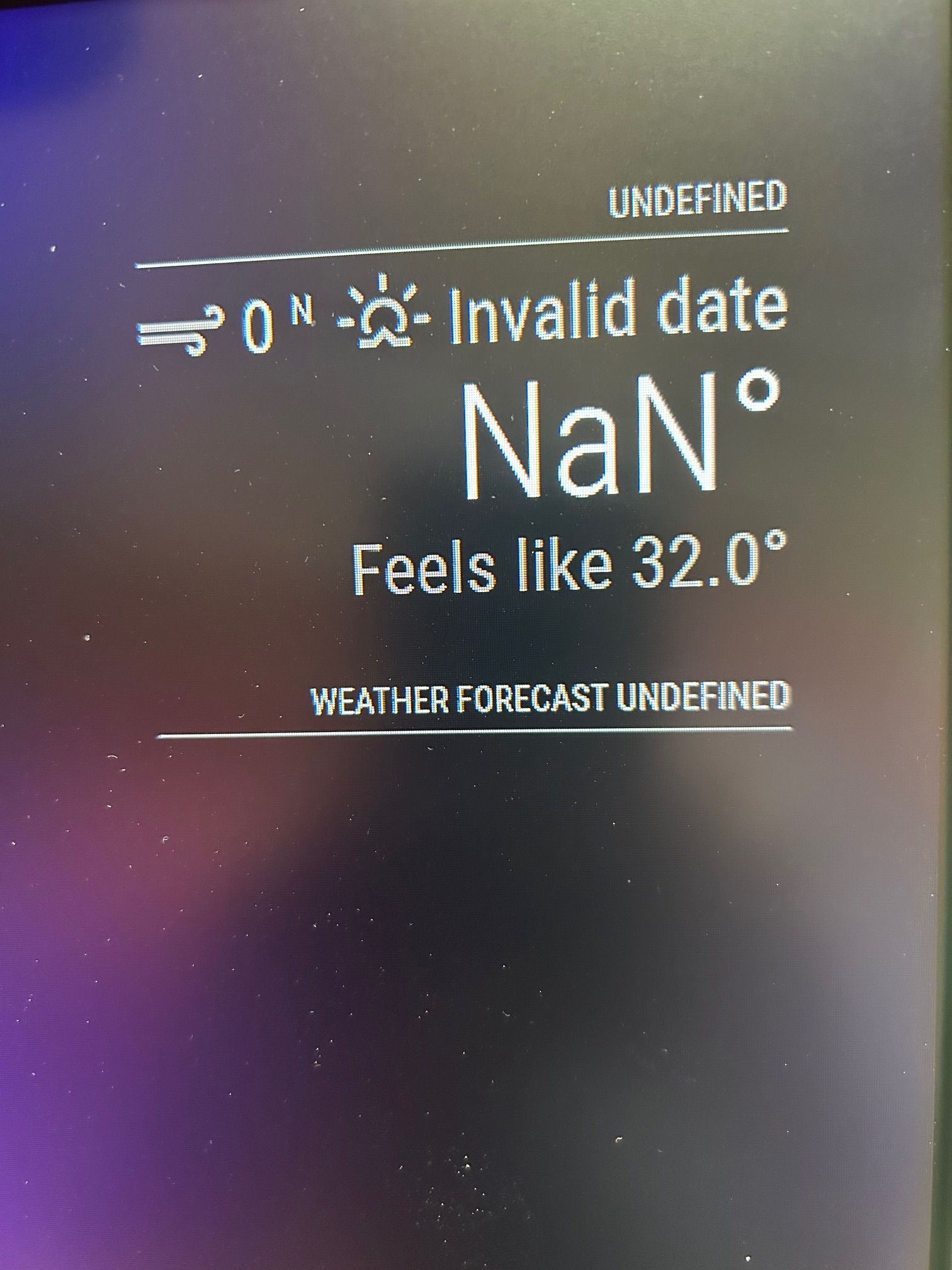



                                            Screen.jpg

                                            1 Reply Last reply Reply Quote 0

                                            Hello! It looks like you're interested in this conversation, but you don't have an account yet.

                                            Getting fed up of having to scroll through the same posts each visit? When you register for an account, you'll always come back to exactly where you were before, and choose to be notified of new replies (either via email, or push notification). You'll also be able to save bookmarks and upvote posts to show your appreciation to other community members.

                                            With your input, this post could be even better 💗

                                            Register Login

                                            • 1
                                            • 2
                                            • 3
                                            • 4
                                            • 5
                                            • 6
                                            • 3 / 6
                                            • First post
                                              Last post
                                            Enjoying MagicMirror? Please consider a donation!
                                            MagicMirror created by Michael Teeuw.
                                            Forum managed by Sam, technical setup by Karsten.
                                            This forum is using NodeBB as its core | Contributors
                                            Contact | Privacy Policy